Welcome Guest ( Log In | Register )

36 Pages « < 11 12 13 14 15 > » Bottom

Outline · [ Standard ] · Linear+

Technical Compatible Routers for PS3, share info and tips here

views
     
fuzz82
post Feb 4 2009, 09:17 PM

New Member
*
Junior Member
18 posts

Joined: Aug 2008
QUOTE(esca_flo @ Feb 4 2009, 05:59 AM)
shouldn't be a problem if ur router is .1  and ur ps3 is .23  .  if there is no need for DHCP u can disable that , and manually set all ur ip on all ur devices on ur own . as long as ur devices is  from .2  onwards  then its ok , make sure ur devices is pointing to .1 as its gateway.  do i make any sense to u ?
*
Not really but I guess it's just a matter of timing. I could obtain IP address and internet connection but then couldn't sign into PSN. But when I tried late at night yesterday, it was smooth sailing all the way, I was even able to play GTA4 online. So, I guess i'll just stick to late night online gaming. Thanks for your help!
irman_ee
post Feb 5 2009, 12:32 AM

New Member
*
Newbie
0 posts

Joined: Feb 2009


Good day,
It's been 2 night I try figure out how to change from NAT3 to NAT2, from this forum info. Youtube,you named it. I think there are some steps missing for me. Can anyone assist me to set my PS3 to get NAT2:
INFO :
Modem : RiGER DB102, PPOE Mode
Router : NETGEAR WGR614V9

I have tried,DMZ , port forwarding, triggering, eventhougt not really understand.For sure there are some point missing in my steps. Any clear instruction?

Maybe, I need to setup the RIGER Modem first? then the router? How?
Please help me, PS3 without network gaming are waste.....
nonoldo
post Feb 5 2009, 12:52 AM

New Member
*
Junior Member
6 posts

Joined: Nov 2008
From: KL


Using belkin G+ router f5d9230. Works great.
koonfoon
post Feb 5 2009, 02:40 PM

New Member
*
Newbie
6 posts

Joined: Sep 2008
QUOTE(AstonCheah @ Feb 2 2009, 11:44 PM)
Hi KoonFoon,

still not able to change the NAT type to 2... sad.gif

here are some picture of my setting...hope it can give you some ideas...

thanks anyway.
*
Maybe u set your PS3 static IP to 192.168.1.50. (outside the range of 192.168.1.3 to 192.168.1.34)

But u have to re-configure port forwarding again.. tongue.gif


If that doesn't work...then i have ran out of idea.

Last solution...change the router... sweat.gif

Your current router is free supplied by TM??
vorchiel
post Feb 6 2009, 03:49 PM

ლ(ಠ_ಠ ლ)
****
Senior Member
666 posts

Joined: Jan 2003
From: Left Hand Society, West London
QUOTE(irman_ee @ Feb 5 2009, 12:32 AM)
Good day,
It's been 2 night I try figure out how to change from NAT3 to NAT2, from this forum info. Youtube,you named it. I think there are some steps missing for me. Can anyone assist me to set my PS3 to get NAT2:
INFO :
Modem : RiGER DB102, PPOE Mode
Router : NETGEAR WGR614V9

I have tried,DMZ , port forwarding, triggering, eventhougt not really understand.For sure there are some point missing in my steps. Any clear instruction?

Maybe, I need to setup the RIGER Modem first? then the router? How?
Please help me, PS3 without network gaming are waste.....
*
set the riger to bridge mode first
http://www.riger.com.my/SmartConfig.pdf
*skip the set up of pppoe dialler in your os part*

then set the netgear to dial pppoe (streamyx)

you will get NAT2
the jazzman
post Feb 6 2009, 10:55 PM

Getting Started
**
Junior Member
284 posts

Joined: Apr 2008
any1 can teach me to do portfowarding.. my router not giving good connection. using TL-WR542G
koonfoon
post Feb 7 2009, 11:48 AM

New Member
*
Newbie
6 posts

Joined: Sep 2008
QUOTE(the jazzman @ Feb 6 2009, 10:55 PM)
any1 can teach me to do portfowarding.. my router not giving good connection. using TL-WR542G
*
This is the site that i recommend to AstonCheah as I trying to help him.

http://portforward.com/routers.htm

Go to the site and search for router brand and model

very good site. They even educate u about port forwarding and other related networking stuff.

This post has been edited by koonfoon: Feb 7 2009, 11:53 AM
irman_ee
post Feb 7 2009, 06:12 PM

New Member
*
Newbie
0 posts

Joined: Feb 2009


QUOTE(vorchiel @ Feb 6 2009, 04:49 PM)
set the riger to bridge mode first
http://www.riger.com.my/SmartConfig.pdf
*skip the set up of pppoe dialler in your os part*

then set the netgear to dial pppoe (streamyx)

you will get NAT2
*
waaaaaa......thank you...that's all it take to change from NAT3 to NAT2...

step :
1) Reset my RIGER DB102 modem
2) Reset my NETGEAR WGR614 V9 --> also set DMZ port to open(don't know this affect or not)
--> already closed no affect still NAT2, also no port triggering/port forwarding, still NAT2...
3) Set RIGER DB102 to bridged mode
4) Connect to NETGEAR --> insert login name and password inside netgear instead of DB102
5) COnnect to PS3, wallah NAT2..UPNP OK..

Basically, no need setting port forwarding/DMZ...only change from PPOE to bridge, RIGER is the problem.....

Thank kiu....vely much..

This post has been edited by irman_ee: Feb 7 2009, 06:19 PM
vorchiel
post Feb 7 2009, 06:25 PM

ლ(ಠ_ಠ ლ)
****
Senior Member
666 posts

Joined: Jan 2003
From: Left Hand Society, West London
yep most of the time people get NAT3 because they are under 2 routers.

previously, your riger modem is also a router, because it dialled to the ISP and then routed the connection to your netgear router. at this point, your netgear router is in NAT2, because the network has already been routed (NAT-ed) 1 time. subsequent routing (& NAT) by the netgear caused your ps3 to be under NAT3.
the jazzman
post Feb 7 2009, 07:30 PM

Getting Started
**
Junior Member
284 posts

Joined: Apr 2008
QUOTE(koonfoon @ Feb 7 2009, 11:48 AM)
This is the site that i recommend to AstonCheah as I trying to help him.

http://portforward.com/routers.htm

Go to the site and search for router brand and model

very good site. They even educate u about port forwarding and other related networking stuff.
*
tks bro.. will try it tomorrow.
AstonCheah
post Feb 9 2009, 12:05 AM

Casual
***
Junior Member
383 posts

Joined: Jan 2009
From: Penang


QUOTE(koonfoon @ Feb 5 2009, 02:40 PM)
Maybe u set your PS3 static IP to 192.168.1.50. (outside the range of 192.168.1.3 to 192.168.1.34)

But u have to re-configure port forwarding again.. tongue.gif
If that doesn't work...then i have ran out of idea.

Last solution...change the router... sweat.gif

Your current router is free supplied by TM??
*
Hi Koonfoon,

i got my problem solved rclxms.gif by adding one D-link wireless router (RM150.00) sad.gif , needless to set anything except to set the internet connection on the router and my PS3 auto went to type 2.

actually i can also get Type 1 by setting my Riger modem to bridge mode but i wanted to browse internet with my PC while playing PS3 Games so no choice but to buy the D-link router...

thanks for your information anyway.
yewjhin
post Feb 9 2009, 12:41 AM

Getting Started
**
Junior Member
159 posts

Joined: Oct 2005


Netgear routers work superbly with my PS3 smile.gif
cwl_ykh
post Feb 9 2009, 08:29 PM

Look at all my stars!!
*******
Senior Member
5,114 posts

Joined: May 2007


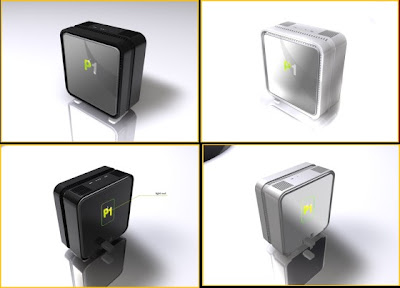
any1 here using p1 wimax? well i having a nat3 type on my ps3... so im try to figure what kind of router that can compatible to ps3... and how can i change to nat2 or nat 1 from router?
jsc_tidus
post Feb 9 2009, 09:40 PM

Vader's Nephew
******
Senior Member
1,930 posts

Joined: Nov 2006
From: The Grid


i'm using cheap2 AZTECH DSL605EW Wireless router. just work like a charm laugh.gif
vorchiel
post Feb 9 2009, 09:48 PM

ლ(ಠ_ಠ ლ)
****
Senior Member
666 posts

Joined: Jan 2003
From: Left Hand Society, West London
QUOTE(cwl_ykh @ Feb 9 2009, 08:29 PM)
any1 here using p1 wimax? well i having a nat3 type on my ps3... so im try to figure what kind of router that can compatible to ps3... and how can i change to nat2 or nat 1 from router?
*
i'm not that well-versed in wimax
how does the router/modem look like (i mean the wimax one)
can you give me the model number etc

i'm interested in a bit of reading hmm.gif
tisumuka
post Feb 9 2009, 09:52 PM

Getting Started
**
Junior Member
70 posts

Joined: Oct 2008
From: Selayang / Country Homes


actually im using wimax..can use with wired connection.but cannot use when i want use with my tenda modem wireless..maybe setup my tenda modem.can someone give idea to solve my problem.tq..
nonoldo
post Feb 10 2009, 12:03 AM

New Member
*
Junior Member
6 posts

Joined: Nov 2008
From: KL


QUOTE(cwl_ykh @ Feb 9 2009, 08:29 PM)
any1 here using p1 wimax? well i having a nat3 type on my ps3... so im try to figure what kind of router that can compatible to ps3... and how can i change to nat2 or nat 1 from router?
*
I'm using. Currently p1 only give NAT3 connection even u plug in the modem direct into ps3. rclxub.gif
cwl_ykh
post Feb 10 2009, 09:12 AM

Look at all my stars!!
*******
Senior Member
5,114 posts

Joined: May 2007


QUOTE(vorchiel @ Feb 9 2009, 09:48 PM)
i'm not that well-versed in wimax
how does the router/modem look like (i mean the wimax one)
can you give me the model number etc

i'm interested in a bit of reading hmm.gif
*
well im not sure about the model no coz im in office rite now...
but this the pic i can get to show for u...
» Click to show Spoiler - click again to hide... «


QUOTE(nonoldo @ Feb 10 2009, 12:03 AM)
I'm using. Currently p1 only give NAT3 connection even u plug in the modem direct into ps3.  rclxub.gif
*
yeah that is what i get also... n i think while we play ps3 online it getting lag might be bcoz the upload speed is too low... sweat.gif

vorchiel
post Feb 10 2009, 09:18 AM

ლ(ಠ_ಠ ლ)
****
Senior Member
666 posts

Joined: Jan 2003
From: Left Hand Society, West London
QUOTE(cwl_ykh @ Feb 10 2009, 09:12 AM)
well im not sure about the model no coz im in office rite now...
but this the pic i can get to show for u...
» Click to show Spoiler - click again to hide... «

*
ok so does it have it;s own dhcp server or wifi access point? most probably it is also a router right? not just a bridge. you can still use it without any additional router.

is that right?
cwl_ykh
post Feb 10 2009, 09:22 AM

Look at all my stars!!
*******
Senior Member
5,114 posts

Joined: May 2007


QUOTE(vorchiel @ Feb 10 2009, 09:18 AM)
ok so does it have it;s own dhcp server or wifi access point? most probably it is also a router right? not just a bridge. you can still use it without any additional router.

is that right?
*
well i think it is a modem only n not coming with router... n also we cannot even access the modem setting...

36 Pages « < 11 12 13 14 15 > » Top
 

Change to:
| Lo-Fi Version
0.0278sec    0.72    6 queries    GZIP Disabled
Time is now: 1st December 2025 - 06:43 PM