QUOTE(moderno @ Feb 27 2008, 07:43 PM)
I nearly fainted that day due to "exhaustion" while waiting my mobo to complete the Winflash Imagine if TNB played trick on you
DFI LANPARTY DK P35-T2RS, Discussions and Results
|
|
Feb 28 2008, 02:01 AM
|
![]() ![]() ![]() ![]() ![]() ![]() ![]()
Senior Member
7,284 posts Joined: Jan 2003 From: Hong Kong / Malaysia |
|
|
|
|
|
|
Feb 28 2008, 02:58 AM
|
![]() ![]() ![]() ![]() ![]() ![]()
Senior Member
1,486 posts Joined: Jun 2005 From: Cyberjaya/Kamunting |
QUOTE(moderno @ Feb 28 2008, 01:13 AM) double posting mean that the system will power down 1st during booting...then restart again bro? yes..the situation is like that...izzit normal?if yes i do face the same problem oso after flashing the bios to 24/12/07.. i just use factory default bios now...nver flash anything yet.. i think this happen after i OC..b4 that just normal..and till now at OC state.. hmm...gonna try all setting at default and see would this double posting happen again.. Added on February 28, 2008, 3:02 am QUOTE(vearn27 @ Feb 28 2008, 02:01 AM) I nearly fainted that day due to "exhaustion" while waiting my mobo to complete the Winflash hmm... i wonder, why to flash(using winflash) the bios take a long time..? Imagine if TNB played trick on you should it be faster do the bios flashing not in windows mode? This post has been edited by xen0: Feb 28 2008, 03:02 AM |
|
|
Feb 28 2008, 09:44 AM
|
![]() ![]() ![]() ![]() ![]() ![]() ![]()
Senior Member
2,765 posts Joined: Nov 2005 From: **Hornbills** |
erm yeah winflash jus atke few minutes oni..i think within2 or 3 minutes oredi done
|
|
|
Feb 28 2008, 10:37 AM
|
![]() ![]() ![]() ![]() ![]() ![]() ![]()
Senior Member
7,173 posts Joined: Jan 2003 From: PCH |
the latest BIOS is 24/12/07 aight? because just read here in previous page said that the latest is 13/02/08
|
|
|
Feb 28 2008, 12:00 PM
|
|
Elite
14,576 posts Joined: May 2006 From: Sarawak |
Hey guys, I think I just realize that we can actually undervolt the CPU on mobos that can't be set in BIOS...... silly of me not to think about that method.....
Will try it out later and let you guys know.... And another thing.... I can change the VID in core temp for my old rig! Will try it out later on my Q6600!!! |
|
|
Feb 28 2008, 01:12 PM
|
![]() ![]() ![]() ![]() ![]() ![]()
Senior Member
1,237 posts Joined: Jul 2006 From: espie-prai |
QUOTE(sniper69 @ Feb 28 2008, 10:37 AM) the latest BIOS is 24/12/07 aight? because just read here in previous page said that the latest is 13/02/08 the latest 1 is 13/2/08http://us.dfi.com.tw/Support/Download/bios..._FLAG=B&SITE=US if u use 24/12/07 can u upload for me...wanna try it.. |
|
|
|
|
|
Feb 28 2008, 04:30 PM
|
![]() ![]() ![]() ![]() ![]() ![]()
Senior Member
1,311 posts Joined: Jan 2003 From: Puchong/Deep Beach |
QUOTE(kmarc @ Feb 28 2008, 12:00 PM) Hey guys, I think I just realize that we can actually undervolt the CPU on mobos that can't be set in BIOS...... silly of me not to think about that method..... bro...u r like a R&D company or something la...so secretive one.. Will try it out later and let you guys know.... And another thing.... I can change the VID in core temp for my old rig! Will try it out later on my Q6600!!! anyway, do let us know once u finished with ur 'research' |
|
|
Feb 28 2008, 05:32 PM
|
|
Elite
14,576 posts Joined: May 2006 From: Sarawak |
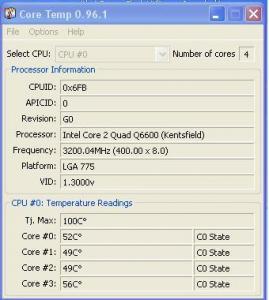
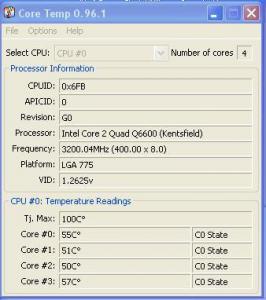
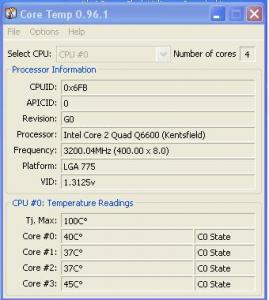
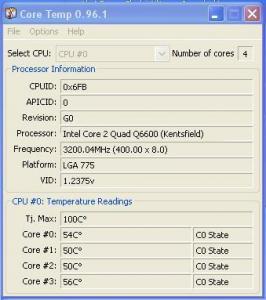
QUOTE(remysix @ Feb 28 2008, 04:30 PM) bro...u r like a R&D company or something la...so secretive one.. No la, just now a bit busy ma.....anyway, do let us know once u finished with ur 'research' Anyway, the program is non other than "Rightmark CPU clock utility". I have used this in my AMD 64 3500+ rig last time and I totally forgot that you could a few cool things in windows: 1) Set your own multiplier e.g. like for the Q6600, you can set it to run at 6x and 7x multiplier only, or 6x and 9x only, or 7x and 8x only or solely on 9x only.... 2) Set the vcore to anything within the CPU's range (that means you can undervolt or overvolt your CPU in windows, even for mobos that don't allow downclocking in BIOS 3) And surprise surprise.... VID in core temp or any program is no longer accurate as it can be changed!!! See pics below... Important : But be careful as the Rightmark CPU clock utility is a powerful app. If you're not careful, you may accidentally overvolt your CPU to very high voltages!!! My original Q6600 VID Instant noodle to 1.300v VID Hmmm..... want to increase my Q6600 - for sale.... VID at 1.2625v This proc should be auctioned!!! Note : Let me find my old guide on Rightmark CPU clock utility..... can't remember where it is.... Ahhhh found it..... gives a basic understanding on how RMCC utility works : http://forum.lowyat.net/index.php?showtopi...entry11703415 (Post #118) Again, be warned : RMCC is a useful and powerful program. Be careful when you use it. Make sure you understand the basic principles. Any damage is NOT MY FAULT!!! This post has been edited by kmarc: Feb 28 2008, 05:39 PM |

|
|
Feb 28 2008, 07:10 PM
|
![]() ![]() ![]() ![]() ![]() ![]()
Senior Member
1,058 posts Joined: Apr 2006 From: Penang , Malaysia |
i might try it with my e8400.
|
|
|
Feb 28 2008, 07:13 PM
|
![]() ![]() ![]() ![]() ![]() ![]()
Senior Member
1,237 posts Joined: Jul 2006 From: espie-prai |
@kmarc
so ur stock vcore will be 1.2375???so what others software and bios will detect ur stock vcore at 1.2375??? |
|
|
Feb 28 2008, 07:26 PM
|
|
Elite
14,576 posts Joined: May 2006 From: Sarawak |
QUOTE(tapirus @ Feb 28 2008, 07:13 PM) @kmarc Errr.... don't understand the question. My actual VID is 1.3125v.....so ur stock vcore will be 1.2375???so what others software and bios will detect ur stock vcore at 1.2375??? The vcore changes in windows when you set it in RMCC. You can change the vcore to whatever you want in windows, no need to go to BIOS to change the vcore.... |
|
|
Feb 28 2008, 07:31 PM
|
![]() ![]() ![]() ![]() ![]() ![]()
Senior Member
1,237 posts Joined: Jul 2006 From: espie-prai |
QUOTE(kmarc @ Feb 28 2008, 07:26 PM) Errr.... don't understand the question. My actual VID is 1.3125v..... mmm..like this..after u set ur vid to certain amount...ur stock vid will became what u set or still like original stock vid...The vcore changes in windows when you set it in RMCC. You can change the vcore to whatever you want in windows, no need to go to BIOS to change the vcore.... |
|
|
Feb 28 2008, 07:51 PM
|
|
Elite
14,576 posts Joined: May 2006 From: Sarawak |
QUOTE(tapirus @ Feb 28 2008, 07:31 PM) mmm..like this..after u set ur vid to certain amount...ur stock vid will became what u set or still like original stock vid... After setting the VID, any program will show the new VID in windows.It doesn't change the actual VID. That means, I can't change my Q6600's VID from 1.3125v to 1.100v and run at stock 2.4GHz!!! Ability to change the VID shows that we should be careful when buying CPUs just based on VID as people can change them in windows, if they know how..... |
|
|
|
|
|
Feb 29 2008, 12:34 AM
|
![]() ![]() ![]() ![]() ![]() ![]()
Senior Member
1,311 posts Joined: Jan 2003 From: Puchong/Deep Beach |
QUOTE(kmarc @ Feb 28 2008, 07:51 PM) After setting the VID, any program will show the new VID in windows. hmmm...i wonder what is the actual reading from vmm would that be after changing it...just curious whether it just change what is being reported by the sensor or it's really change the actual voltage... It doesn't change the actual VID. That means, I can't change my Q6600's VID from 1.3125v to 1.100v and run at stock 2.4GHz!!! Ability to change the VID shows that we should be careful when buying CPUs just based on VID as people can change them in windows, if they know how..... but yeah, it is an interesting piece of apps This post has been edited by remysix: Feb 29 2008, 12:35 AM |
|
|
Feb 29 2008, 07:00 AM
|
|
Elite
14,576 posts Joined: May 2006 From: Sarawak |
Dunno.... I just use CPUz and smartguardian to check on the vcore..... don't want to suddenly get a high vcore setting!!
|
|
|
Feb 29 2008, 01:15 PM
|
![]() ![]() ![]() ![]() ![]() ![]()
Senior Member
1,237 posts Joined: Jul 2006 From: espie-prai |
what does this mean...i use 480 x7 with stock vcore..then i add more vcore to push more bus...cannot boot when i add more than 480 even add 50mv...means my mobo already hit their wall or not????
|
|
|
Feb 29 2008, 01:30 PM
|
|
Elite
6,799 posts Joined: Jan 2003 |
QUOTE(tapirus @ Feb 29 2008, 01:15 PM) what does this mean...i use 480 x7 with stock vcore..then i add more vcore to push more bus...cannot boot when i add more than 480 even add 50mv...means my mobo already hit their wall or not???? try different fsb /vtt termination voltage.adjust ure gtl's to be around the same as ure stock. |
|
|
Feb 29 2008, 02:20 PM
|
|
Elite
14,576 posts Joined: May 2006 From: Sarawak |
QUOTE(tapirus @ Feb 29 2008, 01:15 PM) what does this mean...i use 480 x7 with stock vcore..then i add more vcore to push more bus...cannot boot when i add more than 480 even add 50mv...means my mobo already hit their wall or not???? Could be your CPU FSB wall too..... My previous E6750 also hit a wall at 480mhz FSB..... was lazy to find out whether it was mobo or CPU FSB wall.... |
|
|
Feb 29 2008, 09:13 PM
|
![]() ![]() ![]() ![]() ![]() ![]() ![]()
Senior Member
2,471 posts Joined: Jan 2003 |
QUOTE(tapirus @ Feb 29 2008, 01:15 PM) what does this mean...i use 480 x7 with stock vcore..then i add more vcore to push more bus...cannot boot when i add more than 480 even add 50mv...means my mobo already hit their wall or not???? maybe hit the fsb wall, try other way eg. lower the fsb and rasie the multiplier, see your proc can run at the same equivalent to >480x7 |
|
|
Feb 29 2008, 09:56 PM
|
![]() ![]() ![]() ![]() ![]() ![]()
Senior Member
1,486 posts Joined: Jun 2005 From: Cyberjaya/Kamunting |
just realized.. bro jy14 got bulk for LANPARTY DK X38-T2R...
could be my next mobo end of this year BTW, double posting, izzit normal?? |
| Change to: | 0.0314sec
0.48
6 queries
GZIP Disabled
Time is now: 15th December 2025 - 11:45 PM |