

QUOTE(kevinyap100 @ Apr 9 2025, 09:13 AM)
How can we turn on power saving mode while maintaining 120hz setting?

are you using adaptive power saving? annoyed by the sudden 60hz?Samsung Galaxy S25 Series Discussion Thread, The Next Big Leap - Mobile AI Experience
|
|
 Apr 9 2025, 06:23 PM Apr 9 2025, 06:23 PM
Show posts by this member only | IPv6 | Post
#2961
|
 
All Stars
12,413 posts Joined: Jan 2008 From: KL - Cardiff - Subang - Sydney   
|
QUOTE(kevinyap100 @ Apr 9 2025, 09:13 AM) How can we turn on power saving mode while maintaining 120hz setting? are you using adaptive power saving? annoyed by the sudden 60hz? |
|
|
|
|
|
Apr 10 2025, 04:25 PM
Show posts by this member only | IPv6 | Post
#2962
|

All Stars
31,609 posts Joined: Aug 2010
|
For those who had bought Samsung Care+, I just bought my Samsung Care+ from Samsung Malaysia website
It straight away reflected on my Samsung Members apps, even received email from Samsung Care+ 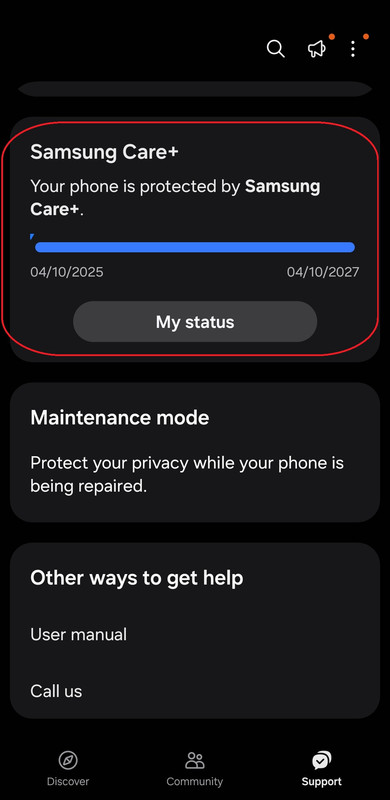 But go to settings, still shown Samsung Care+ not cover? Should I ignore it? 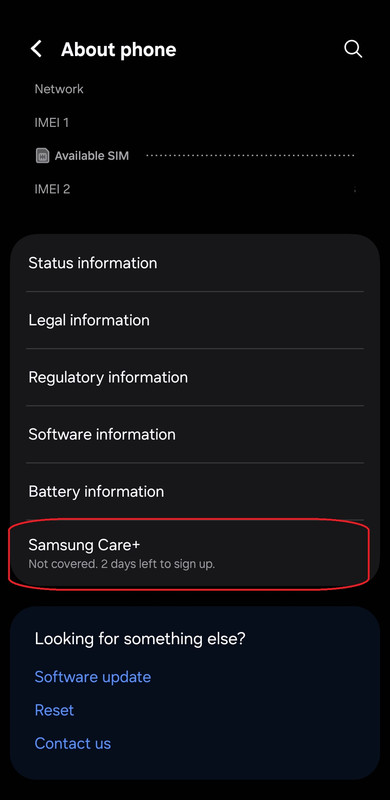 |
|
|
Apr 10 2025, 06:20 PM
|

Senior Member
800 posts Joined: Oct 2007
|
QUOTE(XeactorZ @ Apr 10 2025, 04:25 PM) For those who had bought Samsung Care+, I just bought my Samsung Care+ from Samsung Malaysia website Maybe take a few days. Mine both side shows same dateIt straight away reflected on my Samsung Members apps, even received email from Samsung Care+ But go to settings, still shown Samsung Care+ not cover? Should I ignore it? |
|
|
Apr 10 2025, 07:06 PM
Show posts by this member only | IPv6 | Post
#2964
|
|
All Stars
31,609 posts Joined: Aug 2010
|
QUOTE(ryuzaki_L @ Apr 10 2025, 06:20 PM) Maybe take a few days. Mine both side shows same date You bought Samsung Care+ upon purchased s25 or drag nearly end 30 days then only bought Samsung Care+ ? |
|
|
Apr 10 2025, 07:21 PM
|
|
Senior Member
800 posts Joined: Oct 2007
|
QUOTE(XeactorZ @ Apr 10 2025, 07:06 PM) You bought Samsung Care+ upon purchased s25 or drag nearly end 30 days then only bought Samsung Care+ ? Nearly end |
|
|
Apr 10 2025, 08:00 PM
Show posts by this member only | IPv6 | Post
#2966
|
|
All Stars
31,609 posts Joined: Aug 2010
|
QUOTE(ryuzaki_L @ Apr 10 2025, 07:21 PM) Nearly end I see, did you remember roughly took how many days to be updated under settings? |
|
|
|
|
|
Apr 11 2025, 10:00 AM
|

Junior Member
358 posts Joined: Jan 2016
|
QUOTE(XeactorZ @ Apr 10 2025, 04:25 PM) For those who had bought Samsung Care+, I just bought my Samsung Care+ from Samsung Malaysia website Thanks for this. I just check mine both indicated that the phone is now protected by Care+ It straight away reflected on my Samsung Members apps, even received email from Samsung Care+ But go to settings, still shown Samsung Care+ not cover? Should I ignore it?  |
|
|
Apr 11 2025, 01:00 PM
Show posts by this member only | IPv6 | Post
#2968
|
|
Senior Member
800 posts Joined: Oct 2007
|
QUOTE(XeactorZ @ Apr 10 2025, 08:00 PM) I see, did you remember roughly took how many days to be updated under settings? Can't remember, but not more than 2 days |
|
|
Apr 11 2025, 02:57 PM
|
|
All Stars
31,609 posts Joined: Aug 2010
|
QUOTE(ryuzaki_L @ Apr 11 2025, 01:00 PM) Can't remember, but not more than 2 days had chat with Samsung livechat, told me will take few days to update in the settingstoday consider 1st day since yesterday bought the care+, will wait and see |
|
|
Apr 11 2025, 08:15 PM
|
|
Junior Member
221 posts Joined: Aug 2013
|
QUOTE(ZeneticX @ Apr 9 2025, 06:23 PM) are you using adaptive power saving? annoyed by the sudden 60hz? No,i thinking how to maintain 120hz whiling using saving power mode .Default saving power mode will force using 60hz setting |
|
|
Apr 11 2025, 09:50 PM
|

Senior Member
3,706 posts Joined: Aug 2005 
|
For accidental drop damage is it covered under this careplus
|
|
|
Apr 11 2025, 11:07 PM
|
|
All Stars
12,413 posts Joined: Jan 2008 From: KL - Cardiff - Subang - Sydney
|
QUOTE(kevinyap100 @ Apr 11 2025, 08:15 PM) No,i thinking how to maintain 120hz whiling using saving power mode . Unfortunately the screen refresh rate is tied to the processor speed limit. Have to disable that also to unlock the refresh rate but tbh it defeats the purpose alreadyDefault saving power mode will force using 60hz setting For me i workaround this by setting a routine to enable power saving whenever the battery drops below 30%, and disable adaptive power saving so it doesn't kick it suddenly and make the display 60hz |
|
|
Apr 12 2025, 10:56 AM
Show posts by this member only | IPv6 | Post
#2973
|

Senior Member
1,061 posts Joined: May 2009
|
My s25 ultra can't detect my tng nfc card. So i can't reload. How make it detect my tng card?
Update: my casing somehow make hard the tng nfc to detect. But when i use pay using samsung pay no problem This post has been edited by lagenda: Apr 12 2025, 11:03 AM |
|
|
|
|
|
Apr 13 2025, 12:14 AM
|

Junior Member
199 posts Joined: Oct 2004
|
QUOTE(lagenda @ Apr 12 2025, 10:56 AM) My s25 ultra can't detect my tng nfc card. So i can't reload. How make it detect my tng card? I experience the same too but, try to scan the card nearer or beside to the camera area. It sort of works for me.Update: my casing somehow make hard the tng nfc to detect. But when i use pay using samsung pay no problem |
|
|
Apr 13 2025, 10:42 AM
Show posts by this member only | IPv6 | Post
#2975
|
|
All Stars
12,413 posts Joined: Jan 2008 From: KL - Cardiff - Subang - Sydney
|
QUOTE(lagenda @ Apr 12 2025, 10:56 AM) My s25 ultra can't detect my tng nfc card. So i can't reload. How make it detect my tng card? is it magsafe case?Update: my casing somehow make hard the tng nfc to detect. But when i use pay using samsung pay no problem |
|
|
Apr 13 2025, 09:58 PM
|
|
Junior Member
199 posts Joined: Oct 2004
|
QUOTE(ZeneticX @ Apr 13 2025, 10:42 AM) is it magsafe case? Yes, mine yes ... magsafe case ... |
|
|
Apr 14 2025, 11:35 AM
|

Senior Member
1,058 posts Joined: Oct 2006 From: Petaling Jaya 
|
QUOTE(lagenda @ Apr 12 2025, 10:56 AM) My s25 ultra can't detect my tng nfc card. So i can't reload. How make it detect my tng card? Magsafe problem maybe? I'm using a non-magsafe case and so far no issues.Update: my casing somehow make hard the tng nfc to detect. But when i use pay using samsung pay no problem |
|
|
Apr 14 2025, 11:36 AM
|

All Stars
35,468 posts Joined: Oct 2006
|
QUOTE(ZeneticX @ Apr 13 2025, 10:42 AM) is it magsafe case? Yes usually is due to MagSafe case . Apple have fix this problemMagSafe is MagSafe NFC is nfc it’s located at the camera area. Samsung joined the MagSafe wave late |
|
|
Apr 14 2025, 11:37 AM
|
|
All Stars
35,468 posts Joined: Oct 2006
|
QUOTE(NewbieBetta @ Apr 11 2025, 09:50 PM) For accidental drop damage is it covered under this careplus Yes what my friend do they destroy the entire phone before care plus expire he gets a new phone if they can’t fix it |
|
|
Apr 14 2025, 11:59 AM
|

All Stars
17,224 posts Joined: Dec 2015
|
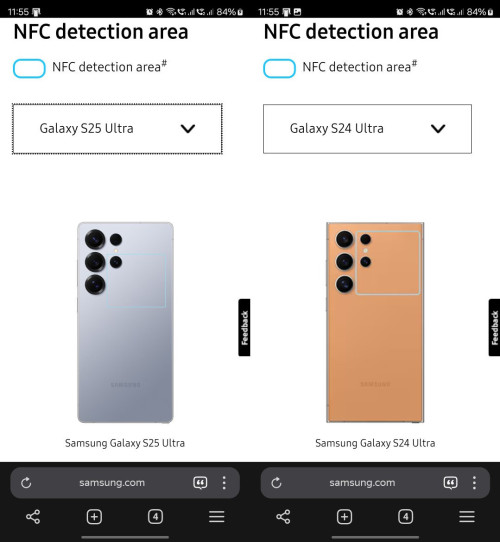 Source : https://www.samsung.com/hk_en/nfc-support/ MagSafe will not affect NFC as the antenna is not near the coil... |
| Change to: |  0.0199sec 0.0199sec
 0.84 0.84
 6 queries 6 queries
 GZIP Disabled GZIP Disabled
Time is now: 15th December 2025 - 04:17 PM |
 Quote
Quote