Welcome Guest ( Log In | Register )

Bump Topic Topic Closed RSS Feed
495 Pages « < 211 212 213 214 215 > » Bottom

Outline · [ Standard ] · Linear+

Unifi Official TM UniFi High Speed Broadband Thread V42, READ 1ST PAGE FOR RELEVANT WIFI INFO!

views
     
kwss
post Aug 7 2024, 12:32 AM

Regular
******
Senior Member
1,208 posts

Joined: Aug 2018
QUOTE(zellleonhart @ Aug 7 2024, 12:07 AM)
if I use my own private DoH server, can TM detect and ban it too? or just the public DoH servers?

Also, could be an ignorant question - can ISP actually block port outgoing traffic for port 443 since we need to browse normal websites in https? or DoH uses incoming traffic?
*
Using the method I described, all endpoint will be dead, including root server. It is the same method China used.

443 is harder to whack but since all open resolver has port 53, 443 and 853 on the same IP, they just need to whack 53 and 853. 443 will be whacked indirectly because the whole IP is in the DNS blocklist.

Of course you can bypass this by putting a CDN in front of your favorite DoH. Since CDN do not have 53 and 853 open, and they are on shared IP, it is not possible to block them. Using CDN also means you have a unique domain name and they cannot whack you solely based on SNI filtering.

If you use HTTP3 (QUIC), the SNI is "encrypted" with a key sent together in the Hello packet too. The censor will then have to do the extra work of extracting the key to decrypt the SNI. At least to my knowledge China and India all drop QUIC packet as a workaround.

The only trouble is you need a working resolver to bootstrap your domain-fronted DoH. You can ride on the ISP resolver for this one.

This post has been edited by kwss: Aug 7 2024, 12:36 AM
tng55
post Aug 7 2024, 12:39 AM

Regular
******
Senior Member
1,443 posts

Joined: Sep 2021


QUOTE(blacktubi @ Aug 6 2024, 08:37 PM)
They can just apply this to all DNS eventually

Easiest way is to enable secure DNS in chrome settings, there's something similar on every major browsers

Alternatively, get a router that support DNS over TLS. This will apply to all devices

Or, just use a VPN
*
asus router can do that support DNS over TLS. This will apply to all devices
yongtjunkit
post Aug 7 2024, 07:23 AM

Look at all my stars!!
*******
Senior Member
2,516 posts

Joined: Mar 2016
QUOTE(Kadaj @ Aug 6 2024, 08:47 PM)
You can install cloudflared DoH client and point your pihole to it as upstream.

https://docs.pi-hole.net/guides/dns/cloudflared/
https://developers.cloudflare.com/1.1.1.1/e...r-https-client/

Another option is DNSCrypt-Proxy.

You can also change to third party DoH like Quad9 and etc in both clients.
*
QUOTE(PRSXFENG @ Aug 6 2024, 11:46 PM)
no, it doesnt really, you need DoH/DoT/DNSCrypt
However, past posts here suggest they are looking into DoH hijacking as well

you can use dnscrypt-proxy, there's a guide on their github for setup with pihole
i setup mine with quad9 dnscrypt
*
Cool, just installed and switched over to dns-crypt proxy

Btw is 1.1.1.1/help the only way to verify DOH?
PRSXFENG
post Aug 7 2024, 08:32 AM

Look at all my stars!!
*******
Senior Member
2,608 posts

Joined: Nov 2020


QUOTE(tng55 @ Aug 7 2024, 12:39 AM)
asus router can do that support DNS over TLS. This will apply to all devices
*
True, but if they want to, DoT can be very easily blocked with just one click, blocking port 853

For those who uses AsusWRT-Merlin supported routers, there are probably 3rd party.packages that can help

Otherwise, a raspberry pi with like Adguard Home can do it, or stuff like Cloudflared, DNSCrypt-proxy
PRSXFENG
post Aug 7 2024, 08:34 AM

Look at all my stars!!
*******
Senior Member
2,608 posts

Joined: Nov 2020


QUOTE(yongtjunkit @ Aug 7 2024, 07:23 AM)
Cool, just installed and switched over to dns-crypt proxy

Btw is 1.1.1.1/help the only way to verify DOH?
*
I don't think there's much ways to check, since it's basically requesting DNS like it is a webpage

Nextdns does have their one at http://test.nextdns.io/

But both of these only check for themselves
sHawTY
post Aug 7 2024, 10:57 AM

Frequent Reporter
********
All Stars
14,909 posts

Joined: Jul 2005

QUOTE(blacktubi @ Aug 6 2024, 08:37 PM)
Alternatively, get a router that support DNS over TLS. This will apply to all devices
This will bypass the sinar project block?
Can we reuse Google/Cloudflare DNS afterwards?
blacktubi
post Aug 7 2024, 11:06 AM

-
Group Icon
Elite
8,415 posts

Joined: Jul 2008

QUOTE(sHawTY @ Aug 7 2024, 10:57 AM)
This will bypass the sinar project block?
Can we reuse Google/Cloudflare DNS afterwards?
*
Yes DoT will prevent the DNS interception by the ISP/regulators. ASUS router for example will let you to use any DNS server that support DoT.

I believe most if not all major public DNS providers support DoT these days.

However, there's a minor performance hit on DNS resolving performance once DoT is enabled. It's mostly unnoticeable on a high-end ASUS router (BCM4908 and above).

More info about this on ASUS router: https://www.asus.com/my/support/faq/1051428/
zellleonhart
post Aug 7 2024, 12:28 PM

Stars stars stars
*******
Senior Member
5,075 posts

Joined: Oct 2008


QUOTE(kwss @ Aug 7 2024, 12:32 AM)
Using the method I described, all endpoint will be dead, including root server. It is the same method China used.

443 is harder to whack but since all open resolver has port 53, 443 and 853 on the same IP, they just need to whack 53 and 853. 443 will be whacked indirectly because the whole IP is in the DNS blocklist.

Of course you can bypass this by putting a CDN in front of your favorite DoH. Since CDN do not have 53 and 853 open, and they are on shared IP, it is not possible to block them. Using CDN also means you have a unique domain name and they cannot whack you solely based on SNI filtering.

If you use HTTP3 (QUIC), the SNI is "encrypted" with a key sent together in the Hello packet too. The censor will then have to do the extra work of extracting the key to decrypt the SNI. At least to my knowledge China and India all drop QUIC packet as a workaround.

The only trouble is you need a working resolver to bootstrap your domain-fronted DoH. You can ride on the ISP resolver for this one.
*
Thanks for the explanation. Just to clarify further, I have my self-hosted Adguard Home DoH server with my own domain e.g. https://xyz.mydomain.com/dns-query, and in the backend I use Unbound DNS which queries root servers instead of cloudflare/google DNS or any public resolvers.

If I understand correctly, my DoH server might not be banned since only myself is using it and it's not an open resolver. But will Unbound still continue to work?
kwss
post Aug 7 2024, 12:33 PM

Regular
******
Senior Member
1,208 posts

Joined: Aug 2018
QUOTE(zellleonhart @ Aug 7 2024, 12:28 PM)
Thanks for the explanation. Just to clarify further, I have my self-hosted Adguard Home DoH server with my own domain e.g. https://xyz.mydomain.com/dns-query, and in the backend I use Unbound DNS which queries root servers instead of cloudflare/google DNS or any public resolvers.

If I understand correctly, my DoH server might not be banned since only myself is using it and it's not an open resolver. But will Unbound still continue to work?
*
Your setup is robust and it will continue to work especially if you use Cloudflare Proxied DNS, Cloudflare Tunnel, AWS CloudFront or Akamai. Try not to use DNS.mydomain.com because it seems obvious during bootstrap.

Just make sure you perform certificate validation so the censor cannot MITM you to discover /dns-query.

EDIT:
You can further protect against active probe from the censor by using signed URL.
At least on AWS CloudFront it can be done:
https://docs.aws.amazon.com/AmazonCloudFron...igned-urls.html

This post has been edited by kwss: Aug 7 2024, 12:44 PM
junsheng
post Aug 7 2024, 01:16 PM

---> pokemon ftw <---
******
Senior Member
1,257 posts

Joined: Apr 2011
From: Penang Malaysia, sometime KL


QUOTE(blacktubi @ Aug 7 2024, 11:06 AM)
Yes DoT will prevent the DNS interception by the ISP/regulators. ASUS router for example will let you to use any DNS server that support DoT.

I believe most if not all major public DNS providers support DoT these days.

However, there's a minor performance hit on DNS resolving performance once DoT is enabled. It's mostly unnoticeable on a high-end ASUS router (BCM4908 and above).

More info about this on ASUS router: https://www.asus.com/my/support/faq/1051428/
*
actually no, i remember sometime in may and june TM did a testing
basically they just block port 853 and dot was not working anymore

dot over port 443 is still working but only only a few test server


mat_7824
post Aug 7 2024, 02:00 PM

New Member
*
Newbie
31 posts

Joined: Feb 2006
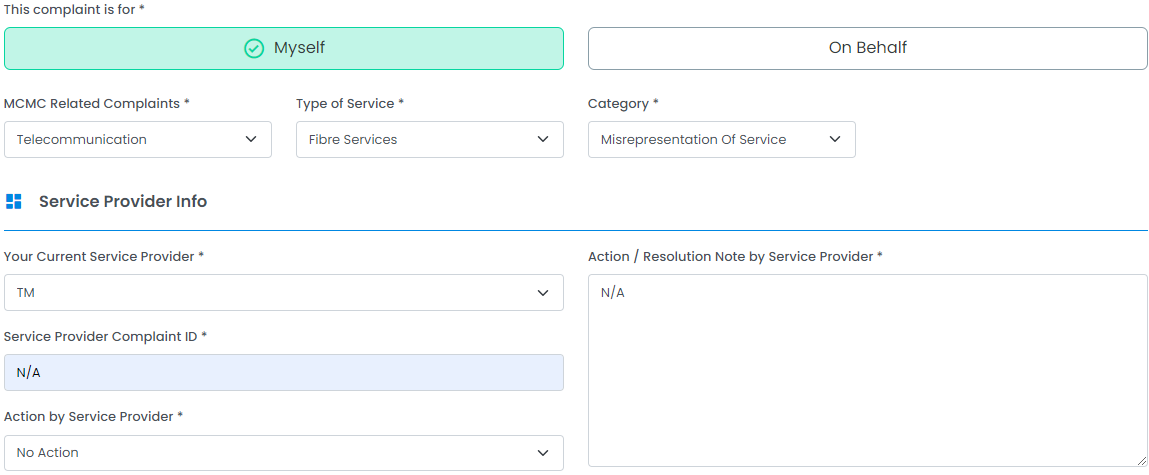
QUOTE(sHawTY @ Apr 23 2024, 04:49 PM)
Sure
1st step is to choose the correct options as per the image below

user posted image

On the next page, this is what I chose:

user posted image

And as for the complain description, this is my message

CODE
UniFi Account: #########
As of April 2024, I have not yet received the anticipated speed upgrade from 800Mb/s to 1Gb/s. Despite their initial commitment to provide this upgrade to 800Mb/s subscribers at the commencement of 2024, no such enhancement has been forthcoming. Furthermore, I have noticed that UniFi has removed the upgrade notification from my account. However, I have retained a screenshot of the original message for reference, as attached.


Finally, I've added the image below as attachment in "Others"
It may not be the same for you as that image states my current UniFi package

user posted image

Hope it helps thumbsup.gif
*
Thanks for your guide, I've lodged the complaint to MCMC just now.
Just wait for the response from both MCMC and TM about this issue.
sHawTY
post Aug 7 2024, 02:21 PM

Frequent Reporter
********
All Stars
14,909 posts

Joined: Jul 2005

QUOTE(mat_7824 @ Aug 7 2024, 02:00 PM)
Thanks for your guide, I've lodged the complaint to MCMC just now.
Just wait for the response from both MCMC and TM about this issue.
Please ensure that your ticket remains open until you have received the promised speed upgrade. If they (Telekom Malaysia) attempt to mark your case as resolved prematurely, utilize the appeal function to keep the ticket active.

Keeping the ticket open for an extended period will eventually attract the attention of personnel from the MCMC. At this stage, TM will make every effort to resolve the issue appropriately.

You may refer to the example below, where an MCMC personnel responded directly to my ticket.
https://forum.lowyat.net/topic/5424552/+4179

This post has been edited by sHawTY: Aug 9 2024, 03:11 PM
blacktubi
post Aug 7 2024, 02:36 PM

-
Group Icon
Elite
8,415 posts

Joined: Jul 2008

QUOTE(junsheng @ Aug 7 2024, 01:16 PM)
actually no, i remember sometime in may and june TM did a testing
basically they just block port 853 and dot was not working anymore

dot over port 443 is still working but only only a few test server
*
They can implement a blanket block on both DoT and DoH for public DNS if they want. But for now, DoT works.

If they enforce a strict block, just get a cloud instance in SG for $5 a month and VPN everything there.
Raymond T.
post Aug 7 2024, 03:48 PM

Glock 19 Holder
******
Senior Member
1,368 posts

Joined: Aug 2010
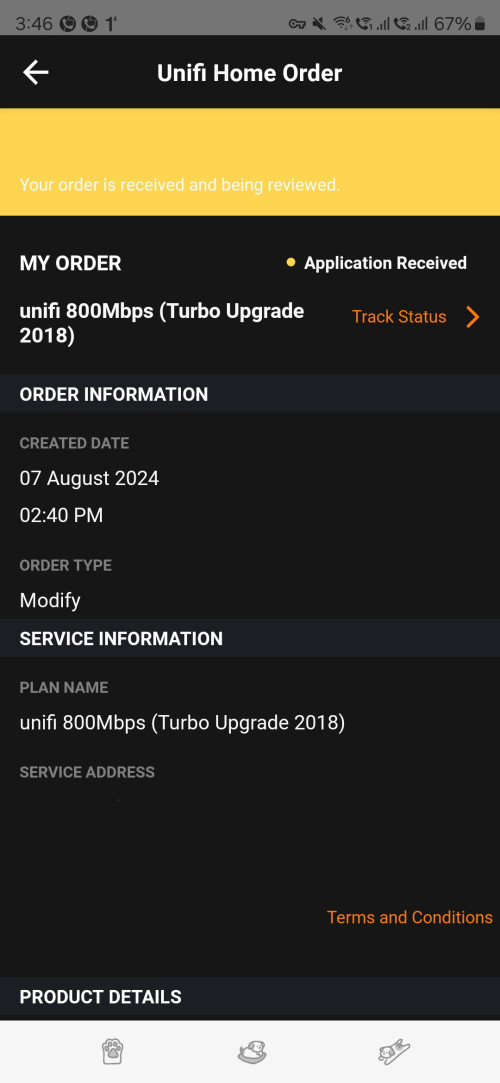
Finally received modify order free upgrade to 1Gbps

user posted image
sHawTY
post Aug 7 2024, 04:08 PM

Frequent Reporter
********
All Stars
14,909 posts

Joined: Jul 2005

QUOTE(Raymond T. @ Aug 7 2024, 03:48 PM)
Finally received modify order free upgrade to 1Gbps
Once the upgrade is completed, you might consider submitting a request for termination to potentially secure the RM159 SWU price.

However, it's advisable to wait at least one to two months before doing so.
Raymond T.
post Aug 7 2024, 04:10 PM

Glock 19 Holder
******
Senior Member
1,368 posts

Joined: Aug 2010
QUOTE(sHawTY @ Aug 7 2024, 04:08 PM)
Once the upgrade is completed, you might consider submitting a request for termination to potentially secure the RM159 SWU price.

However, it's advisable to wait at least one to two months before doing so.
*
If request to port out will have this offer as well ?
sHawTY
post Aug 7 2024, 04:13 PM

Frequent Reporter
********
All Stars
14,909 posts

Joined: Jul 2005

QUOTE(Raymond T. @ Aug 7 2024, 04:10 PM)
If request to port out will have this offer as well ?
A lot of people seem to have managed that.

I made the mistake of adding a smart device to my account before trying it, so I missed out on the lower price. doh.gif
Raymond T.
post Aug 7 2024, 04:18 PM

Glock 19 Holder
******
Senior Member
1,368 posts

Joined: Aug 2010
QUOTE(sHawTY @ Aug 7 2024, 04:13 PM)
A lot of people seem to have managed that.

I made the mistake of adding a smart device to my account before trying it, so I missed out on the lower price. doh.gif
*
Luckily this upgrade no renew contract and maxis currently have better offer. Will try see after 1 - 2 month time
syahpian
post Aug 7 2024, 04:21 PM

Enthusiast
*****
Junior Member
813 posts

Joined: Jul 2008
From: Kota Kinabalu <-> Kuala Lumpur


QUOTE(Raymond T. @ Aug 7 2024, 03:48 PM)
Finally received modify order free upgrade to 1Gbps

user posted image
*
wah, lucky you, mine already getting called on 16 july for FSU service aggrement, but getting ghosted until now, no order number and no appointment, cry.gif
Micky78
post Aug 7 2024, 04:21 PM

Regular
******
Senior Member
1,192 posts

Joined: Nov 2008
From: Cheras


QUOTE(Raymond T. @ Aug 7 2024, 03:48 PM)
Finally received modify order free upgrade to 1Gbps

user posted image

*
meaning will be subject to 24mth contract?

495 Pages « < 211 212 213 214 215 > » Top
Topic ClosedOptions
 

Change to:
| Lo-Fi Version
0.0193sec    0.88    6 queries    GZIP Disabled
Time is now: 12th December 2025 - 08:46 AM