

QUOTE(digita1tech @ Jun 19 2024, 06:46 PM)
I did chase them few months back I think....still no news....How do u get it? Im on 800Mpbs 2018 Turbo......still now news....*sigh

log case with mcmc and after 1 week done upgradeUnifi Official TM UniFi High Speed Broadband Thread V42, READ 1ST PAGE FOR RELEVANT WIFI INFO!
|
|
 Jun 20 2024, 01:41 AM Jun 20 2024, 01:41 AM
|
 
Junior Member
222 posts Joined: May 2016  
|
QUOTE(digita1tech @ Jun 19 2024, 06:46 PM) I did chase them few months back I think....still no news....How do u get it? Im on 800Mpbs 2018 Turbo......still now news....*sigh log case with mcmc and after 1 week done upgrade |
|
|
|
|
|
Jun 20 2024, 01:58 AM
|
|
Junior Member
156 posts Joined: Dec 2010
|
QUOTE(SwarmTroll @ Jun 20 2024, 01:36 AM) If you're a stone throw away, what IPs work the best for you? 124.xx is my first choice but its hard to get usually i get that ip rotation during early morning if reconnect around 3-4 times. 175.xxx is my second preference, i can get this ip range all day long. SwarmTroll liked this post
|
|
|
Jun 20 2024, 02:07 AM
Show posts by this member only | IPv6 | Post
#3303
|
|
Senior Member
1,401 posts Joined: Apr 2012
|
QUOTE(Ashren @ Jun 20 2024, 01:58 AM) 124.xx is my first choice but its hard to get usually i get that ip rotation during early morning if reconnect around 3-4 times. 175.xxx is my second preference, i can get this ip range all day long. I had 175.xxx before, today I rebooted numerous times but at the end stuck with 60.48.xxx. I don't think I've ever gotten 124.xxx before, will try and see. The only way is to reboot the router correct?This post has been edited by SwarmTroll: Jun 20 2024, 02:08 AM |
|
|
Jun 20 2024, 02:25 AM
|
|
Junior Member
156 posts Joined: Dec 2010
|
QUOTE(SwarmTroll @ Jun 20 2024, 02:07 AM) I had 175.xxx before, today I rebooted numerous times but at the end stuck with 60.48.xxx. I don't think I've ever gotten 124.xxx before, will try and see. The only way is to reboot the router correct? Since we're nearby and probably share the same edge router/concentrator try connecting in the morning around 8 to 11 to get the 124.xxx ip because that's the only time i can get the ip range. 175, 210, 60 i can get randomly all day long. As for me i disconnect and reconnect my wan thru my Asus app. Once i get the ip that i want sometimes the router stay connected for months. Reboot is also another way but it takes time. Disconnect/reconnect if you can thru your router app or your router webGUI. Much faster. |
|
|
Jun 20 2024, 08:03 AM
|

Junior Member
304 posts Joined: Aug 2018
|
Hi,
Anyone received their plan name change for their free speed upgrade? I received mine today as I enquired unifi about migrating to another ISP and see that they suddenly updated the profile speed package. 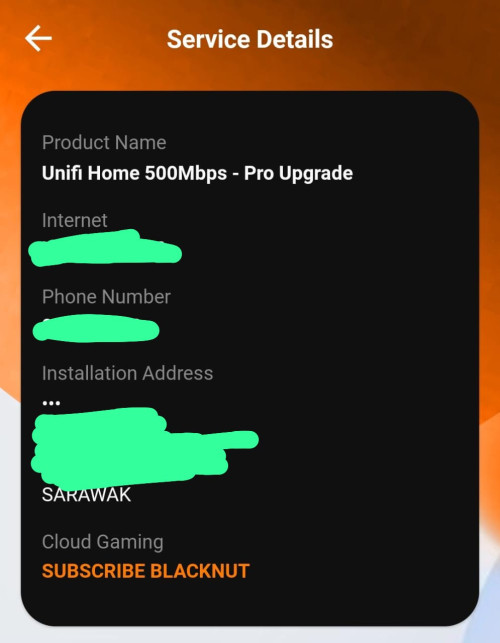 |
|
|
Jun 20 2024, 08:13 AM
|
|
Senior Member
5,292 posts Joined: Nov 2006
|
QUOTE(Ashren @ Jun 20 2024, 12:22 AM) Im just a stone throw away from you I have no idea which extra local gateway you have to pass through since I get 18. But if you don't face any issues with your connection there's nothing to worry about. An extra hop doesnt always mean bad routing if the gateway is optimized. And lesser hop doesnt always mean excellent routing. It only takes 1 hop to screw the whole chain up. No point having 8 hops but the 3rd one screw you up, better to have 10 hops but all hops is optimized. Its just the general rule that we should minimize hops to avoid unnecessary additional latency especially around domestic/local routing. Sorry if I sound repetitive Im on day 4 down with my covid infection. My brain operate at half capacity now. Extra hop will increase you latency which cannot be measure |
|
|
|
|
|
Jun 20 2024, 08:42 AM
Show posts by this member only | IPv6 | Post
#3307
|

Junior Member
178 posts Joined: Dec 2011 From: Seremban
|
Hi, anyone know how can I setup some sort of guest wifi on the DPN-FX3060V to be able to access internet only but isolated from Ethernet LAN devices (connected through a port switch to the DPN-FX3060V)?
|
|
|
Jun 20 2024, 09:00 AM
Show posts by this member only | IPv6 | Post
#3308
|

Senior Member
3,305 posts Joined: Dec 2012
|
QUOTE(Ashren @ Jun 20 2024, 02:25 AM) Since we're nearby and probably share the same edge router/concentrator try connecting in the morning around 8 to 11 to get the 124.xxx ip because that's the only time i can get the ip range. 175, 210, 60 i can get randomly all day long. As for me i disconnect and reconnect my wan thru my Asus app. Once i get the ip that i want sometimes the router stay connected for months. Reboot is also another way but it takes time. Disconnect/reconnect if you can thru your router app or your router webGUI. Much faster. Got screenshots to show how to reconnect the WAN via Asus app and webgui? |
|
|
Jun 20 2024, 09:42 AM
Show posts by this member only | IPv6 | Post
#3309
|

Junior Member
739 posts Joined: Jun 2014
|
Hi, kind to advise that is the current value for money best router for 800Gbit?
My current router can’t handles that, need a upgrade I think |
|
|
Jun 20 2024, 09:49 AM
Show posts by this member only | IPv6 | Post
#3310
|
|
Junior Member
813 posts Joined: Jul 2008 From: Kota Kinabalu <-> Kuala Lumpur
|
QUOTE(swanlover @ Jun 20 2024, 09:42 AM) Hi, kind to advise that is the current value for money best router for 800Gbit? 800Gbit? typo? My current router can’t handles that, need a upgrade I think  This post has been edited by syahpian: Jun 20 2024, 09:56 AM |
|
|
Jun 20 2024, 09:57 AM
|
|
Junior Member
156 posts Joined: Dec 2010
|
QUOTE(jiaen0509 @ Jun 20 2024, 09:00 AM) Got screenshots to show how to reconnect the WAN via Asus app and webgui? Login webgui > network map tab > click the big round internet status logo > then u see internet status right side with the internet connection on of toggle above dual wan toggle. Just toggle that button to disconnect/reconnect.On the app just click settings > wan > click the toggle. |
|
|
Jun 20 2024, 10:09 AM
Show posts by this member only | IPv6 | Post
#3312
|
|
Junior Member
739 posts Joined: Jun 2014
|
QUOTE(syahpian @ Jun 20 2024, 09:49 AM) 800Gbit? typo? Sorry for the type I mean speed at 800 |
|
|
Jun 20 2024, 10:11 AM
|
|
Junior Member
156 posts Joined: Dec 2010
|
QUOTE(OlgaC4 @ Jun 20 2024, 08:13 AM) Extra hop will increase you latency which cannot be measure True I was saying the same thing all along. Its better to have less hops especially local gateway routing. But as long as the additional hop doesnt cripple the end route it should be fine. I went through lenghty replies previously about it. Now I just couldnt be bothered lol. |
|
|
|
|
|
Jun 20 2024, 10:14 AM
|

Senior Member
1,341 posts Joined: Dec 2016
|
QUOTE(Ashren @ Jun 20 2024, 01:58 AM) 124.xx is my first choice but its hard to get usually i get that ip rotation during early morning if reconnect around 3-4 times. 175.xxx is my second preference, i can get this ip range all day long. 20 hops. Btw kept FF standby once Manifest V3 kicks in. 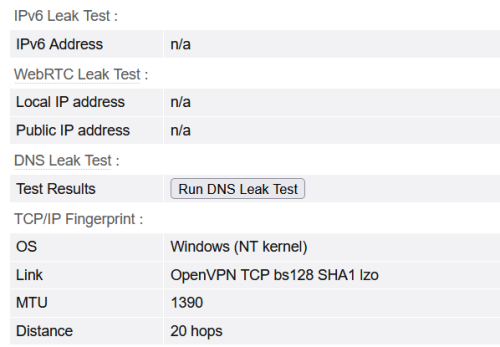 Ashren liked this post
|
|
|
Jun 20 2024, 10:21 AM
|
|
Junior Member
156 posts Joined: Dec 2010
|
QUOTE(Jjuggler @ Jun 20 2024, 10:14 AM) 20 hops. Btw kept FF standby once Manifest V3 kicks in. Additional hops introduced due to vpn routing. Avg 18 direct vs 20. |
|
|
Jun 20 2024, 10:23 AM
|
|
Senior Member
1,341 posts Joined: Dec 2016
|
QUOTE(Ashren @ Jun 20 2024, 10:21 AM) Additional hops introduced due to vpn routing. Avg 18 direct vs 20. FYI, i dont use a vpn at all. Hahaha. |
|
|
Jun 20 2024, 10:31 AM
Show posts by this member only | IPv6 | Post
#3317
|
|
Junior Member
813 posts Joined: Jul 2008 From: Kota Kinabalu <-> Kuala Lumpur
|
QUOTE(Jjuggler @ Jun 20 2024, 10:14 AM) 20 hops. Btw kept FF standby once Manifest V3 kicks in. 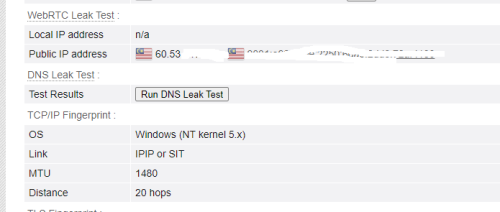 same here 20 hops  |
|
|
Jun 20 2024, 10:35 AM
|
|
Senior Member
5,292 posts Joined: Nov 2006
|
QUOTE(Ashren @ Jun 20 2024, 10:11 AM) True I was saying the same thing all along. Its better to have less hops especially local gateway routing. But as long as the additional hop doesnt cripple the end route it should be fine. I went through lenghty replies previously about it. Now I just couldnt be bothered lol. They just look at ping ping and big mpbs. Anyway is good to shutdown the router for 2min after 1 week of usage. It really help a lot. Ashren liked this post
|
|
|
Jun 20 2024, 10:37 AM
|
|
Junior Member
156 posts Joined: Dec 2010
|
QUOTE(Jjuggler @ Jun 20 2024, 10:23 AM) FYI, i dont use a vpn at all. Hahaha. Then you're the first one with 20 hops here lol. I don't think your additional hops are from local gateways since the site detected your end route to be openvpn probably due to the mtu value. Its better to test with direct routing or do a simple traceroute which i dont have the evergy to. If you manually clamp your mtu just bump it temporarily to 1492 so it fit the pppoe fingerprint and see if its still 20. |
|
|
Jun 20 2024, 10:38 AM
|
|
Junior Member
156 posts Joined: Dec 2010
|
QUOTE(syahpian @ Jun 20 2024, 10:31 AM) same here 20 hops syahpian liked this post
|
|
Topic ClosedOptions
|
| Change to: |  0.0197sec 0.0197sec
 0.48 0.48
 6 queries 6 queries
 GZIP Disabled GZIP Disabled
Time is now: 8th December 2025 - 09:04 PM |
 Quote
Quote