Welcome Guest ( Log In | Register )

Bump Topic Topic Closed RSS Feed
495 Pages « < 165 166 167 168 169 > » Bottom

Outline · [ Standard ] · Linear+

Unifi Official TM UniFi High Speed Broadband Thread V42, READ 1ST PAGE FOR RELEVANT WIFI INFO!

views
     
Jjuggler
post Jun 20 2024, 11:00 AM

Narcissistic Genius
******
Senior Member
1,341 posts

Joined: Dec 2016
QUOTE(Ashren @ Jun 20 2024, 10:37 AM)
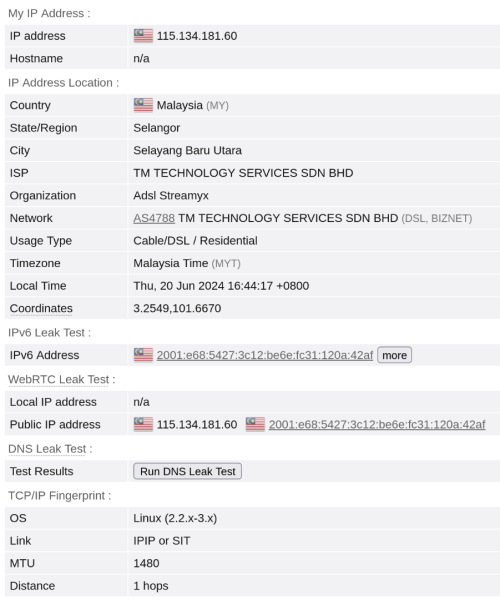
Then you're the first one with 20 hops here lol. I don't think your additional hops are from local gateways since the site detected your end route to be openvpn probably due to the mtu value. Its better to test with direct routing or do a simple traceroute which i dont have the evergy to. If you manually clamp your mtu just bump it temporarily to 1492 so it fit the pppoe fingerprint and see if its still 20.
*
First, i am using unifi air 5G. Second, I am using the given modem to me since don't wish to waste money on buying additional router (technically a better option). But I take your suggestion into consideration and changed the MTU and MSS (equal to MTU value - 40), so basically, 1500, 1460.

user posted image
Ashren
post Jun 20 2024, 11:07 AM

Getting Started
**
Junior Member
156 posts

Joined: Dec 2010
QUOTE(Jjuggler @ Jun 20 2024, 11:00 AM)
First, i am using unifi air 5G. Second, I am using the given modem to me since don't wish to waste money on buying additional router (technically a better option). But I take your suggestion into consideration and changed the MTU and MSS (equal to MTU value - 40), so basically, 1500, 1460.

user posted image
*
Then its TM direct routing. Since syahpian is also at 20 hops on 60.xxx ip range. Nothing is impossible with TM. Every of their ip has their own mind of routing lol.
Jjuggler
post Jun 20 2024, 11:13 AM

Narcissistic Genius
******
Senior Member
1,341 posts

Joined: Dec 2016
QUOTE(Ashren @ Jun 20 2024, 11:07 AM)
Then its TM direct routing. Since syahpian is also at 20 hops on 60.xxx ip range. Nothing is impossible with TM. Every  of their ip has their own mind of routing lol.
*
I am missing the good old days when you can game in peace and enjoy the internet. Everytime when the sun sets, hellish experience starts man. Hahaha.
askm
post Jun 20 2024, 11:44 AM

Getting Started
**
Junior Member
134 posts

Joined: Sep 2016


Anyone receive this msg from unifi offer 3 mths free for ext'g user ? condition to recontact other 2 yrs. very interesting
The issue is on the package name. "Free Upgraded 2023" haven't change yet and still stack on the old speed (before free upgrade).
Recontacting will be based on that package name. That is downgrade.

user posted image
tng55
post Jun 20 2024, 12:32 PM

Regular
******
Senior Member
1,440 posts

Joined: Sep 2021


QUOTE(Godhand73 @ Jun 19 2024, 01:04 PM)
WTF is wrong with unifi. I have 300Mbps plan and it's around 80 Mbps atm. It's been like this for at least 4-5 days now. I report this to their twitter every single day. Yesterday they reset port and it was back to normal speed. Now it's slow again.

Is there any solution to this? Are there better ISP? I don't have TIME here so that's out of the question. I'm really sick of this. I pay monthly on time just for this shit speed.
*
not unifi issue impossible to drop speed 80 mbps
i am sure its router issue buy you own router settle
firdausbhari
post Jun 20 2024, 12:54 PM

Look at all my stars!!
*******
Senior Member
2,281 posts

Joined: Feb 2012


got my 1st bill after 6 months free for SWU 3.0 500mbps RM119

= Rm86.85
tng55
post Jun 20 2024, 01:07 PM

Regular
******
Senior Member
1,440 posts

Joined: Sep 2021


QUOTE(firdausbhari @ Jun 20 2024, 12:54 PM)
got my 1st bill after 6 months free for SWU 3.0 500mbps RM119

= Rm86.85
*
mine like RM7x.xx then second bill normal RM119
kwss
post Jun 20 2024, 04:46 PM

Regular
******
Senior Member
1,207 posts

Joined: Aug 2018
QUOTE(blacktubi @ Jun 19 2024, 07:18 PM)
The number of hops is probably just a simple traceroute from their server and got nothing to do with routing  doh.gif

Routing, peering, transit and bgp is so complex these days and it's hard to determine from a simple test
*
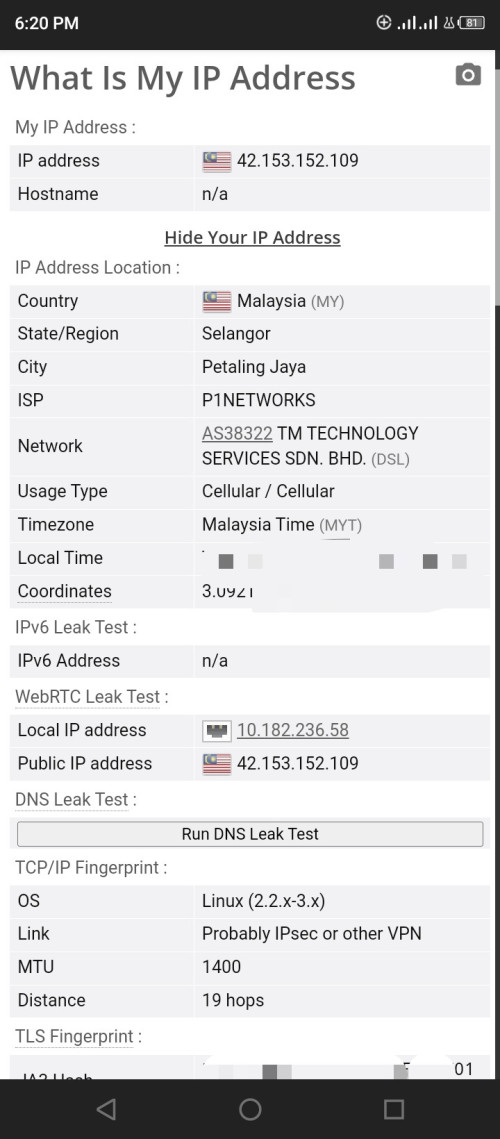
Nope, they didn't do any of that. They just read the packet TTL and derive it from the OS because different OS has different default TTL.
If TM want to game the website they can just MPLS from the BNG.
But wait for it, I can do it myself and the internet is so much smoother after that!
CODE
# sysctl net.ipv4.ip_default_ttl=81


user posted image
Maknusia
post Jun 20 2024, 05:04 PM

Enthusiast
*****
Junior Member
997 posts

Joined: Apr 2009


Hi, anyone having difficulty logging into unifi app or the website?

My page seem to be stuck at OTP, where I didnt receive any OTP. Tried both from app and the web as well
kwss
post Jun 20 2024, 05:48 PM

Regular
******
Senior Member
1,207 posts

Joined: Aug 2018
QUOTE(Jjuggler @ Jun 20 2024, 11:00 AM)
First, i am using unifi air 5G. Second, I am using the given modem to me since don't wish to waste money on buying additional router (technically a better option). But I take your suggestion into consideration and changed the MTU and MSS (equal to MTU value - 40), so basically, 1500, 1460.

user posted image
*
For a start you are not using TM fiber so the magic number don't apply!
Have you test it using ping with DF bit set to verify if it works? I have a feeling it won't actually work.
Your MSS calculation is actually the the minimum. Modern OS utilize TCP Timestamping and needs an additional 12 bytes. Depending on how many more headers you are adding, you need to account for them in your MSS calculation.

That's the problem with one guy coming here and tell everyone just use this magic number, everything will be great, as if all the engineers making your product don't know what they are doing.
MTU problem is not immediately apparent. It will work on most big tech and CDN because they use a very safe MTU that works for everyone, even for people with broken PMTUD.

If you ended up in some sites that don't do this, you will blame routing issue.
JLA
post Jun 20 2024, 06:39 PM

Look at all my stars!!
*******
Senior Member
2,777 posts

Joined: May 2008
QUOTE(kwss @ Jun 20 2024, 04:46 PM)
Nope, they didn't do any of that. They just read the packet TTL and derive it from the OS because different OS has different default TTL.
If TM want to game the website they can just MPLS from the BNG.
But wait for it, I can do it myself and the internet is so much smoother after that!
CODE
# sysctl net.ipv4.ip_default_ttl=81


user posted image
*
user posted image

thanks u sir
wanted to ask this thing
now clear TM fiber and TM mobile is different ip range
AS38332 webe > upstreams AS4788 TM
kwss
post Jun 20 2024, 06:54 PM

Regular
******
Senior Member
1,207 posts

Joined: Aug 2018
QUOTE(JLA @ Jun 20 2024, 06:39 PM)
user posted image

thanks u sir
wanted to ask this thing
now clear TM fiber and TM mobile is different ip range
AS38332 webe > upstreams AS4788 TM
*
Yes you are right they continue to maintain AS38322 separately. Yes, they just upstream to AS4788.

You can verify it here:
https://bgpview.io/asn/38322#upstreams-v4
Jjuggler
post Jun 20 2024, 07:42 PM

Narcissistic Genius
******
Senior Member
1,341 posts

Joined: Dec 2016
QUOTE(kwss @ Jun 20 2024, 05:48 PM)
For a start you are not using TM fiber so the magic number don't apply!
Have you test it using ping with DF bit set to verify if it works? I have a feeling it won't actually work.
Your MSS calculation is actually the the minimum. Modern OS utilize TCP Timestamping and needs an additional 12 bytes. Depending on how many more headers you are adding, you need to account for them in your MSS calculation.

That's the problem with one guy coming here and tell everyone just use this magic number, everything will be great, as if all the engineers making your product  don't know what they are doing.
MTU problem is not immediately apparent. It will work on most big tech and CDN because they use a very safe MTU that works for everyone, even for people with broken PMTUD.

If you ended up in some sites that don't do this, you will blame routing issue.
*
Take a chill pill man. Be calm mate. I thought it was plusminus 8 bytes. Now 12 bytes meh? Maybe I need to refresh my networking knowledge. I think I didn't mention about routing problem for me. I just shared the browserleaks.com/ip stat for fun. Maybe you wrongly tag me mate.
SUSnonamer
post Jun 20 2024, 08:54 PM

Getting Started
**
Junior Member
224 posts

Joined: Apr 2019
QUOTE(kwss @ Jun 20 2024, 04:46 PM)
Nope, they didn't do any of that. They just read the packet TTL and derive it from the OS because different OS has different default TTL.
If TM want to game the website they can just MPLS from the BNG.
But wait for it, I can do it myself and the internet is so much smoother after that!
CODE
# sysctl net.ipv4.ip_default_ttl=81


user posted image
*
whats the point of showing 1 hop when in actual behind it has many hops?

this is not a game of fooling system or people

if u can show unmodified windows linux macos have differing hop count when connect pppoe to same endpoint then we have something otherwise this is just low quality nonsense

SUSnonamer
post Jun 20 2024, 08:58 PM

Getting Started
**
Junior Member
224 posts

Joined: Apr 2019
QUOTE(Jjuggler @ Jun 20 2024, 07:42 PM)
Take a chill pill man. Be calm mate. I thought it was plusminus 8 bytes. Now 12 bytes meh? Maybe I need to refresh my networking knowledge. I think I didn't mention about routing problem for me. I just shared the browserleaks.com/ip stat for fun. Maybe you wrongly tag me mate.
*
my 4g phone have mtu lower than 1400
Ashren
post Jun 20 2024, 09:23 PM

Getting Started
**
Junior Member
156 posts

Joined: Dec 2010
It pains me reading unwarranted attacks flying here and there for nothing. It's so hostile around here to the point where I feel it's not good for my mental health. I was here for the 1gbps FSU upgrade, exchange great engagements regarding the upgrade process, the onr differences etc, reading anime's work on the onr and his pon stick.. made some friends along the way etc... it was a lot of fun. Until I get called out of nowhere and being constantly attacked directly and indirectly to the point where I feel this has to stop. Goodbye guys.
Ashren
post Jun 20 2024, 09:38 PM

Getting Started
**
Junior Member
156 posts

Joined: Dec 2010
QUOTE(kwss @ Jun 19 2024, 12:53 PM)
I is obvious you just google MTU when I mentioned it.
It is even more obvious you do not fully understand the Cloudflare article.
What is most obvious is you are not a network engineer. Every single network engineer I know deal with at least one MTU problem in their life and remember their experience well because it is one hell of a mystery to begin with.

But I am an inclusive person and I will not tell people to stop argument with me. Most importantly I will not brush people off because they are not a doctor or not a network engineer or what not. So let me start you up with your research, as you seems a lot smarter than tng55. Not sure who is smarter, is it you or BeeYenHua

PPPoE:
The standard says the minimum overhead is 8 bytes. It can be more. You never know if the BNG you are using are having an 8 bytes overhead or more.

Multipath link:
All telco run jumbo frame in their network. If they misconfigured one path, anything going through that path will be hit with fragmentation and reassembly.

MPLS and Segment Routing:
Overhead varies, depending on the number of label, and the number of tunnel-in-tunnel the telco use.

5G edge compute:
They are mostly MTU 1300 right now.

The Mikrotik specific problem:
It can do MRU 1500 but MTU is 1480. Do a packet capture and you will understand why. The negitiation for MTU 1500 is actually successful, but then TM BNG has a problem where the LCP-Reply will be malformed. When Mikrotik detects it, it lower MTU to 1480. As far as I can tell, all the TM BNG I tried exhibit this bug. The lowering of MTU is actually a bug itself in RouterOS. So 2 bugs combined made this happen.

The "most stable" MTU:
It is 1280. It is the smallest dictated by IPv6 standard without fragmentation. Large enough to fit most tunnel, including 5G compute edge, PPPoE, VPN. It will even work if Path MTU Discovery is broken.

Windows and their firewall:
The last time I use Windows, their firewall by default block ICMP Type 3 Code 4 and ICMPv6 Type 2 Code 0. What this means is PMTUD will never work on Windows. If the BNG is configured to never disassemble packet, it will break all Windows machine with the default configuration and has a higher than link MTU set.

CDN and big tech runs at MTU 1280 for maximum compatibility. Cloudflare only recently changed and they blogged it:
https://blog.cloudflare.com/increasing-ipv6-mtu

Using a browser test to talk about hop count? You need to do better than that. Hop count is never accurate on MPLS / SR network because everything inside the tunnel session has count=1 regardless of how many physical router they pass-through.

Proof that MRU 1500 is working even when my MTU is 1480... Woots!
CODE

$ ss -tapi
State Recv-Q Send-Q                              Local Address:Port              Peer Address:Port  Process                                                                                                                                                                                                
ESTAB 0      0                                   192.168.88.17:37238              104.26.6.73:https  users:(("firefox",pid=3486,fd=157))                                                                
 bbr wscale:13,7 rto:227 rtt:26.152/5.336 ato:40 mss:1388 pmtu:1500 rcvmss:1428 advmss:1448 cwnd:23 bytes_sent:3454 bytes_acked:3455 bytes_received:7593 segs_out:24 segs_in:21 data_segs_out:13 data_segs_in:15 bbr:(bw:1.81Mbps,mrtt:15.556,pacing_gain:2.88672,cwnd_gain:2.88672) send 9.77Mbps lastsnd:22071 lastrcv:22047 lastack:22047 pacing_rate 10.8Mbps delivery_rate 1.81Mbps delivered:14 app_limited busy:182ms rcv_space:14480 rcv_ssthresh:64088 minrtt:11.561 snd_wnd:49152 rcv_wnd:59392
ESTAB 0      0                                   192.168.88.17:32940           151.101.65.140:https  users:(("firefox",pid=3486,fd=153))                                                                
 bbr wscale:9,7 rto:221 rtt:20.62/5.495 ato:40 mss:1428 pmtu:1500 rcvmss:1428 advmss:1448 cwnd:30 bytes_sent:12516 bytes_acked:12517 bytes_received:23479 segs_out:43 segs_in:50 data_segs_out:22 data_segs_in:31 bbr:(bw:3.78Mbps,mrtt:10.567,pacing_gain:2.88672,cwnd_gain:2.88672) send 16.6Mbps lastsnd:25072 lastrcv:25053 lastack:25053 pacing_rate 27.1Mbps delivery_rate 3.78Mbps delivered:23 app_limited busy:203ms rcv_space:14480 rcv_ssthresh:64088 minrtt:10.567 rcv_ooopack:1 snd_wnd:187392 rcv_wnd:64128
ESTAB 0      0                                   192.168.88.17:50304            104.18.18.239:https  users:(("firefox",pid=3486,fd=125))                                                                
 bbr wscale:13,7 rto:226 rtt:25.686/19.446 ato:40 mss:1388 pmtu:1500 rcvmss:1428 advmss:1448 cwnd:17 bytes_sent:2427 bytes_acked:2428 bytes_received:6841 segs_out:13 segs_in:15 data_segs_out:7 data_segs_in:9 bbr:(bw:1.27Mbps,mrtt:13.162,pacing_gain:2.88672,cwnd_gain:2.88672) send 7.35Mbps lastsnd:29026 lastrcv:28959 lastack:28959 pacing_rate 24.1Mbps delivery_rate 1.27Mbps delivered:8 app_limited busy:183ms rcv_space:14480 rcv_ssthresh:64088 minrtt:13.162 snd_wnd:49152 rcv_wnd:59264
ESTAB 0      0        [2001:e68:5427:3c12:be6e:fc31:120a:42af]:49876   [2001:4860:4860::8844]:https  users:(("firefox",pid=3486,fd=121))                                                                
 bbr wscale:8,7 rto:214 rtt:13.583/4.275 ato:40 mss:1408 pmtu:1480 rcvmss:1208 advmss:1408 cwnd:18 bytes_sent:2837 bytes_acked:2838 bytes_received:2068 segs_out:16 segs_in:12 data_segs_out:8 data_segs_in:7 bbr:(bw:3.2Mbps,mrtt:7.028,pacing_gain:2.88672,cwnd_gain:2.88672) send 14.9Mbps lastsnd:46324 lastrcv:46310 lastack:46310 pacing_rate 23.6Mbps delivery_rate 3.2Mbps delivered:9 app_limited busy:79ms rcv_space:14080 rcv_ssthresh:64128 minrtt:7.028 snd_wnd:74240 rcv_wnd:63616

*
To my defense I wasnt even replying or even engaging any conversation with you but you quote me and turned it all to be about you. You even drop names which I dont even know who they are. If you have issues with them dont trash it on me. Or maybe you have issues with me too since you kept flaming all my conversation with others as if I was in conversation with you. I dont know whats your problem or what are you trying to achieve from all this by being this hostile but rest assured Im not gonna hang around here anymore. Especially not around people like you.

This post has been edited by Ashren: Jun 20 2024, 09:46 PM
kwss
post Jun 20 2024, 09:47 PM

Regular
******
Senior Member
1,207 posts

Joined: Aug 2018
QUOTE(Jjuggler @ Jun 20 2024, 07:42 PM)
Take a chill pill man. Be calm mate. I thought it was plusminus 8 bytes. Now 12 bytes meh? Maybe I need to refresh my networking knowledge. I think I didn't mention about routing problem for me. I just shared the browserleaks.com/ip stat for fun. Maybe you wrongly tag me mate.
*
Good day mate. I am very kan cheong when I see you put in a MSS so big for a mobile network. Sorry for hijacking your post to bad mouth someone else.

We are both wrong about TSopt. It is 10 bytes.
Source: https://datatracker.ietf.org/doc/html/rfc1323
CODE

TCP Timestamps Option (TSopt):

        Kind: 8

        Length: 10 bytes

         +-------+-------+---------------------+---------------------+
         |Kind=8 |  10   |   TS Value (TSval)  |TS Echo Reply (TSecr)|
         +-------+-------+---------------------+---------------------+
             1       1              4                     4


Anyway, did you tried ping with DF bit set to see if it works?


QUOTE(nonamer @ Jun 20 2024, 08:54 PM)
whats the point of showing 1 hop when in actual behind it has many hops?

this is not a game of fooling system or people

if u can show unmodified windows linux macos have differing hop count when connect pppoe to same endpoint then we have something otherwise this is just low quality nonsense
*
I just proved that whoever use the website to justify local routing is low quality nonsense.
You didn't read the whole thread so here goes:
The website states it is a test for web browser. So how do they come out with hop count?
blacktubi suggested the web site may be doing a traceroute behind the scene.
I found that it is not and they are just using packet TTL. I back it up by submitting a proof.
BTW the whole network is smoother is a joke.

Now hop count is not accurate in MPLS network. I already written it few days back to Ashren but he didn't rebuke any of my technical explanation. I will repeat the gist here.
In MPLS network, a single tunnel will reduce TTL by 1 hop, regardless of if it pass through 1 router or 100 routers. Compare to path that didn't enter MPLS tunnel, each router is considered 1 hop. This is also the reason why I have written in the past about local telco should provide BGP Looking Glass which at least shows the MPLS Label routing.


QUOTE(Ashren @ Jun 20 2024, 09:23 PM)
It pains me reading unwarranted attacks flying here and there for nothing. It's so hostile around here to the point where I feel it's not good for my mental health. I was here for the 1gbps FSU upgrade, exchange great engagements regarding the upgrade process, the onr differences etc, reading anime's work on the onr and his pon stick.. made some friends along the way etc... it was a lot of fun. Until I get called out of nowhere and being constantly attacked directly and indirectly to the point where I feel this has to stop. Goodbye guys.
*
You spread misinformation, you need to back it up. I challenge your points but you don't dare to quote me directly and counter it. It is not even 1 week and you have mental health problem just doing technical discussion?
soonwai
post Jun 20 2024, 09:57 PM


********
All Stars
11,456 posts

Joined: Oct 2007
From: KL


QUOTE(Ashren @ Jun 20 2024, 09:23 PM)
It pains me reading unwarranted attacks flying here and there for nothing. It's so hostile around here to the point where I feel it's not good for my mental health. I was here for the 1gbps FSU upgrade, exchange great engagements regarding the upgrade process, the onr differences etc, reading anime's work on the onr and his pon stick.. made some friends along the way etc... it was a lot of fun. Until I get called out of nowhere and being constantly attacked directly and indirectly to the point where I feel this has to stop. Goodbye guys.
*
Nevermind lah bro. Just ignore. He's like that one. https://forum.lowyat.net/index.php?showtopi...ost&p=109048379

I'm sure he's an ok person irl.
Azims
post Jun 20 2024, 09:58 PM

Getting Started
**
Junior Member
211 posts

Joined: Oct 2014
QUOTE(swanlover @ Jun 20 2024, 09:42 AM)
Hi, kind to advise that is the current value for money best router for 800Gbit?

My current router can’t handles that, need a upgrade I think
*
Xiaomi AX3000T looks really good right now; it supports OpenWrt, has a fast CPU (MediaTek Filogic)

Review: https://www.acwifi.net/25657.html

495 Pages « < 165 166 167 168 169 > » Top
Topic ClosedOptions
 

Change to:
| Lo-Fi Version
0.0200sec    0.98    6 queries    GZIP Disabled
Time is now: 4th December 2025 - 10:29 PM