Welcome Guest ( Log In | Register )

120 Pages « < 48 49 50 51 52 > » Bottom

Outline · [ Standard ] · Linear+

 U Home 5G

views
     
MR_alien
post Mar 22 2024, 07:41 PM

Mr.Alien on the loss
*******
Senior Member
3,580 posts

Joined: Oct 2007
From: everywhere in sabah


QUOTE(Jjuggler @ Mar 22 2024, 07:31 PM)
I did for my ZTE MC8020. Just link ASUS as main wireless router while switching off 2.4GHz/5GHz radio on the ZTE. Of course since the 5G modem gets hot (not like super hot lah), just put cheap USB fan too cool it down lorh. I set the modem to reboot on daily basis.

But ya, Double-NAT'ng... cant be helped. Atleast solutions like Tailscale and Zerotier are there, also VPN included.
*
mine only gets warm...don't think it's gonna be hot because there are ventilations on both side
Jjuggler
post Mar 22 2024, 10:49 PM

Narcissistic Genius
******
Senior Member
1,341 posts

Joined: Dec 2016
QUOTE(MR_alien @ Mar 22 2024, 07:41 PM)
mine only gets warm...don't think it's gonna be hot because there are ventilations on both side
*
Idle no warm/hot. When there is download activity yes. I still prefer to keep my modem on optimum condition. I mean I still have a year and half as in contract, so yeah.
SUSpetpenyubobo
post Mar 23 2024, 12:02 AM

Regular
******
Senior Member
1,030 posts

Joined: Jan 2022

The non SIM locked ZTE MC888S 5G modem can now be purchased from Shopee/Lazada. The price is about RM815.

https://shopee.com.my/ZTE-5G-CPE-3-SE-MC888...521.16896636086
https://www.lazada.com.my/products/zte-5g-c...3476107808.html

But for the price I think I'd buy either the Arcadyan, Gteniq or Olax with OpenWRT firmwares with tons more features.


Gargamel_gibson
post Mar 23 2024, 09:45 PM

On my way
****
Junior Member
526 posts

Joined: Feb 2021
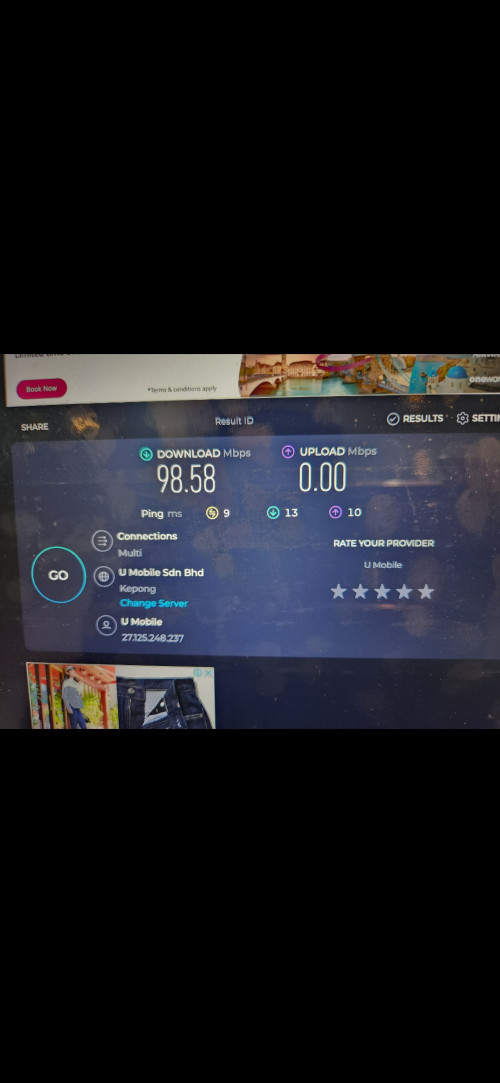
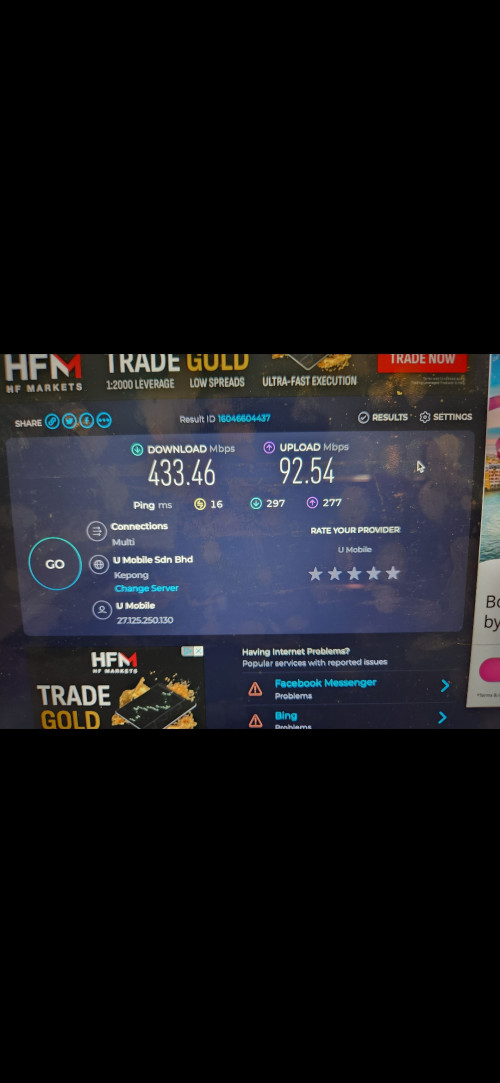
Just switched for my dad.


From this, Unifi 100m, 90+ a month

user posted image


To this, 70+ a month


user posted image


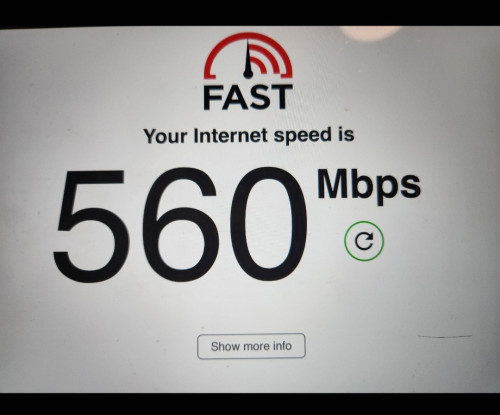
Edit: fast speed test by Netflix is even faster.

user posted image

This post has been edited by Gargamel_gibson: Mar 23 2024, 10:00 PM
waikit1985
post Mar 25 2024, 09:54 AM

New Member
*
Junior Member
35 posts

Joined: Sep 2022
Few years ago I tried U-mobile postpaid on my phone, the 4G signal is quite terrible at my area (Hulu Langat).

Not sure how's it now because I am planning to get this U Home 5G for my parents to use it at home since they don't have Unifi and the Unifi port at my area also quite full from time to time.

Maybe I should get the starter pack sim card and buy 1 week plan to test it out.

I got a 4G modem at home, bought it couple of years ago, those modem that unlocked can use all types of sim card and bypassing the data quota one... not sure if I can use that to test this U home 5G or not... for sure cannot get 5G signal since it's a 4G modem by the way. will also test it on my iPhone to check signal strength.

Anyone could give me some advice or how to properly test it? Thanks in advance.
cyktai
post Mar 25 2024, 11:32 AM

New Member
*
Newbie
14 posts

Joined: Nov 2010
QUOTE(waikit1985 @ Mar 25 2024, 09:54 AM)
Few years ago I tried U-mobile postpaid on my phone, the 4G signal is quite terrible at my area (Hulu Langat).

Not sure how's it now because I am planning to get this U Home 5G for my parents to use it at home since they don't have Unifi and the Unifi port at my area also quite full from time to time.

Maybe I should get the starter pack sim card and buy 1 week plan to test it out.

I got a 4G modem at home, bought it couple of years ago, those modem that unlocked can use all types of sim card and bypassing the data quota one... not sure if I can use that to test this U home 5G or not... for sure cannot get 5G signal since it's a 4G modem by the way. will also test it on my iPhone to check signal strength.

Anyone could give me some advice or how to properly test it? Thanks in advance.
*
Download the Cellmapper app on your phone. Look for the signal for Band 28, if the RSRP is somewhere around -80 to -90, it's excellent, -100 to -110 not so good. -120 is unusable. This is assuming you are getting the 5G router since LTE B28 is under DNB 5G. When using pure 4G, U Mobile will prioritise their own frequency, Band 1,3,7,8.
MR_alien
post Mar 25 2024, 01:19 PM

Mr.Alien on the loss
*******
Senior Member
3,580 posts

Joined: Oct 2007
From: everywhere in sabah


QUOTE(waikit1985 @ Mar 25 2024, 09:54 AM)
Few years ago I tried U-mobile postpaid on my phone, the 4G signal is quite terrible at my area (Hulu Langat).

Not sure how's it now because I am planning to get this U Home 5G for my parents to use it at home since they don't have Unifi and the Unifi port at my area also quite full from time to time.

Maybe I should get the starter pack sim card and buy 1 week plan to test it out.

I got a 4G modem at home, bought it couple of years ago, those modem that unlocked can use all types of sim card and bypassing the data quota one... not sure if I can use that to test this U home 5G or not... for sure cannot get 5G signal since it's a 4G modem by the way. will also test it on my iPhone to check signal strength.

Anyone could give me some advice or how to properly test it? Thanks in advance.
*
buy a sim frm 7-11, load some money and buy the weekly plan to test the signal strength and speed at that location
umobile's 4G and 5G is like night and day difference
for me at least at where i'm staying right now, the key is to lock it at 5G because the 4G is unusable(but usable when i'm elsewhere)

just use your phone that has 5G to test...thn if it's ok, just take up the plan that has router included or buy the sim only and buy the router somewhere else
waikit1985
post Mar 25 2024, 02:24 PM

New Member
*
Junior Member
35 posts

Joined: Sep 2022
QUOTE(MR_alien @ Mar 25 2024, 01:19 PM)
buy a sim frm 7-11, load some money and buy the weekly plan to test the signal strength and speed at that location
umobile's 4G and 5G is like night and day difference
for me at least at where i'm staying right now, the key is to lock it at 5G because the 4G is unusable(but usable when i'm elsewhere)

just use your phone that has 5G to test...thn if it's ok, just take up the plan that has router included or buy the sim only and buy the router somewhere else
*
QUOTE(cyktai @ Mar 25 2024, 11:32 AM)
Download the Cellmapper app on your phone. Look for the signal for Band 28, if the RSRP is somewhere around -80 to -90, it's excellent, -100 to -110 not so good. -120 is unusable. This is assuming you are getting the 5G router since LTE B28 is under DNB 5G. When using pure 4G, U Mobile will prioritise their own frequency, Band 1,3,7,8.
*
I just bought a u-mobile prepaid sim (RM10). Will load some money into it and buy the weekly plan.
Will test it with my iPhone 12 Pro via Cellmapper and see if I can get B28 most of the time.
I checked u-mobile coverage website, my parents house is at the edge of 5G but within the coverage, while 4G is fully covered. Hope both 4G and 5G there are usable. Of course if can get B28 most or all the time then will be great.

Will test it first, thanks Mr alien and cyktai notworthy.gif notworthy.gif
MR_alien
post Mar 25 2024, 02:33 PM

Mr.Alien on the loss
*******
Senior Member
3,580 posts

Joined: Oct 2007
From: everywhere in sabah


QUOTE(waikit1985 @ Mar 25 2024, 02:24 PM)
I just bought a u-mobile prepaid sim (RM10). Will load some money into it and buy the weekly plan.
Will test it with my iPhone 12 Pro via Cellmapper and see if I can get B28 most of the time.
I checked u-mobile coverage website, my parents house is at the edge of 5G but within the coverage, while 4G is fully covered. Hope both 4G and 5G there are usable. Of course if can get B28 most or all the time then will be great.

Will test it first, thanks Mr alien and cyktai  notworthy.gif  notworthy.gif

*
just do speed test instead of u can get certain signal or not
just keep going everywhere and go to fast.com...no need for it to perform the full test
just let it run few second thn pause it so it doesn't eat that much of your data

thn watch how many bars of 5G and/or 4G are u getting as well....4G 4G+ full bar also doesn't mean it's usable
my place 4G 4G+ is full signal but nothing loads

This post has been edited by MR_alien: Mar 25 2024, 02:34 PM
ch1ck3n
post Mar 25 2024, 03:40 PM

Regular
******
Senior Member
1,437 posts

Joined: Oct 2004
QUOTE(MR_alien @ Mar 19 2024, 03:45 PM)
i got the ZTE...i think for now, they're giving everybody ZTE

lock band i think can but i've never tried
but it is telco lock and cannot change DNS due to that
*
How to lock for ZTE bro? just got the unit. it keeps jumping to 4g, even if i put only 5G NSA only.

how i know jump to 4G? when speed is below 100 mbps confirm is on 4g line
MR_alien
post Mar 25 2024, 03:45 PM

Mr.Alien on the loss
*******
Senior Member
3,580 posts

Joined: Oct 2007
From: everywhere in sabah


QUOTE(ch1ck3n @ Mar 25 2024, 03:40 PM)
How to lock for ZTE bro? just got the unit. it keeps jumping to 4g, even if i put only 5G NSA only.

how i know jump to 4G? when speed is below 100 mbps confirm is on 4g line
*
set from automatic to manual thn set to 5G NSA
it works for me
on phone also same time...set to NR only
waikit1985
post Mar 25 2024, 04:11 PM

New Member
*
Junior Member
35 posts

Joined: Sep 2022
QUOTE(cyktai @ Mar 25 2024, 11:32 AM)
Download the Cellmapper app on your phone. Look for the signal for Band 28, if the RSRP is somewhere around -80 to -90, it's excellent, -100 to -110 not so good. -120 is unusable. This is assuming you are getting the 5G router since LTE B28 is under DNB 5G. When using pure 4G, U Mobile will prioritise their own frequency, Band 1,3,7,8.
*
I just noticed cellmapper don’t have app for iOS. I need to get an android phone to test out
ch1ck3n
post Mar 25 2024, 05:05 PM

Regular
******
Senior Member
1,437 posts

Joined: Oct 2004
QUOTE(MR_alien @ Mar 25 2024, 03:45 PM)
set from automatic to manual thn set to 5G NSA
it works for me
on phone also same time...set to NR only
*
oh ya they locked for u already actually.

if u go to advanced settings - others section - u can go developer options - enter password - network debug.


this zte lose to Zyxel NR5103e.

Speed is about the same, but zte lose latency. Zte latency is about 17-19, Zyxel latency is about 14-17
waikit1985
post Mar 25 2024, 05:11 PM

New Member
*
Junior Member
35 posts

Joined: Sep 2022
QUOTE(MR_alien @ Mar 25 2024, 02:33 PM)
just do speed test instead of u can get certain signal or not
just keep going everywhere and go to fast.com...no need for it to perform the full test
just let it run few second thn pause it so it doesn't eat that much of your data

thn watch how many bars of 5G and/or 4G are u getting as well....4G 4G+ full bar also doesn't mean it's usable
my place 4G 4G+ is full signal but nothing loads
*
Using Honor 90 lite to perform the testing now.

Phone showing 4G+ (ald turn on 5g) Cellmapper showing band 1,3,7,8 most of the time with RSRP -100 ish.
Occasionally showing band 28 with RSRP around -80 ish.

But I’m still on the given free data 1GB la. Haven’t buy the weekly plan yet.
cyktai
post Mar 25 2024, 05:24 PM

New Member
*
Newbie
14 posts

Joined: Nov 2010
QUOTE(waikit1985 @ Mar 25 2024, 05:11 PM)
Using Honor 90 lite to perform the testing now.

Phone showing 4G+ (ald turn on 5g) Cellmapper showing band 1,3,7,8 most of the time with RSRP -100 ish.
Occasionally showing band 28 with RSRP around -80 ish.

But I’m still on the given free data 1GB la. Haven’t buy the weekly plan yet.
*
If you are getting RSRP -80 then the DNB signal is very strong. Open a browser window and go to cellmapper.net, Menu>Provider - Filter the Telco to Yes, Signal to 4G LTE. For some reason, all DNB 5G towers are listed under Yes 4G.

You will see signal towers with numbers 3XXXXX and 7XXXXX. The ones starting with 7XXXXX are the DNB 5G masts. If you are getting -80 for B28, my guess is you have a 5G mast very near your house.
MR_alien
post Mar 25 2024, 06:06 PM

Mr.Alien on the loss
*******
Senior Member
3,580 posts

Joined: Oct 2007
From: everywhere in sabah


QUOTE(ch1ck3n @ Mar 25 2024, 05:05 PM)
oh ya they locked for u already actually.

if u go to advanced settings - others section - u can go developer options - enter password - network debug.
this zte lose to Zyxel NR5103e.

Speed is about the same, but zte lose latency. Zte latency is about 17-19, Zyxel latency is about 14-17
*
originally it's locked in 5G/4G when it's set in auto
the router occasionally will drop back to 4G thn went back to 5G

QUOTE(waikit1985 @ Mar 25 2024, 05:11 PM)
Using Honor 90 lite to perform the testing now.

Phone showing 4G+ (ald turn on 5g) Cellmapper showing band 1,3,7,8 most of the time with RSRP -100 ish.
Occasionally showing band 28 with RSRP around -80 ish.

But I’m still on the given free data 1GB la. Haven’t buy the weekly plan yet.
*
buy the plan...your free data isn't 5G eventhough it said "5G ready data"
ya....it took me some days to find out that myself...people thought my line has problem
the problem is u have to buy plan to activate 5G else it's stuck at 4G

This post has been edited by MR_alien: Mar 25 2024, 06:07 PM
waikit1985
post Mar 25 2024, 06:38 PM

New Member
*
Junior Member
35 posts

Joined: Sep 2022
QUOTE(cyktai @ Mar 25 2024, 05:24 PM)
If you are getting RSRP -80 then the DNB signal is very strong. Open a browser window and go to cellmapper.net, Menu>Provider - Filter the Telco to Yes, Signal to 4G LTE. For some reason, all DNB 5G towers are listed under Yes 4G.

You will see signal towers with numbers 3XXXXX and 7XXXXX. The ones starting with 7XXXXX are the DNB 5G masts. If you are getting -80 for B28, my guess is you have a 5G mast very near your house.
*
Oh I see. The RSRP -80ish is actually quite rare, but maybe I not yet buy the weekly plan so the phone actually keep showing 4G+ instead of 5G eventhough my phone enable 5G. Will carry out the test again.

QUOTE(MR_alien @ Mar 25 2024, 06:06 PM)
originally it's locked in 5G/4G when it's set in auto
the router occasionally will drop back to 4G thn went back to 5G
buy the plan...your free data isn't 5G eventhough it said "5G ready data"
ya....it took me some days to find out that myself...people thought my line has problem
the problem is u have to buy plan to activate 5G else it's stuck at 4G
*
Hahahaha, no wonder la. Okok will carry out the test again after buy the weekly plan.

Thanks both of u again 🙏🙏
cyktai
post Mar 25 2024, 06:46 PM

New Member
*
Newbie
14 posts

Joined: Nov 2010
QUOTE(waikit1985 @ Mar 25 2024, 06:38 PM)
Oh I see. The RSRP -80ish is actually quite rare, but maybe I not yet buy the weekly plan so the phone actually keep showing 4G+ instead of 5G eventhough my phone enable 5G. Will carry out the test again.
Hahahaha, no wonder la. Okok will carry out the test again after buy the weekly plan.

Thanks both of u again 🙏🙏
*
It's very rare because you are on 4G and UM will prioritise their own infrastructure. But it's obvious you have very strong DNB signal, so 5G should not be an issue for your location. If you go to the cell mapper website on your browser, you can click on the cell tower and they will show a highlighted area where real user data has been mapped, the data should also show you which tower the 5G is from, assuming there are multiple 5G towers in your vicinity.
ms6309
post Mar 25 2024, 09:06 PM

Getting Started
**
Junior Member
111 posts

Joined: Jul 2011


Which 5G router do you all recommend between TP link Deco X50 and others like Telstra AW1000, Nokia Fastmiles, etc? Saw promotion on TP link X50 today.
tomato people
post Mar 26 2024, 01:54 AM

Tomato fan
******
Senior Member
1,730 posts

Joined: Jul 2016
From: tomato land


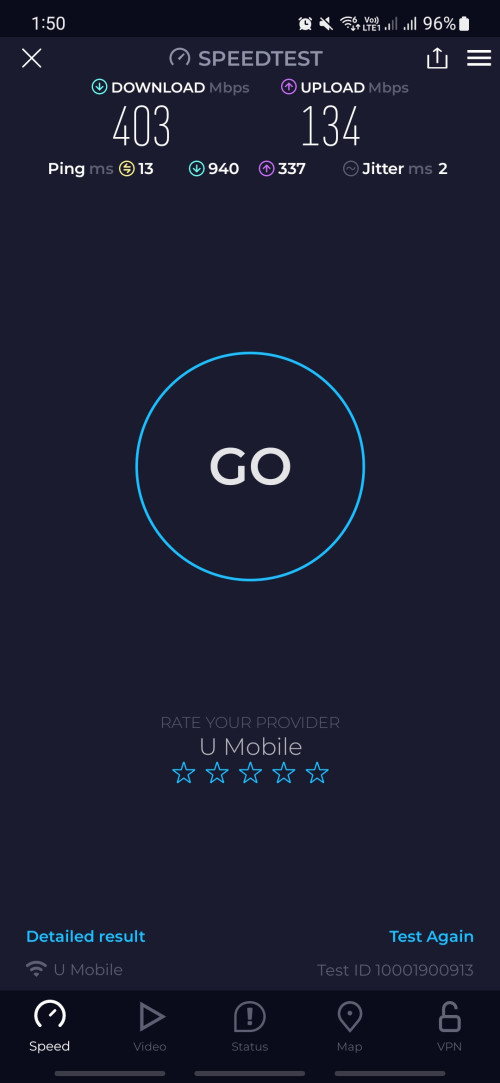
user posted image

Speedtest using zte router mc888s

120 Pages « < 48 49 50 51 52 > » Top
 

Change to:
| Lo-Fi Version
0.0218sec    0.47    6 queries    GZIP Disabled
Time is now: 5th December 2025 - 10:57 AM