Welcome Guest ( Log In | Register )

Outline · [ Standard ] · Linear+

 U Home 5G

views
     
Jjuggler
post Mar 22 2024, 07:31 PM

Narcissistic Genius
******
Senior Member
1,341 posts

Joined: Dec 2016
QUOTE(MR_alien @ Mar 22 2024, 06:31 PM)
i think not
u can't even control 2.4Ghz and 5Ghz individually like a normal router
*
I did for my ZTE MC8020. Just link ASUS as main wireless router while switching off 2.4GHz/5GHz radio on the ZTE. Of course since the 5G modem gets hot (not like super hot lah), just put cheap USB fan too cool it down lorh. I set the modem to reboot on daily basis.

But ya, Double-NAT'ng... cant be helped. Atleast solutions like Tailscale and Zerotier are there, also VPN included.

This post has been edited by Jjuggler: Mar 22 2024, 07:33 PM
Jjuggler
post Mar 22 2024, 10:49 PM

Narcissistic Genius
******
Senior Member
1,341 posts

Joined: Dec 2016
QUOTE(MR_alien @ Mar 22 2024, 07:41 PM)
mine only gets warm...don't think it's gonna be hot because there are ventilations on both side
*
Idle no warm/hot. When there is download activity yes. I still prefer to keep my modem on optimum condition. I mean I still have a year and half as in contract, so yeah.
Jjuggler
post Apr 15 2024, 10:39 AM

Narcissistic Genius
******
Senior Member
1,341 posts

Joined: Dec 2016
QUOTE(ultrageek @ Apr 14 2024, 11:56 AM)
Yeah, reboot the modem solves the problem. Hence, the annoyance... I doubt other modems face these kind of problems?
*
QUOTE(waikit1985 @ Apr 15 2024, 05:56 AM)
Same here, the only solution is to reboot the modem manually, once it's done, the SSID will appear in less than a minute.

Otherwise if you let it reboot itself, SSID will not appear nor the internet will be connected.
*
I set my 5G modem to be rebooted everyday. Saves headache and hassle. ZTE MC8020 Unifi Air 5G. Also, no firmware update for this model with ridiculous high retail price, sigh.
Jjuggler
post Apr 26 2024, 10:10 PM

Narcissistic Genius
******
Senior Member
1,341 posts

Joined: Dec 2016
QUOTE(ameyhazuan @ Apr 22 2024, 02:07 PM)
Damn..I was tricked on getting this modem. I saw it uses Qualcomm chip. However it was not for the 5G.

5G chipset = Unisoc
Ethernet chipset = Qualcomm

Damn...
*
Man never knew the model supplied by uMobile for their 5G plans would be such problematic modem. The one unifi providing for their customers using a legit 5G chipset from qualcomm. Never encounter any issues in terms of overheating with the model so far. At least they dont supply rubbish router like what they are doing for fiber users.
Jjuggler
post May 3 2024, 01:52 PM

Narcissistic Genius
******
Senior Member
1,341 posts

Joined: Dec 2016
QUOTE(MR_alien @ Apr 27 2024, 09:47 AM)
Of course look at the price difference laugh.gif

But if I wanna subscribe unifi air 5G...the difference in price, I might as well buy my own router
*
My contract with unifi for their 5g plan left another 17 months. Once ended will use the modem for other telco since it's unlocked modem.
Jjuggler
post Jun 13 2024, 09:17 PM

Narcissistic Genius
******
Senior Member
1,341 posts

Joined: Dec 2016
QUOTE(JLA @ Jun 13 2024, 07:30 AM)
sure
good modem not cheap
but the price become RM99/month something

telco u always price war with telco y
*
I have to agree with him. Glad that Unifi despite their track record providing crap routers for fibre users, they indeed gave one of the best 5G modem in the market, MC8020; for their Air 5G users. No problem at all. Only in few cases line drops to 4G mode. Just need to reboot manually via mobile app.

This post has been edited by Jjuggler: Jun 13 2024, 09:17 PM
Jjuggler
post Jun 13 2024, 10:03 PM

Narcissistic Genius
******
Senior Member
1,341 posts

Joined: Dec 2016
QUOTE(andrekua2 @ Jun 13 2024, 09:57 PM)
I thought someone shared that Unifi has stopped giving that router
*
I am not sure about the news. So, I am unable to comment on that.
Jjuggler
post Jun 14 2024, 08:43 AM

Narcissistic Genius
******
Senior Member
1,341 posts

Joined: Dec 2016
So the KAON's housing is using similar design with Tenda's 5G modem?

Product page: Tenda 5G03
Jjuggler
post Sep 8 2024, 03:05 PM

Narcissistic Genius
******
Senior Member
1,341 posts

Joined: Dec 2016
QUOTE(cloudwan @ Sep 6 2024, 10:47 AM)
Not sure what chipset it's using..  hmm.gif  hmm.gif
*
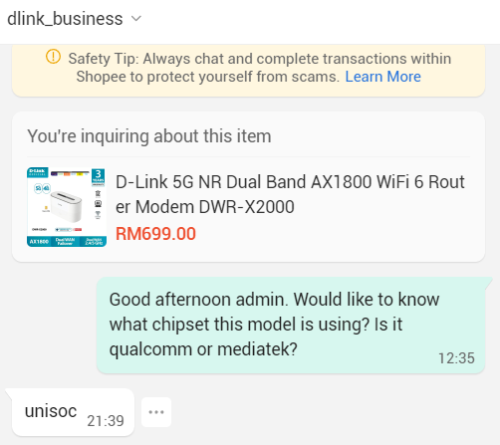
It is using Unisoc chip. So....... yeah

user posted image
Jjuggler
post Sep 29 2024, 03:05 PM

Narcissistic Genius
******
Senior Member
1,341 posts

Joined: Dec 2016
QUOTE(syahpian @ Sep 20 2024, 04:24 PM)
user posted image

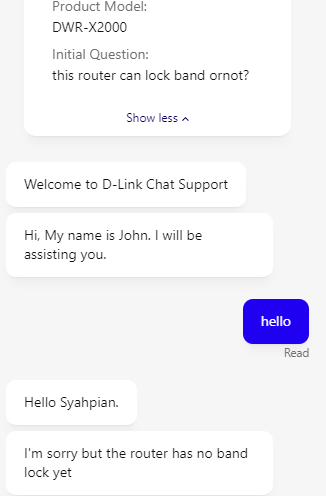
also, that 5G router cannot lock band  laugh.gif
*
The router actually receives a few mixed feedback. If you check on carousell, I saw two person selling their units for cheap price.

Also, D-Link's portable 5G modem also receives negative feedback.

I mean, what do you expect from D-Link? Nothing-Links.

This post has been edited by Jjuggler: Sep 29 2024, 03:05 PM
Jjuggler
post Sep 29 2024, 10:41 PM

Narcissistic Genius
******
Senior Member
1,341 posts

Joined: Dec 2016
QUOTE(xswatch @ Sep 29 2024, 08:01 PM)
true that. only sohai buy dlink. lol
*
Those days they used to be average consumer product. Now become shitty brand already. I miss the good old unifi days where you get a customizable router from TM, precisely the famous DIR-615, where you can run ddwrt on it. Nowadays routers more into aesthetics than serving its actual purpose.
Jjuggler
post Sep 30 2024, 05:20 PM

Narcissistic Genius
******
Senior Member
1,341 posts

Joined: Dec 2016
QUOTE(vkashin @ Sep 30 2024, 09:58 AM)
wah.. was looking at the DWR-U2000 5G mifi to use together with my U Home 5G, initially planned to add to cart for 10.10..
how bad are their portable 5G modem?

Are there any recommended alternatives for 5G mifi that is around 600-800 range?
*
I cannot recommend any brands at the moment. Just look for those powered by Qualcomm chipset. Don't go for unisoc-based modem. Qualcomm is expensive, but worth it. Also, client device location or target plays crucial role from the telco tower.

QUOTE(cloudwan @ Sep 30 2024, 10:58 AM)
Ya, regret buying their AC1300 range extender last time, bought it thinking just to extend current my mum house wifi range to cater for a single CCTV just slightly out of range.
But since setup and use, the bloody wifi from the extender kept going DC etc even when separated the 2.4 and 5ghz wifi.. In the end bought a Tplink AX1800 router for rm160 to replace the TM router and settled the wifi coverage already.
Wasted RM80 bucks for that extender.  sweat.gif  sweat.gif
*
I bought 2xFiberhome AX3000 wifi (new) for cheap and using it to extend wifi since I am doing business from home. Easy and jimat. I avoid D-Link. TP-Link kira okay lagi.


Change to:
| Lo-Fi Version
0.0608sec    0.21    7 queries    GZIP Disabled
Time is now: 7th December 2025 - 12:17 AM