

I got 1 qstion.
I wanna learn oc but firstly i need to know how to lock my sata port to prevent my hard dsic from corrupted. me using biostar ta690g here.
Pls help guys.

AMD® Socket-AM2/AM2+ Overclocking thread (V3), Phenom... Here AMD goes
|
|
 Dec 14 2007, 08:04 AM Dec 14 2007, 08:04 AM
|
 
Junior Member
6 posts Joined: Dec 2007  
|
hello guys.. noob here.
I got 1 qstion. I wanna learn oc but firstly i need to know how to lock my sata port to prevent my hard dsic from corrupted. me using biostar ta690g here. Pls help guys. |
|
|
|
|
|
Dec 14 2007, 08:06 AM
|

Senior Member
2,827 posts Joined: Mar 2007 From: MALAYSIA 
|
Bro dblooi, its hard to catch up with u.
 3++ secs gap in super PI.  |
|
|
Dec 14 2007, 08:12 AM
|
 
Elite
8,545 posts Joined: Aug 2006 From: 224.0.0.6
|
QUOTE(mod99 @ Dec 14 2007, 08:04 AM) hello guys.. noob here. Just locked your PCI-E to 100MHz will do I got 1 qstion. I wanna learn oc but firstly i need to know how to lock my sata port to prevent my hard dsic from corrupted. me using biostar ta690g here. Pls help guys.   QUOTE(ocz @ Dec 14 2007, 08:06 AM) Bro dblooi, its hard to catch up with u. Haha...you go for LN2 confirm can 3++ secs gap in super PI.  -pWs- |
|
|
Dec 14 2007, 08:16 AM
|
|
Senior Member
2,827 posts Joined: Mar 2007 From: MALAYSIA
|
QUOTE(-pWs- @ Dec 14 2007, 08:12 AM) -pWs- Huhu..LN2? not for me as im not ready for it,but i will just keep on trying to get good result. I think my F3 limit me to 3.41 with Div 667 la. Even i tried 2.9Ghz with 800 Div also appear error at superPI. I feel like wanna sell all my pc d.  |
|
|
Dec 14 2007, 08:26 AM
|

Senior Member
971 posts Joined: Aug 2006 From: Penang
|
Here's the rest of my OC log. For those who haven't read the first part, its here -> Link
I actually did something interesting first before I started OCing the F3..those of you who COD our F3s together would know quite well what..frankly, I had more fun doing this than actually OCing the F3.. http://forum.lowyat.net/index.php?showtopi...post&p=14653750 To be honest, there's not much to say this time, just a couple of screenies only. My initial OC with the F3 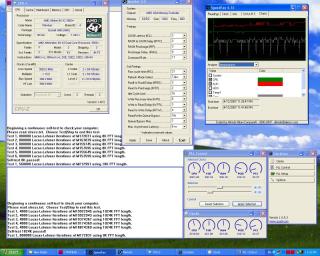
And for my OC record, which I did not have any time to optimise settings (I was in a hurry), » Click to show Spoiler - click again to hide... « At long last, add me into the list of AM2 overclockers 3800+ X2 Windsor F3 | lohwenli | Abit NF-M2 nview | Crucial 10th Anniversary | Thermalright XP-120 Superpi 32m screenshot in spoiler above This post has been edited by lohwenli: Dec 14 2007, 08:35 AM |
|
|
Dec 14 2007, 08:50 AM
|
|
Junior Member
6 posts Joined: Dec 2007
|
QUOTE(-pWs- @ Dec 14 2007, 08:12 AM) Just locked your PCI-E to 100MHz will do How to lock PCI-E speed? cant find it in bios. Sorry for being noob.. -pWs- |
|
|
|
|
|
Dec 14 2007, 10:50 AM
|
|
Senior Member
545 posts Joined: Nov 2006
|
QUOTE(dblooi @ Dec 14 2007, 06:32 AM) this is my result at 3.6G phew.... 3800+ can OC better than my 5200+.... really feel that my 5200+ is kinda junk now.. sigh... for you as reference [attachmentid=359471] i tried again yesterday bro... Speed bus 220MHz Core multiplier 13 HT Link 1100Mhz obviously HTT multi is 5 Ram 353MHz 5-5-5-15-21 1T Vcore default Vdim default. 1) i tried to increase the Vdim to 2.0v in windonws and the whole PC stalled I reboot again and the voltage wet back to normal. Then i plan to set the Vdim in the Bios, but the Vdim setting is 1.95,2.05,2.15 bla bla..... so i set to 2.05... wahlah... the PC didnt start. Keep on having long beep every 2 second... sigh... have to reset Cmos..... kinda need help here... may i know what possibly went wrong? 2) I set the memory back to normal again. and i start tweaking on the Vcore.. I remain the bus speed at 220MHz. As from my understanding form the sharing in the forum, increase the Vcore is like pusing the CPU for more potential OC, of course not over push. Once i increase the Vcore, in window base, to 1.38v, the pc continue to run for a while and suddenly black out and shut down. actually i experience this before but i didnt realize that the it was the Vcore causing the shut down. Was it really it? need comment  3) just want to check, is AMDX2 5200+ and TF7050 and 2G Kingston value ram DDR667 a decent combination for OC? thanks.... |
|
|
Dec 14 2007, 10:59 AM
|
|
Senior Member
545 posts Joined: Nov 2006
|
Bro... I notice something different about your ClockGen.
Pls refer to the attachment below... the one mark with red circle, i dont have it when i open the ClockGen. I only have Clock and Options menu only. As for the clock menu, I can see reading for the first 3 meter starting from the right.. however i dont get the rest of the meter reading as marked in circle red as well... about the PLL control menu, forget it.. i dont even have those... ha ha ha... curious... is yours the latest ClockGen? I tried download from CPUID.com but not available.... cheers and thanks.. Attached thumbnail(s) 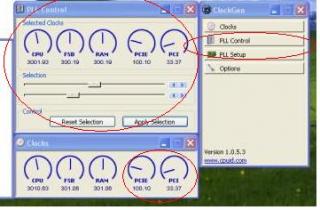
|
|
|
Dec 14 2007, 12:10 PM
|

Senior Member
1,560 posts Joined: May 2005 From: Penang
|
QUOTE(jeromeccm @ Dec 14 2007, 10:50 AM) phew.... 3800+ can OC better than my 5200+.... really feel that my 5200+ is kinda junk now.. sigh... u should lower ya ram timing to 533 and htt multiplier to 4x so that your cpu will have more room for increase more htt...i tried again yesterday bro... Speed bus 220MHz Core multiplier 13 HT Link 1100Mhz obviously HTT multi is 5 Ram 353MHz 5-5-5-15-21 1T Vcore default Vdim default. 1) i tried to increase the Vdim to 2.0v in windonws and the whole PC stalled I reboot again and the voltage wet back to normal. Then i plan to set the Vdim in the Bios, but the Vdim setting is 1.95,2.05,2.15 bla bla..... so i set to 2.05... wahlah... the PC didnt start. Keep on having long beep every 2 second... sigh... have to reset Cmos..... kinda need help here... may i know what possibly went wrong? 2) I set the memory back to normal again. and i start tweaking on the Vcore.. I remain the bus speed at 220MHz. As from my understanding form the sharing in the forum, increase the Vcore is like pusing the CPU for more potential OC, of course not over push. Once i increase the Vcore, in window base, to 1.38v, the pc continue to run for a while and suddenly black out and shut down. actually i experience this before but i didnt realize that the it was the Vcore causing the shut down. Was it really it? need comment 3) just want to check, is AMDX2 5200+ and TF7050 and 2G Kingston value ram DDR667 a decent combination for OC? thanks.... overclocking depents on ram, power supply, cooling, a good board... and of cause knowledge... read more guide This post has been edited by cyberloner: Dec 14 2007, 12:12 PM |
|
|
Dec 14 2007, 12:19 PM
|
|
Senior Member
545 posts Joined: Nov 2006
|
QUOTE(cyberloner @ Dec 14 2007, 12:10 PM) u should lower ya ram timing to 533 and htt multiplier to 4x so that your cpu will have more room for increase more htt... thanks for reply..overclocking depents on ram, power supply, cooling, a good board... and of cause knowledge... read more guide actually i have gone through alot of forum for the over clocking for weeks before started OC.. 2 days ago.. i reduce the HTT multi to 4 and i reduce the Ram to 566MHz for more rooms for OC. Same thing. When i increase the Vcore, it auto shutdown.. and when it restart again, the blue screen appear for 1/2sec and restart again. Then the setting for the Vcore went to default and Bus speed reduce from 230MHz to 215MHz. I did make sure the HT linke was below 1k, but i found from forumer that they can actually go slightly above around 1.2k for newer version board. I am using a 450True power with 8800GT 512 amp. my board is TF7050 (good or bad?) CPU cooling is Zalman S8700. copper heatsink. using Kingston Value ram DDR667Mhz |
|
|
Dec 14 2007, 01:53 PM
|
|
Elite
8,545 posts Joined: Aug 2006 From: 224.0.0.6
|
What power supply u use?? Model??
-pWs- |
|
|
Dec 14 2007, 02:13 PM
|

Senior Member
2,497 posts Joined: Jan 2006 From: Selangor
|
i suspect the problems comes from his PSU....
maybe need to try other PSU?? suppose the rams wouldn't bottlenecking his ocing... |
|
|
Dec 14 2007, 02:20 PM
|
|
Senior Member
1,237 posts Joined: Jul 2006 From: espie-prai 
|
s#it...mine can boot and run super pi at 3.55GHz 1.525 Vcore and 2.2 vdim..usind 400 divider...but i try orthos failde around 15 minutes..WTF...should i increase more vcore... idle 42 load 54 pwm when load around 74
 ... ...it's consider stable if we run orthos with divider 400...then pass for 8 hours..after that we change divider to 533 @ above...got any different in stability or not???should we run orthos back??? |
|
|
|
|
|
Dec 14 2007, 02:22 PM
|
|
Senior Member
545 posts Joined: Nov 2006
|
QUOTE(-pWs- @ Dec 14 2007, 01:53 PM) What power supply u use?? Model?? i am using a cooler master 450watt real power-pWs- here is the link. http://www.coolermaster.com/products/produ...cate=173&id=192 I bought about 5 months ago. |
|
|
Dec 14 2007, 02:25 PM
|

Senior Member
1,404 posts Joined: Apr 2006 From: ......
|
QUOTE(jeromeccm @ Dec 14 2007, 10:59 AM) Bro... I notice something different about your ClockGen. TF7050 cannot use clockgen Pls refer to the attachment below... the one mark with red circle, i dont have it when i open the ClockGen. I only have Clock and Options menu only. As for the clock menu, I can see reading for the first 3 meter starting from the right.. however i dont get the rest of the meter reading as marked in circle red as well... about the PLL control menu, forget it.. i dont even have those... ha ha ha... curious... is yours the latest ClockGen? I tried download from CPUID.com but not available.... cheers and thanks.. |
|
|
Dec 14 2007, 02:26 PM
|
|
Elite
8,545 posts Joined: Aug 2006 From: 224.0.0.6
|
QUOTE(rainingzero @ Dec 14 2007, 02:13 PM) i suspect the problems comes from his PSU.... maybe need to try other PSU?? suppose the rams wouldn't bottlenecking his ocing... QUOTE(jeromeccm @ Dec 14 2007, 02:22 PM) i am using a cooler master 450watt real power I think your PSU having problem too. Do you have other PSU to try??here is the link. http://www.coolermaster.com/products/produ...cate=173&id=192 I bought about 5 months ago. QUOTE(tapirus @ Dec 14 2007, 02:20 PM) s#it...mine can boot and run super pi at 3.55GHz 1.525 Vcore and 2.2 vdim..usind 400 divider...but i try orthos failde around 15 minutes..WTF...should i increase more vcore... idle 42 load 54 pwm when load around 74 I doubt you can orthos for long time @ that speed. Kinda hard ...it's consider stable if we run orthos with divider 400...then pass for 8 hours..after that we change divider to 533 @ above...got any different in stability or not???should we run orthos back??? -pWs- This post has been edited by -pWs-: Dec 14 2007, 02:28 PM |
|
|
Dec 14 2007, 02:33 PM
|
|
Senior Member
545 posts Joined: Nov 2006
|
QUOTE(dblooi @ Dec 14 2007, 02:25 PM) TF7050 cannot use clockgen oh Sh**.... man.... then this board is not really good for OC... any other recomendation to tweak the bus speed from windows? thanks... by the way... increase Vdim hang/cant reboot... have to cmos reset..... sigh Added on December 14, 2007, 2:36 pm QUOTE(-pWs- @ Dec 14 2007, 02:26 PM) I think your PSU having problem too. Do you have other PSU to try?? hmmm.... PSU problem... sorry dont have other PSU..I doubt you can orthos for long time @ that speed. Kinda hard -pWs- when i dont OC, my PC can run 24/7. when o OC the buss speed to 220MHz with the rest of the setting remain default, i also can run but when increase further, PC cannot take it already... This post has been edited by jeromeccm: Dec 14 2007, 02:36 PM |
|
|
Dec 14 2007, 02:42 PM
|
|
Elite
8,545 posts Joined: Aug 2006 From: 224.0.0.6
|
QUOTE(jeromeccm @ Dec 14 2007, 02:33 PM) hmmm.... PSU problem... sorry dont have other PSU.. Cannot take it meant?? when i dont OC, my PC can run 24/7. when o OC the buss speed to 220MHz with the rest of the setting remain default, i also can run but when increase further, PC cannot take it already... I suspect is PSU problem. If can, try to lend one PSU and try.  -pWs- |
|
|
Dec 14 2007, 02:43 PM
|
|
Senior Member
1,404 posts Joined: Apr 2006 From: ......
|
QUOTE(jeromeccm @ Dec 14 2007, 02:33 PM) oh Sh**.... man.... then this board is not really good for OC... can try biostar OC tool but not recommended. This program is too buggy and lame any other recomendation to tweak the bus speed from windows? thanks... by the way... increase Vdim hang/cant reboot... have to cmos reset..... sigh Added on December 14, 2007, 2:36 pm hmmm.... PSU problem... sorry dont have other PSU.. when i dont OC, my PC can run 24/7. when o OC the buss speed to 220MHz with the rest of the setting remain default, i also can run but when increase further, PC cannot take it already...  |
|
|
Dec 14 2007, 02:43 PM
|

Senior Member
3,102 posts Joined: May 2005 From: Penang *̡͌l̡*̡̡
|
QUOTE(jeromeccm @ Dec 14 2007, 02:33 PM) hmmm.... PSU problem... sorry dont have other PSU.. i think ur PSU really not enuf for ur current spec la~when i dont OC, my PC can run 24/7. when o OC the buss speed to 220MHz with the rest of the setting remain default, i also can run but when increase further, PC cannot take it already... u using 88GT is need lot of power~ U better get other PSU to try 1st just me 2cent |
|
Topic ClosedOptions
|
| Change to: |  0.0178sec 0.0178sec
 0.41 0.41
 6 queries 6 queries
 GZIP Disabled GZIP Disabled
Time is now: 2nd December 2025 - 12:43 AM |
 Quote
Quote

