Welcome Guest ( Log In | Register )

Bump Topic Topic Closed RSS Feed

Outline · [ Standard ] · Linear+

 AMDŽ Socket-AM2/AM2+ Overclocking thread (V3), Phenom... Here AMD goes

views
     
jeromeccm
post Dec 13 2007, 12:54 PM

On my way
****
Senior Member
545 posts

Joined: Nov 2006
Hi Guys..

noob here.. he he..
actually i have been following up the OC K8 for quite a while. Never tried to OC but once i OC i got addicted..
I have quite a number of question here, so dont mind if i can bombard the question to get more understanding..

My RIG
AMD X2 5200+ @ 2.6GHz stock with Zalman S8700 heatsink and fan.
Biostar TF7050-M2
2GHz Kingston RAM DDR667 (running pair-1GHz each)
Zotac 8800GT amp! (700/2000) stock cooler.


I finally tried to Oc yesterday and here is what i've got.

I am using the default OC software given by Biostar to OC the buss speed.
Here is what i did before OC the buss speed.
- Lower the HT Lnk to X4
- Reduce the RAM speed to 566MHz
During OC time, the incremental of the Buss speed is 5MHz each time and test Ortho for 15m. If stable then increase 5MHz again.

I didnt change the voltage at first.
Multiplier remain at X13.
My RAM speed was about 297MHz.

However when i hit 230MHz, my PC black out and restart by it self. Then suddenly it jump into blue screen for 1/2sec and restart again. This time, the Bus speed have been automatically change to 215MHz once i boot to window. MY HTT was 920MHz.

Hence i have reduce the buss speed to 225MHz as shown in the picture below.

My question is,
1) Is my initial setting correct for the HT link, The RAM frequency as well as for the multiplier?
2) Is the blue screen happened because of not enough voltage during OC?
3) My Temp is idle at around 36deg C and load is 45deg C. Is it normal?
4) Is my Processror F3 version?
5) Is there anything to do with the HTT?
6) since my RAM is DDR667, the actual clock is 333Mhz. During the OC can the memory frequency go beyond 333MHz? I assume 333MHz is the limit and anything go beyond that is consider OC.
7) What if the memory is beyond the 333MHz, will there be a risk that the memory will burn?
8) I notice some people said lowering the CPU multiplier able to push the bus speed further.. Why is that so?
9) What will be my safe margin of the CPU temp when OC. some says 50C, some say 55C and some even said 60C.. confuse.
10) Yesterday my bus speed hit 230MHz, CPU Multiplier is 13, HT link 920MHz, and the Memory speed is about 300MHZ, i tested with Ortho for 6 hours.. stable and no error. But when i tested with the 3Dmark03, the graphic teste was ok.. but when come to the CPU test where the Orgs were playing stone game, the PC black out and reboot.... may i know why? I thought the Ortho already stressing the CPU and should be fine in running other programs...

Please please provide me advise how to clock it further... below is a snap shot of my current setting..
Please comment... thanks...

sorry guys for the questions and questions... i am a technical person so everything i do i have to understand.,, if not i am like a copier machine but not knowing the content..


Attached thumbnail(s)
Attached Image
jeromeccm
post Dec 13 2007, 02:10 PM

On my way
****
Senior Member
545 posts

Joined: Nov 2006
Dude, thanks alot for the information.. i have a few things to clarify...
I hope people who ready my Q&A able to obsorb the OC issue/or uncertainty that i face.. I believe it is about the same all the time..
Hey can you post up your screenshot of your CPUz for the main and memory? thanks.. like to see how yours did.
1) your overclock looks good to me , but u might wanna change the command to 2T if u wish to go further with this setting
-- I thought in the forum and OC advise they mentioned 2T is not as good as 1T as it will slow down the ram performance? By the way i really dont know the meaning of the setting where.. the 2-3-2- bla bla bla.... confuse..
I dont know the 1 or 2T is for .. ha ha ha.. really noob

2) not really , BSOD can happen when ur ram oc to unstable frequency as well. In my case, not enough vcore usually end up with stucked at bios safe mode. Ic ic.. understand..

3) ur temp is quite ok to me smile.gif
-- cool... keeping a close look on it.

4) yeah you are using a F3 proc brows.gif
i duno... some say no.... hmmm...

5) HTT = bus speed in ur CPU-Z wink.gif
--Sorry.. i think my question confuse people here.. I ment the HT Link...
I herd reducing the HT Link will reduce the overall performance of the PC. So we shall mazimize it to 1K. Forum advise that this should be kept within 1K and below.. anything above is unstable.. but i see alot of them are going above 1k.... can i say this is consider overclocking the comm between the RAM and the chipset?

6) it's depend on which kinda ram chipset that u are using. i assume that it is unknown ram chipset, what u can do is
u can try to oc , if it's unstable then stop. Normally safe vdimm that can be add on those normal ram chipset is 2.2v.
-- I am using Kingston Ram with Hynix chipset. No heatsink.. DDR667

7) your ram won't burn if u just overclock the ram without adding vdimm. ur system will be unstable when it reaches its limit. i answer part of this question in 6) adi icon_rolleyes.gif
-- Got it... thanks..

8) 5200+ has 13x multiplier. there are few reasons people lower the multi:
a) multi lower to 11x , that's the highest multi that can use /6 memory divider ( by using 800 divider, check ur cpu-z if u don't understand wat i mean by /6)
if u don't understand, check the DDR2 divider diagram in post#1 of this thread.
b) lower multi , u need to oc the HTT higher in order to get same speed. your HT link will be following in this case. HT link higher = overall performance better wink.gif
-- so in this case assume i clock to 3GHz, Bus Speed 250MHz and Multi is 12 vs. Buss Speed 230MHz and Multi 13.
Which performs faster? I rad that higher Buss Speed = faster traffic = faster flow. so in that case, why they need a multiplier for? ke ke ke.. dont laugh.. i said i am noob... ke ke ke ke sweat.gif

9) control ur temp under 65C, always wink.gif
-- got it... thanks.

10) in concolusion , orthos and other stressing program is not 100% assure that ur system is freaking stable icon_rolleyes.gif
-- ahhaaa...... ic ic... so i got to after burn the PC with all kinds of stress/benchmark program for couple of days to ensure it runs 24/7 to conclude it is 99% full prove stable....

many questions u asked , but i'm glad to answer them all laugh.gif
happy to see people provide screenshot when asking some questions, that's easier to troubleshoot thumbup.gif
-- If i dont provide screenshot, will kena kick again.. he he he...


Added on December 13, 2007, 2:14 pm
regarding to bro jeromeccm, i read reviews and posts from other forums regarding OC using biostar mobo. One thing they stress about is DO NOT use biostar overclocking software. They say it's crap and alwez freeze your PC. That exactly what heppened to me b4 when i used that software.

Why dont you use bios instead? smile.gif
*

[/quote]

IC IC.... bios setting need alot of reboot..
I was thinking of OC under windows first then when check stable already then will set the "determine" setting in the Bios... then stress test again. No need to restart so many times ma..
Any other software you can recommend? I herd that ClockGen can do the job... but the clock gen version i have can only see the meter reading only, not adjustable...

This post has been edited by jeromeccm: Dec 13 2007, 02:14 PM
jeromeccm
post Dec 13 2007, 02:59 PM

On my way
****
Senior Member
545 posts

Joined: Nov 2006
1) command rate 2T, u can change it in dram configuration in bios. try to read tru that page, there are alot of sub timings there. wink.gif
-- Ok... i will get to this when i am done with the CPU OC.. so far is my setting correct or i should change the settings? I will try 2T today....

4) ur proc is confirm a F3. there are few ways u can verify it
  a) check ur box , code should be ADA XXXX5200CZ BOX
  b) your cpu-z SS show me that it is a F3 stepping proc  laugh.gif
-- aahaa...... got it...

5) that's old forum advise  laugh.gif
it is recommend to keep the HT link around 1000-1200 for better system performance
however, different mobo chipset can oc the ht link to different range
ur TF7050 , max HT link oc should be around 1200-1300
if u are using TA690G, u can hit 1500MHz without swt brows.gif
-- ok ok.. now i know my HTlink can go above 1k...  I did 1.1k before i got to know i have to lower down the HT multiplier.

6) hynix wat chipset? FP-Y5? S5? or others?
-- this i got to check.. the ram is the one selling at RM65/piece now... ke ke ke..
Kingston 1GHz DDR667 - RM65  rclxms.gif

8) ur comparison is not detail enough.  Assume that memory divider and HT multiplier are same, of coz 250X 12 will be faster. But not much faster than 230X13. one reason ppl use higher multi is to do less tourture the mobo.

- now i know.. i have clearer picture now... cheers mate... thanks for the information... really clear out the mist in my head.. notworthy.gif thumbup.gif

This post has been edited by jeromeccm: Dec 13 2007, 03:01 PM
jeromeccm
post Dec 13 2007, 03:53 PM

On my way
****
Senior Member
545 posts

Joined: Nov 2006
QUOTE(dj.eRicZzz @ Dec 13 2007, 03:41 PM)
damn dissapointed...reach 3.7g liao ...but later try try mobo cannot start...dont know what problem...

then later psu problem pulak..the cooling fan wont work..but got power...den open check check den fan warking back =.=

now no more ice to play liao.. tried since 1pm+ till now...haih....duno whats the problem...

temp is around 3-4degrees after oc and -8 before oc..
*
wow shocking.gif ..... ice ice babe
jeromeccm
post Dec 13 2007, 04:01 PM

On my way
****
Senior Member
545 posts

Joined: Nov 2006
QUOTE(dblooi @ Dec 13 2007, 03:57 PM)
what the...??!!! -8C???? shocking.gif
haha, what happen bro? tak sempat to take SS?  sad.gif
btw, i saw the TF7050 reunion with the waterblock again rclxm9.gif
*
brother dblooi,, can show me a screen shot of your OC?
jeromeccm
post Dec 14 2007, 10:50 AM

On my way
****
Senior Member
545 posts

Joined: Nov 2006
QUOTE(dblooi @ Dec 14 2007, 06:32 AM)
this is my result at 3.6G brows.gif
for you as reference  laugh.gif

[attachmentid=359471]
*
phew.... 3800+ can OC better than my 5200+.... really feel that my 5200+ is kinda junk now.. sigh...
i tried again yesterday bro...
Speed bus 220MHz
Core multiplier 13
HT Link 1100Mhz obviously HTT multi is 5
Ram 353MHz 5-5-5-15-21 1T
Vcore default
Vdim default.

1) i tried to increase the Vdim to 2.0v in windonws and the whole PC stalled
I reboot again and the voltage wet back to normal.
Then i plan to set the Vdim in the Bios, but the Vdim setting is 1.95,2.05,2.15 bla bla.....
so i set to 2.05... wahlah... the PC didnt start. Keep on having long beep every 2 second... sigh... have to reset Cmos..... kinda need help here... may i know what possibly went wrong?

2) I set the memory back to normal again. and i start tweaking on the Vcore.. I remain the bus speed at 220MHz. As from my understanding form the sharing in the forum, increase the Vcore is like pusing the CPU for more potential OC, of course not over push. Once i increase the Vcore, in window base, to 1.38v, the pc continue to run for a while and suddenly black out and shut down. actually i experience this before but i didnt realize that the it was the Vcore causing the shut down. Was it really it? need comment smile.gif

3) just want to check, is AMDX2 5200+ and TF7050 and 2G Kingston value ram DDR667 a decent combination for OC? thanks....

jeromeccm
post Dec 14 2007, 10:59 AM

On my way
****
Senior Member
545 posts

Joined: Nov 2006
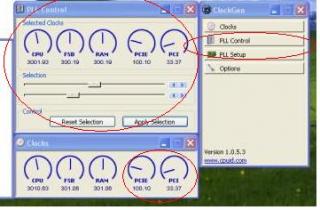
Bro... I notice something different about your ClockGen.
Pls refer to the attachment below... the one mark with red circle, i dont have it when i open the ClockGen.
I only have Clock and Options menu only.
As for the clock menu, I can see reading for the first 3 meter starting from the right.. however i dont get the rest of the meter reading as marked in circle red as well...

about the PLL control menu, forget it.. i dont even have those...

ha ha ha... curious... is yours the latest ClockGen? I tried download from CPUID.com but not available.... cheers and thanks..


Attached thumbnail(s)
Attached Image
jeromeccm
post Dec 14 2007, 12:19 PM

On my way
****
Senior Member
545 posts

Joined: Nov 2006
QUOTE(cyberloner @ Dec 14 2007, 12:10 PM)
u should lower ya ram timing to 533 and htt multiplier to 4x so that your cpu will have more room for increase more htt...
overclocking depents on ram, power supply, cooling, a good board... and of cause knowledge... read more guide
*
thanks for reply..
actually i have gone through alot of forum for the over clocking for weeks before started OC..
2 days ago.. i reduce the HTT multi to 4 and i reduce the Ram to 566MHz for more rooms for OC. Same thing.
When i increase the Vcore, it auto shutdown.. and when it restart again, the blue screen appear for 1/2sec and restart again. Then the setting for the Vcore went to default and Bus speed reduce from 230MHz to 215MHz.

I did make sure the HT linke was below 1k, but i found from forumer that they can actually go slightly above around 1.2k for newer version board.

I am using a 450True power with 8800GT 512 amp.
my board is TF7050 (good or bad?)
CPU cooling is Zalman S8700. copper heatsink.
using Kingston Value ram DDR667Mhz
jeromeccm
post Dec 14 2007, 02:22 PM

On my way
****
Senior Member
545 posts

Joined: Nov 2006
QUOTE(-pWs- @ Dec 14 2007, 01:53 PM)
What power supply u use?? Model??

-pWs-
*
i am using a cooler master 450watt real power
here is the link.
http://www.coolermaster.com/products/produ...cate=173&id=192

I bought about 5 months ago.
jeromeccm
post Dec 14 2007, 02:33 PM

On my way
****
Senior Member
545 posts

Joined: Nov 2006
QUOTE(dblooi @ Dec 14 2007, 02:25 PM)
TF7050 cannot use clockgen  smile.gif
*
oh Sh**.... man.... then this board is not really good for OC...
any other recomendation to tweak the bus speed from windows?
thanks... by the way... increase Vdim hang/cant reboot... have to cmos reset..... sigh


Added on December 14, 2007, 2:36 pm
QUOTE(-pWs- @ Dec 14 2007, 02:26 PM)
I think your PSU having problem too. Do you have other PSU to try??
I doubt you can orthos for long time @ that speed. Kinda hard  wink.gif

-pWs-
*
hmmm.... PSU problem... sorry dont have other PSU..
when i dont OC, my PC can run 24/7. when o OC the buss speed to 220MHz with the rest of the setting remain default, i also can run but when increase further, PC cannot take it already...


This post has been edited by jeromeccm: Dec 14 2007, 02:36 PM
jeromeccm
post Dec 14 2007, 02:44 PM

On my way
****
Senior Member
545 posts

Joined: Nov 2006
QUOTE(-pWs- @ Dec 14 2007, 02:42 PM)
Cannot take it meant??
I suspect is PSU problem. If can, try to lend one PSU and try.  icon_rolleyes.gif

-pWs-
*
Ok... got to look for volunteer already... ke ke ke.....
i have a question... i notice alot of people here using 3800+ and can OC until 3.4GHz above.... does this means the 3800+ at 3.4GHz can out perform the stock 6000+ running at 3GHz?


Added on December 14, 2007, 2:45 pm
QUOTE(tachlio @ Dec 14 2007, 02:43 PM)
i think ur PSU really not enuf for ur current spec la~

u using 88GT is need lot of power~

U better get other PSU to try 1st laugh.gif

just me 2cent
*
thanks... will do...
curious, which card draw more power? 8800GTS320 super clock or the 8800GT 512 amp?


This post has been edited by jeromeccm: Dec 14 2007, 02:45 PM
jeromeccm
post Dec 14 2007, 02:48 PM

On my way
****
Senior Member
545 posts

Joined: Nov 2006
QUOTE(dblooi @ Dec 14 2007, 02:43 PM)
can try biostar OC tool but not recommended. This program is too buggy and lame sad.gif
*
yeah.. the menu can only change the bus speed, and cpu and ram voltage... i am sure this is not ment for hard OCers
by the way, the display CPU voltage and the CPUz varies also....

any third party OC tool? i notice in forum alot of people use ClockGen...
jeromeccm
post Dec 14 2007, 02:50 PM

On my way
****
Senior Member
545 posts

Joined: Nov 2006
QUOTE(-pWs- @ Dec 14 2007, 02:47 PM)
I think so.  wub.gif  wub.gif
But bear in mind that, 6000+ L2 cache is 2MB together IIANM.

Provided that 3800 clocked @ 3GHz same as 6000+, 6000+ only win by a bit.  whistling.gif

-pWs-
*
ic... got it... then might as well buy a cheaper processor then clock the fella kaw kaw... save more.. ke ke ke
noob conclusion.... brows.gif


Added on December 14, 2007, 2:52 pm
QUOTE(-pWs- @ Dec 14 2007, 02:50 PM)
Clockgen nice and easy to use.  laugh.gif  laugh.gif

-pWs-
*
bro dblooi told me TF7050 cannot use ClockGen.... sob sob... cry.gif really regret buy this board....
should have bought a TF690

This post has been edited by jeromeccm: Dec 14 2007, 02:52 PM
jeromeccm
post Dec 14 2007, 02:53 PM

On my way
****
Senior Member
545 posts

Joined: Nov 2006
QUOTE(-pWs- @ Dec 14 2007, 02:52 PM)
Yea...but you have to equip w nice combination of hardware and of coz a nice processor [Example: F3]

-pWs-
*
true true....

Anybody using the same board as i am using now? TF7050? if this fella really cannot oc then i am going to sell already... buy something that can OC....
jeromeccm
post Dec 14 2007, 03:00 PM

On my way
****
Senior Member
545 posts

Joined: Nov 2006
QUOTE(dblooi @ Dec 14 2007, 02:54 PM)
can try FSBset , but i tried b4 when i was using TF7050. It won't work for me as well
that's what we are doing here  brows.gif
*
ha ha ha... great answer.... i want to join in the club also.. but before that i got much more to learn especially the memory timing setting side... really cant understand it.... sigh..


Added on December 14, 2007, 3:01 pm
QUOTE(tachlio @ Dec 14 2007, 02:55 PM)
better u try other PSU 1st~

i don think ur mobo cant OC  nod.gif
*
ok... thinking of getting a 600 real power.... this weekend...

This post has been edited by jeromeccm: Dec 14 2007, 03:01 PM
jeromeccm
post Dec 14 2007, 03:09 PM

On my way
****
Senior Member
545 posts

Joined: Nov 2006
QUOTE(tachlio @ Dec 14 2007, 02:55 PM)
better u try other PSU 1st~

i don think ur mobo cant OC  nod.gif
*
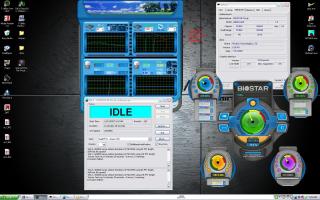
There is something that might further conclude that it is the PSU problem.
Right after OC, i tested out the system with Ortho and OCCT.
I notice there is some glitches at the CPU Fan monitoring chart.
It is like a sudden drop of Fan speed...
please refer to my picture below.. could this be the PSU issue as well?


Added on December 14, 2007, 3:13 pm
QUOTE(byfc2010 @ Dec 14 2007, 03:03 PM)
yea... bro dblooi oced wif that piece of mobo be4 oso...
he can oc too...
*
ok... actually i am not really heacy overclockers... i just want to hit the 3G line. smile.gif blush.gif
so if the PSU can solve this issue, i am kinda happy already... anyway this is my first time OC.. maybe next project i will get other better OC mobo and CPU.. brows.gif

This post has been edited by jeromeccm: Dec 14 2007, 03:13 PM


Attached thumbnail(s)
Attached Image

Topic ClosedOptions
 

Change to:
| Lo-Fi Version
0.0330sec    0.36    7 queries    GZIP Disabled
Time is now: 2nd December 2025 - 10:42 AM