Welcome Guest ( Log In | Register )

Bump Topic Topic Closed RSS Feed
453 Pages « < 305 306 307 308 309 > » Bottom

Outline · [ Standard ] · Linear+

Unifi Official TM UniFi High Speed Broadband Thread V40, READ 1ST PAGE FOR RELEVANT WIFI INFO

views
     
poco loco
post May 26 2023, 02:32 PM

On my way
****
Junior Member
611 posts

Joined: Sep 2022
From: Last member of the tribe


QUOTE(YoungMan @ May 26 2023, 02:27 PM)
I think if you are not the account owner, can't register also. The landlord might have already register e-bill.
*
i check out aready..just need the account number jer...other all i can fill up....btw can register as a tenant aka to VIEW only..cant modified anything...
just missing the account number jer
Oltromen Ripot
post May 26 2023, 02:36 PM

👍 999999 person Likes this member
*******
Senior Member
4,034 posts

Joined: Dec 2019
QUOTE(poco loco @ May 26 2023, 02:15 PM)
is there anyway to find out unifi account number?
i only know the house landline number..

i am a tenant
i ask owner but no reply...just wanna register to view bill
*
QUOTE(YoungMan @ May 26 2023, 02:27 PM)
I think if you are not the account owner, can't register also. The landlord might have already register e-bill.
*
QUOTE(poco loco @ May 26 2023, 02:32 PM)
i check out aready..just need the account number jer...other all i can fill up....btw can register as a tenant aka to VIEW only..cant modified anything...
just missing the account number jer
*
suggestion:

(1) go TMpoint, see if their kiosk can pay using phone number and whether it displays account number on-screen or on payment receipt. Just pay RM5/RM10 enough lah....

(2) with account number, you have option to add to Boost and it will display real-time outstanding amount. in case you can't add to myunifi.
Rob W
post May 27 2023, 01:57 AM

New Member
*
Junior Member
40 posts

Joined: Feb 2006


My wife accepted an upgrade to 500 Mbps whilst I way away and we now have 2 DLink AX3000 (DIR-X3060Z) Wifi 6mesh routers.

As expected, there are issues when TM install stuff so I’m wondering if anyone can advise on some simple things. The change in router had messed up smart home settings and most doesn't work inc the Daikin AC via its app.

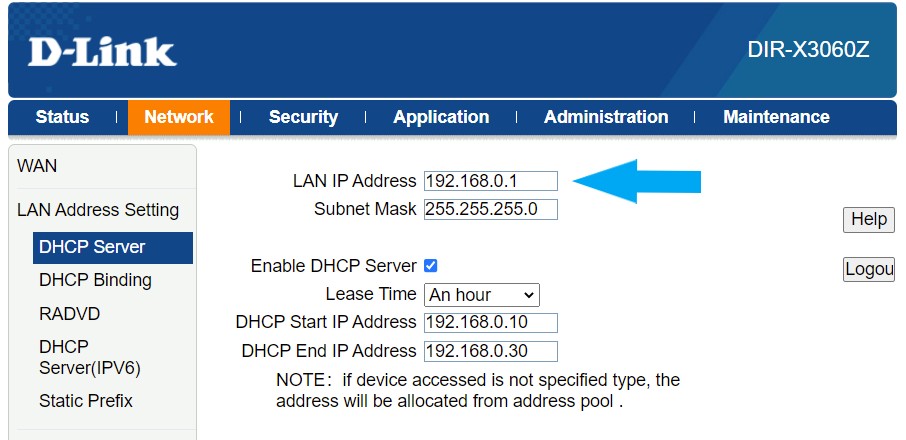
1. The previous router was 192.168.1.1 and this has been changed in the new router to 192.168.1.1. This is a pain because I have some devices with static IP eg Synology NAS, CCTV etc. The installer told her that we must use this address which was the same nonsense when they changed to the 1.1 address in the last router.
Apart from changing the new router to the old address and reconfiguring the static IP’s is there a simple way to access the 192.168.1.x network? I changed it manually but it would be useful to know.

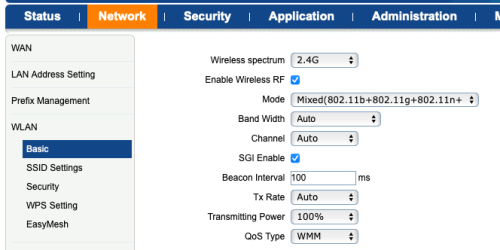
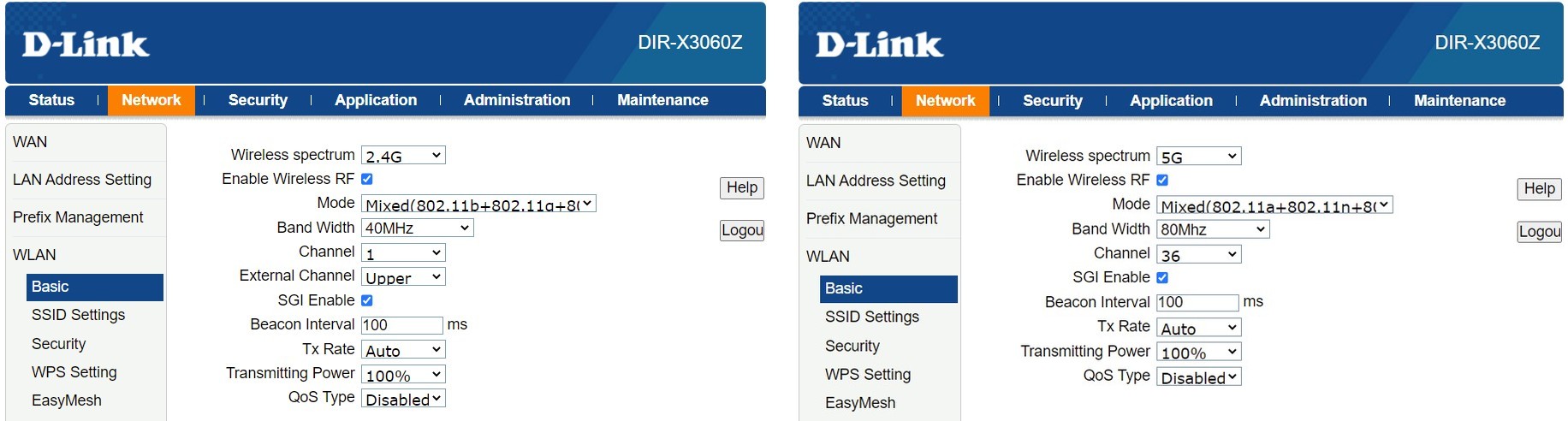
2. The Wifi seems really slow at about 30 Mbps and when I look at the config its set to 2.4 Ghz which is what the TM told her that it needs to be. This is nonsense and its little wonder that its slow. I changed it to 5Ghz and its quicker at about 345 Mpbs. Why on earth would they say it needs to be set to 2.4Ghz?

user posted image

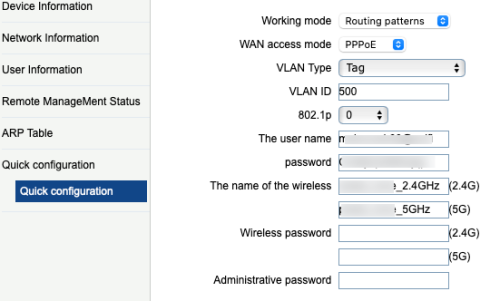
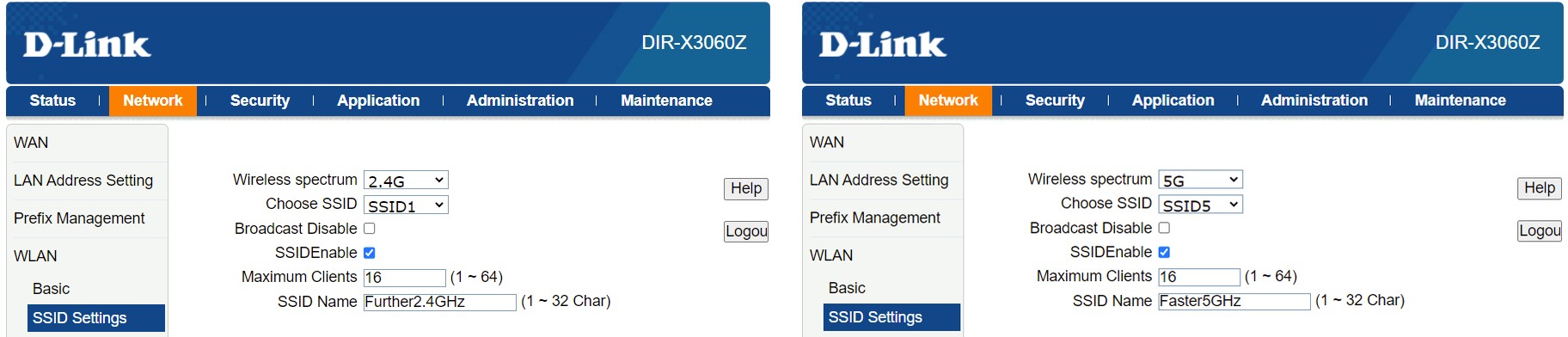
The number if SSID's seems quite limited on the model and there is no option for a combined SSID Like the Deco M9 or am misunderstanding it.
At the moment I'm running 2 SSIDS, 1 for each band.

user posted image

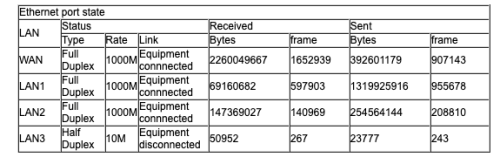
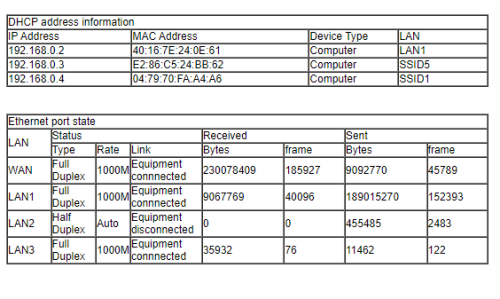
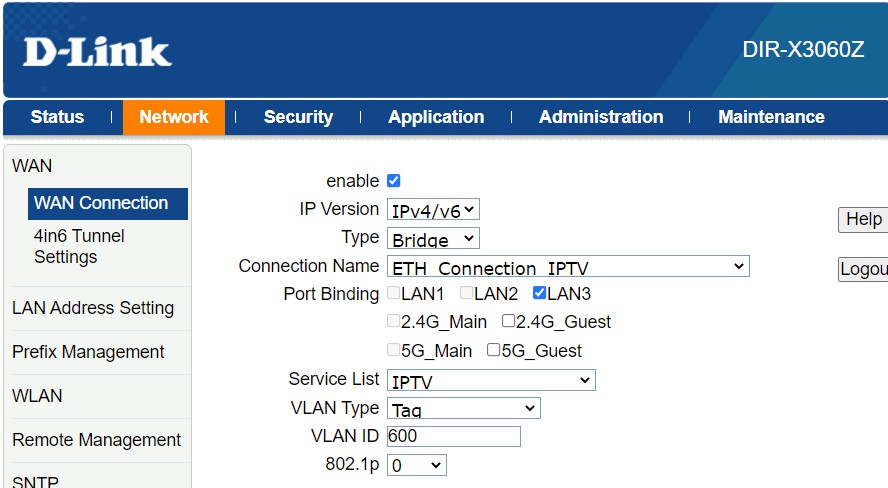
3. There are 3 LAN ports and LAN 3 doesn't seem to work. Looking at the config I note its half duplex. I cannot find any option to reconfigure this or understand why it doesn't work.

user posted image

4. Are there any other user menu's because it's seems a little basic. I remember in the past there used to be multiple TM user ID's which gave you further access.

5. Any tips of useful things to know about this kit?


firdausbhari
post May 27 2023, 04:04 AM

Look at all my stars!!
*******
Senior Member
2,281 posts

Joined: Feb 2012


» Click to show Spoiler - click again to hide... «


to be honest, DLink UI & settings sucks

This post has been edited by firdausbhari: May 27 2023, 04:04 AM
soonwai
post May 27 2023, 04:13 AM


********
All Stars
11,459 posts

Joined: Oct 2007
From: KL


QUOTE(Rob W @ May 27 2023, 01:57 AM)
My wife accepted an upgrade to 500 Mbps whilst I way away and we now have 2 DLink AX3000 (DIR-X3060Z) Wifi 6mesh routers.

As expected, there are issues when TM install stuff so I’m wondering if anyone can advise on some simple things. The change in router had messed up smart home settings and most doesn't work inc the Daikin AC via its app.

1. The previous router was 192.168.1.1 and this has been changed in the new router to 192.168.1.1. This is a pain because I have some devices with static IP eg Synology NAS, CCTV etc. The installer told her that we must use this address which was the same nonsense when they changed to the 1.1 address in the last router.
Apart from changing the new router to the old address and reconfiguring the static IP’s is there a simple way to access the 192.168.1.x network? I changed it manually but it would be useful to know.

2. The Wifi seems really slow at about 30 Mbps and when I look at the config its set to 2.4 Ghz which is what the TM told her that it needs to be. This is nonsense and its little wonder that its slow. I changed it to 5Ghz and its quicker at about 345 Mpbs. Why on earth would they say it needs to be set to 2.4Ghz?

user posted image

The number if SSID's seems quite limited on the model and there is no option for a combined SSID Like the Deco M9 or am misunderstanding it.
At the moment I'm running 2 SSIDS, 1 for each band.

user posted image

3. There are 3 LAN ports and LAN 3 doesn't seem to work. Looking at the config I note its half duplex. I cannot find any option to reconfigure this or understand why it doesn't work.

user posted image

4. Are there any other user menu's because it's seems a little basic. I remember in the past there used to be multiple TM user ID's which gave you further access.

5. Any tips of useful things to know about this kit?
*
1. Just set the new router to your old IP address. Was it 192.168.1.1?
2. Set both the 2.4 and 5Ghz to the same SSID. Just use back the old SSID.
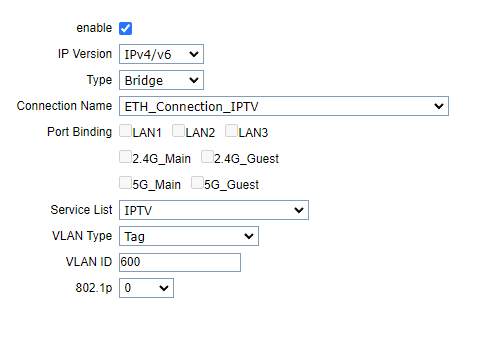
3. LAN3 is probably set for UnifiTV (VLAN600). You should be able to change it in the router, somewhere.
4. No idea, about this, sorry.
westlife
post May 27 2023, 07:59 AM

10k Club
********
All Stars
14,310 posts

Joined: Jan 2011
QUOTE(firdausbhari @ May 27 2023, 04:04 AM)
» Click to show Spoiler - click again to hide... «


to be honest, DLink UI & settings sucks
*
Yes. All the while I find Dlink products sucks. Get overheated easily also.
westlife
post May 27 2023, 08:02 AM

10k Club
********
All Stars
14,310 posts

Joined: Jan 2011
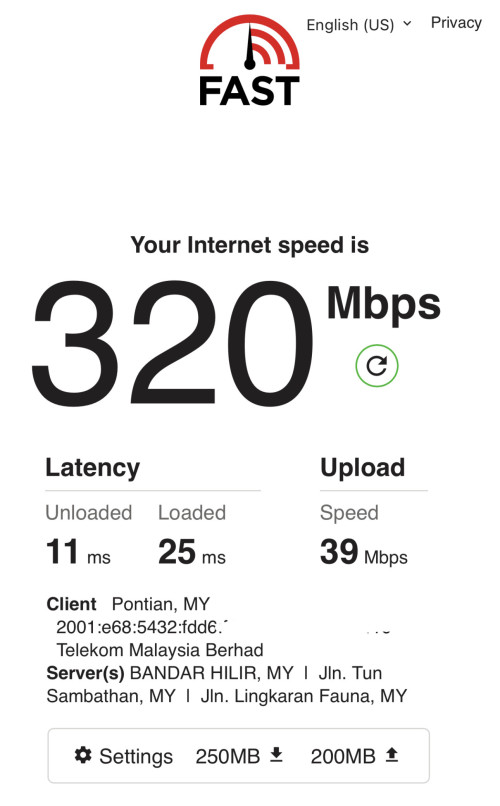
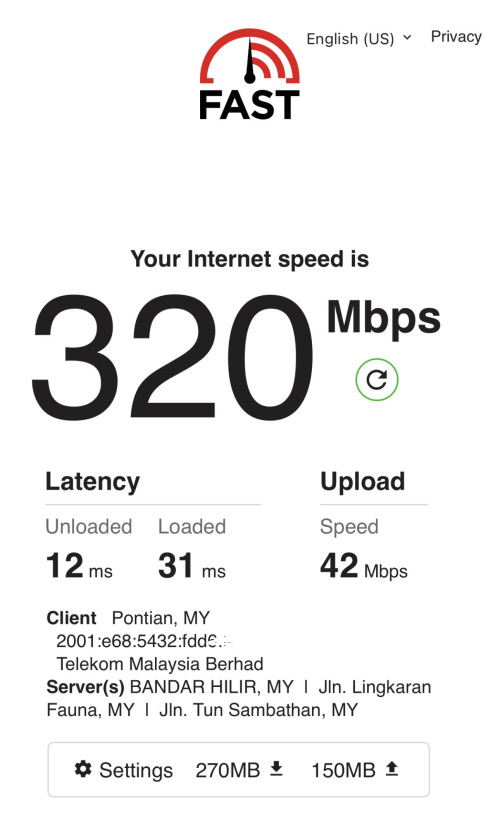
Hey guys, recently my unifi 300Mbps plan whenever it comes to night time the maximum speed I can get will drop to 200Mbps+ and I can never hit 300Mbps and latency will increase as well.

Is it Becos at nite my area has too many neighbours at home and use the Internet so the bandwidth are shared thus it is lowered?

During daytime I can always hit full speed easily without any issue.

Or could it be one or some of the neighbour wifi routers interfere with mine thus it resulted in this?

user posted image
user posted image

This post has been edited by westlife: May 27 2023, 08:08 AM
kcl2006ch
post May 27 2023, 08:14 AM

Getting Started
**
Junior Member
288 posts

Joined: Sep 2020


QUOTE(Rob W @ May 27 2023, 01:57 AM)
My wife accepted an upgrade to 500 Mbps whilst I way away and we now have 2 DLink AX3000 (DIR-X3060Z) Wifi 6mesh routers.

As expected, there are issues when TM install stuff so I’m wondering if anyone can advise on some simple things. The change in router had messed up smart home settings and most doesn't work inc the Daikin AC via its app.

1. The previous router was 192.168.1.1 and this has been changed in the new router to 192.168.1.1. This is a pain because I have some devices with static IP eg Synology NAS, CCTV etc. The installer told her that we must use this address which was the same nonsense when they changed to the 1.1 address in the last router.
Apart from changing the new router to the old address and reconfiguring the static IP’s is there a simple way to access the 192.168.1.x network? I changed it manually but it would be useful to know.

2. The Wifi seems really slow at about 30 Mbps and when I look at the config its set to 2.4 Ghz which is what the TM told her that it needs to be. This is nonsense and its little wonder that its slow. I changed it to 5Ghz and its quicker at about 345 Mpbs. Why on earth would they say it needs to be set to 2.4Ghz?

user posted image

The number if SSID's seems quite limited on the model and there is no option for a combined SSID Like the Deco M9 or am misunderstanding it.
At the moment I'm running 2 SSIDS, 1 for each band.

user posted image

3. There are 3 LAN ports and LAN 3 doesn't seem to work. Looking at the config I note its half duplex. I cannot find any option to reconfigure this or understand why it doesn't work.

user posted image

4. Are there any other user menu's because it's seems a little basic. I remember in the past there used to be multiple TM user ID's which gave you further access.

5. Any tips of useful things to know about this kit?
*
1. if want cheng the ip address of the router need the admin in& password:
admin id: tnadmin
password Adm@xxxx(xxxx means last 4 mac address of router)
2.no need combine the ssid , just spetare then set fix wireless channel for each ssid, be awere that some device cannot support WPA3 password encription due to hardware limitation
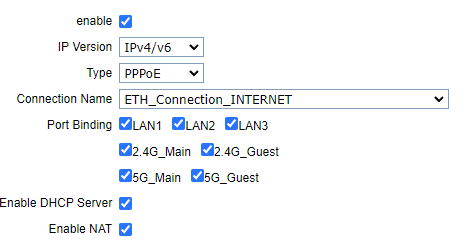
3.LAN3 is set for the unifi tv VALN 600 but can change to VLAN 500 to use as normal LAN port , need unbind port for VLAN 600 on LAN port3 user posted imagethen bind VLAN 500 forLAN port3 like picture attached user posted image, it show half duplex due to the network cable that u are using, recommended use CAT5e or CAt6 network cable user posted image
4. no detailed user manual is provided


This post has been edited by kcl2006ch: May 27 2023, 08:21 AM
westlife
post May 27 2023, 08:38 AM

10k Club
********
All Stars
14,310 posts

Joined: Jan 2011
QUOTE(kcl2006ch @ May 27 2023, 08:14 AM)
1. if want cheng the ip address of the router need the admin in& password:
admin id: tnadmin
password Adm@xxxx(xxxx means last 4 mac address of router)
2.no need combine the ssid , just spetare then set fix wireless channel for each ssid, be awere that some device cannot support WPA3 password encription due to hardware limitation
3.LAN3 is set for the unifi tv  VALN 600 but can change to VLAN 500 to use as normal LAN port , need unbind port for VLAN 600 on LAN port3 user posted imagethen bind VLAN 500 forLAN port3 like picture attached user posted image, it show half duplex due to the network cable that u are using, recommended use CAT5e or CAt6 network cable user posted image
4. no detailed user manual is provided
*
Mixed 2.4Ghz and 5GHz is actually ok rite if the mesh units are having strong enough 5GHz among them. This makes the roaming easier if really there is blind spot in the house that only 2.4Ghz is covered and no need to do the manual shifting of connections.
countingcrows
post May 27 2023, 11:10 AM

Getting Started
**
Junior Member
259 posts

Joined: Feb 2023
QUOTE(Rob W @ May 27 2023, 01:57 AM)
My wife accepted an upgrade to 500 Mbps whilst I way away and we now have 2 DLink AX3000 (DIR-X3060Z) Wifi 6mesh routers.
1) You can change the Dlink's IP to the previous router's IP, 192.168.1.1

user posted image

2) That page is to set the WIFI settings for 2.4GHz and 5GHz. If the "Enable Wireless RF" is checked for both 2.4GHz and 5GHz then both 2.4GHz and 5GHz are enabled.

user posted image


You can change the SSIDs for both 2GHz and 5GHz to the same SSID if you want.

user posted image


3) The default settings for the Dlink makes LAN 3 the port for wired IPTV connections.
If you want to use LAN 3 for internet and not IPTV, then uncheck "Enable"

user posted image

Then, enable internet-port binding for LAN 3 by checking it.

user posted image


4) Not that I know of but I was able to configure everything from scratch with the default user/pwd.


MyProLife
post May 27 2023, 12:18 PM

I bully wumao & MPKL
*******
Senior Member
2,075 posts

Joined: Sep 2021
From: nowhere

QUOTE(firdausbhari @ May 27 2023, 04:04 AM)
» Click to show Spoiler - click again to hide... «


to be honest, DLink UI & settings sucks
*
It depends on what exact model is

For majority of dlink models, the ui is just too simplicity for me, nothing much to tinker with besides of basic networking functions


Some dlink models (especially recently wifi 6 model provided by tm) looks vastly different and much more complicated, a dead giveaway that the model is being outsourced to Chinese ODM
PJng
post May 27 2023, 05:09 PM

10k Club
********
All Stars
12,053 posts

Joined: Oct 2017


QUOTE(westlife @ May 27 2023, 08:02 AM)
Hey guys, recently my unifi 300Mbps plan whenever it comes to night time the maximum speed I can get will drop to 200Mbps+ and I can never hit 300Mbps and latency will increase as well.

Is it Becos at nite my area has too many neighbours at home and use the Internet so the bandwidth are shared thus it is lowered?

During daytime I can always hit full speed easily without any issue.

Or could it be one or some of the neighbour wifi routers interfere with mine thus it resulted in this?

user posted image
user posted image
*
Why you need full speed all the time?
Mine 100mbps, sometime drop a bit, then later ok back, i also ok
Unless you all the time stream 4k, download upload torrent all the time
ckalvin
post May 27 2023, 06:44 PM

Getting Started
**
Junior Member
91 posts

Joined: Jul 2008


closed

This post has been edited by ckalvin: May 27 2023, 08:25 PM
darkearth
post May 27 2023, 07:10 PM

Getting Started
**
Junior Member
258 posts

Joined: Jan 2003
From: PJ


QUOTE(Oltromen Ripot @ May 22 2023, 01:38 PM)
Yes.

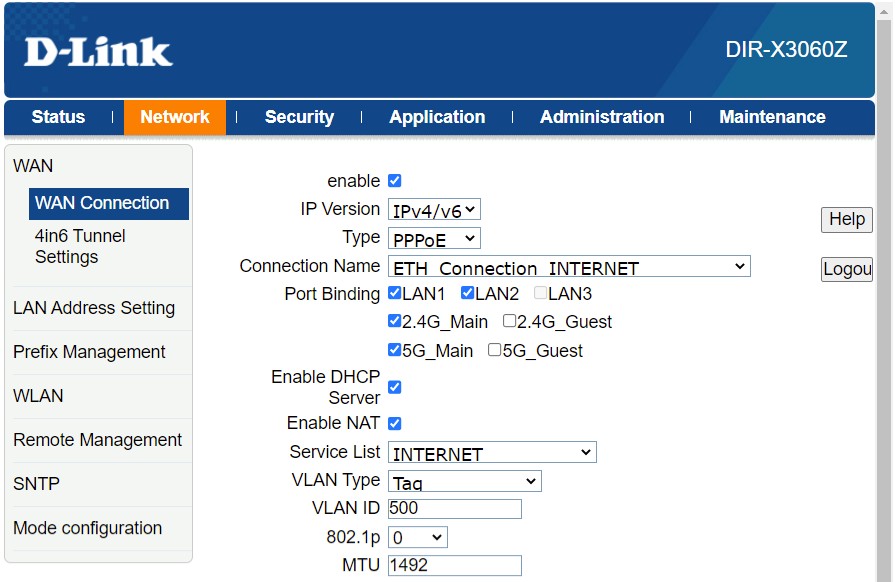
In the ONR, I chose for it to dial PPPoE for, map to all LAN and Wifi ports, but did not vlan-tag any. I chose to connect LAN1+LAN2 to ASUS; but any are usable since already mapped to all.

In my case, I also set its DMZ Host to point to 192.168.0.2 (so any unsolicited incoming internet traffic falling through the fibre interface gets shifted to fall onto the downstream ASUS later).

And I disabled Wifi altogether.

--

In the ASUS, I assume you have choice of either 1Gbps WAN or 2.5G LAN-convertible-to-WAN....

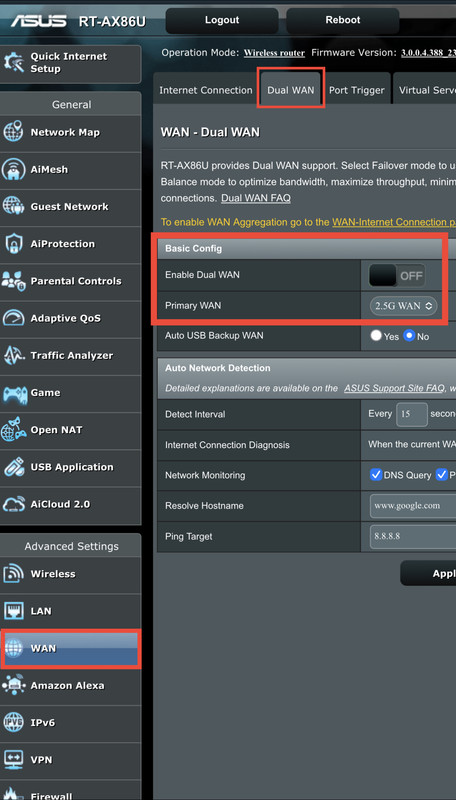
(1) On Dual-WAN tab, DO NOT ENABLE Dual-WAN, but you should still be able to choose 2.5G port as primary WAN interface.

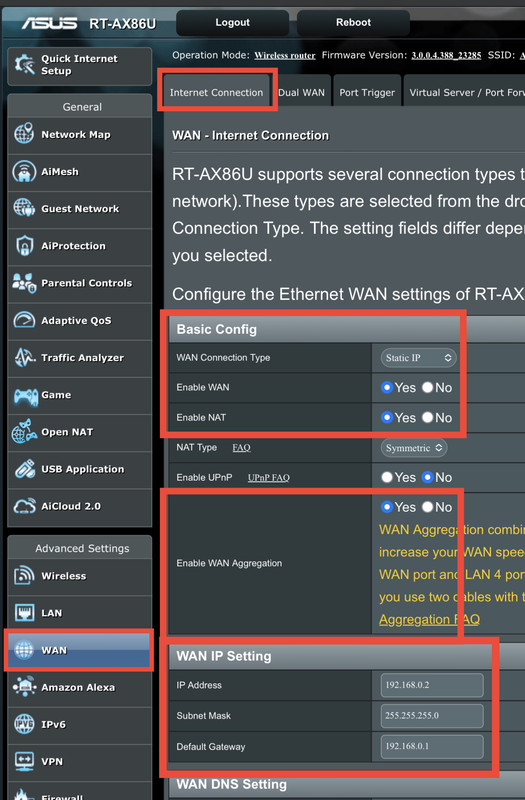
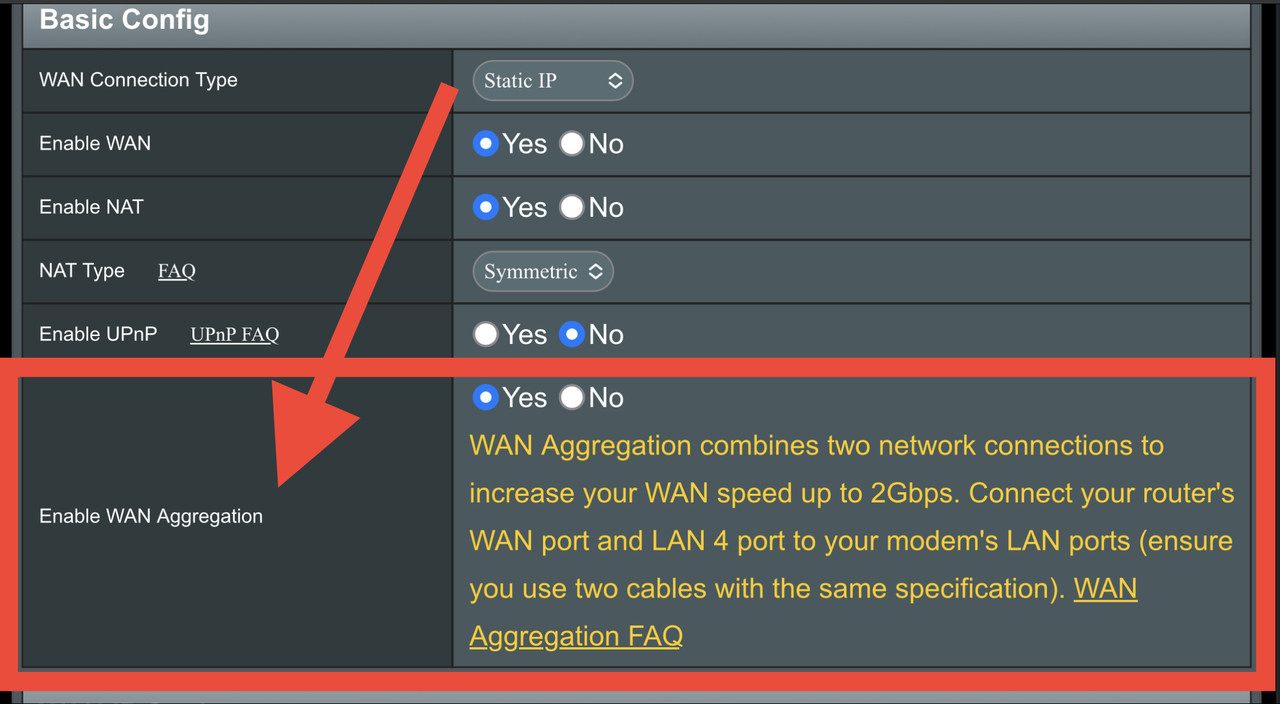
(2) On WAN tab, chose to configure your selected primary WAN interface. DO NOT USE PPPoE. If you scroll slightly down, you will now see option to aggregate port appears. On RT-AX86U, the aggregation is on primary WAN port (you chose 2.5G on Dual-WAN tab, right?) AND LAN4.

(3) Any ports that are not part of WAN purpose will now become LAN ports - and that also applicable the original 1Gbps WAN port.

For my use, I chose to assign static IP 192.168.0.2 to my aggregate WAN port with gateway pointing to the ONR's 192.168.0.1. (Remember I set DMZ in ONR above?)

--

I use the spare ports LAN3+LAN4 on the ONR to connect my AndroidTV and ASTRO. Those devices are safe to leave outside the inner network protected by ASUS, AND, they don't need to burden my ASUS with endless streaming. They can also mop up the remaining Mbps that is not reachable by the downstream ASUS. You can also expand the LAN3+LAN4 by attaching network switch. So now I have 2 layered Intranet.
*
Hi Senpai,

I finally got my AX-88U but unable to setup wan aggregation. I connected two cable (same type and brand) from LAN 1 and LAN of the DPN-FX3060V to WAN and LAN4 or the AX-88U and turn of WAN Aggregation.

Is there anything else I need to do ?
mazlani
post May 27 2023, 07:28 PM

New Member
*
Newbie
2 posts

Joined: May 2005


» Click to show Spoiler - click again to hide... «


Hi. Retired IT guy here.
It has been a while I got involved and upgrading my Unifi speed to 2Gbps from 800Mbps.

I was following Oltromen Ripot who has a done a good job getting the Asus wifi router to work with the TM D-Link ONR.

Before the upgrade, my original setup was the Asus RT-AC88U with RT-AC68U as a mesh and ONU Alcatel Lucent I-240G-P.

Late April, Unifi technician came to install the D-Link ONR. This where the problem came. My home automation went haywire because the wifi was not stable. You can see the D-Link ONR wifi light blinking on off. Told the technician just configure the D-Link as a ONU/modem.
The technician being new to the product could not do it. So back to my old setup and the technician will get back to me. Later the tech just gave a me a new ONU ZTE. bangwall.gif

So I played around with the setting until got into GPON bridge mode. Got it to work with my Asus router but the phone was not working. The speed was a bit disappointing which download speed was around 500Mbps. Back then I did not know about the the Dual WAN setup until I read Oltromen Ripot post. thumbup.gif So back to my old setup again.
With the D-Link alone I did a TM speed test on 2 laptop which I got 947/670.9 and 249.3/391.6Mbps. It was terrible.

So I start emailing to D-Link Technical consultant and CC to Unifi....the answer was just disappointing. I told Unifi just give me a reliable ONU/ONR just to connect to my wifi router.
After a few emails, got a reply from Unifi that my case goes to another channel sad.gif
A couple of time got a SMS to reset the ONU.

2 days ago got a call from Unifi inform me that my fiber does not support the 2Gbps speed and will revert back to 800Mbps. bangwall.gif
Told her(Unifi) can you just upgrade me to 1Gbps....will get back. doh.gif

In the mean time, just have to figure out Oltromen Ripot setting. rclxub.gif
NickedAsy
post May 27 2023, 07:52 PM

~: 6-Star Space Marshall :~
******
Senior Member
1,898 posts

Joined: Jan 2003
From: Kuala Lumpur


Nak bayar bill but the app session timed out then cannot login. Used their website to login but received this:
user posted image

Apa la TM, first some unknown network down a few days ago and now this pulak.
Oltromen Ripot
post May 27 2023, 07:52 PM

👍 999999 person Likes this member
*******
Senior Member
4,034 posts

Joined: Dec 2019
QUOTE(darkearth @ May 27 2023, 07:10 PM)
Hi Senpai,

I finally got my AX-88U but unable to setup wan aggregation. I connected two cable (same type and brand) from LAN 1 and LAN of the DPN-FX3060V to WAN and LAN4 or the AX-88U and turn of WAN Aggregation.

Is there anything else I need to do ?
*
turn OFF WAN Aggregation?

i assume you still want to use WAN Aggregation for this reply.

switch ON Aggregation on the WAN config tab. But WAN Aggregation only appears if you DON'T USE PPPoE, and only possible DON'T USE DUAL-WAN.

Dual-WAN is where you have 1 or 2 different ISP, being connected via "either-this-or-that" set up. That's why it comes with either fail-over mode or load-balance mode.

WAN aggregation means it combine both constituent port to go only to 1 upstream ISP. You total bandwidth becomes 1+1Gbps or 1+2.5Gbps, depending on the constituent ports - if both sides (ASUS and your upstream) supports LACP. In our case, ASUS supports LACP, but D-LINK ONR didn't, so the next best option if fingers-crossed to just be able to blast whatever we have anyway over the 2 cable links and hope for the best. As it is, we're lucky that the D-LINK ONR didn't trigger its loop detection (either it really isn't a loop, or the loop detection algorithm is dud), so we have both links UP.

I assume RT-AX88U have similar interface and number of ports as RT-AX86U.

I assume you also have a working D-LINK ONR with its LAN IP set to 192.168.0.1/24. Modify the following as needed if you are not using the pre-installation default like I am.

(1) On WAN>Dual-WAN tab, disable Dual-WAN.

(2) On WAN>Dual-WAN tab, select port that will act as Primary WAN Interface (if you have the choice).

(3) On WAN>WAN tab, select to NOT use PPPoE. For my case, I use Static IP. I set the WAN's interface IP to 192.168.0.2/24, and point its gateway to the ONR's IP 192.168.0.1.

(4) On WAN>WAN tab, the WAN Aggregation option only appears if NOT using PPPoE. Enable it. Read the note carefully. In my RT-AX86U, it says the WAN port and LAN4. In your RT-88U, it might be another port combination. I have determined on my device that the "WAN" port mentioned in the note refers to the port set as Primary WAN on WAN>Dual-WAN tab, thus the reason I instruct that to be set properly beforehand.

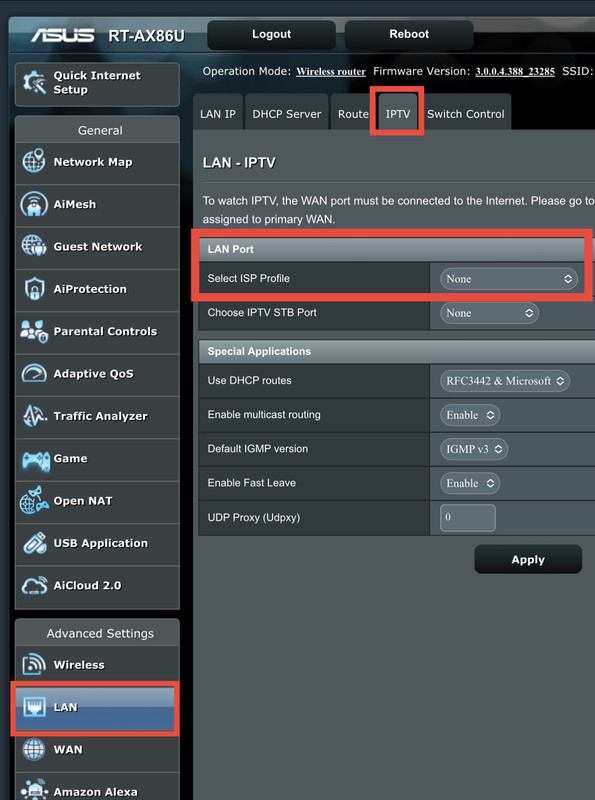
(5) On LAN>IPTV tab, set ISP Profile to None. The D-LINK ONR default set up no longer uses VLAN tagging on its LAN ports, so downstream routers shouldn't have to deal with VLAN any longer.

I doubt it, but if you still use IPTV, then deal with it at the D-LINK ONR, such as associating LAN1-LAN3 (without vlan tagging) for INTERNET and LAN4 (without vlan tagging) for IPTV.

user posted image

user posted image

user posted image

user posted image

image uploader

This post has been edited by Oltromen Ripot: May 27 2023, 07:56 PM
PJng
post May 27 2023, 08:01 PM

10k Club
********
All Stars
12,053 posts

Joined: Oct 2017


QUOTE(NickedAsy @ May 27 2023, 07:52 PM)
Nak bayar bill but the app session timed out then cannot login. Used their website to login but received this:
user posted image

Apa la TM, first some unknown network down a few days ago and now this pulak.
*
I always usr ewallet pay bill
Oltromen Ripot
post May 27 2023, 08:16 PM

👍 999999 person Likes this member
*******
Senior Member
4,034 posts

Joined: Dec 2019
QUOTE(mazlani @ May 27 2023, 07:28 PM)
Back then I did not know about the the Dual WAN setup until I read Oltromen Ripot post. thumbup.gif  So back to my old setup again.

With the D-Link alone I did a TM speed test on 2 laptop which I got 947/670.9 and 249.3/391.6Mbps. It was terrible.

In the mean time, just have to figure out Oltromen Ripot setting.  rclxub.gif
*
Just to be clear, on the RT-AX86U,
Dual-WAN is suitable when you have 2 different upstream on 2 different addresses. And it's only in failover mode or in loadbalance mode, so it's "either-this-port-or-that-port".

With the D-LINK ONR gifted by TM, it isn't really ideal. Because we can't set up a 2nd LAN IP address for ASUS to at least be in a working loadbalance mode. At least in that mode, we can hope for ASUS to push more traffic on a different route, and thus achieve a way to saturate our subscribed bandwidth.

So the next best option with the D-LINK ONR, with no support for LACP, is to create multiple cable links and just dump as much as possible on both. And it's just nice STP(?) in ONR is not flagging both ports as loop. I really hope that ASUS really dump on both links and that being the cause for the speed increase even if just in tens of megabit, that it's not just an illussion on my part.

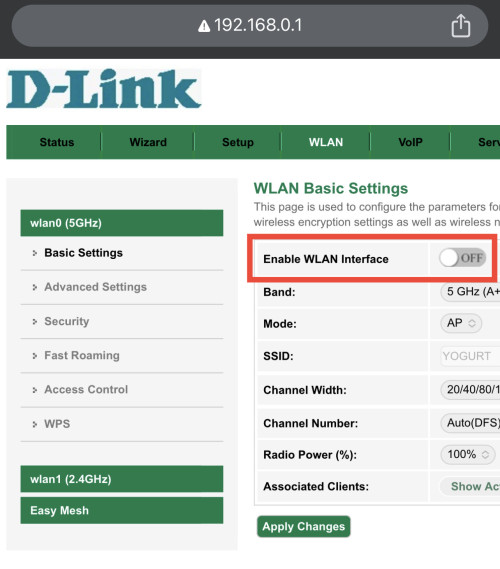
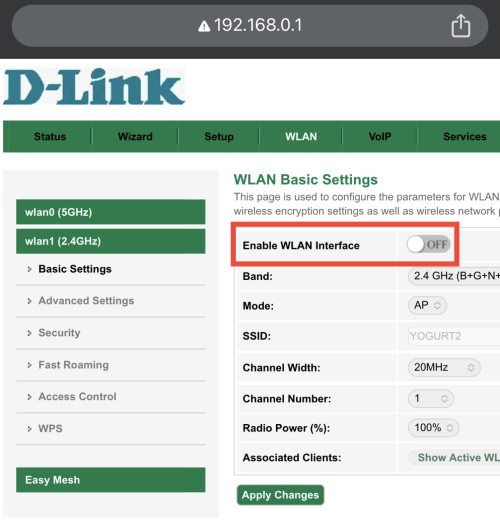
Actually switching off Wifi signal of the DLINK is easy. I disabled mine to less polute the airwaves and to avoid backdoor entry.

Oh, I forgot to mention before.
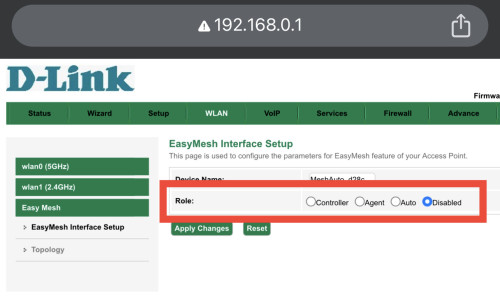
There is Easymesh support inside whistling.gif
Disabled it anyway.

user posted image

user posted image

user posted image
Oltromen Ripot
post May 27 2023, 08:21 PM

👍 999999 person Likes this member
*******
Senior Member
4,034 posts

Joined: Dec 2019
QUOTE(NickedAsy @ May 27 2023, 07:52 PM)
Nak bayar bill but the app session timed out then cannot login. Used their website to login but received this:
user posted image

Apa la TM, first some unknown network down a few days ago and now this pulak.
*
Register account number in Boost. it will show real-time outstanding amount. Collect star points in addition to the now-retired TM bonus points.
Redeem starpoints as cash rebate for next payment.
2000 points = RM2.
5000 points = RM5.
10000 points = RM10.
The amount of points i'm getting for paying all bills over 2 months can get redeem up to RM30 in the 3rd. Good enough than nothing.


453 Pages « < 305 306 307 308 309 > » Top
Topic ClosedOptions
 

Change to:
| Lo-Fi Version
0.0232sec    0.99    6 queries    GZIP Disabled
Time is now: 19th December 2025 - 12:57 PM