QUOTE(go626201 @ Dec 18 2021, 11:46 AM)
There will be a IP pool for private ip user,but normally if u didn't disconnect(or reboot) the public ip will not change.
Ya, as you can see on that IPv6 configuration screenshot, I don't get disconnected, still 22 hours uptime, and my QQ still online since midnight.

QUOTE(go626201 @ Dec 18 2021, 12:07 PM)
And for the connection issue,it really depends on the alot of factor,
1.Between your home to your local area bandwidth exchange center.
2.The local area exchange bandwidth to your states TM exchange center.
3.your states TM exchange center to TM centralized core network.
4.TM centralized core network to out of TM network.
And normally alot of network issue that occurs on website or server outside of MY is having problem between the TM centralized core network end and worldwide network.(in this case is SG network)
(There is multiple core end edge router on this network and different ip range will on different end edge router)
And some router is congestion to specific network to SG for last 2 years of issue. (And also QoS implemented for specific time)
So it really depends which ip is better for your usage.
So try to reboot router to see which ip range is good to use is better way now.
Or else get a VPN service to overcome most routing issue on unifi.
There is some vpn service that having quite good connection with unifi, like Nordvpn. (having 3-4 different network of SG vpn server,and 1-2 and sometime maybe 3 of them is stable to unifi,but of course different time also may affect the connection)
For me i just get a singapore vps and setup my vpn service or port redirect to those commercial vpn service,to use different network of the vpn service.
And so if u have a small budget and want to alternative solving this issue,i really recommended to setup your own vpn service to overcome the problem,because commercial vpn is not always suitable for sensitive information usage.
Just get a OVH SG vps service and setup the wireguard service and setup on all your device and all good for 99.5% of time.
(There mighe be having a very short time every month or every few month that still will having problem with it but it is very stable between unifi and OVH,because of the private peering agreement for OVH and unifi)
Yes, I think yesterday issues only happen to Melaka, JB and certain IP range, but someone point it out QoS is fair based for whole MY, not IP range based or Private IP based, me is...

Anyways.
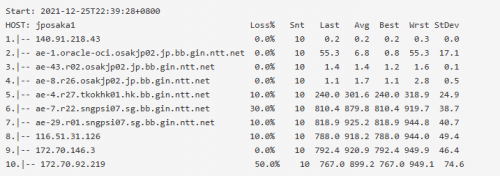
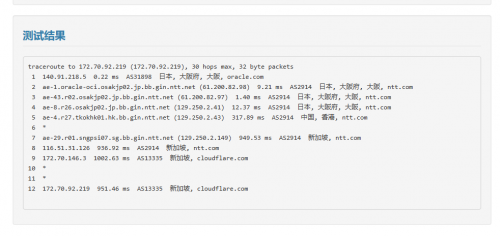
My suspect is they putting too much users under the same IP range/pool, so it went unbalanced, and all going out together the same route/gateway to SG, causing too high the packet drop as it was hitting the total bandwidth of TM internal route(traceroute show it), packet drop = more retransmit happen = more packet drop, so it start causing issues to others.
(just thinking about it, SG transfer to MY JB, but getting packet drop by TM internal route, it will get another retransmit from SG to MY JB again and again, causing much higher bandwidth used in between SG to MY JB, but it does nothing...
)
And I don't use VPN because Taobao, they will block you from placing order when they detected VPN, even blacklist your account and disable your red money, so...
Anyways, except I want to gaming, so far UniFi is good after they moved most traffic from PCCW to other exchange, only those going to China Telecom and Unicom are unstable(because going via US).

QUOTE(heLL_bOy @ Dec 18 2021, 12:25 PM)
everything seem normal for now

Yup.


 Dec 18 2021, 11:23 AM


 Quote
Quote






 0.0219sec
 0.24
0.24
 6 queries
 GZIP Disabled