Welcome Guest ( Log In | Register )

7 Pages  1 2 3 > » Bottom

Outline · [ Standard ] · Linear+

 Unifi Connection Issue to International Server, Occured usually at night 9-11pm

views
     
BenYeeHua
post May 30 2021, 11:36 PM

Regular
******
Senior Member
1,873 posts

Joined: Nov 2010


Just coming for info, today going to China one seem fixed some part of it.

These few days it is laggy when Taobao client drop the user to China Mainland DNS, if forcing them going through local DNS will go to HK server.

But not today, unsure what they done, maybe they reroute some SG traffic going via HK back to SG? tongue.gif


For going SG one(twitter etc), still the same.

For Lazada, seem like Lazada and Akamai do something for this case, even when getting SG server from DNS, most are getting normal latency like 10-20ms.
Like 69.192.164.66, going via sgix, no issues, 20ms.
Another like 163.181.36.227 going via singtel, no issues, 10ms.

But, 23.44.0.3 is going via telstra HK, then going back to SG...

What?? hmm.gif


CloudFlare default to HK, in history it was default to SG, then KUL, then SG, and last, HK.

When using 1.1.1.1 WARP now, you will get slower speed overall, but stable connection to China Mainland server, for HK and SG, those are good for other country than China Mainland server.
If you get your preferred WARP server via you mobile data etc, don't reset the APP data, or it will force back to HK server.

www.vaksincovid.gov.my and lowyat.net are also getting reroute to far far away, like telstra at Japan or HK.


So, seem like telstra or TM are doing something, what is it? and why? hmm.gif

This post has been edited by BenYeeHua: May 30 2021, 11:36 PM
BenYeeHua
post Jun 9 2021, 02:51 PM

Regular
******
Senior Member
1,873 posts

Joined: Nov 2010


QUOTE(heLL_bOy @ Jun 9 2021, 10:17 AM)
i feel TM don't have much balancing on their international gateway

TM depend too much on HE.net IP transit at 65% rate @ mostly is 100Gbps port
-SG
-HKG
-JP
-SAN JOSE,USA
-MARSEILLE

less favoured IP-transit that TM using 35% rate @ either 10Gbps port and 40Gbps
Cogent - HKG , MARSEILLE
Telia - LAX . MARSEILLE
CW - HKG , MARSEILLE
NTT - HKG
TATA - exchange traffic
PCCW - HKG
Telstra - exchange traffic
*
I can comment on PCCW, PCCW always break during Taobao big sale, when lot of Malaysian are browsing Taobao.
I think which is why they putting less rate on it.

PCCW HKG not just for Aliyun(Taobao), it also used for Tencent server, which is responsible for WeChat and QQ services, as Tencent moved the traffic to SG server like 1-2 month ago, so traffic to PCCW had become less issues, or I can say, stable now.

Last year at this time, Taobao will be unable to use after 12 PM, QQ also will be kicking the user out because of unstable connection, you need to reroute the group chat picture to China mainland server or it will be sharing same HK server as chat, which causing disconnect of QQ because too much traffic on it.
Using TCP connect method can avoid disconnect, but once you are kicked out and wanna login at night, well, you are dead. tongue.gif


Today, I can get stable Taobao service that connect to HK CDN server, and still laggy on China Mainland, also no issues on QQ anymore.
But Tencent SG are using Singtel la, so might not related to this laggy issues. tongue.gif

I think you are sawing less traffic on PCCW HKG is because, Tencent moved their oversea users to SG server, which including Malaysian la.


So yes, if they trying to put more rate on PCCW HKG, it will break, again, which revert the HK connection back to before Tencent SG is online.

PS: I am not tech enough, so I just saying what I saw and understanding la. icon_rolleyes.gif
BenYeeHua
post Jun 9 2021, 10:34 PM

Regular
******
Senior Member
1,873 posts

Joined: Nov 2010


QUOTE(Patent @ Jun 9 2021, 10:10 PM)
this is really annoying.. can't use twitch or any international streaming service because of this
*
Just having quick check, Amazon at SG server, known as laggy experience for Lazada.

video-edge-c67e3c.sin01.abs.hls.ttvnw.net


QUOTE(asellus @ Jun 9 2021, 10:19 PM)
Youtube sure is slow tonight without using VPNs.
*
Having quick check on Live, getting r7---sn-uh-h31l.googlevideo.com.
Server is TM peer.

r2---sn-30a7yne7.googlevideo.com, server is Google, Malaysia.

Either IPv4 or IPv6 is same server, no lag.


More info needed from your side, because Google decide which server you should connect. hmm.gif
BenYeeHua
post Jun 9 2021, 10:44 PM

Regular
******
Senior Member
1,873 posts

Joined: Nov 2010


QUOTE(heLL_bOy @ Jun 9 2021, 03:07 PM)
tencent/alibaba already have major country CDN including malaysia to balance their network.

is not like the past anymore depending on HKG to relay china network.
*
Yes, but 90% of important API/website only on US, HK and China Mainland, so...

Try h5api-intl.m.taobao.com, api.m.taobao.com, which used for any webpage in Taobao client.

Also item.taobao.com, detail.tmall.com, rate.taobao.com for desktop webpage.

But still happy got many of them moving to SG and MY la, but not enough, just home page and mobile webpage...
The product page and shop's page still in China Mainland, not even HK server...


QUOTE(The.Lucas.DaY @ Jun 9 2021, 10:41 PM)
Can't watch Twitch ?
*
I tested for him, can watch, not original quality la, unless you prefer <720p la. tongue.gif
BenYeeHua
post Jun 9 2021, 10:51 PM

Regular
******
Senior Member
1,873 posts

Joined: Nov 2010


QUOTE(Chiggah @ Jun 9 2021, 10:48 PM)
1080p source on Twitch seems fine for me

Could this be IP pool related ?
*
Can be, which server are you connect to?

Mine is 180.74.x.x, to video-edge-c67e3c.sin01.abs.hls.ttvnw.net, Amazon SG, latency can get high to 1s.

It is easy to spot a QoS or throttle issues, just watch the third ping result from Best Trace, when it as high as 1s, then yes throttle. tongue.gif
---
Just reloaded, kicked me to video-edge-7e9334.hkg01.abs.hls.ttvnw.net, HKG is fine. thumbsup.gif

Guess like YouTube, need the server kicked you to the nearby server that fine.

This post has been edited by BenYeeHua: Jun 9 2021, 10:53 PM
BenYeeHua
post Jun 9 2021, 11:00 PM

Regular
******
Senior Member
1,873 posts

Joined: Nov 2010


QUOTE(Chiggah @ Jun 9 2021, 10:55 PM)
Connected to core2.sin1 see attached image
*
Hmm, this is website or video server? hmm.gif
I am getting 45.113.129.82 which is under Amazon unknown link.

QUOTE(michaelkkl @ Jun 9 2021, 10:57 PM)
Just tested on some random twitch live, seems ok on 1080p source.

Streaming from HK server (video-edge-7ea2f4.hkg01.abs.hls.ttvnw.net) without lag.

Another live from SG server (video-edge-c684c4.sin01.abs.hls.ttvnw.net) have some random lag, but still watchable.
*
Yes, just like old time with Youtube, just reload to get yourself a HK server without lag.

Easy method, add

CODE
*sin01.abs.hls.ttvnw.net


to ublock origin(adblock), when no video then it means you need to reload. laugh.gif

QUOTE(michaelkkl @ Jun 9 2021, 10:59 PM)
That's the twitch homepage IP,

You need the streaming source IP which can obtain through IPvfoo (Chrome/Firefox extension) or Resource Monitor (Task Manager)
*
Why?
F12 is enough. thumbsup.gif
BenYeeHua
post Jun 9 2021, 11:05 PM

Regular
******
Senior Member
1,873 posts

Joined: Nov 2010


QUOTE(Chiggah @ Jun 9 2021, 11:02 PM)
Sorry how do i get the streaming source IP from F12 ?
I see a bunch of entries on Network tab
*
Scroll to the bottom of waterfall/timeline, the one keep showing up is the latest DASH segment of video getting loading, should last 1-2s of loading/dow time

Click on it, then you will saw the IP address
BenYeeHua
post Jun 9 2021, 11:09 PM

Regular
******
Senior Member
1,873 posts

Joined: Nov 2010


QUOTE(michaelkkl @ Jun 9 2021, 11:08 PM)
That is also one of the methods but I'm prefer more to IPvFoo, more visualize. biggrin.gif
*
Ya, but unless you keep monitoring the network, simple is enough for newbie ma. icon_rolleyes.gif
BenYeeHua
post Jun 9 2021, 11:24 PM

Regular
******
Senior Member
1,873 posts

Joined: Nov 2010


QUOTE(Chiggah @ Jun 9 2021, 11:15 PM)
Thanks, its 45.113.128.155 - getting to *.hkg01.abs.hls.ttvnw.net
*
Ya, guess twitch fast(?) enough and reroute new users to HK server, after detecting new Malaysia user stutter too much.

Patent should know what to do now. tongue.gif
BenYeeHua
post Jun 10 2021, 11:08 PM

Regular
******
Senior Member
1,873 posts

Joined: Nov 2010


QUOTE(iCare @ Jun 10 2021, 10:57 PM)
Unifi....

user posted image
*
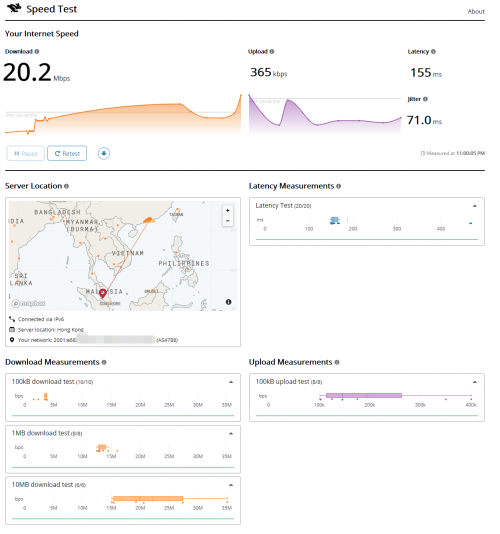
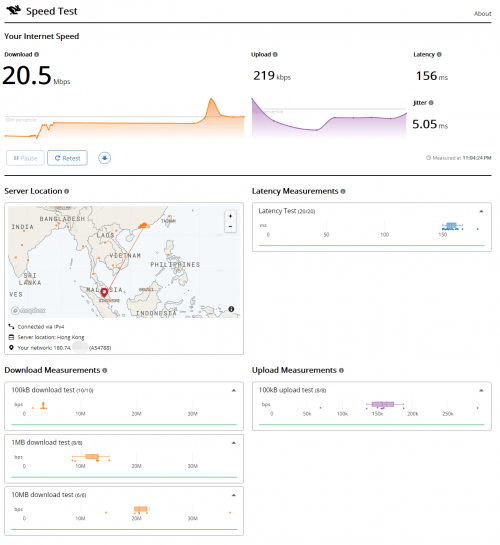
Yours is worst... doh.gif

Anyways, jitter is bit higher on IPv6, both can get as high as 50-150ms, just pure luck that this screenshot got only 5ms jitter on IPv4. tongue.gif

Guess who closed to KUL which is the main redirect for MY traffic will get lower trouble? hmm.gif
user posted image

user posted image

This post has been edited by BenYeeHua: Jun 10 2021, 11:09 PM
BenYeeHua
post Jun 14 2021, 06:21 AM

Regular
******
Senior Member
1,873 posts

Joined: Nov 2010


QUOTE(iCare @ Jun 13 2021, 10:51 PM)
yang aku perhati, waktu macam ni memang packet loss melulu kalau route PCCW. tak kisah la PCCW HK ke PCCW SG ke. semua sama. entah apa masalahnya.

clouldflare boleh kata dah ok, tapi kadang2 ada sikit spike sampai 1000+ms

Pening tengok kualiti Unifi macam ni.
*
Yup, talk about PCCW HK few pages ago, it is always a trouble for people using Tencent software(QQ/WeChat) as it is going via PCCW HK to Tencent HK server.
Worst is during MCO 1.0, where the whole world stay at home and overloading PCCW.

Lucky they open and move oversea users to SG server before MCO 3.0 happen, what's left are the image server still going via PCCW HK. tongue.gif

PS: Packet loss happen at internal route of PCCW HK, I google about normal PCCW HK ISP users, wow, so many complain...
PS2: So now can confirm the overload also because TM sending people to PCCW HK then back to SG, another problem solved for me. sweat.gif


---
For CloudFlare, yes, 2 possible routes to SG, I used WARP+FAST(speedtest) for testing, they always got 2 conditions, worst(1 Mbps) or good(30+ Mbps).
90% it is good routing la. icon_rolleyes.gif


---
UniFi gonna getting worst, as long as Streamyx user coming to UniFi, and International route still not improving on time.

Unlike other country which connect to local CDN server that nearby them, within country, and greatly reducing international traffic with caching, we are going to other country asking for data, but TM just like, never mind la.

As far as I know, it is because opening server at Malaysia not cheap, so they going to other country like SG and HK, and well.
Payback coming back to TM now, National Fiberisation, free speed upgrade from 10M-100M to 30M-800M, and TNB allo joining the market. tongue.gif

PS3: Just correct me if I am wrong la. icon_rolleyes.gif
BenYeeHua
post Jun 15 2021, 11:44 PM

Regular
******
Senior Member
1,873 posts

Joined: Nov 2010


QUOTE(heLL_bOy @ Jun 15 2021, 06:13 PM)
is not about the explanation that we should teach them how the thing is done. As ISP they should know what should be done and they rather ignore the issue that persist and act nothing happen and push the blame to customer either your router problem or PC/device problem.
i don't see Akamai / Alicloud / Tencent  hosted in TM got issue but only our unifi user having becos of SLA of this hosting company are priority.
*
7 years ago, when UniFi 10M just showing up, Streamyx throttling Google ISP server Malaysia to 480kbps, including Google Search, as shown in the Task Manager.

How I know it?
Around that time, when IPv6 showing up, I got full speed for using IPv6, then after sometimes, going back to 480kbps, then I know, ya, TM throttling and just lucky that IPv6 don't got QoS system when it is enabled for the first time. sweat.gif

So ya, they saying about after going out Malaysia then it is not their issues, but they can't explain about this throttle happen 7 years ago. laugh.gif


This also helps me to learn that, YouTube assign which server to you, also other video streaming platform.
(7 years ago, a triple reload on YouTube will assigned TM peer server to you and solved this issues, but DNS still give you Google MY ISP server instead of TM peer server, which means you take 2-3 second to open a Google search...)

This post has been edited by BenYeeHua: Jun 15 2021, 11:47 PM
BenYeeHua
post Jul 22 2021, 01:36 PM

Regular
******
Senior Member
1,873 posts

Joined: Nov 2010


QUOTE(heLL_bOy @ Jul 21 2021, 11:54 PM)
since TM upgraded SGIX and Equinix SG and HKIX on end of june... hopefully its maintain this till next round happen again..

SGIX -100Gbps
Equinix SG -new 100Gbps for unifi user.
HKIX -new 100Gbps for unifi user.
*
Yes, spotted a lot of HK connection going via HKIX now, also stable. thumbsup.gif

In the meanwhile, some SG CDN server are having crappy experience, like 139.159.241.37(bilibili.com) which is capitalonline.net.
Not sure it is TM or the server side issues as it is directly connect, but it will hang on connection, switching to HK server works as normal, so. sweat.gif

This post has been edited by BenYeeHua: Jul 22 2021, 01:37 PM
BenYeeHua
post Jul 22 2021, 02:16 PM

Regular
******
Senior Member
1,873 posts

Joined: Nov 2010


QUOTE(heLL_bOy @ Jul 22 2021, 02:03 PM)
139.159.241.37 is huawei CN server not HK of cos the ping is higher.

which SG CDN you experiencing slow?
*
Crap, copy wrong IP address, sorry for that. tongue.gif
164.52.39.44(bilibili.com)

No going through any ISP, from TM direct to capitalonline.net.

It will hang the connection, and required whole app to be reopen, turning on and off the WiFi to cut the connection/link don't works. tongue.gif
For website, it will just, no respond, end up with timeout or peer reset. sweat.gif
---
Lot of website also facing same issues, connection hang, but it is on China Mainland, like DMZJ.
Looking great on loading image via long scrolling, suddenly, hang.

Using chrome://net-internals/#sockets to force flush socket don't fix it, need to wait certain amount of reload will fix it.

On mobile, I just use Tachiyomi to view the DMZJ, also same issues, turning off and on the WiFi will fix it sometimes, 20% chance, but you can observe via the loading icon.
By observing the loading icon, 30% hang on connect to server but no respond, 60% connected to server but no contents received from server side, 10% image loading slow and required to turn off and on the WiFi.

Using WARP not fixed and killed ability to turn off and on the WiFi for workaround it, but my friend in China not reporting such issues, so this issues only happen to Malaysia, which is interesting. tongue.gif

Also same to Taobao, but it only happen to high packet loss connection, if switched to China Telecom or China Mobile server(HK server the best la) then okay la.

This post has been edited by BenYeeHua: Jul 22 2021, 02:28 PM
BenYeeHua
post Jul 22 2021, 10:15 PM

Regular
******
Senior Member
1,873 posts

Joined: Nov 2010


QUOTE(heLL_bOy @ Jul 22 2021, 04:33 PM)
164.52.39.44 hosted in TM unifi infrastructure is the same ours.. unless they host at TM VADS which have CN optimized route .

others then this connection to CN are limited due pricing of CN connectivity is not cheap. unless go for Maxis/Celcom/TIME which they offer abit better connectivity to CN.
*
Ok then, because the server itself told me it is SG when 503 gateway error, F12 also can see the name as SG.. tongue.gif
So it means that, even TM Business user got crappy connection to CN, and I need to find a method to reach the real SG server, or just stick with HK server then... sweat.gif

Still gonna missing good old time, when ADSL 512kbps, just 70ms to CN with best IP range. laugh.gif
BenYeeHua
post Jul 23 2021, 05:36 PM

Regular
******
Senior Member
1,873 posts

Joined: Nov 2010


QUOTE(heLL_bOy @ Jul 22 2021, 11:39 PM)
you mean when you connecting 164.52.39.44 it link you to SG or HK server or?
*
SG, but you said it is at MY, so... sweat.gif
First time saw a server claim at SG, but at MY, because cost at MY is higher than SG, with crappy connection some more...

And, I always use hosts file to manual switch over the server with IP address, so no need VPN for that. icon_rolleyes.gif
Unless it is like CloudFlare, which is unicast(or whatever) IP address, and redirected by ISP, this one I hate the most la.

Also, lot of service sensitive to VPN, like Taobao, one of my friend just get shadow ban and unable to do daily coins mission now, so not a good choice to bypass bad route by ISP/TM. sweat.gif
BenYeeHua
post Jul 23 2021, 08:24 PM

Regular
******
Senior Member
1,873 posts

Joined: Nov 2010


QUOTE(heLL_bOy @ Jul 23 2021, 06:02 PM)
you surf 164.52.39.44(bilibili.com) which is under TM hosted link you to  SG server or you surf 164.52.39.44(bilibili.com) click on the videos it link you to SG?
*
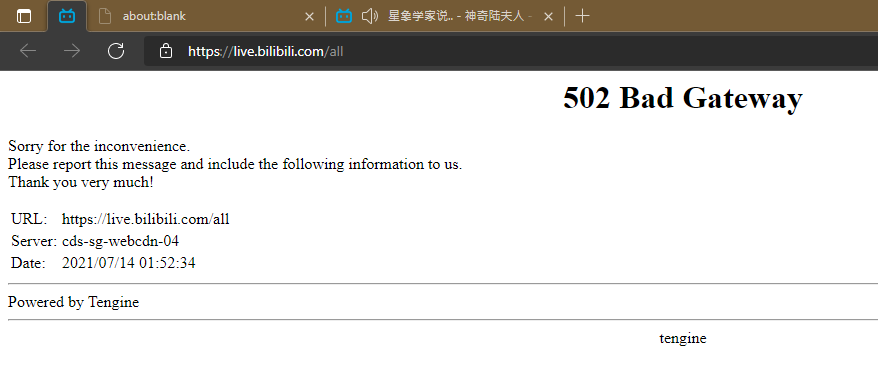
Lucky got screenshot, here you go.

user posted image

F12 now reporting as blzone04 la, so nothing change, same CDN IP address as 7.14.

This post has been edited by BenYeeHua: Jul 23 2021, 08:28 PM
BenYeeHua
post Jul 25 2021, 02:07 PM

Regular
******
Senior Member
1,873 posts

Joined: Nov 2010


QUOTE(heLL_bOy @ Jul 25 2021, 12:27 PM)
i test for few days first.. i never get the same error like you.
*
This one is server down la, normally they will serve you a page with 40x error code comic. tongue.gif

I guess someone got SG VPN can helps traceroute, so if it going via TM ISP, then we know it is at MY, or it is just strange server that connect directly via TM. hmm.gif
----
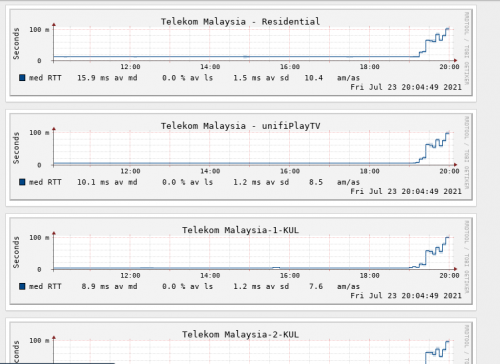
QUOTE(Sam Leong @ Jul 23 2021, 08:40 PM)
Is it because of RTM server is under TM IP
and all traffic is going through MYIX for those not using private peering
I get severe high ping spike until 100ms and buffering for my unifiPlayTV , same goes to RTM
TIME - TM
» Click to show Spoiler - click again to hide... «

*
Even TM watching RTM Olympus are having 5ms low latency but laggy experience sometimes, can be lot of users watching la.

You may ask Time to fix it, as it is within Malaysia, so it should not be too hard to tweak for them, and RTM is official news channel for Malaysia. icon_rolleyes.gif
QUOTE(heLL_bOy @ Jul 25 2021, 12:29 PM)
Yesterday got abit slowdown and latency issue on Cloudflare HKG route, not sure its my ip range affected or what

including lowyat as well.
*
Hmm, a bit la, like drop to 1M/s(someone posted 50M picture at that China forum, so it keep testing CloudFlare server tongue.gif ), don't notice too much about it.

Lowyat IPv6 are special tweaked to Malaysia CloudFlare JB server, so far not notify anything, unless you are under IPv4 la. thumbsup.gif

This post has been edited by BenYeeHua: Jul 25 2021, 02:09 PM
BenYeeHua
post Jul 30 2021, 09:50 PM

Regular
******
Senior Member
1,873 posts

Joined: Nov 2010


Tonight hkix overloaded, first time saw this happen, guess TM start moving too much traffic to HK...
---
Look like Tencent SG back to China Mainland also bombed, keep kicking people out. bruce.gif

This post has been edited by BenYeeHua: Jul 30 2021, 10:12 PM
BenYeeHua
post Dec 17 2021, 10:34 AM

Regular
******
Senior Member
1,873 posts

Joined: Nov 2010


QUOTE(hostingmalaya @ Dec 17 2021, 10:30 AM)
damn, even open yahoo mail so slow right now for me.
*
Pls check did you getting kicked to Private IP, me is slowing down after getting kicked to Private IP.
Even the IPv6 is public, also slow down to hell, they messed up the QoS, why?

I am finding CS now, then he help me on reset port, after reset, everything on full speed, including IPv6, then drop back after QoS work normally, lol. tongue.gif

7 Pages  1 2 3 > » Top
 

Change to:
| Lo-Fi Version
0.0742sec    0.36    7 queries    GZIP Disabled
Time is now: 5th December 2025 - 10:24 PM