Welcome Guest ( Log In | Register )

90 Pages « < 70 71 72 73 74 > » Bottom

Outline · [ Standard ] · Linear+

 Unifi Connection Issue to International Server, Occured usually at night 9-11pm

views
     
TShostingmalaya
post Nov 28 2022, 01:20 AM

Getting Started
**
Junior Member
184 posts

Joined: Dec 2015
From: Malaysia


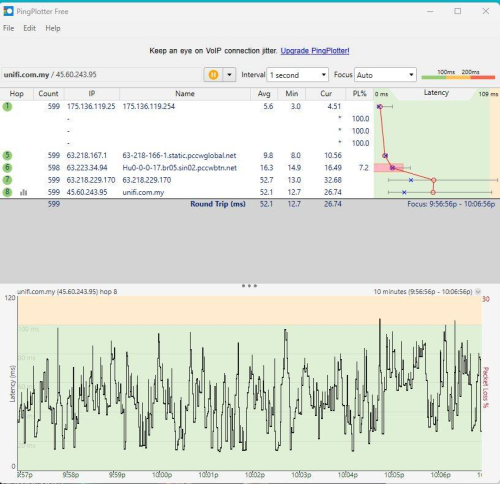
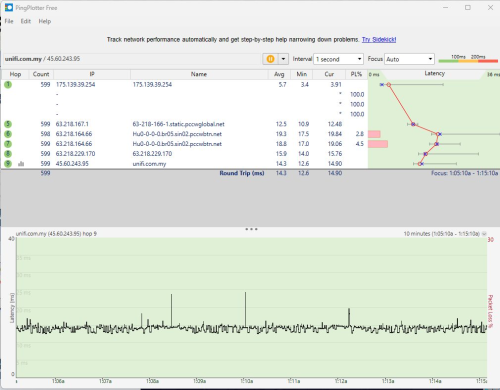
Since I pingplot to unifi.com.my, lets compare with 1am right now.

See...

user posted image

user posted image

Bincangkan. Bagaimana Unifi boleh ada masalah buka website Unifi pada 9 malam above. Haha.


Sebelum ini ada group yang menarik dan tidak bias iaitu Unifi Super Group Unofficial walaupun terhad kepada Unifi sahaja, tetapi group tersebut dah hilang.

Jadi ini inisiatif saya mewujudkan group untuk kita berdiskusi dan perkongsian sebagai pengguna untuk pengalaman penggunaan internet dan telekomunikasi di Malaysia yang lebih baik.

Antara objektif yang kita boleh capai melalui group ini :
1. Cubaan sambungan kepada target server berdasarkan pelbagai telco di Malaysia.
2. Penyedia sistem aplikasi atau games boleh memilih lokasi server yang sesuai diakses oleh kebanyakan telco di Malaysia.
3. Memudahkan urusan membuat laporan kepada telco yang bermasalah.
4. Tip dan perkongsian untuk pengalaman penggunaan internet yang lebih baik.
5. Perkongsian promosi internet yang menarik serta berbaloi.

Jika anda berminat untuk berdiskusi berkenaan objektif yang tertera diatas, boleh join group ini : Malaysia Internet & Telekomunikasi

*Maaf Admin kalau melanggar t&c group boleh delete ya post ini.

Just nak share supaya kalau ada gamers bermasalah guna telco sekian-sekian ketika gaming dan sebagainya, kita boleh cuba semak adakah itu masalah route telco dan ketahui telco yang sesuai.

This post has been edited by hostingmalaya: Nov 28 2022, 12:03 PM
TShostingmalaya
post Nov 28 2022, 09:47 PM

Getting Started
**
Junior Member
184 posts

Joined: Dec 2015
From: Malaysia


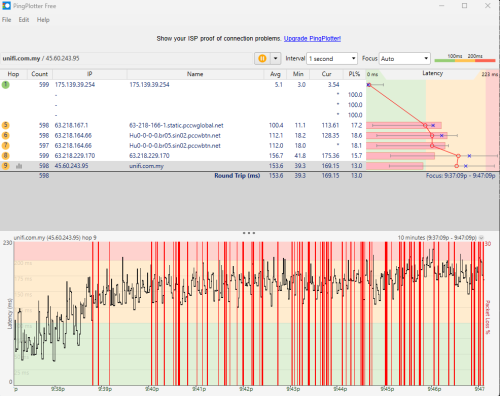
The reason why livechat Unifi messages undelivered so much.

user posted image
BenYeeHua
post Nov 28 2022, 09:52 PM

Regular
******
Senior Member
1,873 posts

Joined: Nov 2010


QUOTE(hostingmalaya @ Nov 28 2022, 09:47 PM)
The reason why livechat Unifi messages undelivered so much.

user posted image
*
Can confirm, most IP are crappy now, even ping 8.8.8.8 are jumpy in between 33-40ms, but fine with time2.google.com over ipv6... sweat.gif
---Edit 2022-11-28 22:12:19
Back to normal now, both IPv4.
45.60.245.95 going to the incapsula MY server via TIME.COM.MY, lol. laugh.gif
45.60.243.95 going to the incapsula SG server via PCCW, this one fault one.

Unsure it is balancing the load, or routing configuration issues. tongue.gif
---Edit 2022-11-28 22:16:17
And 243 start crappy again, lol, guess you need to know how to edit hosts file before seeking for UniFi CS service, 50% block rate to CS for better 2022 target is it? tongue.gif

This post has been edited by BenYeeHua: Nov 28 2022, 10:17 PM
khainiz94
post Nov 29 2022, 09:37 PM

Look at all my stars!!
*******
Senior Member
2,856 posts

Joined: Mar 2012


Fuhhh nasib baik I did not tie the contract with Unifi and go for Maxis.
I rely heavily on international content, if this happens, my parents will be pissed.
QuantumEdge
post Nov 29 2022, 11:11 PM

Regular
******
Senior Member
1,592 posts

Joined: Jan 2016


Massive slowdowns on Telegram and Onedrive now...

This post has been edited by QuantumEdge: Nov 29 2022, 11:27 PM
darachan
post Dec 1 2022, 10:37 AM

Getting Started
**
Junior Member
87 posts

Joined: Jul 2022
QUOTE(QuantumEdge @ Nov 29 2022, 11:11 PM)
Massive slowdowns on Telegram and Onedrive now...
*
Is Twitter affected too? Twitter latency seems way off at midnight.
SUSnatx001
post Dec 1 2022, 10:40 AM

Getting Started
**
Junior Member
121 posts

Joined: Sep 2016
Now the blockheads has limited port for port forwarding also.
I am only able to use port 80, 88 and 8888
BenYeeHua
post Dec 1 2022, 10:32 PM

Regular
******
Senior Member
1,873 posts

Joined: Nov 2010


QUOTE(natx001 @ Dec 1 2022, 10:40 AM)
Now the blockheads has limited port for port forwarding also.
I am only able to use port 80, 88 and 8888
*
Works for IPv6, unable to test with double NAT v4. tongue.gif
SUSnatx001
post Dec 2 2022, 09:10 AM

Getting Started
**
Junior Member
121 posts

Joined: Sep 2016
QUOTE(BenYeeHua @ Dec 1 2022, 10:32 PM)
Works for IPv6, unable to test with double NAT v4. tongue.gif
*
I have changed to several routers including Asus 3200, Asus AX3000 and the standard shiet DLink provided but none can exceed the 3 ports.
In fact Dlink & AX3000 cant even do a single port.

Mind checking this link and click Middle - Scan all common ports and see if you are able to see any ports opened?

https://www.yougetsignal.com/tools/open-ports/
BenYeeHua
post Dec 2 2022, 10:11 AM

Regular
******
Senior Member
1,873 posts

Joined: Nov 2010


QUOTE(natx001 @ Dec 2 2022, 09:10 AM)
I have changed to several routers including Asus 3200, Asus AX3000 and the standard shiet DLink provided but none can exceed the 3 ports.
In fact Dlink & AX3000 cant even do a single port.

Mind checking this link and click Middle - Scan all common ports and see if you are able to see any ports opened?

https://www.yougetsignal.com/tools/open-ports/
*
?
You Means, custom port like 1024-65535 are blocked?
I tested on your provided website, nope, it don't support IPv6, showing invalid.

https://www.port.tools/
This one tested for IPv6, port 16823 or 49888 works, but sadly unable to showing filtered or closed lol.


Any reason you wanna open on those common port, except getting DDOS testing on your network??? hmm.gif
SUSnatx001
post Dec 2 2022, 10:46 AM

Getting Started
**
Junior Member
121 posts

Joined: Sep 2016
QUOTE(BenYeeHua @ Dec 2 2022, 10:11 AM)
?
You Means, custom port like 1024-65535 are blocked?
I tested on your provided website, nope, it don't support IPv6, showing invalid.

https://www.port.tools/
This one tested for IPv6, port 16823 or 49888 works, but sadly unable to showing filtered or closed lol.
Any reason you wanna open on those common port, except getting DDOS testing on your network??? hmm.gif
*
What router are you using btw?
My result below - UniFi cant even resolve it

user posted image
BenYeeHua
post Dec 2 2022, 10:51 AM

Regular
******
Senior Member
1,873 posts

Joined: Nov 2010


QUOTE(natx001 @ Dec 2 2022, 10:46 AM)
What router are you using btw?
My result below - UniFi cant even resolve it

user posted image
*
Well, as I say, me 30M users, so private IPv4, only can test for IPv6 lol.
Did you think about the possible of firewall?

And, did your qbittorrent running on port 21, 80 or 49888?
You know, port forward, for utorrent or custom gaming server or NAS file hosting or xxx, need be to running as a server on the computer that you forwarded, and also, most software support UPnP port forward, so no need manual port forward.
Doing port scan without a server open on that port, sure is no respond la. tongue.gif

This post has been edited by BenYeeHua: Dec 2 2022, 10:51 AM
SUSnatx001
post Dec 2 2022, 10:56 AM

Getting Started
**
Junior Member
121 posts

Joined: Sep 2016
QUOTE(BenYeeHua @ Dec 2 2022, 10:51 AM)
Well, as I say, me 30M users, so private IPv4, only can test for IPv6 lol.
Did you think about the possible of firewall?

And, did your qbittorrent running on port 21, 80 or 49888?
You know, port forward, for utorrent or custom gaming server or NAS file hosting or xxx, need be to running as a server on the computer that you forwarded, and also, most software support UPnP port forward, so no need manual port forward.
Doing port scan without a server open on that port, sure is no respond la. tongue.gif
*
Running a number iot appliances and assigned them with thier own static local IPs.
Everything was fine barely 3 weeks ago suddenly the blockheads at UniFi started messing with their network.

Now they advise me to get a crap DLINK router to test - am not their lab rat so I hantam them kow kow
BenYeeHua
post Dec 2 2022, 11:12 AM

Regular
******
Senior Member
1,873 posts

Joined: Nov 2010


QUOTE(natx001 @ Dec 2 2022, 10:56 AM)
Running a number iot appliances and assigned them with thier own static local IPs.
Everything was fine barely 3 weeks ago suddenly the blockheads at UniFi started messing with their network.

Now they advise me to get a crap DLINK router to test - am not their lab rat so I hantam them kow kow
*
Guess public IPv4 not gonna be useful as it is blocked for custom port lol.
Maybe you think about just build a small server for all of you IoT?

So no need care about port forward, as long as they still open you up for port 80 88
---
Wait, your screenshot is showing port 80 closed, did you really open any iot on port 80? hmm.gif
Or, you are getting switch to Private IPv4??? sweat.gif
SUSnatx001
post Dec 2 2022, 03:34 PM

Getting Started
**
Junior Member
121 posts

Joined: Sep 2016
QUOTE(BenYeeHua @ Dec 2 2022, 11:12 AM)
Guess public IPv4 not gonna be useful as it is blocked for custom port lol.
Maybe you think about just build a small server for all of you IoT?

So no need care about port forward, as long as they still open you up for port 80 88
---
Wait, your screenshot is showing port 80 closed, did you really open any iot on port 80? hmm.gif
Or, you are getting switch to Private IPv4??? sweat.gif
*
Went to All IT and got the crap DLINK DIR-X1870 that Unifi die die said will work.
Well it doesnt ports are still closed
I guess have to return and buy something else
BenYeeHua
post Dec 3 2022, 12:22 AM

Regular
******
Senior Member
1,873 posts

Joined: Nov 2010


QUOTE(natx001 @ Dec 2 2022, 03:34 PM)
Went to All IT and got the crap  DLINK DIR-X1870 that Unifi die die said will work.
Well it doesnt ports are still closed
I guess have to return and buy something else
*
I am not quite sure what is your problem already, all your info provided is not enough....
How about you try using PPPoE on Windows, bypass the router, disable Windows Firewall and see can get public or not? sweat.gif
prokiller1199
post Dec 3 2022, 12:50 AM

Hi there.
*****
Senior Member
966 posts

Joined: Apr 2016


QUOTE(natx001 @ Dec 2 2022, 03:34 PM)
Went to All IT and got the crap  DLINK DIR-X1870 that Unifi die die said will work.
Well it doesnt ports are still closed
I guess have to return and buy something else
*
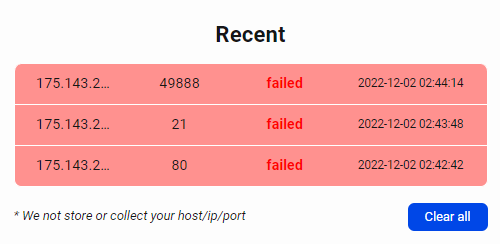
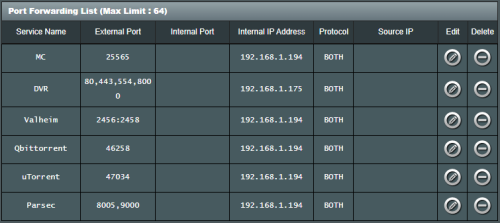
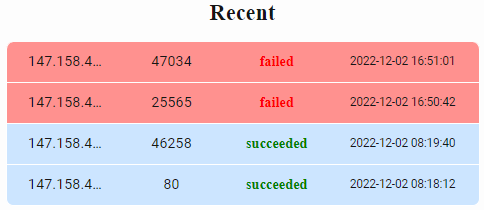
well if not mistaken after u port forward, need something on the other side to "receive" that then only you can see the port is open.
For example, if my MC server is not open, then it will show like failed.

user posted image

user posted image
My port 80 is running on a DVR thats why its open

This post has been edited by prokiller1199: Dec 3 2022, 12:53 AM
papyrous
post Dec 3 2022, 08:01 AM

Getting Started
**
Junior Member
214 posts

Joined: May 2017
QUOTE(natx001 @ Dec 2 2022, 03:34 PM)
Went to All IT and got the crap  DLINK DIR-X1870 that Unifi die die said will work.
Well it doesnt ports are still closed
I guess have to return and buy something else
*
are you on CGNAT or not?
perhaps you did not open up your firewall to allow those on device?
jibpek
post Dec 3 2022, 08:07 AM

Enthusiast
*****
Junior Member
706 posts

Joined: Jul 2012
Unifi intentionally throttles speed to some countries.

Connection to CCP land is like shyt, but when using Mobile Data is superb (even though they are on TM Backbone)
SUSnatx001
post Dec 3 2022, 08:46 AM

Getting Started
**
Junior Member
121 posts

Joined: Sep 2016
QUOTE(papyrous @ Dec 3 2022, 08:01 AM)
are you on CGNAT or not?
perhaps you did not open up your firewall to allow those on device?
*
Not on CGNAT and to test firewall is also disabled

90 Pages « < 70 71 72 73 74 > » Top
 

Change to:
| Lo-Fi Version
0.0249sec    0.80    6 queries    GZIP Disabled
Time is now: 1st December 2025 - 12:20 PM