

Now the blockheads has limited port for port forwarding also.
I am only able to use port 80, 88 and 8888
Unifi Connection Issue to International Server, Occured usually at night 9-11pm
Unifi Connection Issue to International Server, Occured usually at night 9-11pm
|
|
 Dec 1 2022, 10:40 AM Dec 1 2022, 10:40 AM
Return to original view | Post
#1
|
 
Junior Member
121 posts Joined: Sep 2016 
|
Now the blockheads has limited port for port forwarding also.
I am only able to use port 80, 88 and 8888 |
|
|
|
|
|
Dec 2 2022, 09:10 AM
Return to original view | Post
#2
|
|
Junior Member
121 posts Joined: Sep 2016
|
QUOTE(BenYeeHua @ Dec 1 2022, 10:32 PM) Works for IPv6, unable to test with double NAT v4. I have changed to several routers including Asus 3200, Asus AX3000 and the standard shiet DLink provided but none can exceed the 3 ports.  In fact Dlink & AX3000 cant even do a single port. Mind checking this link and click Middle - Scan all common ports and see if you are able to see any ports opened? https://www.yougetsignal.com/tools/open-ports/ |
|
|
Dec 2 2022, 10:46 AM
Return to original view | Post
#3
|
|
Junior Member
121 posts Joined: Sep 2016
|
QUOTE(BenYeeHua @ Dec 2 2022, 10:11 AM) ? What router are you using btw?You Means, custom port like 1024-65535 are blocked? I tested on your provided website, nope, it don't support IPv6, showing invalid. https://www.port.tools/ This one tested for IPv6, port 16823 or 49888 works, but sadly unable to showing filtered or closed lol. Any reason you wanna open on those common port, except getting DDOS testing on your network???  My result below - UniFi cant even resolve it 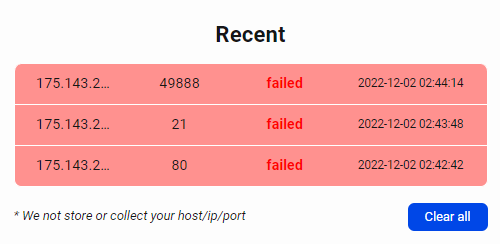 |
|
|
Dec 2 2022, 10:56 AM
Return to original view | Post
#4
|
|
Junior Member
121 posts Joined: Sep 2016
|
QUOTE(BenYeeHua @ Dec 2 2022, 10:51 AM) Well, as I say, me 30M users, so private IPv4, only can test for IPv6 lol. Running a number iot appliances and assigned them with thier own static local IPs.Did you think about the possible of firewall? And, did your qbittorrent running on port 21, 80 or 49888? You know, port forward, for utorrent or custom gaming server or NAS file hosting or xxx, need be to running as a server on the computer that you forwarded, and also, most software support UPnP port forward, so no need manual port forward. Doing port scan without a server open on that port, sure is no respond la. Everything was fine barely 3 weeks ago suddenly the blockheads at UniFi started messing with their network. Now they advise me to get a crap DLINK router to test - am not their lab rat so I hantam them kow kow |
|
|
Dec 2 2022, 03:34 PM
Return to original view | Post
#5
|
|
Junior Member
121 posts Joined: Sep 2016
|
QUOTE(BenYeeHua @ Dec 2 2022, 11:12 AM) Guess public IPv4 not gonna be useful as it is blocked for custom port lol. Went to All IT and got the crap DLINK DIR-X1870 that Unifi die die said will work. Maybe you think about just build a small server for all of you IoT? So no need care about port forward, as long as they still open you up for port 80 88 --- Wait, your screenshot is showing port 80 closed, did you really open any iot on port 80? Or, you are getting switch to Private IPv4???  Well it doesnt ports are still closed I guess have to return and buy something else |
|
|
Dec 3 2022, 08:46 AM
Return to original view | Post
#6
|
|
Junior Member
121 posts Joined: Sep 2016
|
QUOTE(papyrous @ Dec 3 2022, 08:01 AM) are you on CGNAT or not? Not on CGNAT and to test firewall is also disabledperhaps you did not open up your firewall to allow those on device? |
|
|
Dec 3 2022, 09:00 AM
Return to original view | Post
#7
|
|
Junior Member
121 posts Joined: Sep 2016
|
QUOTE(papyrous @ Dec 3 2022, 08:50 AM) if you're opening UDP port it wont show on those port scanner. only TCP. Sent you a PM if you have time to check it out |
| Change to: |  0.0855sec 0.0855sec
 0.69 0.69
 7 queries 7 queries
 GZIP Disabled GZIP Disabled
Time is now: 11th December 2025 - 08:11 AM |
 Quote
Quote