

Same problem here, 15 mbps to international servers, 70 to Msian.
Official TM UniFi High Speed Broadband Thread V39, READ 1ST PAGE FOR RELEVANT WIFI INFO
Official TM UniFi High Speed Broadband Thread V39, READ 1ST PAGE FOR RELEVANT WIFI INFO
|
|
 Feb 21 2022, 09:59 PM Feb 21 2022, 09:59 PM
|
 
Junior Member
78 posts Joined: Oct 2021 
|
Same problem here, 15 mbps to international servers, 70 to Msian.
|
|
|
|
|
|
Feb 21 2022, 10:12 PM
|

Senior Member
4,381 posts Joined: Jan 2003
|
My area is Setia Alam....Ok with speedtest.
|
|
|
Feb 21 2022, 10:48 PM
Show posts by this member only | IPv6 | Post
#7903
|
|
Junior Member
197 posts Joined: Jul 2011
|
Ampang area
 |
|
|
Feb 21 2022, 11:32 PM
|
|
Junior Member
363 posts Joined: Sep 2014 
|
QUOTE(Hitman190 @ Feb 21 2022, 08:46 PM) When I check my speeds on anything but TM Speedtest or TM's server on ookla Speedtest, I am getting only a fraction of the 500Mbps speeds I am paying for. Anyone else have slow speeds right now? same here today in PJ. 800mbps plan, tm server getting 300mbps rest 100mbps on lan reset not working |
|
|
Feb 21 2022, 11:41 PM
|

Senior Member
565 posts Joined: Jan 2003 From: Melaka
|
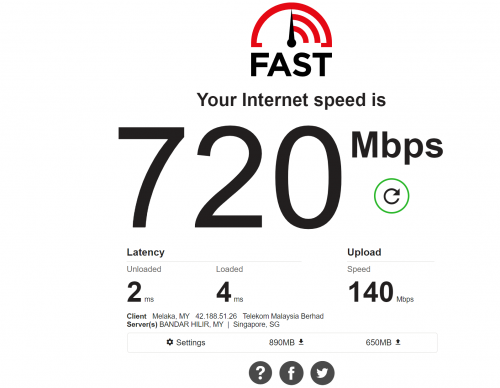 MLK here 800Mbps in LAN mode. but still feel a bit slow... |
|
|
Feb 21 2022, 11:44 PM
Show posts by this member only | IPv6 | Post
#7906
|

Senior Member
3,902 posts Joined: Jul 2005 From: Sin Lor, B'worth,Pg.
|
still shit
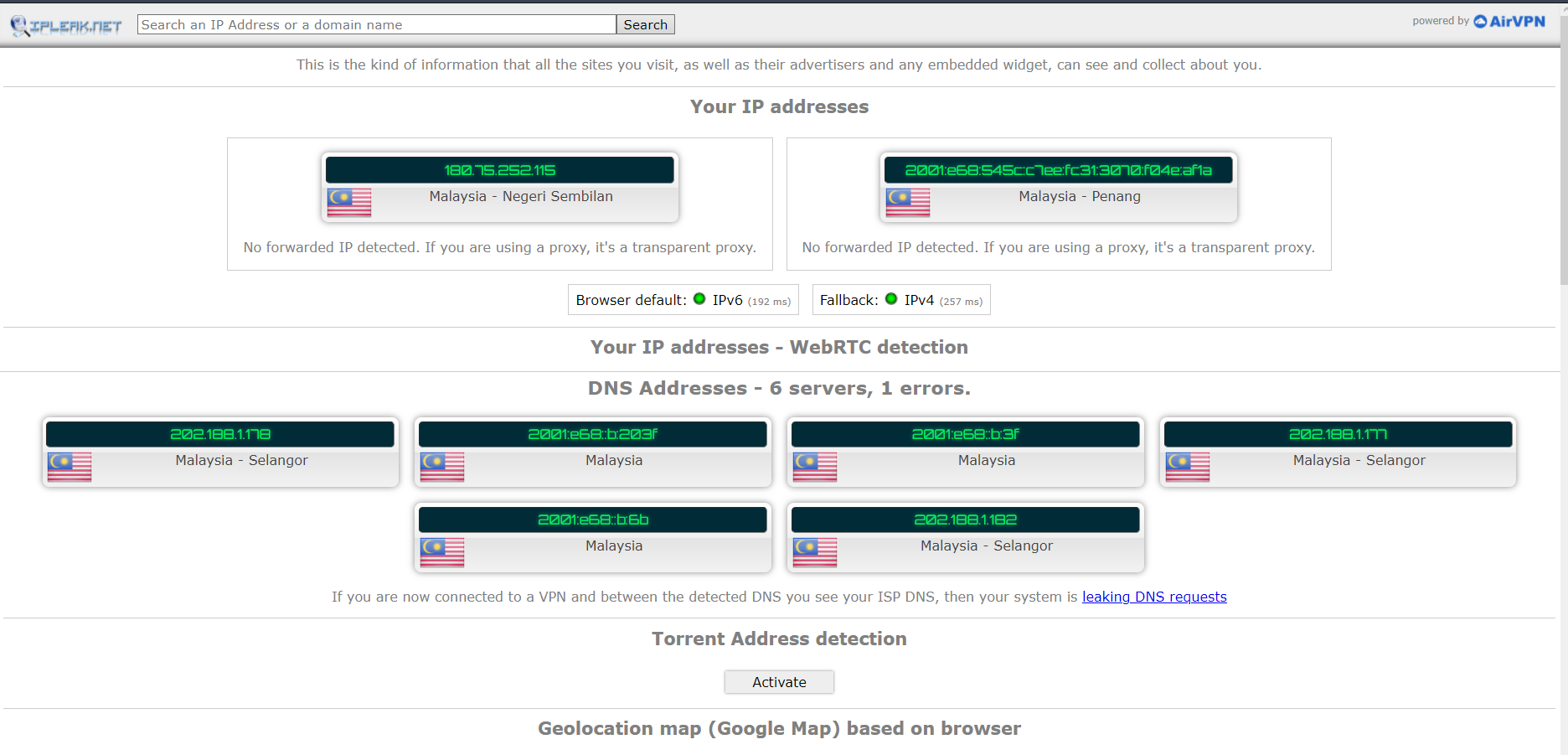 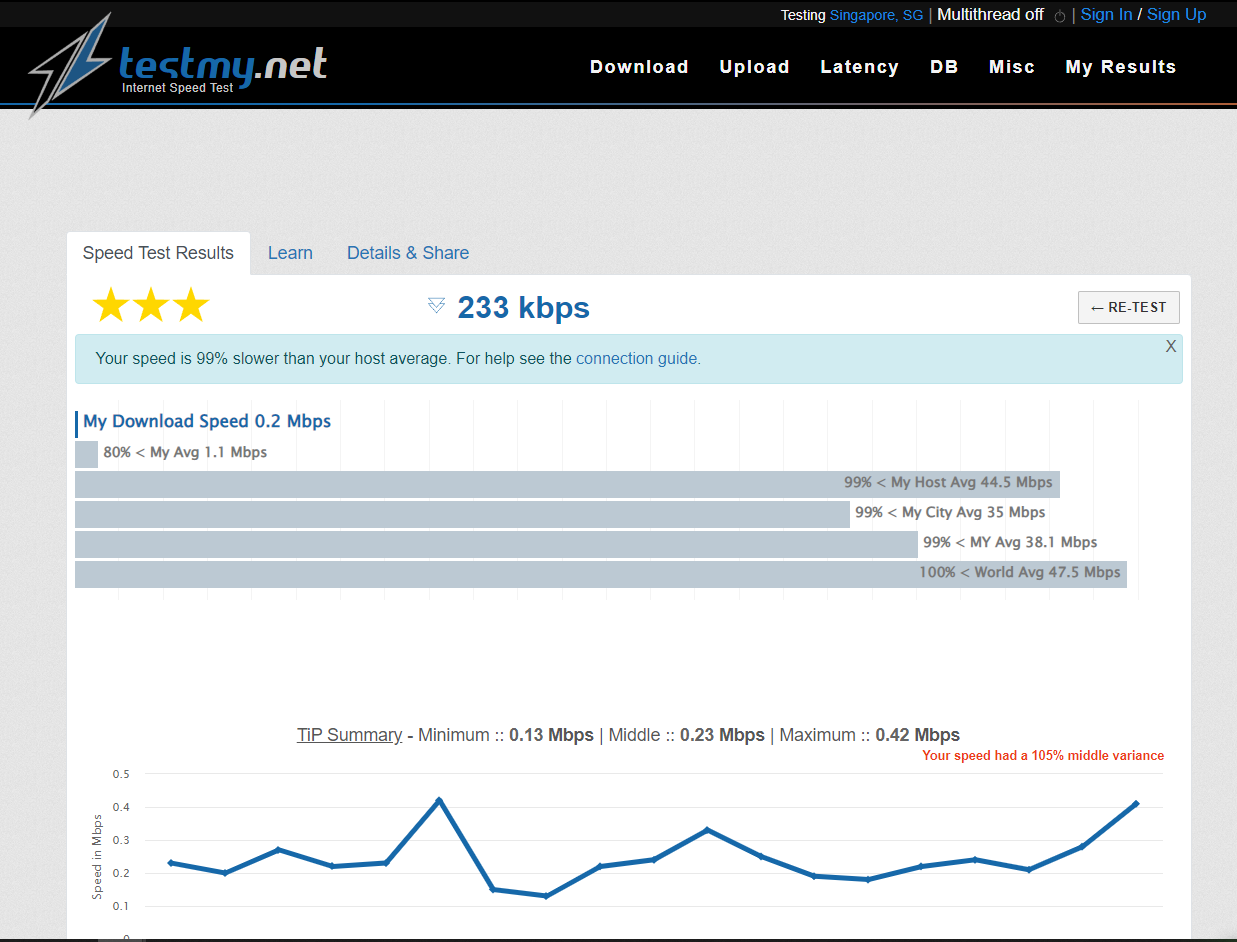 on standard no vpn with vpn opera browser 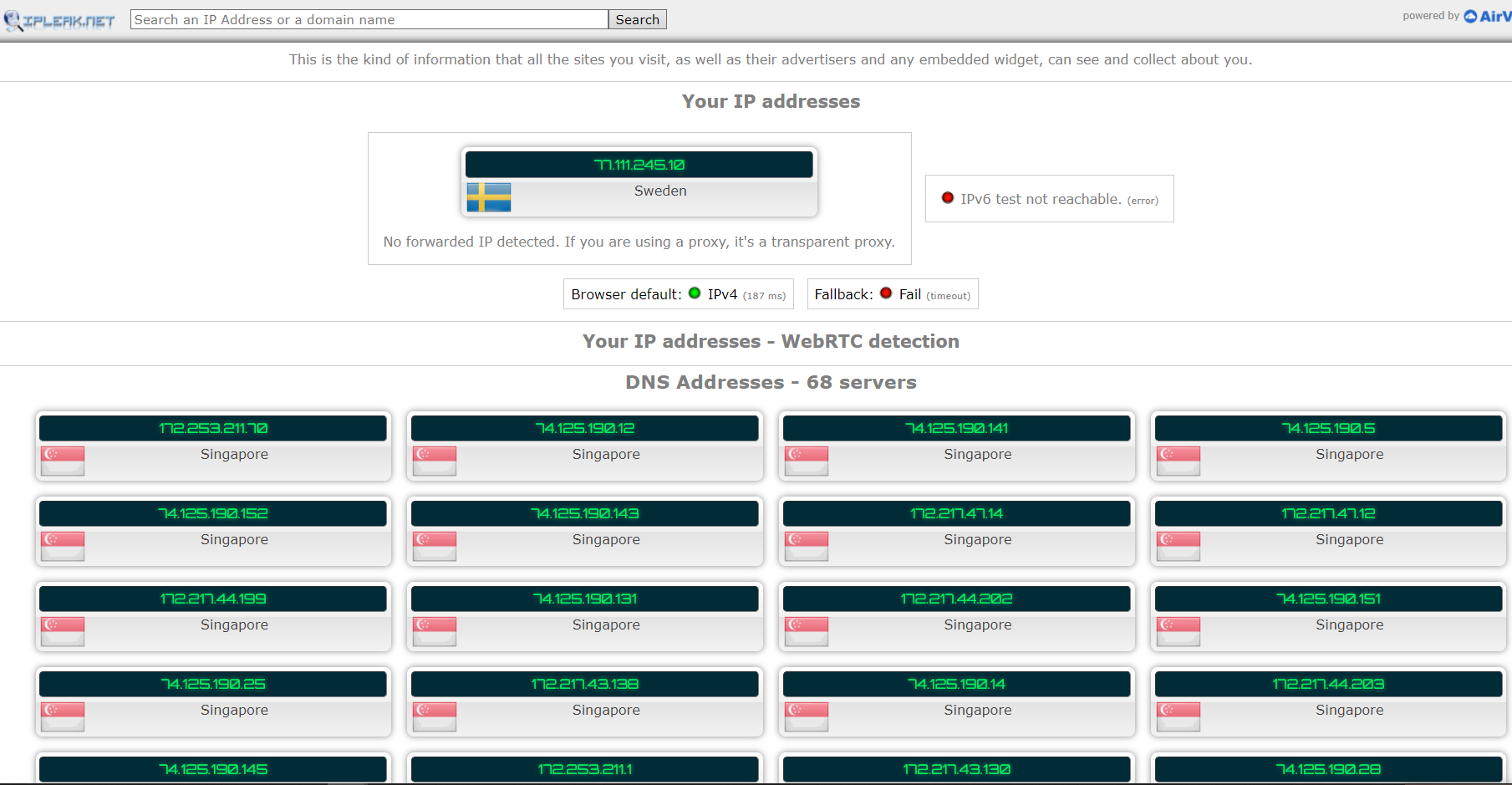 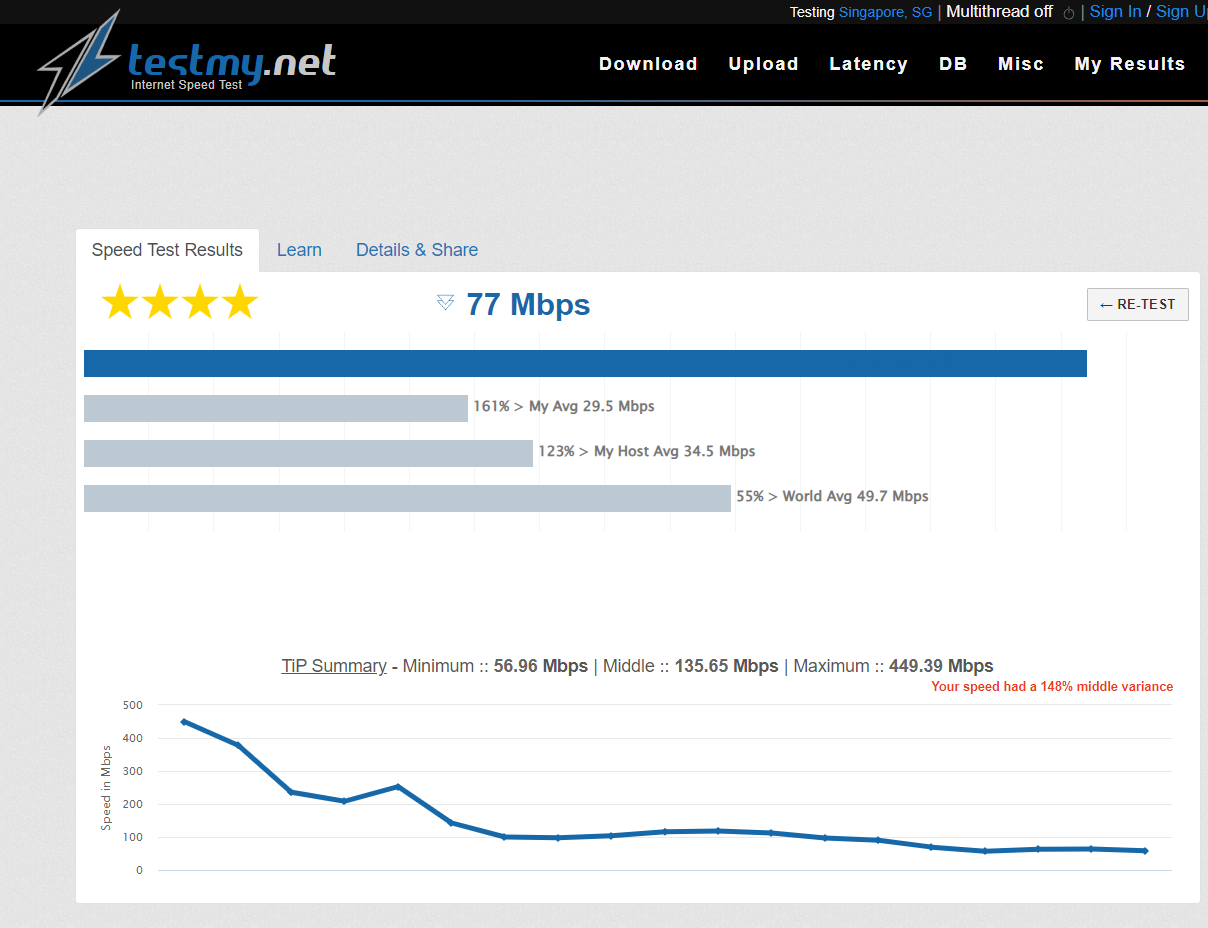 why not just stick with vpn? some stuff like upload to Pictr above wont work and just got mine 100mbps unifi last sept..... |
|
|
|
|
|
Feb 22 2022, 12:04 AM
|
|
Senior Member
1,882 posts Joined: Sep 2017
|
QUOTE(mcchin @ Feb 21 2022, 11:44 PM) still shit Only recommend always VPN ON with your own-self VPN server,otherwise using vpn that sharing with others is not a good solution.on standard no vpn with vpn opera browser why not just stick with vpn? some stuff like upload to Pictr above wont work and just got mine 100mbps unifi last sept..... And also speedtest on testmy.net SG node is not a good way to check your internet is good or not,because it only confirn the connection status between your network and Linode SG network. Check with speedtest.net (but not choose TM node is okay,TM does not ensure the connectivity for other server or network.) Edit: I saw your screenshot,you are using the Unifi DNS? Try change to Google DNS should can solve some web slow problem. This post has been edited by go626201: Feb 22 2022, 12:15 AM |
|
|
Feb 22 2022, 12:18 AM
Show posts by this member only | IPv6 | Post
#7908
|
|
Senior Member
3,902 posts Joined: Jul 2005 From: Sin Lor, B'worth,Pg.
|
QUOTE(go626201 @ Feb 22 2022, 12:04 AM) Only recommend always VPN ON with your own-self VPN server,otherwise using vpn that sharing with others is not a good solution. Yet they are not throttling all data to linodeAnd also speedtest on testmy.net SG node is not a good way to check your internet is good or not,because it only confirn the connection status between your network and Linode SG network. Check with speedtest.net (but not choose TM node is okay,TM does not ensure the connectivity for other server or network.) VPN lets you get some resemblance of normalcy to linode So basically they are just blanket blocking certain IP range to certain servers? Why I chose testmy.net was because of twitch They say to test with this And at the same time having issue when twitch stream also start to buffering constantly last week That's the corelation I have No point others test my speed is no problem When a simple 720p twitch also cannot stream without buffering every 5 secs |
|
|
Feb 22 2022, 12:25 AM
|
|
Senior Member
1,882 posts Joined: Sep 2017
|
QUOTE(mcchin @ Feb 22 2022, 12:18 AM) Yet they are not throttling all data to linode Twitch is using their own Amazon AWS server, so test with testmy.net SG node is not the way to check for twitch problem. (Maybe there are some server hosted on AWS,but i not sure)VPN lets you get some resemblance of normalcy to linode So basically they are just blanket blocking certain IP range to certain servers? Why I chose testmy.net was because of twitch They say to test with this And at the same time having issue when twitch stream also start to buffering constantly last week That's the corelation I have No point others test my speed is no problem When a simple 720p twitch also cannot stream without buffering every 5 secs The twitch stream problem is causing by the unifi network congestion. So at night,unifi to a lot of server will having slow connectivity problem. To be clear even to Twitch Sin04 node also will suddenly having buffering issue. And of course now the easiest way to mitigate the problem by user is to use a vpn service. |
|
|
Feb 22 2022, 12:33 AM
|

Senior Member
1,346 posts Joined: Nov 2004 From: HEAVEN & HELL
|
QUOTE(mcchin @ Feb 22 2022, 12:18 AM) Yet they are not throttling all data to linode TM is throttling those ASN with high traffic back to TMVPN lets you get some resemblance of normalcy to linode So basically they are just blanket blocking certain IP range to certain servers? Why I chose testmy.net was because of twitch They say to test with this And at the same time having issue when twitch stream also start to buffering constantly last week That's the corelation I have No point others test my speed is no problem When a simple 720p twitch also cannot stream without buffering every 5 secs Linode is one of them... there many more....  |
|
|
Feb 22 2022, 12:46 AM
|
|
Senior Member
1,346 posts Joined: Nov 2004 From: HEAVEN & HELL
|
QUOTE(go626201 @ Feb 22 2022, 12:25 AM) Twitch is using their own Amazon AWS server, so test with testmy.net SG node is not the way to check for twitch problem. (Maybe there are some server hosted on AWS,but i not sure) it seem that Twitch have their own ASN block for video caching.The twitch stream problem is causing by the unifi network congestion. So at night,unifi to a lot of server will having slow connectivity problem. To be clear even to Twitch Sin04 node also will suddenly having buffering issue. And of course now the easiest way to mitigate the problem by user is to use a vpn service. but most of their server are icmp blocked. |
|
|
Feb 22 2022, 12:59 AM
|
|
Senior Member
1,882 posts Joined: Sep 2017
|
QUOTE(heLL_bOy @ Feb 22 2022, 12:46 AM) it seem that Twitch have their own ASN block for video caching. Ya all server is ICMP blocked.but most of their server are icmp blocked. So i just use TCP Ping port 443 to get the latency. |
|
|
Feb 22 2022, 01:27 AM
|
|
Senior Member
1,346 posts Joined: Nov 2004 From: HEAVEN & HELL
|
QUOTE(go626201 @ Feb 22 2022, 12:59 AM) Ya all server is ICMP blocked. just did a test using vpn to check on those stream.. only will get same region video cache nodes base on nearest location.So i just use TCP Ping port 443 to get the latency. for example using SG vpn only could get SG region server node tried SG,HKG,TYO region all same result. for MY nearest will be SG i dont think it will connect over others region. |
|
|
|
|
|
Feb 22 2022, 03:44 AM
|
|
Senior Member
1,185 posts Joined: Nov 2020
|
Did anyone else loose internet connection a few minutes ago? Had just reset my router so can’t be an ip change issue
|
|
|
Feb 22 2022, 04:19 AM
|
|
Junior Member
52 posts Joined: Dec 2021
|
is they a cable fault again cause my game ping genshin skyroketed againnn
|
|
|
Feb 22 2022, 04:32 AM
|
|
Junior Member
363 posts Joined: Sep 2014
|
QUOTE(nomadtube @ Feb 22 2022, 04:19 AM) is they a cable fault again cause my game ping genshin skyroketed againnn Could be, my YouTube app is taking forever to load now Getting no connection error even when internet works |
|
|
Feb 22 2022, 11:17 AM
|
|
Senior Member
1,882 posts Joined: Sep 2017
|
QUOTE(heLL_bOy @ Feb 22 2022, 01:27 AM) just did a test using vpn to check on those stream.. only will get same region video cache nodes base on nearest location. It depends of your IP address,For most people that who currently facing problem is due to 2 issuefor example using SG vpn only could get SG region server node tried SG,HKG,TYO region all same result. for MY nearest will be SG i dont think it will connect over others region. 1.Twitch distribute user to other country server for specific ip block(lax/pdx/ams/hkg/tyo/sin) 2.TM have unstable connectivity to those server (speed not fast or not stable enough to get the ts data) Even lucky get SG node,also not 100% smooth watchable at night (maybe watchable with non-low latency mode) |
|
|
Feb 22 2022, 11:44 AM
|

Senior Member
1,669 posts Joined: Apr 2011  
|
Speed back to normal now. Not sure what happened last night but man it was super slow.
|
|
|
Feb 22 2022, 02:21 PM
|

Junior Member
835 posts Joined: Oct 2006
|
Any solution to deal with private ip? I just subscribe 100Mbps UNIFI, nad my Synology NAS is die when I connect from my office.
|
|
|
Feb 22 2022, 02:25 PM
|

Senior Member
2,090 posts Joined: Aug 2009 From: Shithole Klang
|
QUOTE(Feliex @ Feb 22 2022, 02:21 PM) Any solution to deal with private ip? I just subscribe 100Mbps UNIFI, nad my Synology NAS is die when I connect from my office. Vpn. Buy a cheap nat vps so you can make the session persistent.Else use ipv6 but its rare to find corporate network that enable internal ipv6. This post has been edited by failed.hashcheck: Feb 22 2022, 02:27 PM |
|
Topic ClosedOptions
|
| Change to: |  0.0187sec 0.0187sec
 0.76 0.76
 6 queries 6 queries
 GZIP Disabled GZIP Disabled
Time is now: 1st December 2025 - 07:14 PM |
 Quote
Quote