


Official TM UniFi High Speed Broadband Thread V39, READ 1ST PAGE FOR RELEVANT WIFI INFO
Official TM UniFi High Speed Broadband Thread V39, READ 1ST PAGE FOR RELEVANT WIFI INFO
|
|
 Feb 20 2022, 02:09 PM Feb 20 2022, 02:09 PM
|
 
Junior Member
147 posts Joined: Jun 2005  
|
Out of everything I do online, I'm only having problems with stuff I need to connect to Japan to, like Granblue Fantasy and Pixiv. Thank goodness I'm taking a break from FFXIV. Does anyone have a reliable VPN to rerout with? Or do VPNs not even work for this kind of problem? I can't wait until repairs are fully completed.
|
|
|
|
|
|
Feb 20 2022, 02:21 PM
Show posts by this member only | IPv6 | Post
#7862
|

Junior Member
745 posts Joined: Jul 2016
|
QUOTE(AzureSkies @ Feb 20 2022, 02:09 PM) Out of everything I do online, I'm only having problems with stuff I need to connect to Japan to, like Granblue Fantasy and Pixiv. Thank goodness I'm taking a break from FFXIV. Does anyone have a reliable VPN to rerout with? Or do VPNs not even work for this kind of problem? I can't wait until repairs are fully completed. vpn does work and it is always trial and error based the site u want to use. Perhaps u can try proton vpn free JP server if it helps 1st |
|
|
Feb 20 2022, 02:54 PM
|

Senior Member
1,848 posts Joined: Jan 2003 From: Boleh Land
|
QUOTE(aniq8676 @ Feb 17 2022, 02:04 PM) Upgrade to a 300mbps plan and above or switch to another ISP. i dont mind upgrade too 100mbps plan, and request, cause mostly only games i play with issues is destiny 2, guess i can prove that to them, but where do i request that walk in tmpoint or through 100 call? usually the call one are idiots, cant request technical stuff. If the area has TIME, proceed with TIME. If not, the alternative is Maxis fibre, but need to request Public IP. Celcom fibre, Digi fibre, Allo fibre does not provide a Public IP Addition: Users of 30,50,100mbps plans who wish to apply for Public IP for certain reasons need to provide some strong evidence to support your application. Secondly, TM will send a few TM Experts to your premises to investigate some evidence  |
|
|
Feb 20 2022, 03:04 PM
|
|
Junior Member
147 posts Joined: Jun 2005
|
QUOTE(akhito @ Feb 20 2022, 02:21 PM) vpn does work and it is always trial and error based the site u want to use. Perhaps u can try proton vpn free JP server if it helps 1st Thank you so much. I've heard good things about proton vpn. I'll try it right away. |
|
|
Feb 20 2022, 04:01 PM
|

Senior Member
1,350 posts Joined: Nov 2004 From: HEAVEN & HELL
|
QUOTE(go626201 @ Feb 20 2022, 01:59 AM) I think half TM ip prefix had the issue. your range 147.158.xxx also affected? |
|
|
Feb 20 2022, 04:04 PM
|
|
Senior Member
1,350 posts Joined: Nov 2004 From: HEAVEN & HELL
|
QUOTE(go626201 @ Feb 20 2022, 01:07 PM) Edit: Testmy SG node is located at Linode SG. The result is the same on the Linode SG Speedtest Site (https://speedtest.singapore.linode.com/) Conclusion: TM to Linode SG is having issue.(Latency normal,but download speed slow) Edit2: Sometime fast sometime slow. is another previous OVH case  |
|
|
|
|
|
Feb 20 2022, 04:06 PM
|
|
Senior Member
1,350 posts Joined: Nov 2004 From: HEAVEN & HELL
|
QUOTE(AzureSkies @ Feb 20 2022, 03:04 PM) Thank you so much. I've heard good things about proton vpn. I'll try it right away. find those with OVH server hosted vpn. |
|
|
Feb 20 2022, 04:08 PM
|

Senior Member
1,882 posts Joined: Sep 2017
|
QUOTE(heLL_bOy @ Feb 20 2022, 04:01 PM) your range 147.158.xxx also affected? Yes this problem already persisted for weeks.(Before Feb still okay)QUOTE(heLL_bOy @ Feb 20 2022, 04:04 PM) TM been limit rate on those ASN who having high traffic back to TM I think is becuase of packet loss causing the speedtest suddenly slow.is another previous OVH case 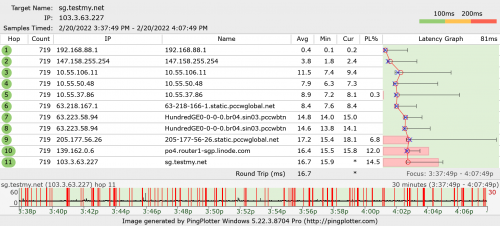 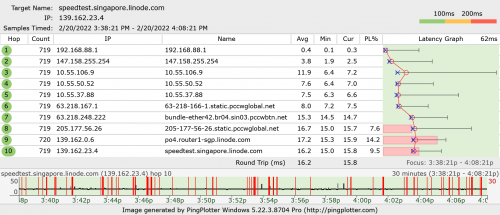 |
|
|
Feb 20 2022, 04:39 PM
|
|
Senior Member
1,350 posts Joined: Nov 2004 From: HEAVEN & HELL
|
QUOTE(go626201 @ Feb 20 2022, 04:08 PM) Yes this problem already persisted for weeks.(Before Feb still okay) as far i remember 147.158.xxx is one of the best range to SG having good latency compare to any others range. seem now TM they change into default like other range having.I think is becuase of packet loss causing the speedtest suddenly slow. TM to Linode there is no congestion Linode to TM seriously congested due to TM limitation. still TM keep changing the limitation by time to time making it become worsen And their another Equinix SG line also not fully utilize  |
|
|
 Feb 20 2022, 04:50 PM Feb 20 2022, 04:50 PM
|
|
Junior Member
159 posts Joined: Aug 2018
|
Hello guys, is it recommended to turn on Ipv6 with unifi ? or its just better to stay on Ipv4 only?
 |
|
|
Feb 20 2022, 04:55 PM
|
|
Senior Member
1,882 posts Joined: Sep 2017
|
QUOTE(Nicknamed666 @ Feb 20 2022, 04:50 PM) Hello guys, is it recommended to turn on Ipv6 with unifi ? or its just better to stay on Ipv4 only? If you mainly use popular service like Facebook/Google/Youtube/Netflix then IPv6 On is okay.But if you also have a lot of unpopular site(Not hosted on Cloudflare) usage then better disable IPv6. Nicknamed666 liked this post
|
|
|
Feb 20 2022, 05:21 PM
Show posts by this member only | IPv6 | Post
#7872
|

Senior Member
1,595 posts Joined: Jan 2016
|
QUOTE(Nicknamed666 @ Feb 20 2022, 04:50 PM) Hello guys, is it recommended to turn on Ipv6 with unifi ? or its just better to stay on Ipv4 only? In my personal experience, if you are in the southern regionIpv6 is often fked up in the night, eg Twitter pictures don't load, youtube video super slow buffering. If you are perfectly fine with Ipv4 at the moment, don't really need to turn it on. Nicknamed666 liked this post
|
|
|
Feb 20 2022, 06:11 PM
Show posts by this member only | IPv6 | Post
#7873
|
|
Junior Member
362 posts Joined: Jan 2011
|
QUOTE(Nicknamed666 @ Feb 20 2022, 04:50 PM) Hello guys, is it recommended to turn on Ipv6 with unifi ? or its just better to stay on Ipv4 only? It is recommended to enable IPv6 as the Internet is gradually moving to IPv6.Also you may noticed some performance boost such as faster loading time and better routing (if the website support IPv6). IPv6 also has an average of 10%-40% lower latency than IPv4 as mentioned by Apple, Facebook and Akamai. This post has been edited by michaelkkl: Feb 20 2022, 06:38 PM Nicknamed666 liked this post
|
|
|
|
|
|
Feb 20 2022, 07:04 PM
|
|
Senior Member
1,882 posts Joined: Sep 2017
|
QUOTE(michaelkkl @ Feb 20 2022, 06:11 PM) IPv6 also has an average of 10%-40% lower latency than IPv4 as mentioned by Apple, Facebook and Akamai. This does not applied on Unifi.  Most situation still like crap even MY to SG also a lot of IPv6 routing not optimized. QuantumEdge liked this post
|
|
|
Feb 20 2022, 09:15 PM
Show posts by this member only | IPv6 | Post
#7875
|
|
Senior Member
1,873 posts Joined: Nov 2010
|
QUOTE(bitebug @ Feb 18 2022, 10:58 PM) I ran speedtest and it seems fine. But I'm still getting packet losses and I can't even watch 360p on Twitch without it lagging. Speedtest for local fiber test only, it ensure that from your WiFi to router to TM ISP are all ok only.For real test, choose other country server.  QUOTE(heLL_bOy @ Feb 19 2022, 12:34 AM) if you can rewrite domain IP i give you another alternative CM IP for DMZJ. So far using copymanga because of, you know la, bilibili manga purchased most famous DMZJ's manga, only copymanga dare to copy from bilibili manga.That bilibili manga, censorship to the max, and no update to cool(no longer a hot topic) manga, except the current animed manga that's on air. And now, most anime source including AI 4k upscaled are from bilibili ASEAN.  QUOTE(heLL_bOy @ Feb 20 2022, 04:04 PM) TM been limit rate on those ASN who having high traffic back to TM They always do this, I know the most craziest is applying to Google MY, throttling to 480kbps, but limited to Streamyx user only.is another previous OVH case At that time, you can only hoping DNS giving you TM peer server instead of Google MY, but YouTube server assignment are controlled by Google, lucky reload few times solved it. At that time, moved to UniFi 30M solved it, but because 50% users moved to UniFi, so it is coming back... And now, local still can get throttling, like TM to Time. I also wonder what will be happen to Microsoft when MY server or database online, because Microsoft always full speed for anything, even though the server are not in Asia. But so far the best is Microsoft, never got issues one, at least in my memory. Also, uploading is throttling by Google, like WhatsApp FREE backup, 1 min full speed then dropped. For plus side, WhatsApp can encrypt the backup now, it is stupid to backup plaintext files in past...  QUOTE(go626201 @ Feb 20 2022, 07:04 PM) This does not applied on Unifi. Yes, only certain IPv6 are fine, like CloudFlare SG, nah... Most situation still like crap even MY to SG also a lot of IPv6 routing not optimized. For China mainland, ISP are stop assigning public IPv4 to users now, but asking ISP to provide more IPv6 support with free upgrading their fiber modem to latest. Their ISP is interesting, just single fiber modem with router + WiFi feature, the only downside like us, modem + PPPoE unable running on high speed, but cheap 300M than us. So they normally just changing fiber modem to dial-up mode, then connect router to fiber modem for PPPoE, bypassing modem CPU for letting router processing NAT and problem solved. But as I know, still many lack of IPv6 support, because their apartment's owner are giving a LAN cable, a local PPPoE account, then dial-up to the first floor server. Except those having FTTH like us and free upgrade for fiber speed and modem, still many lack of IPv6 support because of strange owner's setup to earn for internet money with cheap internet.... So far I am using TeamViewer to connect them sometimes, also interesting, IPv6 allowing UDP connection, giving a much more stable connection than over TCP on IPv4. TeamViewer can checking the latency for me to server, and another side to server, very helpful, can blame the right side who having bad connection, me or him.  |
|
|
Feb 20 2022, 09:44 PM
Show posts by this member only | IPv6 | Post
#7876
|
|
Junior Member
362 posts Joined: Jan 2011
|
QUOTE(go626201 @ Feb 20 2022, 07:04 PM) This does not applied on Unifi. You are right, some of the IPv6 route to SG have a suboptimal route. Most situation still like crap even MY to SG also a lot of IPv6 routing not optimized. Sometime when I noticed the suboptimal IPv6 route, I'll directly report to TM NOC email to fix their crappy IPv6 route. |
|
|
Feb 20 2022, 09:57 PM
|
|
Senior Member
1,882 posts Joined: Sep 2017
|
QUOTE(BenYeeHua @ Feb 20 2022, 09:15 PM) For China mainland, ISP are stop assigning public IPv4 to users now, but asking ISP to provide more IPv6 support with free upgrading their fiber modem to latest. Their ISP is interesting, just single fiber modem with router + WiFi feature, the only downside like us, modem + PPPoE unable running on high speed, but cheap 300M than us. So they normally just changing fiber modem to dial-up mode, then connect router to fiber modem for PPPoE, bypassing modem CPU for letting router processing NAT and problem solved. But as I know, still many lack of IPv6 support, because their apartment's owner are giving a LAN cable, a local PPPoE account, then dial-up to the first floor server. Except those having FTTH like us and free upgrade for fiber speed and modem, still many lack of IPv6 support because of strange owner's setup to earn for internet money with cheap internet.... So far I am using TeamViewer to connect them sometimes, also interesting, IPv6 allowing UDP connection, giving a much more stable connection than over TCP on IPv4. TeamViewer can checking the latency for me to server, and another side to server, very helpful, can blame the right side who having bad connection, me or him. So if want the best performance separate the modem and router still is the first choice (if modem not good enough) For enthusiast,Fiber modem + Non-Wifi Router + Dedicated Wifi AP will getting the best performance. (Or like the Anime4000 use SFP GPON with router also a good solution as the Fiber modem provided by ISP is not so powerful) Anime4000 liked this post
|
|
|
Feb 20 2022, 11:06 PM
|
|
Junior Member
216 posts Joined: Dec 2019
|
Tonight unfi so slow or what, watch twitch, keep buffering. Every few second buffering. Whyy?
And suddenly after reset port, the ping is high than usual. Usually 3\4 ms, after reset port. It change back to 25ms 33ms This post has been edited by Dylnyat: Feb 20 2022, 11:06 PM |
|
|
Feb 20 2022, 11:43 PM
Show posts by this member only | IPv6 | Post
#7879
|
|
Junior Member
109 posts Joined: Apr 2020
|
QUOTE(Dylnyat @ Feb 20 2022, 11:06 PM) Tonight unfi so slow or what, watch twitch, keep buffering. Every few second buffering. Whyy? Try restart router and get different IP range. Some Unifi IP range have routing issue to twitch servers.And suddenly after reset port, the ping is high than usual. Usually 3\4 ms, after reset port. It change back to 25ms 33ms Dylnyat liked this post
|
|
|
Feb 21 2022, 01:09 AM
|
|
Senior Member
1,350 posts Joined: Nov 2004 From: HEAVEN & HELL
|
QUOTE(michaelkkl @ Feb 20 2022, 09:44 PM) You are right, some of the IPv6 route to SG have a suboptimal route. mind to share their NOC email ?Sometime when I noticed the suboptimal IPv6 route, I'll directly report to TM NOC email to fix their crappy IPv6 route. |
|
Topic ClosedOptions
|
| Change to: |  0.0238sec 0.0238sec
 0.51 0.51
 6 queries 6 queries
 GZIP Disabled GZIP Disabled
Time is now: 5th December 2025 - 08:05 PM |
 Quote
Quote