Welcome Guest ( Log In | Register )

Bump Topic Topic Closed RSS Feed
413 Pages « < 388 389 390 391 392 > » Bottom

Outline · [ Standard ] · Linear+

 Official TM UniFi High Speed Broadband Thread V39, READ 1ST PAGE FOR RELEVANT WIFI INFO

views
     
BenYeeHua
post Feb 16 2022, 09:17 PM

Regular
******
Senior Member
1,873 posts

Joined: Nov 2010


QUOTE(heLL_bOy @ Feb 16 2022, 12:30 AM)
bilibili live stream on 8pm onward can watch 1080p? you connecting their SG region cdn ?

douyin mainland server after 8pm any FHD quality will be dropped to lowest quality as 360p or 480p due high volume traffic at peak hours.
*
d1--ov-gotcha05.bilivideo.com
58.26.x.x is MY TM, 202.122.x.x is MY Maxis, 163.171.x.x is SG cdnetworks(starhub) ok then.

Depend on Bilibili, 600 TTL expired then it will give new IP address to Google DNS, 1 of them will lag, but reload fixed it, unsure which one. laugh.gif

Also unsure on mobile client, lazy to do analysis using local DNS/VPN apk. tongue.gif
But mobile client, it is using another subdomain/server, 3 years ago it is laggy on web, but no issues on mobile app.

QUOTE(annoymous1234 @ Feb 16 2022, 03:49 PM)
update. this morning made a report at live chat. afternoon they sent a technician, it turns out its a cable fault. the guy show me the reading of the signal, it's -34 which is super bad, he said it should be -25 or below, or at least -28, after he did some adjustment of the wiring, it become -30 which is just average, but important thing is i can get back my 100mbps and my remote desktop connection no longer lag.  rclxms.gif overall im happy of the fast service from tm, same day report same day repair  thumbup.gif
*
Good then, remember, speedtest to know it is cable/fiber or not.

If speedtest show strange, then yes it is mostly local issues not TM side issues. thumbsup.gif
And yes, faced signal too strong, even Huawei modem can't hold it and keep kicking PPPoE session out, and funny enough a reboot of router fixed it for 5 mins. laugh.gif

This post has been edited by BenYeeHua: Feb 16 2022, 09:18 PM
PRSXFENG
post Feb 16 2022, 09:39 PM

Look at all my stars!!
*******
Senior Member
2,608 posts

Joined: Nov 2020


QUOTE(annoymous1234 @ Feb 16 2022, 03:49 PM)
update. this morning made a report at live chat. afternoon they sent a technician, it turns out its a cable fault. the guy show me the reading of the signal, it's -34 which is super bad, he said it should be -25 or below, or at least -28, after he did some adjustment of the wiring, it become -30 which is just average, but important thing is i can get back my 100mbps and my remote desktop connection no longer lag.  rclxms.gif overall im happy of the fast service from tm, same day report same day repair  thumbup.gif
*
Btw next time you can check too by logging into the huawei modem
Connect a lan cable from it to pc, then set your pc ethernet to obtain ip manually and set a specific ip range (can find on google, I think 192.168.100.X)
Then visit 192.168.100.1 and login as telecomadmin/admintelecom (at least with maxis fibre, not sure if tm uses other)

Then somewhere within the settings can see the fibre signal reading

Some older modems may need more work to get in
Not sure for FibreHome/ZTE brand modems
heLL_bOy
post Feb 17 2022, 01:11 AM

Regular
******
Senior Member
1,350 posts

Joined: Nov 2004
From: HEAVEN & HELL


QUOTE(BenYeeHua @ Feb 16 2022, 09:17 PM)
d1--ov-gotcha05.bilivideo.com
58.26.x.x is MY TM, 202.122.x.x is MY Maxis, 163.171.x.x is SG cdnetworks(starhub) ok then.

Depend on Bilibili, 600 TTL expired then it will give new IP address to Google DNS, 1 of them will lag, but reload fixed it, unsure which one. laugh.gif

Also unsure on mobile client, lazy to do analysis using local DNS/VPN apk. tongue.gif
*
i still prefer connecting their origin server in china due to streaming delay at least 15sec if using SG or MY or any others nearby.
BenYeeHua
post Feb 17 2022, 04:29 AM

Regular
******
Senior Member
1,873 posts

Joined: Nov 2010


QUOTE(heLL_bOy @ Feb 17 2022, 01:11 AM)
i still prefer connecting their origin server in china due to streaming delay at least 15sec if using SG or MY or any others nearby.
*
You never watch Bilibili live stream, right?

The latency is 3-5s, with 1s of caching on my side, I can ensure the broadcast latency keep around 3s only, and the best is 1s during beta testing. brows.gif
To check the latency, easy, when you saw SC(SuperChat) showing on your side, count for the time until the Danmaku machine on Live streamer read it out.

Or find a room with Danmaku live chat showing also on the live screen, then you send it out, count the time until it shown out on it.


With this speed up video technique, I can also lower down the latency of YouTube live and YouTube premiere video from 30s to 5-10s only. brows.gif

---
Nearly forgot.

The worst latency is 12s for bilibili, after >10s of local caching and line become stable, the live stream player will seek the time until left 5-9s of caching on your side.
And nope, the latency is higher on China mainland, because if you using web player + China Mainland IP, they will connect you to nearby P2P instead of the CDN that connected to the origin.
Much, more, worst. laugh.gif

Yes, using mobile client or PC client or P2P disabled via Greasy Fork's user script also workaround it for them la. tongue.gif

https://segmentfault.com/a/1190000040297780

PS: All Bilibili live latency above, are talk with Original quality, no recompress/reencode of video happen, reencode take another 2s delay.

This post has been edited by BenYeeHua: Feb 17 2022, 04:37 AM
Hwoarang45
post Feb 17 2022, 12:21 PM

Hardcore Gamer
******
Senior Member
1,848 posts

Joined: Jan 2003
From: Boleh Land


im using Unifi 30mbps in my work place, and each time i try to play destiny 2 on this line its show NAT restricted, no matter what port forwarding i did or change to google DNS its the same.... this got to do with the switch to private ip they are doing recently right?

my question is does upgrading to their 100mbps plan lets me request for open ip? my other home im using 100mbps line and it has never has issue with Nat restriction.


user posted image

This post has been edited by Hwoarang45: Feb 17 2022, 12:39 PM
dawho
post Feb 17 2022, 12:26 PM

Enthusiast
*****
Senior Member
782 posts

Joined: Oct 2009


QUOTE(Hwoarang45 @ Feb 17 2022, 12:21 PM)
im using Unifi 30mbps in my work place, and each time i try to play destiny 2 on this line its show NAT restricted, no matter what port forwarding i did or change to google DNS its the same.... this got to do with the private ip they are providing right?

my question is does upgrading to 100mbps plan lets me request for open ip? my other home im using 100mbps line and it has never has issue with Nat restriction.

user posted image
*
duhh playing at workplace...surely la workplace block
Hwoarang45
post Feb 17 2022, 12:31 PM

Hardcore Gamer
******
Senior Member
1,848 posts

Joined: Jan 2003
From: Boleh Land


QUOTE(dawho @ Feb 17 2022, 12:26 PM)
duhh playing at workplace...surely la workplace block
*
ps: for the uninformed blush.gif , i own the building and the business. Hence im asking about plan change? how is that not obvious hmm doh.gif

This post has been edited by Hwoarang45: Feb 17 2022, 12:33 PM
Rainings
post Feb 17 2022, 12:43 PM

Regular
******
Senior Member
1,101 posts

Joined: Jul 2008
QUOTE(Hwoarang45 @ Feb 17 2022, 12:21 PM)
im using Unifi 30mbps in my work place, and each time i try to play destiny 2 on this line its show NAT restricted, no matter what port forwarding i did or change to google DNS its the same.... this got to do with the private ip they are providing right?

my question is does upgrading to 100mbps plan lets me request for open ip? my other home im using 100mbps line and it has never has issue with Nat restriction.

user posted image
*
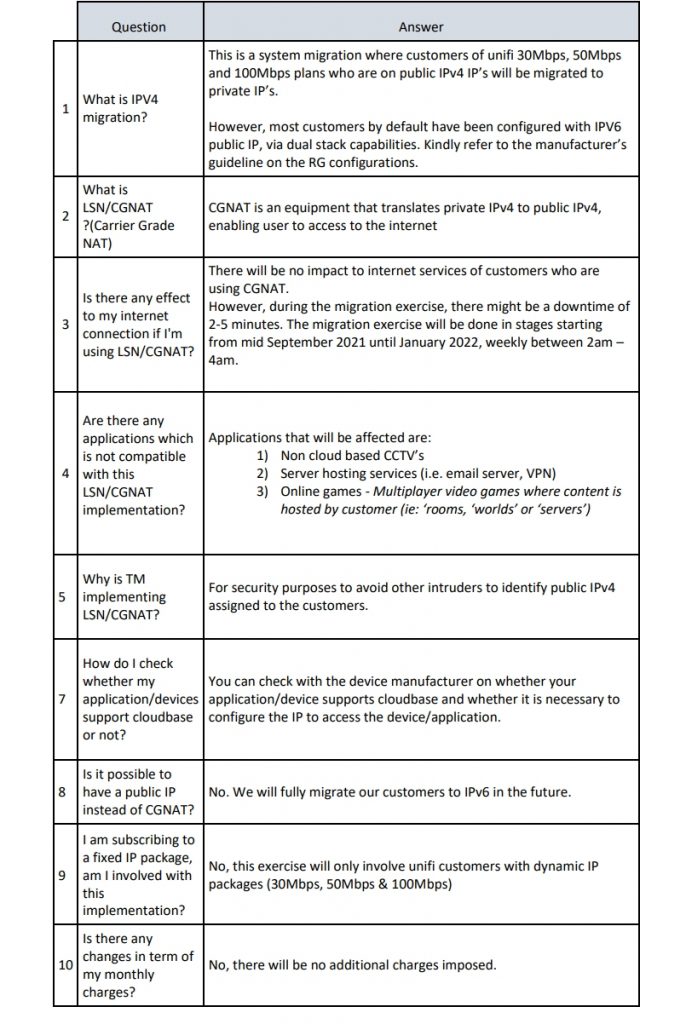
TM migrating all 30Mbps, 50Mbps and 100Mbps user to private ip. if ur 100m still public ip, its just temporary, soon they will migrate all to private ip.
based on the statement, it looks like migration will be done on Jan 2022. Maybe delayed, but not sure.
user posted image
https://www.thestar.com.my/business/busines...s-to-private-ip

spacelion
post Feb 17 2022, 12:43 PM

Ada Liu
******
Senior Member
1,690 posts

Joined: Mar 2009
From: Probation?
Attached Image

Hey who to report for this ... Seems like dial 100 also nothing ... Tried few times

So far connection is good but u know sooner or later will down
Hwoarang45
post Feb 17 2022, 12:45 PM

Hardcore Gamer
******
Senior Member
1,848 posts

Joined: Jan 2003
From: Boleh Land


QUOTE(Rainings @ Feb 17 2022, 12:43 PM)
TM migrating all 30Mbps, 50Mbps and 100Mbps user to private ip. if ur 100m still public ip, its just temporary, soon they will migrate all to private ip.
based on the statement, it looks like migration will be done on Jan 2022. Maybe delayed, but not sure.
user posted image
https://www.thestar.com.my/business/busines...s-to-private-ip
*
GG guess kena switch to other telco then... doh.gif
Rainings
post Feb 17 2022, 01:48 PM

Regular
******
Senior Member
1,101 posts

Joined: Jul 2008
QUOTE(Hwoarang45 @ Feb 17 2022, 12:45 PM)
GG guess kena switch to other telco then...  doh.gif
*
Which telco u going to switch? biggrin.gif , TIME, Maxis, Allo only provide private IP

PRSXFENG
post Feb 17 2022, 01:55 PM

Look at all my stars!!
*******
Senior Member
2,608 posts

Joined: Nov 2020


QUOTE(Rainings @ Feb 17 2022, 01:48 PM)
Which telco u going to switch? biggrin.gif , TIME, Maxis, Allo only provide private IP
*
Actually TIME provide public by default
Maxis does provide but you have to request it, otherwise private by default
Allo don't think they provide public
aniq8676
post Feb 17 2022, 01:55 PM

Regular
******
Senior Member
1,524 posts

Joined: Dec 2020
From: Perak


QUOTE(spacelion @ Feb 17 2022, 12:43 PM)
Attached Image

Hey who to report for this ... Seems like dial 100 also nothing ... Tried few times

So far connection is good but u know sooner or later will down
*
Livechat or go to a nearby TMpoint, need to include the DP box number. (e.g. PY C020 0015)

Need to know the DP number

This post has been edited by aniq8676: Feb 17 2022, 01:57 PM
YoungMan
post Feb 17 2022, 02:01 PM

Look at all my stars!!
*******
Senior Member
6,799 posts

Joined: Oct 2008
From: Kuala Lumpur


QUOTE(spacelion @ Feb 17 2022, 01:43 PM)
Attached Image

Hey who to report for this ... Seems like dial 100 also nothing ... Tried few times

So far connection is good but u know sooner or later will down
*
Maybe just call 100 and report your connection problem. When they send technician over, tell him to check on the box.

QUOTE(Hwoarang45 @ Feb 17 2022, 01:45 PM)
GG guess kena switch to other telco then...  doh.gif
*
Not necessary. You can subscribe to plan 300mbps and above and get public IP.

QUOTE(Rainings @ Feb 17 2022, 02:48 PM)
Which telco u going to switch? biggrin.gif , TIME, Maxis, Allo only provide private IP
*
Maxis can request public IP just by one call to CS. Switch lah while promo is available.
aniq8676
post Feb 17 2022, 02:04 PM

Regular
******
Senior Member
1,524 posts

Joined: Dec 2020
From: Perak


QUOTE(Hwoarang45 @ Feb 17 2022, 12:45 PM)
GG guess kena switch to other telco then...  doh.gif
*
Upgrade to a 300mbps plan and above or switch to another ISP.

If the area has TIME, proceed with TIME.
If not, the alternative is Maxis fibre, but need to request Public IP.

Celcom fibre, Digi fibre, Allo fibre does not provide a Public IP

Addition: Users of 30,50,100mbps plans who wish to apply for Public IP for certain reasons need to provide some strong evidence to support your application. Secondly, TM will send a few TM Experts to your premises to investigate some evidence

user posted image

This post has been edited by aniq8676: Feb 17 2022, 02:11 PM
YoungMan
post Feb 17 2022, 02:20 PM

Look at all my stars!!
*******
Senior Member
6,799 posts

Joined: Oct 2008
From: Kuala Lumpur


QUOTE(aniq8676 @ Feb 17 2022, 03:04 PM)
Upgrade to a 300mbps plan and above or switch to another ISP.

If the area has TIME, proceed with TIME.
If not, the alternative is Maxis fibre, but need to request Public IP.

Celcom fibre, Digi fibre, Allo fibre does not provide a Public IP

Addition: Users of 30,50,100mbps plans who wish to apply for Public IP for certain reasons need to provide some strong evidence to support your application. Secondly, TM will send a few TM Experts to your premises to investigate some evidence

user posted image
*
Celcom fibre also can request public IP.
haturaya
post Feb 17 2022, 02:25 PM

Look at all my stars!!
Group Icon
Elite
2,553 posts

Joined: Jan 2003
QUOTE(spacelion @ Feb 17 2022, 12:43 PM)
Attached Image

Hey who to report for this ... Seems like dial 100 also nothing ... Tried few times

So far connection is good but u know sooner or later will down
*
Ask your neighbours to report too. Whole neighbourhood will be effected whistling.gif
spacelion
post Feb 17 2022, 02:44 PM

Ada Liu
******
Senior Member
1,690 posts

Joined: Mar 2009
From: Probation?
QUOTE(aniq8676 @ Feb 17 2022, 01:55 PM)
Livechat or go to a nearby TMpoint, need to include the DP box number. (e.g. PY C020 0015)

Need to know the DP number
*
OK thanks that's good advice
tzxsean
post Feb 17 2022, 03:13 PM

Lonely Driver
*******
Senior Member
5,608 posts

Joined: Jan 2010


http://i.unifi.my/TNc

Just received this via sms but tbh I did not request to port over and my contract should have ended more than a year when they offer free upgrade
blibala
post Feb 17 2022, 04:18 PM

Regular
******
Senior Member
1,910 posts

Joined: Jan 2005
QUOTE(aniq8676 @ Feb 17 2022, 02:04 PM)
Upgrade to a 300mbps plan and above or switch to another ISP.

If the area has TIME, proceed with TIME.
If not, the alternative is Maxis fibre, but need to request Public IP.

Celcom fibre, Digi fibre, Allo fibre does not provide a Public IP

Addition: Users of 30,50,100mbps plans who wish to apply for Public IP for certain reasons need to provide some strong evidence to support your application. Secondly, TM will send a few TM Experts to your premises to investigate some evidence

user posted image
*
They wont send technician to check evedence. Just snap photo and email them

413 Pages « < 388 389 390 391 392 > » Top
Topic ClosedOptions
 

Change to:
| Lo-Fi Version
0.0255sec    0.23    6 queries    GZIP Disabled
Time is now: 6th December 2025 - 07:18 PM