Welcome Guest ( Log In | Register )

Bump Topic Topic Closed RSS Feed
413 Pages « < 149 150 151 152 153 > » Bottom

Outline · [ Standard ] · Linear+

 Official TM UniFi High Speed Broadband Thread V39, READ 1ST PAGE FOR RELEVANT WIFI INFO

views
     
evilhomura89
post Jun 4 2021, 11:28 AM

Look at all my stars!!
*******
Senior Member
5,886 posts

Joined: Jan 2003
From: BM


QUOTE(spreeeee @ Jun 4 2021, 10:32 AM)
actually how it could be better?
sry im noob..
*
The default router provided by TM is not exactly the best in its class
In a way that might or will become a bottleneck to your mesh network

By connecting deco directly to the TM modem (BTU), you are reducing the amount of unnecessary devices - save power, less chance of things going wrong and less headache trying to troubleshoot them and a tad better latency for your local network?
YoungMan
post Jun 4 2021, 11:46 AM

Look at all my stars!!
*******
Senior Member
6,799 posts

Joined: Oct 2008
From: Kuala Lumpur


QUOTE(ying20495 @ Jun 3 2021, 10:17 PM)
Thanks for your info, too many info, i am not sure what to edit on it.

so i just delete the IPTV and ticked on LAN4

It works
*
Yes that's correct.

QUOTE(JasonTheGreat @ Jun 3 2021, 11:45 PM)
Aiyah I missed the deal 300 for 139.....I am planning to upgrade my 100mbps for rm129. Please share if got good deal
*
Even then, you can't get the deal unless you are previous 300mb subs with bill increase to RM199. Switch to other competitor ISP then if you want cheaper 300mb plan, refer post above.
ray8426
post Jun 4 2021, 12:01 PM

Casual
***
Junior Member
334 posts

Joined: Jul 2011
QUOTE(spreeeee @ Jun 4 2021, 10:14 AM)
oo.. didn't know deco can replace directly the existing tm wifi router.. thought only serve as mesh.
means the deco itself can establish pppoe and there is configuration for it..
right?
*
Yes, this way will more stable and you can have some own configuration.

Remember select TM profile when setup.
ray8426
post Jun 4 2021, 12:09 PM

Casual
***
Junior Member
334 posts

Joined: Jul 2011
QUOTE(spreeeee @ Jun 4 2021, 10:32 AM)
actually how it could be better?
sry im noob..
*
some brand even already custom the firmware or rom for TM.....
Limited the configuration.....
hyakushiki84
post Jun 4 2021, 12:14 PM

New Member
*
Junior Member
33 posts

Joined: Nov 2005
From: Shah Alam


Hi guys,

My unifi is facing internet disturbance for this past few days, at first thought this is just a temporary setback
The issue is it tends to disconnect & reconnect at random times, could be in few mins or after an hour and never maintained a perfect connection after an hour max
While the internet was disconnected I login to my router and I get this (refer below), but before I get to modify anything the internet reconnects again
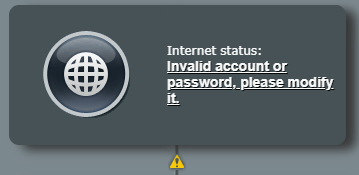
user posted image

My suspect is my router could be the problem so I switched to a spare/older router to test my theory and the exact same problem happens (both my routers are Asus brand)
I contacted unifi hotline via live chat & explained my issue & they assisted me by resetting/restarting/refreshing my unifi line from their end and instructed me to switch off my router & modem for 15 seconds
According to them this should fix the problem but nooooo, it's still happening even right now

I have 2 internet line in my home, Unifi & Maxis Fibre (via Astro IPTV)
Maxis line has no issue at all and it's currently serving as my temporary/backup line, it should be suffice for regular usage, video call/streaming but not for online gaming rclxub.gif

So my other theory, is this because earlier this week people began to WFH and the unifi in my area is congested? Since this problem began in between monday-tuesday this week
Or could there be other factor?

Thx

PRSXFENG
post Jun 4 2021, 12:58 PM

Look at all my stars!!
*******
Senior Member
2,608 posts

Joined: Nov 2020


Maybe a problem with the modem?
JasonTheGreat
post Jun 4 2021, 01:10 PM

Enthusiast
*****
Junior Member
832 posts

Joined: Jul 2016
QUOTE(YoungMan @ Jun 4 2021, 11:46 AM)
Yes that's correct.
Even then, you can't get the deal unless you are previous 300mb subs with bill increase to RM199. Switch to other competitor ISP then if you want cheaper 300mb plan, refer post above.
*
Missed the time when I get free upgrade to 500mbps for rm189 only in 2018. But later I downgrade it back to 100Mbps for Rm129. That was before I need to Work from home heavily. Seemed now is even more expensive for 300mbps

This post has been edited by JasonTheGreat: Jun 4 2021, 01:12 PM


Attached thumbnail(s)
Attached Image
spreeeee
post Jun 4 2021, 01:52 PM

♠ . ♥ . ♣ . ♦
*******
Senior Member
3,812 posts

Joined: Apr 2009
From: West Malaysia

QUOTE(evilhomura89 @ Jun 4 2021, 11:28 AM)
The default router provided by TM is not exactly the best in its class
In a way that might or will become a bottleneck to your mesh network

By connecting deco directly to the TM modem (BTU), you are reducing the amount of unnecessary devices - save power, less chance of things going wrong and less headache trying to troubleshoot them and a tad better latency for your local network?
*
QUOTE(ray8426 @ Jun 4 2021, 12:09 PM)
some brand even already custom the firmware or rom for TM.....
Limited the configuration.....
*
ya.. knowing if use tm default devices, there could be some limited configuration.
but wondering is the deco dual internal antenna is better than the tm wifi router (fiberhome sr120a) with 4 external external?

This post has been edited by spreeeee: Jun 4 2021, 01:52 PM
hyakushiki84
post Jun 4 2021, 01:59 PM

New Member
*
Junior Member
33 posts

Joined: Nov 2005
From: Shah Alam


QUOTE(PRSXFENG @ Jun 4 2021, 12:58 PM)
Maybe a problem with the modem?
*
I switched off the modem and back on as instructed by the unifi careline but still nothing
Which I don't think it's the modem because this modem is shared with 2 internet fibre line that is Maxis & Unifi and the Maxis line has no problem at all

confused.gif
WaNaWe900
post Jun 4 2021, 02:25 PM

చąហ ąచҽ™
******
Senior Member
1,397 posts

Joined: Feb 2012
From: sOuL SoCiETY.. iSKaNDaRPuTeRi.. JB.. JDT


QUOTE(rebecca_choo @ Jun 1 2021, 10:49 PM)
I remember last time someone made a page where we could check the internet connectivity and availability by inputting our jalan, unit number and etc. and it will show in detail the type of line, max speed and all those information

is the page still active? I saw some guys pulling the fibre cables at the back of my house and am wondering if fibre is already activated
*
Some contractors had done fiberized in my apartment said under JENDELA in Feb/Mar 2021... so had check UniFi coverage and saw can up to 800Mbps now.. but when I tried to upgrade they said not yet available rclxub.gif

Is there something missing?

user posted image
aniq8676
post Jun 4 2021, 02:34 PM

Regular
******
Senior Member
1,524 posts

Joined: Dec 2020
From: Perak


QUOTE(WaNaWe900 @ Jun 4 2021, 02:25 PM)
Some contractors had done fiberized in my apartment said under JENDELA in Feb/Mar 2021... so had check UniFi coverage and saw can up to 800Mbps now.. but when I tried to upgrade they said not yet available  rclxub.gif

Is there something missing?

user posted image
*
Meaning that the fiber service in the apartment has not been activated yet.
You can try to register through the unifi portal or any Unifi agent.
ray8426
post Jun 4 2021, 02:34 PM

Casual
***
Junior Member
334 posts

Joined: Jul 2011
QUOTE(spreeeee @ Jun 4 2021, 01:52 PM)
ya.. knowing if use tm default devices, there could be some limited configuration.
but wondering is the deco dual internal antenna is better than the tm wifi router (fiberhome sr120a) with 4 external external?
*
FiberHome with 4 external antenna, but single location.
Deco with Dual antenna but multiple location in 1 house.

For myself, i use Deco M5 in 1st.
Then change to Deco X20, Deco X20 much far can go and stable. laugh.gif

Deco X20 - Dual Antenna
Deco M5 - 4 antenna
spreeeee
post Jun 4 2021, 03:21 PM

♠ . ♥ . ♣ . ♦
*******
Senior Member
3,812 posts

Joined: Apr 2009
From: West Malaysia

QUOTE(ray8426 @ Jun 4 2021, 02:34 PM)
FiberHome with 4 external antenna, but single location.
Deco with Dual antenna but multiple location in 1 house.

For myself, i use Deco M5 in 1st.
Then change to Deco X20, Deco X20 much far can go and stable. laugh.gif

Deco X20 - Dual Antenna
Deco M5 - 4 antenna
*
both m5 and x20, over my budget.. furthermore im only on 30mbps unifi fiber.. i think m40 jz fine for me (i guess)..
and in dilemma whether to maintain fiberhome or replace fiberhome with m40.. not very sure the configuration.

This post has been edited by spreeeee: Jun 4 2021, 03:31 PM
ray8426
post Jun 4 2021, 03:39 PM

Casual
***
Junior Member
334 posts

Joined: Jul 2011
QUOTE(spreeeee @ Jun 4 2021, 03:21 PM)
both m5 and x20, over my budget.. furthermore im only on 30mbps unifi fiber.. i think m40 jz fine for me (i guess)..
and in dilemma whether to maintain fiberhome or replace fiberhome with m40.. not very sure the configuration.
*
I not suggest you Deco X20 or Deco M5.
That why asked you early how many mbps you use before this.

I am telling you the different between 4 antenna and dual antenna. doh.gif

This post has been edited by ray8426: Jun 4 2021, 03:41 PM
spreeeee
post Jun 4 2021, 03:51 PM

♠ . ♥ . ♣ . ♦
*******
Senior Member
3,812 posts

Joined: Apr 2009
From: West Malaysia

QUOTE(ray8426 @ Jun 4 2021, 03:39 PM)
I not suggest you Deco X20 or Deco M5.
That why asked you early how many mbps you use before this.

I am telling you the different between 4 antenna and dual antenna. doh.gif
*
okok.. thanks.. i wish i can afford better/highend one.. rclxm9.gif
ray8426
post Jun 4 2021, 03:53 PM

Casual
***
Junior Member
334 posts

Joined: Jul 2011
QUOTE(spreeeee @ Jun 4 2021, 03:51 PM)
okok.. thanks.. i wish i can afford better/highend one..  rclxm9.gif
*
No need.... as we can afford is most important.

Reason i use Deco X20 + M5 (2pcs) because my house size and a lot wall blocking the signal. laugh.gif

Both i buy less than RM300 when sale. rclxm9.gif

This post has been edited by ray8426: Jun 4 2021, 04:12 PM
neekun
post Jun 4 2021, 06:35 PM

I'm a Mac
*******
Senior Member
2,570 posts

Joined: Jun 2006


QUOTE(hyakushiki84 @ Jun 4 2021, 12:14 PM)
Hi guys,

My unifi is facing internet disturbance for this past few days, at first thought this is just a temporary setback
The issue is it tends to disconnect & reconnect at random times, could be in few mins or after an hour and never maintained a perfect connection after an hour max
While the internet was disconnected I login to my router and I get this (refer below), but before I get to modify anything the internet reconnects again

user posted image

My suspect is my router could be the problem so I switched to a spare/older router to test my theory and the exact same problem happens (both my routers are Asus brand)
I contacted unifi hotline via live chat & explained my issue & they assisted me by resetting/restarting/refreshing my unifi line from their end and instructed me to switch off my router & modem for 15 seconds
According to them this should fix the problem but nooooo, it's still happening even right now

I have 2 internet line in my home, Unifi & Maxis Fibre (via Astro IPTV)
Maxis line has no issue at all and it's currently serving as my temporary/backup line, it should be suffice for regular usage, video call/streaming but not for online gaming rclxub.gif

So my other theory, is this because earlier this week people began to WFH and the unifi in my area is congested? Since this problem began in between monday-tuesday this week
Or could there be other factor?

Thx
*
Try verify with telekom your Unifi user Id and password. Make sure it’s correctly saved in router. I guess if still Ng most likely is your area is congested

Lately at night also my connection especially to Apple Music is intermittent. I’m on 800mbps.
nicholas5141
post Jun 4 2021, 10:17 PM

Getting Started
**
Junior Member
72 posts

Joined: Feb 2007
QUOTE(hyakushiki84 @ Jun 4 2021, 12:14 PM)
Hi guys,

My unifi is facing internet disturbance for this past few days, at first thought this is just a temporary setback
The issue is it tends to disconnect & reconnect at random times, could be in few mins or after an hour and never maintained a perfect connection after an hour max
While the internet was disconnected I login to my router and I get this (refer below), but before I get to modify anything the internet reconnects again

user posted image

My suspect is my router could be the problem so I switched to a spare/older router to test my theory and the exact same problem happens (both my routers are Asus brand)
I contacted unifi hotline via live chat & explained my issue & they assisted me by resetting/restarting/refreshing my unifi line from their end and instructed me to switch off my router & modem for 15 seconds
According to them this should fix the problem but nooooo, it's still happening even right now

I have 2 internet line in my home, Unifi & Maxis Fibre (via Astro IPTV)
Maxis line has no issue at all and it's currently serving as my temporary/backup line, it should be suffice for regular usage, video call/streaming but not for online gaming rclxub.gif

So my other theory, is this because earlier this week people began to WFH and the unifi in my area is congested? Since this problem began in between monday-tuesday this week
Or could there be other factor?

Thx
*
Previously I had the same issue, can you check from system log in ASUS router setting page isit keep restarting?
JasonTheGreat
post Jun 5 2021, 11:45 AM

Enthusiast
*****
Junior Member
832 posts

Joined: Jul 2016
Hi does anyone know if we can revert back to previous package?

Now I’m using YEP2019, 100Mbps for Rm129.
Back in 2018 I was using free upgrade 500mbps for RM189. Do TM or Unifi allow to revert?
go626201
post Jun 5 2021, 12:07 PM

Regular
******
Senior Member
1,882 posts

Joined: Sep 2017
QUOTE(JasonTheGreat @ Jun 5 2021, 11:45 AM)
Hi does anyone know if we can revert back to previous package?

Now I’m using YEP2019, 100Mbps for Rm129.
Back in 2018 I was using free upgrade 500mbps for RM189. Do TM or Unifi allow to revert?
*
Not possible,if u changed the plan,u cant revert to the previous promo plan anymore.
U can only wait for the next similar promo and change to it.

413 Pages « < 149 150 151 152 153 > » Top
Topic ClosedOptions
 

Change to:
| Lo-Fi Version
0.0858sec    0.40    6 queries    GZIP Disabled
Time is now: 6th December 2025 - 12:49 PM