QUOTE(jonsalam @ Mar 5 2021, 12:14 PM)
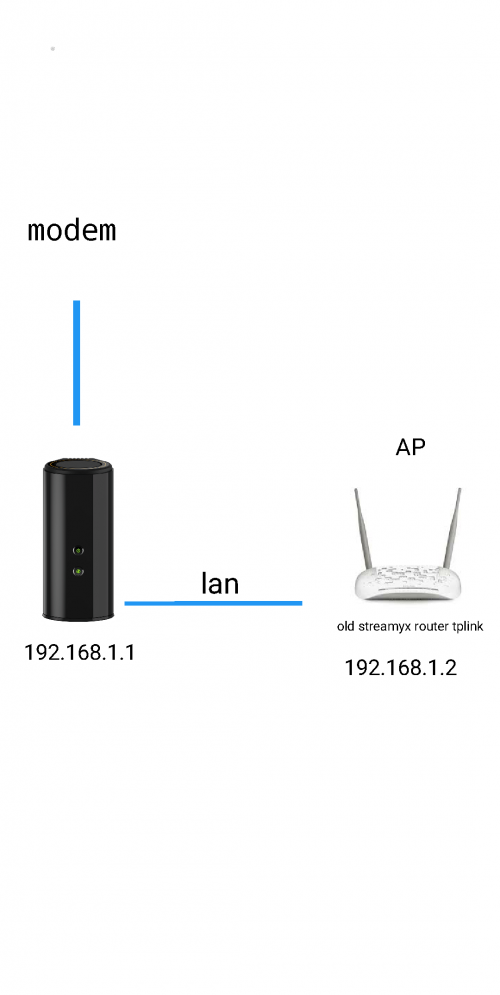
This is my current setup. I plan to replace my AP. Since DIR-868L hard to find can i use with any asus router or asus router with aimesh featured?

DIR-868L to ASUS RT-AC66U with AiMesh, Latest DIR-868L Migration Options
|
|
 Mar 5 2021, 01:53 PM Mar 5 2021, 01:53 PM
|
 
Senior Member
529 posts Joined: Aug 2005 
|
QUOTE(jonsalam @ Mar 5 2021, 12:14 PM) This is my current setup. I plan to replace my AP. Since DIR-868L hard to find can i use with any asus router or asus router with aimesh featured? |
|
|
|
|
|
Mar 5 2021, 03:15 PM
|

Probation
11 posts Joined: Feb 2021
|
QUOTE(gary_cheah85 @ Mar 5 2021, 01:53 PM) Just make sure the AiMesh router and AiMesh node is running on latest firmware. AiMesh ver2.0 on latest firmware for better compatibility So they need to be features with Aimesh right? Almost buy used RT-AC55UHP. Thanks |
|
|
Mar 5 2021, 06:56 PM
|

Junior Member
72 posts Joined: May 2014 
|
QUOTE(jonsalam @ Mar 5 2021, 12:14 PM) This is my current setup. I plan to replace my AP. Since DIR-868L hard to find can i use with any asus router or asus router with aimesh featured? I have a suggestion to make. Considering you already have a DIR-868L migrated to ASUSwrt, why not invest in new or used ASUS router? Use it as AiMesh router and DIR-868L as AiMesh node. ASUS RT-AC55X AX1800. Entry into WiFi 6. Cost RM329.  ASUS RT-AC68U RM488. 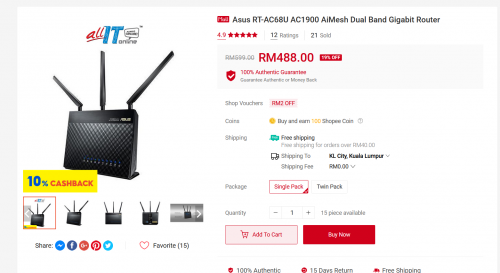 Yes. I must admit both of them a bit on expensive side. New ASUS routers are not cheap! Alternatively, you can try Tenda AC23 or Dlink DIR-2150 as repeater. You get get either of them less than RM170 in Shopee. Also you can use AC1200 class routers such as Tenda AC6 if your budget is around RM100. 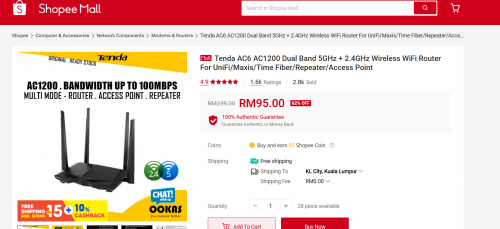 Any of them should be better than your old Streamyx repeater. Which one? Subject to your budget.  . . If you managed to get a used ASUS router in good condition (with AiMesh), perhaps better than the above suggestions. Regards P/S: My apologies if I offended anyone, especially the Seniors and Sifus here. I just wanted to help a fellow member to see different options available. This post has been edited by misk94: Mar 6 2021, 12:13 AM |
|
|
Mar 6 2021, 04:14 PM
|
|
Junior Member
72 posts Joined: May 2014
|
DIR-868L with Asuswrt-Merlin firmware update:
Through the new firmware, I discovered my AiMesh Router is running a bit hot. CPU is 80 C. 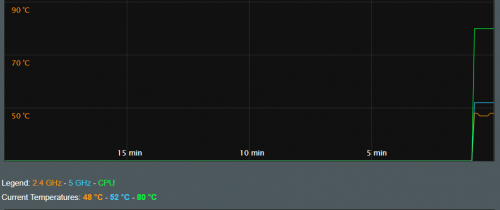 48 - 52 - 80 C After I installed a USB cooling fan the temperature dropped to below 70 C. Also, the 2.4G and 5G WiFi radios temperatures dropped too. 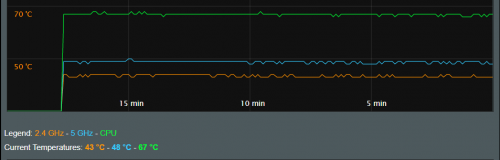 43 - 48 - 67 C Regards, Updated 6 March 2021. This post has been edited by misk94: Mar 6 2021, 04:21 PM |
|
|
Mar 6 2021, 05:23 PM
|

Senior Member
1,372 posts Joined: Dec 2007 
|
QUOTE(misk94 @ Mar 6 2021, 04:14 PM) DIR-868L with Asuswrt-Merlin firmware update: Wow yours is cool!! I've seen mine going up to 95C.Through the new firmware, I discovered my AiMesh Router is running a bit hot. CPU is 80 C. 48 - 52 - 80 C After I installed a USB cooling fan the temperature dropped to below 70 C. Also, the 2.4G and 5G WiFi radios temperatures dropped too. 43 - 48 - 67 C Regards, Updated 6 March 2021. Can you share some photos of your cooling fan design? |
|
|
Mar 6 2021, 07:00 PM
|
|
Junior Member
72 posts Joined: May 2014
|
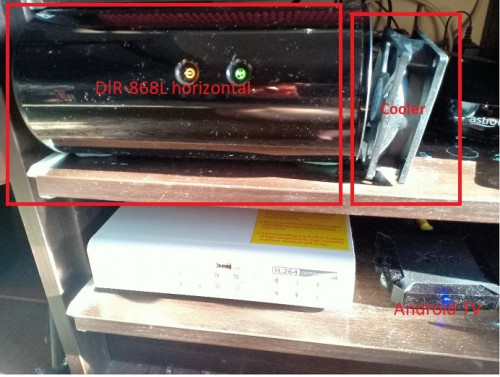
QUOTE(fisherman10 @ Mar 6 2021, 05:23 PM) Wow yours is cool!! I've seen mine going up to 95C. Thank you fisherman10.Can you share some photos of your cooling fan design? Actually, I did not expect the temperature to go that low because I am using low tech and cheap USB cooling fan. Cost less than RM10. I don't know how long it will last but at least not expensive to replace after a few months. After whole night and day running the temperature remains steady. Changed only by 1 or 2 C in the afternoon when it was hot. The temperature went back down later in the day. I think you guys going to laugh when you see my cooler setup. . The setup not pretty but does the job well. Cooler can be secured using Blu-Tak or Tack-It. No need screws. 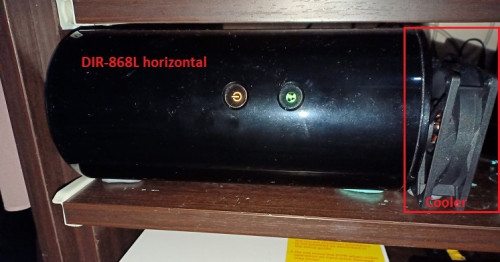 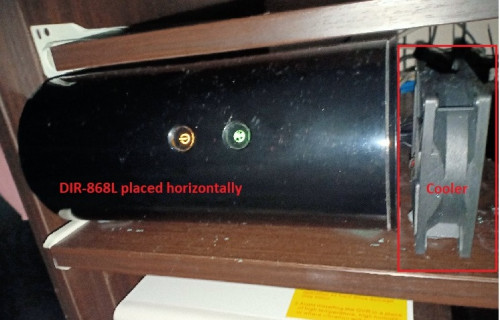 Since my DIR-868L is placed horizontally to fit the cupboard, I need to put the cooler at the bottom end of the router where the label is. I bought the cooler from Shopee. Size 80x80x25 mm USB. The cooler is surprisingly quite. https://shopee.com.my/DC-5V-USB-12V-2-Pin-4...1591.1796940602 I think this model is better and safer because have cover on both sides. I missed this one when I made the purchase earlier. I will buy this model later when my current cooler going to fail. https://shopee.com.my/%E3%80%90BEST%E3%80%9...1591.1448311562 For those having their DIR-868L placed vertically, I think the following standing model will serve you well. Just put the cooler at the bottom of the router. The 8 cm or 9 cm model should be OK. https://shopee.com.my/USB-Router-Fan-TV-Box...1901.5158026107 Stay cool guys.  Regards, This post has been edited by misk94: Mar 7 2021, 07:10 PM |
|
|
|
|
|
Mar 6 2021, 08:37 PM
|
|
Senior Member
1,372 posts Joined: Dec 2007
|
QUOTE(misk94 @ Mar 6 2021, 07:00 PM) Thank you fisherman10. Is the 5V usb fan from shopee spinning fast? Is 5V capable of spinning full speed?Actually, I did not expect the temperature to go that low because I am using low tech and cheap usb cooling fan. Cost less than RM10. I don't know how long it will last but at that price, replacing the cooler after a few months is OK. After whole night and whole day running the temperature is steady. Changed only by 1 or 2 C in the afternoon when it is hot. Now the temperature went back down again. I think you guys going to laugh when you see my cooler setup. . The setup not pretty but works well. » Click to show Spoiler - click again to hide... « Since my DIR-868L is placed horizontally to fit the cupboard, I need to put the cooler at the bottom end of the router where the label is. I bought the cooler from Shopee. Size 80x80x25 mm USB. The cooler is surprisingly quite. https://shopee.com.my/DC-5V-USB-12V-2-Pin-4...1591.1796940602 Maybe this one better because have cover for both sides. I missed this one when I made the purchase earlier. Maybe I buy this model when after my current cooler failed. https://shopee.com.my/%E3%80%90BEST%E3%80%9...1591.1448311562 For those having their DIR-868L placed vertically, I think the following model will serve you well. Just put the cooler at the bottom of the router. The 8 cm or 9 cm model should be OK. https://shopee.com.my/USB-Router-Fan-TV-Box...1901.5158026107 Stay cool guys. Regards, So far I joined 80mm PC fan to USB cable. 12V PC fan powered with 5V USB from usb port. It spins but slow. |
|
|
Mar 6 2021, 10:20 PM
|
|
Junior Member
72 posts Joined: May 2014
|
Yes. The 5V USB fan spins fast.
Same size 80 mm fan. The seller claimed 2000 rpm. I could feel the cold air when I put my finger near the gap between router and fan. I think that's why I am getting good cooling from the fan. BTW. I replaced posts with better pictures just now. This post has been edited by misk94: Mar 25 2021, 12:06 PM |
|
|
Mar 6 2021, 11:03 PM
|
|
Senior Member
1,372 posts Joined: Dec 2007
|
QUOTE(misk94 @ Mar 6 2021, 10:20 PM) Yes. The 5V USB fan spin fast. ThanksSame size 80 mm fan. The seller claimed 2000 - 3000 rpm. I could feel the cold air when I put my finger near the gap between router and fan. I think that's why I am getting good cooling from the fan. BTW. I replaced posts with better pictures just now. |
|
|
Mar 7 2021, 05:10 PM
|
|
Probation
11 posts Joined: Feb 2021
|
QUOTE(misk94 @ Mar 5 2021, 06:56 PM) Dear jonsalam, Exactly. That what I'm trying to do. And you just answer my question with edited post. Tq. Sorry for late reply due to acc probation. 😂I have a suggestion to make. Considering you already have a DIR-868L migrated to ASUSwrt, why not invest in new or used ASUS router? Use it as AiMesh router and DIR-868L as AiMesh node. ASUS RT-AC55X AX1800. Entry into WiFi 6. Cost RM329. ASUS RT-AC68U RM488. Yes. I must admit both of them a bit on expensive side. New ASUS routers are not cheap! Alternatively, you can try Tenda AC23 or Dlink DIR-2150 as repeater. You get get either of them less than RM170 in Shopee. Also you can use AC1200 class routers such as Tenda AC6 if your budget is around RM100. Any of them should be better than your old Streamyx repeater. Which one? Subject to your budget. . If you managed to get a used ASUS router in good condition (with AiMesh), perhaps better than the above suggestions. Regards P/S: My apologies if I offended anyone, especially the Seniors and Sifus here. I just wanted to help a fellow member to see different options available. |
|
|
Mar 7 2021, 08:54 PM
|

Junior Member
279 posts Joined: Aug 2009 From: KL
|
QUOTE(misk94 @ Mar 6 2021, 04:14 PM) DIR-868L with Asuswrt-Merlin firmware update: how to check temperature?Through the new firmware, I discovered my AiMesh Router is running a bit hot. CPU is 80 C. 48 - 52 - 80 C After I installed a USB cooling fan the temperature dropped to below 70 C. Also, the 2.4G and 5G WiFi radios temperatures dropped too. 43 - 48 - 67 C Regards, Updated 6 March 2021. |
|
|
Mar 7 2021, 09:04 PM
|
|
Probation
11 posts Joined: Feb 2021
|
QUOTE(hdd-corrupted @ Mar 7 2021, 08:54 PM) how to check temperature? Scroll up. He already state from previous post. Temp reading under administration menu. |
|
|
Mar 9 2021, 10:37 PM
|
|
Junior Member
72 posts Joined: May 2014
|
DIR-868L with Asuswrt-Merlin firmware update:
Improvements on WiFi connection performance between AiMesh router and node after installed USB cooler on both of them. 1. Before only two bars. Now three bars. This the same so far. 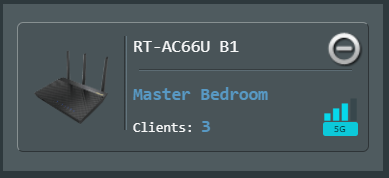 2. Before connection quality rating is Good or OK. Now it is Great. Same here. 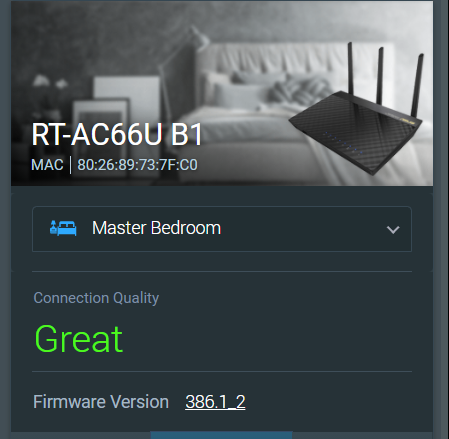 3. Physical connection rate improved. Before I was getting 234 - 351 Mbps. This changes over time. Sometimes 351 Mbps, 468 Mbps and higher. Still an improvement than without any cooling. 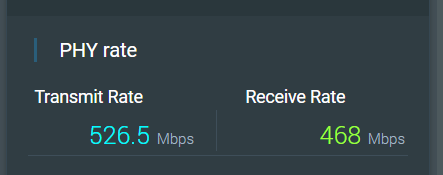 So, adding the USB coolers does improve WiFi performance too. Maybe the 2.4G and 5G radios are operating better because of the cooling. 4. OKLA Speedtest from upstairs PC connected via LAN cable to AiMesh node. Before downloads getting 90 plus Mbps. Now doubled.  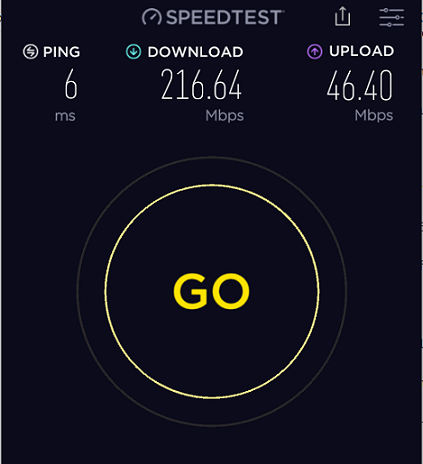 This make sense as AiMesh node is still a repeater. DL speed is usually 40-60% of PHY connection rate because of repeater mode. However, UL speed did not reduced by much. FYI, I am having a 300Mbps DL/50 Mbps DL fiber connection to the modem. We are using Maxis because my wife likes Astro. Astro is giving a rebate when bundle fiber internet and Astro together. AiMesh router is connected to the modem. I am getting 290+ Mbps/46+ Mbps from the AiMesh router when tested with OKLA Speedtest on my phone. 5. Recently, I am getting random disconnection from the AiMesh node to the AiMesh router. My wife told me this when she was using her computer. The node will reconnect again after a few minutes. There is no problem with the AiMesh router. I recalled having this problem when using DLink firmware last time at the repeater node too. I did not recalled having this with the ASUS RT-AC66U B1 firmware. Maybe I did not noticed because I was running this firmware only for a few weeks before I moved to Asuswrt-Merlin firmware. Anyone having similar random disconnections from the AiMesh node? Just wondering whether it is a hardware thing for DLink DIR-868L router to behave this way? It seems that changing the firmware did not resolve the issue. Other than that, I am quite satisfied with the AiMesh system in my home. Performing better and more stable when compared to DLink's factory firmware. I think gary_cheah85 is right in saying that Asuswrt-Merlin firmware is quite solid and stable. So far so good. Regards, Updated 14 March 2021 This post has been edited by misk94: Mar 14 2021, 08:27 PM |
|
|
|
|
|
Mar 16 2021, 03:03 PM
|
|
Junior Member
72 posts Joined: May 2014
|
Latest ASUSwrt firmware for RT-AC66U B1
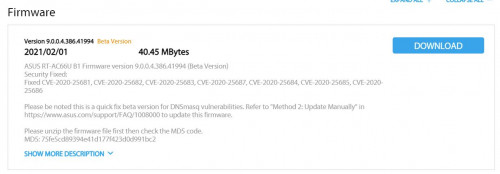 https://www.asus.com/us/Networking-IoT-Serv.../HelpDesk_BIOS/ Latest ASUSwrt-Merlin firmware for RT-AC66U B1 or RT-AC68U  https://sourceforge.net/projects/asuswrt-me...-AC68U/Release/ Updated 16 March 2021 This post has been edited by misk94: Mar 16 2021, 03:11 PM |
|
|
Mar 20 2021, 11:18 AM
Show posts by this member only | IPv6 | Post
#55
|

Junior Member
45 posts Joined: Jun 2011
|
QUOTE(jonsalam @ Mar 4 2021, 06:40 AM) Same situation here and i did some digging and found the solution.2.4GHz wifi Channel bandwidth 20MHz and Control Channel 6. If not working try change to channel 1 or 11 depends on wifi interference around you. QUOTE(misk94 @ Mar 4 2021, 10:22 AM) Yes. Correct recommendations. Is there any improvement on 2.4G speed? any speedtest on sole 2.4G main router. I followed both thread in lowyat and hwz.sg, but hesitate a bit since I only own 1 unit of DIR868L 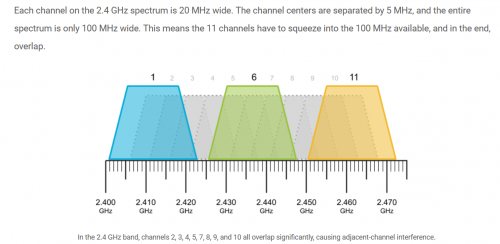 Refer to the following link https://www.metageek.com/training/resources...els-1-6-11.html Regards  |
|
|
Mar 21 2021, 07:39 PM
|
|
Junior Member
72 posts Joined: May 2014
|
Dear geep. Current interests are 5 GHz (WiFi 5) and the latest WiFi 6. 2.4 GHz is legacy. Actually good for distance but not speed in comparison to WiFi 5 and WiFi 6. Of course you need the proper router and client side to support WiFi 5 and WiFi 6. Nevertheless, 2.4 GHz still offers reasonable performance for daily use. I think DIR-868L is giving comparable 2.4 GHz WiFi performance to other routers. The Asuswrt-Merlin firmware may give a bit more performance based on experience from performance at 5 GHz WiFi. And the cooling does help too. Keep the radios at top performance. Sorry could not be much help on this. Regards, This post has been edited by misk94: Mar 21 2021, 07:39 PM geep liked this post
|
|
|
Mar 21 2021, 09:32 PM
Show posts by this member only | IPv6 | Post
#57
|
|
Junior Member
45 posts Joined: Jun 2011
|
QUOTE(misk94 @ Mar 21 2021, 07:39 PM) Dear geep. Thanks for the head up. I will surely try this 1 day cuz im planning to buy another Aimesh router in the future.Current interests are 5 GHz (WiFi 5) and the latest WiFi 6. 2.4 GHz is legacy. Actually good for distance but not speed in comparison to WiFi 5 and WiFi 6. Of course you need the proper router and client side to support WiFi 5 and WiFi 6. Nevertheless, 2.4 GHz still offers reasonable performance for daily use. I think DIR-868L is giving comparable 2.4 GHz WiFi performance to other routers. The Asuswrt-Merlin firmware may give a bit more performance based on experience from performance at 5 GHz WiFi. And the cooling does help too. Keep the radios at top performance. Sorry could not be much help on this. Regards, For now, 2.4G still my concern cuz i still have some old device like ipcam which rely on it. Anyhow thanks for the guide, will surely save more $$$$$  |
|
|
Mar 21 2021, 09:37 PM
|
|
Senior Member
1,372 posts Joined: Dec 2007
|
QUOTE(geep @ Mar 21 2021, 09:32 PM) Thanks for the head up. I will surely try this 1 day cuz im planning to buy another Aimesh router in the future. 2.4G working fine for me with 2 units DIR-868L running latest Asus Merlin 386.1_2 with aimesh.For now, 2.4G still my concern cuz i still have some old device like ipcam which rely on it. Anyhow thanks for the guide, will surely save more $$$$$ geep liked this post
|
|
|
Mar 23 2021, 11:05 PM
|
|
Junior Member
72 posts Joined: May 2014
|
Dear members, For your information, I am trying out an interesting and useful feature of Asuswrt-Merlin firmware the Roaming Assistant. The idea is that your devices will be connected to AiMesh router or node transparently when you move around in your home. You can access the Roaming Assistant by clicking Wireless menu under Advanced Settings. 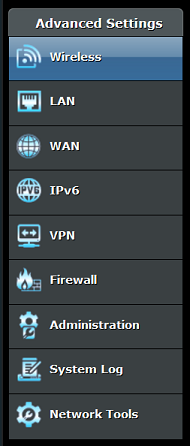 Next click on the Professional tab.  Scroll down until you see Roaming Assistant. It should be Enabled by default. Enable it, if it is not. 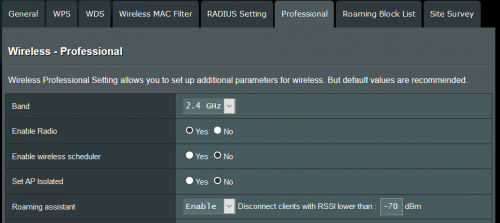 You should check the settings for 2.4GHz and 5GHz. By default the value is set at -70 dB for both.  I found that the default -70 dB setting is not suitable in a home environment, at least my home  . .Currently, I am using -50 dB for 2.4 GHz and -55 dB for 5 GHz. I selected the values after checking the 2.4 GHz and 5 GHz WiFi strengths using a WiFi Analyser app in my phone. An example is shown below. The values are not from my home. 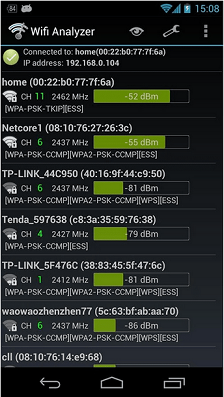 In the above example, if you look at first entry, home router reading is -52dB. So you need to put -55 dB to replace the -70 dB default value. Please do not put less than -52 dB such as -50 dB or -45 dB. Link to some good WiFi analyser Android apps https://www.netspotapp.com/wifi-analyzer-apps-android.html Please use the app to get good values suitable for your home. Definitely it should be better than the default -70 dB. A good range to consider are from -40 to -60 dB. Please do not use very low values else you may have trouble connecting to your WiFi. I think this is important if you have other devices using WiFi such as CCTV, smart devices, etc which operate at 2.4 GHz. In such cases, you should reduce dB setting for 2.4GHz by increments of -5dB and see what happens until you reach a good value for your home. Distance of your AiMesh router and node from each other could be use as a guide to choose good dB values. You want such that when you move from the router to the node, your WiFi will be changed by the Roaming Assistant smoothly. So a bit of trial and error in finding the right dB values for your home. P/S: Good news. This morning my phone could roam successfully when I moved from second floor to ground floor. The roaming worked better now Regards, Updated 24 March 2021. This post has been edited by misk94: Mar 25 2021, 12:04 PM geep liked this post
|
|
|
Mar 25 2021, 04:34 PM
Show posts by this member only | IPv6 | Post
#60
|
|
Junior Member
45 posts Joined: Jun 2011
|
Thank you guys, so I finally made my mind and flashed the modded CFE and Asus/Merlin firmware on my DIR-868L. Its working fine and really stable, but then the low throughput speed on 2.4G is still there. Its minor issue TBH because 30mbps on lecacy devices is still reliable with no hiccup. Since im on non-Aimesh/single router setup, I also try Tomato firmware and the good news is the 2.4G speed on Tomato is much better, roughly I can get 60-70mbps on it. Also I use the full features AIO .trx images, the CFE seems solved the issue with 32kb NVRAM limit. Flashed Merlin straight from Asus CFE Bootloader 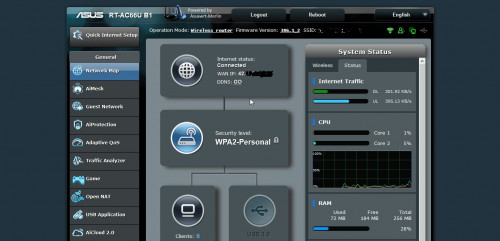 Flashed Freshtomato (R6400 AIO image) with Asus Firmware Restoration Tool 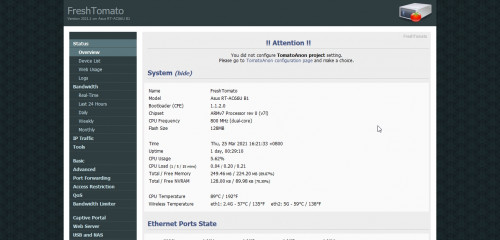 misk94 liked this post
|
| Change to: |  0.1948sec 0.1948sec
 0.35 0.35
 6 queries 6 queries
 GZIP Disabled GZIP Disabled
Time is now: 15th December 2025 - 08:03 PM |
 Quote
Quote