Welcome Guest ( Log In | Register )

Outline · [ Standard ] · Linear+

 DIR-868L to ASUS RT-AC66U with AiMesh, Latest DIR-868L Migration Options

views
     
geep
post Mar 20 2021, 11:18 AM

New Member
*
Junior Member
45 posts

Joined: Jun 2011
QUOTE(jonsalam @ Mar 4 2021, 06:40 AM)
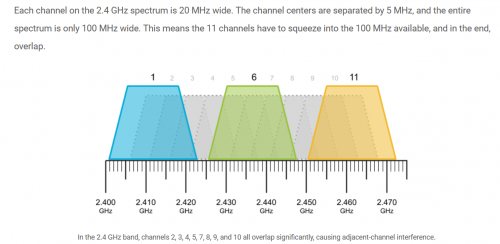
Same situation here and i did some digging and found the solution.2.4GHz wifi Channel bandwidth 20MHz and Control Channel 6. If not working try change to channel 1 or 11 depends on wifi interference around you.
*
QUOTE(misk94 @ Mar 4 2021, 10:22 AM)
Yes. Correct recommendations.
user posted image

Refer to the following link https://www.metageek.com/training/resources...els-1-6-11.html

Regards
*
Is there any improvement on 2.4G speed? any speedtest on sole 2.4G main router. I followed both thread in lowyat and hwz.sg, but hesitate a bit since I only own 1 unit of DIR868L blush.gif
geep
post Mar 21 2021, 09:32 PM

New Member
*
Junior Member
45 posts

Joined: Jun 2011
QUOTE(misk94 @ Mar 21 2021, 07:39 PM)
Dear geep.

Current interests are 5 GHz (WiFi 5) and the latest WiFi 6.

2.4 GHz is legacy. Actually good for distance but not speed in comparison to WiFi 5 and WiFi 6.

Of course you need the proper router and client side to support WiFi 5 and WiFi 6.

Nevertheless, 2.4 GHz still offers reasonable performance for daily use.

I think DIR-868L is giving comparable 2.4 GHz WiFi performance to other routers.

The Asuswrt-Merlin firmware may give a bit more performance based on experience from performance at 5 GHz WiFi.

And the cooling does help too. Keep the radios at top performance.

Sorry could not be much help on this.

Regards,
*
Thanks for the head up. I will surely try this 1 day cuz im planning to buy another Aimesh router in the future.
For now, 2.4G still my concern cuz i still have some old device like ipcam which rely on it.
Anyhow thanks for the guide, will surely save more $$$$$ thumbup.gif
geep
post Mar 25 2021, 04:34 PM

New Member
*
Junior Member
45 posts

Joined: Jun 2011
Thank you guys, so I finally made my mind and flashed the modded CFE and Asus/Merlin firmware on my DIR-868L. Its working fine and really stable, but then the low throughput speed on 2.4G is still there. Its minor issue TBH because 30mbps on lecacy devices is still reliable with no hiccup.

Since im on non-Aimesh/single router setup, I also try Tomato firmware and the good news is the 2.4G speed on Tomato is much better, roughly I can get 60-70mbps on it. Also I use the full features AIO .trx images, the CFE seems solved the issue with 32kb NVRAM limit.

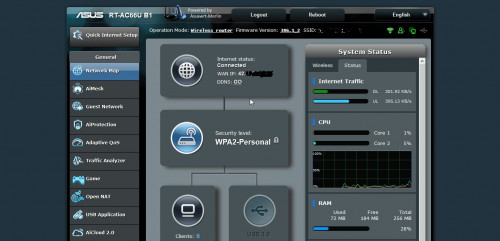
Flashed Merlin straight from Asus CFE Bootloader
user posted image

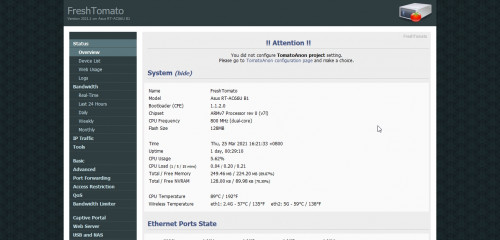
Flashed Freshtomato (R6400 AIO image) with Asus Firmware Restoration Tool
user posted image
geep
post Mar 25 2021, 11:02 PM

New Member
*
Junior Member
45 posts

Joined: Jun 2011
QUOTE(misk94 @ Mar 25 2021, 09:18 PM)
Dear geep,

Good way to go back to Tomato from Asuswrt-Merlin.  thumbsup.gif 

Interestingly, Tomato recognized the router as an Asus RT-AC66U B1 and not DLink DIR-868L.  shocking.gif

I suppose the firmware could only read the motherboard firmware/hardware but not the shell of the router. biggrin.gif

Nevertheless, it is a good option for those still restricted to 2.4 GHz and wanted more performance.

BTW, did you get the firmware from freshtomato.org website?

https://freshtomato.org/

I noticed the firmware version is 2021.1.

It seems that both is using the same firmware K26ARM, which explains a lot why it worked.  rclxms.gif

Nevertheless, the 32K NVRAM limit is still an issue if your flash straight from DIR-868L.

Unless you follow the earlier part of my original post how to overcome that or if your already flashed your DIR-868L to Asuswrt-Merlin firmware can follow like you did.

Regards,
*
Yes, im using the official .trx image from Freshtomato.org. It doesnt matter what .trx image i flash on it, it will boot as RT-AC66U B1.
It seems Tomato will read the pre-config data from the CFE and load the profile for RT-AC66U B1 instead.
If i have more time and courage, will definitely try to reedit the CFE for further test and observation. sweat.gif
user posted image

geep
post Mar 26 2021, 02:42 AM

New Member
*
Junior Member
45 posts

Joined: Jun 2011
QUOTE(fisherman10 @ Mar 25 2021, 11:22 PM)
Please don't. I tried to change the odmpid to RT-AC68U and it will brick.

Then need to unbrick through the serial pins.
*
Thank you for alerting me, you just save my precious time. thumbsup.gif
Also glad to know that there is someone on here succeed with the serial method.
geep
post Mar 26 2021, 09:34 PM

New Member
*
Junior Member
45 posts

Joined: Jun 2011
QUOTE(fisherman10 @ Mar 26 2021, 03:07 PM)
Yes there's a weird bug. Even if I change the odmpid through NVRAM (not flashing the CFE with modified values), it will brick straight away. So you can't even clear NVRAM using the WPS button.
*
Interesting hmm.gif modifying a single string will corrupt the whole bootloader.
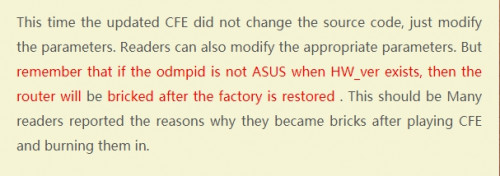
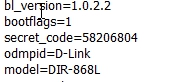
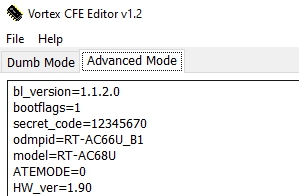
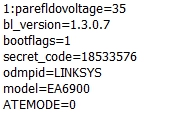
Btw have you tried a tips from Bigxd the time you edit the odmpid?
Cuz I saw his mod CFE version and also Linksys mod version with native string.

To Remove HW_ver ?
user posted image

D-link with native odmpid
user posted image

Linksys version
user posted image
geep
post Mar 26 2021, 09:40 PM

New Member
*
Junior Member
45 posts

Joined: Jun 2011
QUOTE(fisherman10 @ Mar 26 2021, 09:37 PM)
Can you link me the tips? I don't really understand the photos
*
Its in chinese, I use google translate sweat.gif
https://www.bigxd.com/2020/10/802.html
geep
post Apr 4 2021, 08:42 PM

New Member
*
Junior Member
45 posts

Joined: Jun 2011
QUOTE(fisherman10 @ Apr 4 2021, 08:12 PM)
I've edited my post with new links and instructions. Please try again.
Weirdly enough, now my Internet LED lights up green eventhough it's on AC68u. Seems to have fixed itself.
*
After like more than a week moving back and forth from 68U to 66U, Here some glitch and instability i've notice on 68U.
-The LED will on and off randomly (it will light up when i make a change on setting/nvram)
-2.4G throughput remain high but inconsistent
-Temperature 5-10% high (Maybe cause by 68U vs 66U wattage)
-Some stats are missing, like my clients connected to guest network not shown.


Change to:
| Lo-Fi Version
0.0290sec    0.77    7 queries    GZIP Disabled
Time is now: 15th December 2025 - 10:34 PM