Welcome Guest ( Log In | Register )

10 Pages < 1 2 3 4 > » Bottom

Outline · [ Standard ] · Linear+

 DIR-868L to ASUS RT-AC66U with AiMesh, Latest DIR-868L Migration Options

views
     
fisherman10
post Feb 19 2021, 01:02 PM

Regular
******
Senior Member
1,372 posts

Joined: Dec 2007


Managed to convert to using AC68U merlin firmware.

Connected as Access Point but funny thing now is that every time after reboot or power loss, it will startup with WiFi Disabled. Have to manually toggle it on and then it works until next reboot.

Any ideas why?
jackal1950
post Feb 19 2021, 01:08 PM

On my way
****
Senior Member
572 posts

Joined: Nov 2004


Thank you very much for the guide. I have successfully convert my DLINK DIR-868L into Asus RT-AC66U B1.

Now I am looking for any TP-Link or D-Link WiFi 6 Router that can convert to AsusWRT too. Do you have any recommendation?
gary_cheah85
post Feb 20 2021, 07:14 PM

**Gary**
****
Senior Member
529 posts

Joined: Aug 2005
QUOTE(misk94 @ Jan 5 2021, 06:40 PM)
Step 7: Upload RT-AC66U firmware using Asus CFE Miniweb Server

• After booting, the router IP address is changed back to 192.168.0.1.
• I can only assumed that the router default IP address was inherited from DLink CFE Miniweb Server.
• Change PC IP address back to 192.168.0.3
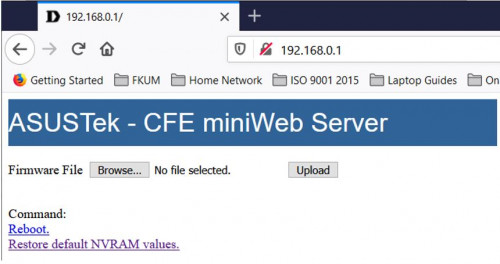
• On your browser, type 192.168.0.1 and you should see the web page below.
user posted image

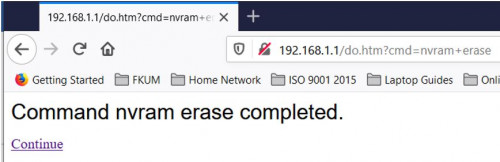
• Next, click on "Restore default NVRAM values" to erase nvram contents.
user posted image

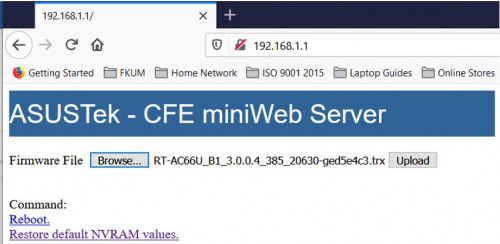
• Browse for  RT-AC66U_B1_3.0.0.4_385_20630-ged5e4c3.trx firware file
user posted image

• Click Upload button and let the RT-AC66U firmware be loaded to the router. Please be patient, it will take some time (maybe about 3-5 minutes).
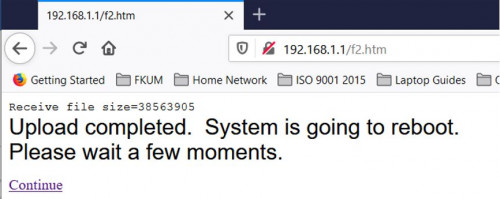
• Finally, you will see the following message. Click Continue link to reboot the router.
user posted image

• Congratulations you succeeded in migrating your DIR-868L router to Asus AiMesh firmware.
• Don’t forget to set your PC IP address back to automatic.
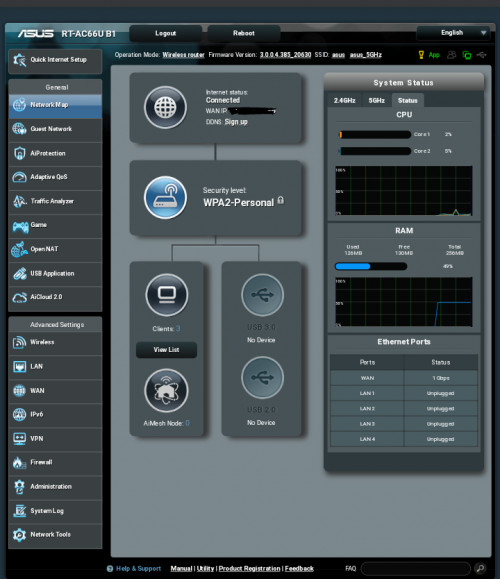
• You should see welcome page of RT-AC66U B1.
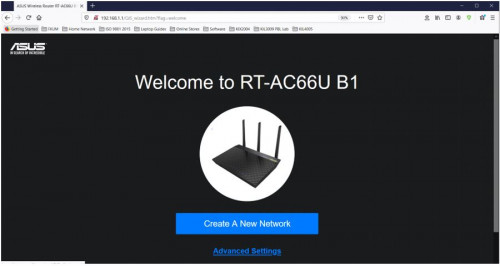
user posted image

• Now you should be able to do the necessary router configurations. See sample below.
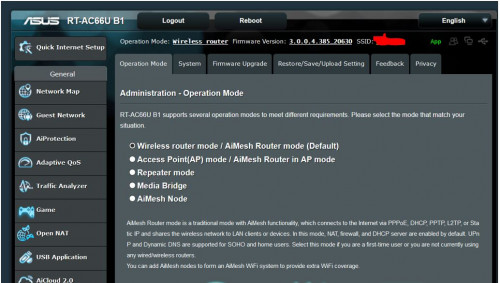
user posted image

• Good luck with migration to Asus AiMesh. :thumbsup:

• My work is done. rclxm9.gif

ASUS Router App:

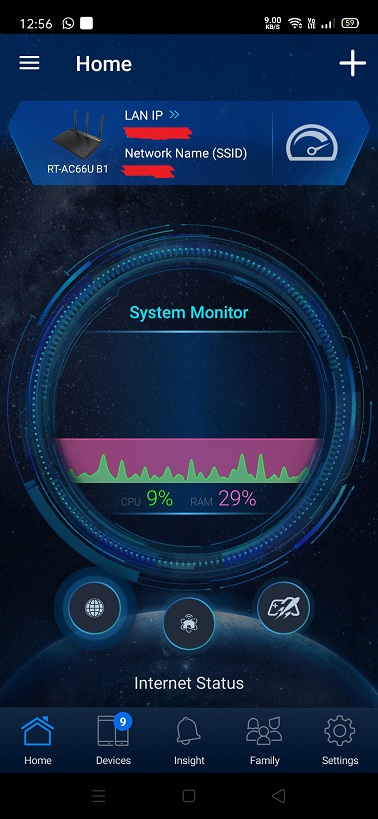
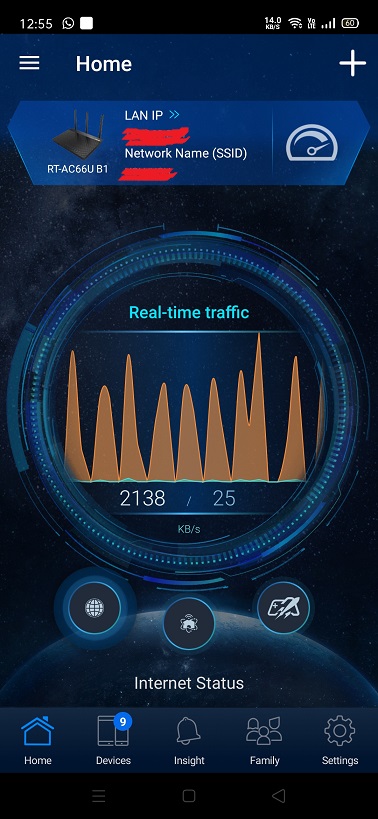
• Recently, I installed the ASUS Router app in my android phone. The app is awesome.
• Similar in comparison to other routers brand such as TP-Link or DLink in terms of functionality but definitely more features and better looking.
• The app will think the converted DIR-868L is a genuine RT-AC66U B1 router. biggrin.gif
• A recommended download.  thumbup.gif

user posted image

user posted image

user posted image

user posted image

P/S:
• I saw in the internet people migrating to AsusWrt-Merlin firmware.
• Technically it could be done.
• I don't have any spare DIR-868L router anymore to try this.
• Maybe someone with a spare DIR-868L could have a try and let us know the outcome?

Updated 16th January 2021

*
I flashed to Merlin firmware, few advanced features available
Can see real time temperature, CPU is idling at 77C
Reboot schedule is great too, set to reboot router once a week to flush the RAM
gary_cheah85
post Feb 20 2021, 07:16 PM

**Gary**
****
Senior Member
529 posts

Joined: Aug 2005
QUOTE(jackal1950 @ Feb 19 2021, 01:08 PM)
Thank you very much for the guide. I have successfully convert my DLINK DIR-868L into Asus RT-AC66U B1.

Now I am looking for any TP-Link or D-Link WiFi 6 Router that can convert to AsusWRT too. Do you have any recommendation?
*
Some people have tried Tenda Ac18 and Huawei ws880, flashed to xwrt.
However those can only run on legacy firmware 380.xx
Flash at your own risk


gary_cheah85
post Feb 20 2021, 07:18 PM

**Gary**
****
Senior Member
529 posts

Joined: Aug 2005
QUOTE(fisherman10 @ Feb 19 2021, 01:02 PM)
Managed to convert to using AC68U merlin firmware.

Connected as Access Point but funny thing now is that every time after reboot or power loss, it will startup with WiFi Disabled. Have to manually toggle it on and then it works until next reboot.

Any ideas why?
*
Did you flash to Asuswrt then only flash to Merlin?
Try the process again.
fisherman10
post Feb 20 2021, 09:41 PM

Regular
******
Senior Member
1,372 posts

Joined: Dec 2007


QUOTE(gary_cheah85 @ Feb 20 2021, 07:18 PM)
Did you flash to Asuswrt then only flash to Merlin?
Try the process again.
*
Having the same problem on both latest stock Asus AC68u and Merlin AC68u firmware too.
TSmisk94
post Feb 21 2021, 11:03 PM

Getting Started
**
Junior Member
72 posts

Joined: May 2014


QUOTE(gary_cheah85 @ Feb 20 2021, 07:14 PM)
I flashed to Merlin firmware, few advanced features available
Can see real time temperature, CPU is idling at 77C
Reboot schedule is great too, set to reboot router once a week to flush the RAM
*
Thank you gary_cheah85 for sharing your experience with the Merlin firmware.

Yes. The CPU temperature reading is a useful bonus.

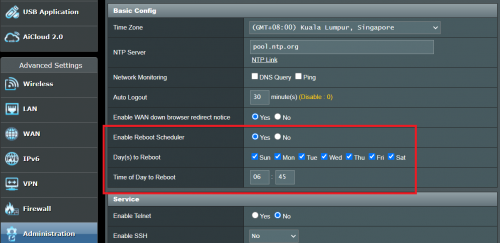
BTW. There is a reboot schedule function in the ASUS RT-AC66U B1 firmware too.

It's under Administration menu. Below is a shapshot for my main router. I set it to reboot at 6:45 AM everyday.

user posted image

Regards.

This post has been edited by misk94: Feb 21 2021, 11:30 PM
TSmisk94
post Feb 21 2021, 11:21 PM

Getting Started
**
Junior Member
72 posts

Joined: May 2014


QUOTE(gary_cheah85 @ Feb 20 2021, 07:16 PM)
Some people have tried Tenda Ac18 and Huawei ws880, flashed to xwrt.
However those can only run on legacy firmware 380.xx
Flash at your own risk
*
Yes. I did migrated a Tenda AC18 sometime in 2019. Which I sold later. This is before I played with DIR-868L.

Gary_cheah85 is right. The Tenda AC18 is limited to 380.XX series firmware. You will brick it if you flash to a higher series firmware. Some poor souls found that out the hard way.

Latest Tenda flagship router is Tenda AC23. You can get it for less than RM200 from Shopee or Lazada.

Anyone tried this Tenda router? Interested to know how well it perform compare to major brands for consumers like DLink or TP-Link.

Tenda no longer using Broadcom chipsets. I think Tenda AC18 was their last model using Broadcom.

Tenda is currently using Realtek RTL8197 series CPU for their routers. Not as powerful (i.e. expensive) as Broadcom CPUs, but it seems to do the job well enough based on some reviews.

Hopefully, better value for consumers.

Regards.

This post has been edited by misk94: Feb 23 2021, 09:35 AM
gary_cheah85
post Feb 22 2021, 08:52 PM

**Gary**
****
Senior Member
529 posts

Joined: Aug 2005
QUOTE(fisherman10 @ Feb 20 2021, 09:41 PM)
Having the same problem on both latest stock Asus AC68u and Merlin AC68u firmware too.
*
You probably got a lemon unit then. Quickly sell it for cheap and get another unit
gary_cheah85
post Feb 22 2021, 09:02 PM

**Gary**
****
Senior Member
529 posts

Joined: Aug 2005
QUOTE(misk94 @ Feb 21 2021, 11:03 PM)
Thank you gary_cheah85 for sharing your experience with the Merlin firmware.

Yes. The CPU temperature reading is a useful bonus.

BTW. There is a reboot schedule function in the ASUS RT-AC66U B1 firmware too.

It's under Administration menu. Below is a shapshot for my main router. I set it to reboot at 6:45 AM everyday.

user posted image

Regards.
*
Oh really, did not really explore much on the Asus Rt-AC66u B1 firmware especially on the reboot schedule.
Previously I was using Huawei WS880(flashed with Xwrt), rock solid uptime for few months. The only time need to reboot was when power outage or power trip.
TSmisk94
post Mar 3 2021, 07:34 AM

Getting Started
**
Junior Member
72 posts

Joined: May 2014


Dear All,

Just would like to share my successful firmware migration from Asus to Merlin firmware last night. rclxm9.gif

I manually updated the AiMesh node first. Followed by main router. It is best to manually reboot both once you completed your migration.

user posted image

It's ASUSwrt-Merlin RT-AC68U 386.1_2 firmware. Release date 12 Feb 2021. I think it is similar to current ASUS firmware.

You can download it here. https://sourceforge.net/projects/asuswrt-me...-AC68U/Release/

By the way. The router is still identified as ASUS RT-AC66U B1 although it is running a RT-AC68U firmware.

user posted image

Bonus. Temperature readings inside the Administration menu.

user posted image

So far, performance wise comparable to stock ASUS firmware, maybe a bit better.

Let's see how stable it is compared to stock ASUS firmware.

Regards,

Updated 3 March 2021.

This post has been edited by misk94: Mar 4 2021, 10:29 AM
jonsalam P
post Mar 3 2021, 02:45 PM

New Member
*
Probation
11 posts

Joined: Feb 2021
QUOTE(misk94 @ Mar 3 2021, 07:34 AM)
Dear All,

Just would like to share my successful firmware migration from Asus to Merlin firmware last night.  :hyper:

I manually updated the AiMesh node first. Followed by main router. It is best to manually reboot both once you completed your migration.

user posted image

It's Asuswrt-Merlin RT-AC68U 386.1_2 firmware. Release date 12 Feb 2021. I think it is similar to current ASUS firmware.

You can download it here. https://sourceforge.net/projects/asuswrt-me...-AC68U/Release/

user posted image

Bonus. Temperature readings inside the Administration menu.

user posted image

So far, performance wise comparable to stock ASUS firmware, maybe a bit better.

Let's see how stable it is compared to stock ASUS firmware.

Regards,

Updated 3 March 2021.
*
Tq for firmware and guide. Been looking for long time. I managed to convert to Asus firmware and the results its awesome. Far better from stock firmware. Im looking forward the result from you using Merlin firmware. TQ

user posted image
TSmisk94
post Mar 3 2021, 10:58 PM

Getting Started
**
Junior Member
72 posts

Joined: May 2014


Welcome. Jonsalam.

Enjoy the improved DIR-868L running ASUS firmware.
jonsalam P
post Mar 4 2021, 06:40 AM

New Member
*
Probation
11 posts

Joined: Feb 2021
QUOTE(sgpdsmss @ Feb 15 2021, 05:07 PM)
i follow your step to migrate to asus 66 firmware ..but after done ...the lan connection max 100mbps and 2.4g wifi at 30mbps ...
*
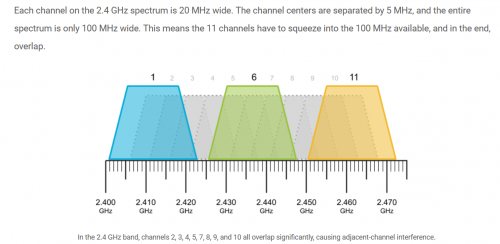
Same situation here and i did some digging and found the solution.2.4GHz wifi Channel bandwidth 20MHz and Control Channel 6. If not working try change to channel 1 or 11 depends on wifi interference around you.
sgpdsmss
post Mar 4 2021, 08:06 AM

Regular
******
Senior Member
1,704 posts

Joined: Jan 2005
QUOTE(jonsalam @ Mar 4 2021, 06:40 AM)
Same situation here and i did some digging and found the solution.2.4GHz wifi Channel bandwidth 20MHz and Control Channel 6. If not working try change to channel 1 or 11 depends on wifi interference around you.
*
thanks ...will try to set it see can improve or not ..

TSmisk94
post Mar 4 2021, 10:13 AM

Getting Started
**
Junior Member
72 posts

Joined: May 2014


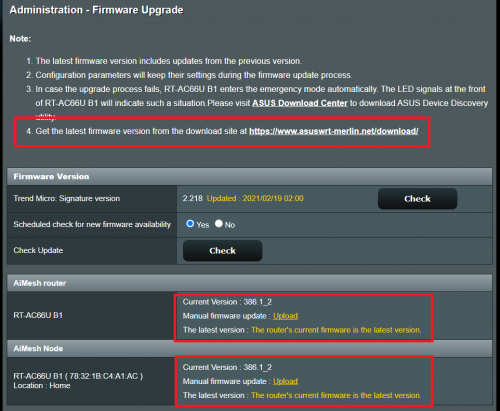
The Firmware upgrade page was changed after migration.

This make sense. Indicating current ASUSwrt-Merlin firmware running.

user posted image

This post has been edited by misk94: Mar 4 2021, 10:25 AM
TSmisk94
post Mar 4 2021, 10:22 AM

Getting Started
**
Junior Member
72 posts

Joined: May 2014


QUOTE(jonsalam @ Mar 4 2021, 06:40 AM)
Same situation here and i did some digging and found the solution.2.4GHz wifi Channel bandwidth 20MHz and Control Channel 6. If not working try change to channel 1 or 11 depends on wifi interference around you.
*
Yes. Correct recommendations.

user posted image

Refer to the following link https://www.metageek.com/training/resources...els-1-6-11.html

Regards

This post has been edited by misk94: Mar 4 2021, 10:23 AM
TSmisk94
post Mar 4 2021, 10:45 AM

Getting Started
**
Junior Member
72 posts

Joined: May 2014


Good morning All,

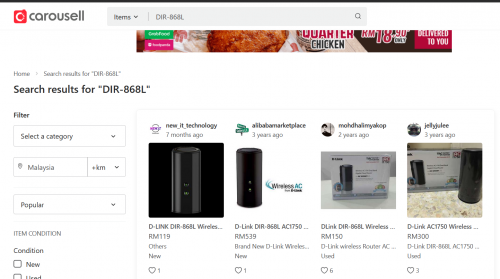
Anyone looking to buy DIR-868L router can try at Carousell Malaysia. ( No. I am not getting any commission from Carousell ).

https://www.carousell.com.my/search/DIR-868L?

user posted image

DIR-868L is currently a bit expensive at Lazada or Shopee.

Maybe they know people are looking for DIR-868L to create an inexpensive AiMesh cluster using ASUS firmware. nod.gif

More choices in Carousell Singapore https://www.carousell.sg/q/electronics-7/dlink-router-868l/?

But then need to cross border and shipping cost. doh.gif

Regards

This post has been edited by misk94: Mar 4 2021, 10:56 AM
jonsalam P
post Mar 5 2021, 12:14 PM

New Member
*
Probation
11 posts

Joined: Feb 2021
QUOTE(misk94 @ Mar 4 2021, 10:45 AM)
Good morning All,

Anyone looking to buy DIR-868L router can try at Carousell Malaysia. ( No. I am not getting any commission from Carousell ).

https://www.carousell.com.my/search/DIR-868L?

user posted image

DIR-868L is currently a bit expensive at Lazada or Shopee.

Maybe they know people are looking for DIR-868L to create an inexpensive AiMesh cluster using ASUS firmware.  nod.gif

More choices in Carousell Singapore https://www.carousell.sg/q/electronics-7/dlink-router-868l/?

But then need to cross border and shipping cost. doh.gif

Regards
*
user posted image

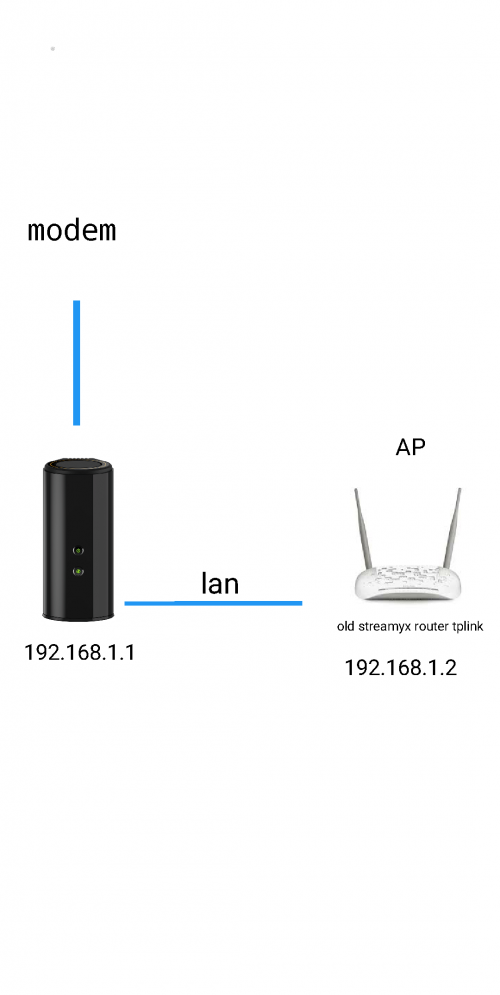
This is my current setup. I plan to replace my AP. Since DIR-868L hard to find can i use with any asus router or asus router with aimesh featured?
Jjuggler
post Mar 5 2021, 12:42 PM

Narcissistic Genius
******
Senior Member
1,341 posts

Joined: Dec 2016
ASUS GT-AX11000 is now supported by Asus-Merlin. Currently only alpha build available. So far so good. Currently testing this firmware. The only thing you lose is the ROG feature and ROG UI.

https://pictr.com/image/7XY69r

10 Pages < 1 2 3 4 > » Top
 

Change to:
| Lo-Fi Version
0.0348sec    0.50    6 queries    GZIP Disabled
Time is now: 16th December 2025 - 04:40 AM