Welcome Guest ( Log In | Register )

10 Pages « < 3 4 5 6 7 > » Bottom

Outline · [ Standard ] · Linear+

 DIR-868L to ASUS RT-AC66U with AiMesh, Latest DIR-868L Migration Options

views
     
TSmisk94
post Mar 29 2021, 03:30 PM

Getting Started
**
Junior Member
72 posts

Joined: May 2014


OpenWRT - 802.11s Mesh WiFi Network

user posted image

Anyone with plenty of free time and available router hardware suitable for OpenWRT firmware to play around with this open-source Mesh system?

https://youtu.be/1yaodn1BpSw

https://youtu.be/cw8ykKgVKbM

Just sharing what I found by accident.

It seems you could mix and match different brand of routers as long the routers are supported by OpenWRT firmware.

Regards,

This post has been edited by misk94: Mar 29 2021, 04:10 PM
fisherman10
post Mar 29 2021, 03:39 PM

Regular
******
Senior Member
1,372 posts

Joined: Dec 2007


QUOTE(takumaki67 @ Mar 29 2021, 03:14 PM)
Thank you BTS1501 for the advice.
Ok, so we will focus to ASUS Firmware restoration.

I re-download the firmware restoration and latest RT-AC66U B1 firmware Version 3.0.0.4.386.41634 from ASUS website.

1. Set to static IP 192.168.0.10 (255.255.255.0) and turn off Firewall
2. Plug in LAN (No. 3) at DIR868L
3. Switch on + hold RESET button (15 seconds)
4. Launch Firmware restoration with browse downloaded new firmware
5. Firmware uploading in progress
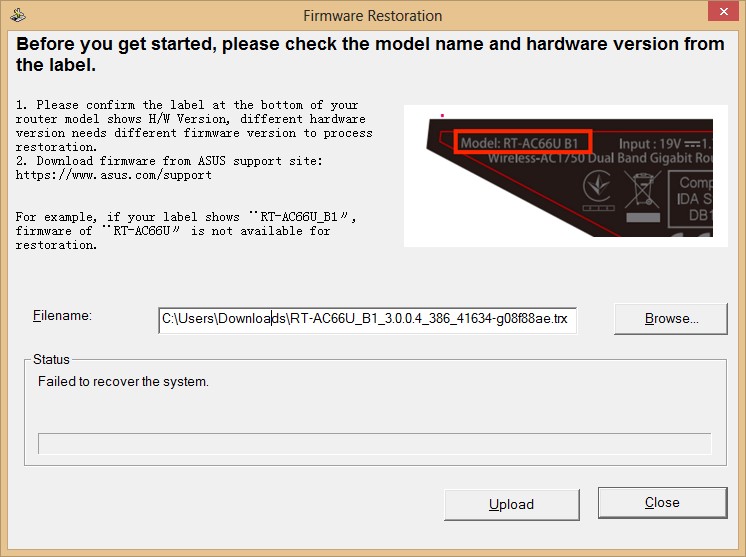
6. Then after 100% flash but it shown 'Failed to recover the system'
user posted image
7. After that, only the INTERNET LED light up
8. Wait for 20 mins, and still only INTERNET LED light up (like no response)
9. Restart by switch power off then on, then it looks like the video shown before (INTERNET LED blinking)
https://youtu.be/mZPENORbJpA

Eventually still unable startup the router...
*
Saw the video. It's not bricked. No need serial method.

I think IP is wrong. Set this in PC.
ip address 192.168.1.123
Subnet 255.255.255.0
Gateway 192.168.1.1

Hold reset and power on. Then try the firmware restoring again.

BTS1501
post Mar 29 2021, 04:59 PM

Getting Started
**
Junior Member
250 posts

Joined: May 2019
Yes, ip address in your pc should be set 192.168.1.10, subnet 255.255.255.0, no need gateway. You type 192.168.0.10

Dlink uses 192.168.0.x
asus uses 192.168.1.x (for older routers)

If still can not (don't know what firmware you flashed previously), then
1. WPS button + power on, ping 192.168.1.1 -t until ttl=100, then release wps button
2. reset button + power on, ping 192.168.1.1 -t until ttl=100, then release reset button

try 1 and/or 2 repeatedly

This post has been edited by BTS1501: Mar 29 2021, 05:03 PM
takumaki67
post Mar 29 2021, 05:37 PM

New Member
*
Newbie
13 posts

Joined: Feb 2011
QUOTE(BTS1501 @ Mar 29 2021, 04:59 PM)
Yes, ip address in your pc should be set 192.168.1.10, subnet 255.255.255.0, no need gateway. You type 192.168.0.10

Dlink uses 192.168.0.x
asus uses 192.168.1.x (for older routers)

If still can not (don't know what firmware you flashed previously), then
1. WPS button + power on, ping 192.168.1.1 -t until ttl=100, then release wps button
2. reset button + power on, ping 192.168.1.1 -t until ttl=100, then release reset button

try 1 and/or 2 repeatedly
*
Thank you BTS1501!
By the option 1... pressing the WPS button is work!
It is back online now!

Again thank you BTS1501 and fisherman10 for the great guide!
BTS1501
post Mar 29 2021, 08:38 PM

Getting Started
**
Junior Member
250 posts

Joined: May 2019
QUOTE(takumaki67 @ Mar 29 2021, 05:37 PM)
Thank you BTS1501!
By the option 1... pressing the WPS button is work!
It is back online now!

Again thank you BTS1501 and fisherman10 for the great guide!
*
That's great. Enjoy smile.gif

The wps + power on is to clear nvram, you will need to use this when reflash cfe. So most likely you did not clear nvram after flashing the asus cfe.

The reset + power on is to go into the miniweb screen, for flashing firmware.

When you do 2 868l together in aimesh, you also need to use wps + power on.
takumaki67
post Mar 29 2021, 08:58 PM

New Member
*
Newbie
13 posts

Joined: Feb 2011
QUOTE(BTS1501 @ Mar 29 2021, 08:38 PM)
That's great. Enjoy smile.gif

The wps + power on is to clear nvram, you will need to use this when reflash cfe. So most likely you did not clear nvram after flashing the asus cfe.

The reset + power on is to go into the miniweb screen, for flashing firmware.

When you do 2 868l together in aimesh, you also need to use wps + power on.
*
Appreciate BTS1510!
I see... So you mean need to clear two 868l nvram when I want setup Aimesh ya?
Then I will need to reconfigure the WAN and Wireless?

fisherman10
post Mar 29 2021, 09:25 PM

Regular
******
Senior Member
1,372 posts

Joined: Dec 2007


QUOTE(takumaki67 @ Mar 29 2021, 08:58 PM)
Appreciate BTS1510!
I see... So you mean need to clear two 868l nvram when I want setup Aimesh ya?
Then I will need to reconfigure the WAN and Wireless?
*
I think he mistaken.

If everything is working in Asus firmware already, you don't need to hold any button and power on.

To set up a node, let the device start-up as usual, press and hold reset button until light blinks then let go. This will factory reset that device.

Go to your main router, press AI Mesh, search for nodes, add the device that it found. It should work unless you messed up the MAC address/WPS pin when converting.
takumaki67
post Mar 29 2021, 09:38 PM

New Member
*
Newbie
13 posts

Joined: Feb 2011
QUOTE(fisherman10 @ Mar 29 2021, 09:25 PM)
I think he mistaken.

If everything is working in Asus firmware already, you don't need to hold any button and power on.

To set up a node, let the device start-up as usual, press and hold reset button until light blinks then let go. This will factory reset that device.

Go to your main router, press AI Mesh, search for nodes, add the device that it found. It should work unless you messed up the MAC address/WPS pin when converting.
*
Thank you fisherman10!
Brilliant! Understand clearly now!

TSmisk94
post Mar 31 2021, 03:31 PM

Getting Started
**
Junior Member
72 posts

Joined: May 2014


Dear members,

I am thinking of selling my DIR-868L AiMesh router and node.

Both are already migrated to Asuswrt-Merlin firmware.

These are the units that I have been showing you the guide and performance benchmark.

So they are tested and having reasonably good performance.

The units are still having balance of the three year D-Link warranty. i.e. until mid Nov. 2022.

I am asking RM300 for the set (one router and one node) - AC1750 AiMesh system. Complete with original box and power supply.

I think it is a reasonable price and comes with more than 1 year and 6 months remaining warranty.

Other sellers are selling used DIR-868L around the same price with no warranty at all.

Anyone interested please let me know.

Thank you.

Regards,

This post has been edited by misk94: Mar 31 2021, 05:39 PM
fisherman10
post Mar 31 2021, 04:50 PM

Regular
******
Senior Member
1,372 posts

Joined: Dec 2007


QUOTE(misk94 @ Mar 31 2021, 03:31 PM)
Dear members,

I am thinking of selling my DIR-868L AiMesh router and node.

Both are already migrated to Asuswrt-Merlin firmware.

These are the units that I have been showing you the guide and performance benchmark.

So they are tested and having reasonably good performance.

The units are still having balance of the three year D-Link warranty. i.e. until mid Nov. 2022.

I am asking RM300 for the set (one router and one node). Complete with original box and power supply.

I think it is a reasonable price and comes with more than 1 year and 6 months remaining warranty.

Other sellers are selling used DIR-868L around the same price with no warranty at all.

Anyone interested please let me know.

Thank you.

Regards,
*
Upgrading to AX?
TSmisk94
post Mar 31 2021, 05:28 PM

Getting Started
**
Junior Member
72 posts

Joined: May 2014


QUOTE(fisherman10 @ Mar 31 2021, 04:50 PM)
Upgrading to AX?
*
Thinking in that direction. Faster WiFi5 or WiFi6?

Wife and children urging for upgrades.

I am fine with current setup but obviously I will be out voted by them. biggrin.gif

Happy Wife Happy Life. cool2.gif

Regards,

This post has been edited by misk94: Mar 31 2021, 05:34 PM
fisherman10
post Mar 31 2021, 08:01 PM

Regular
******
Senior Member
1,372 posts

Joined: Dec 2007


QUOTE(misk94 @ Mar 31 2021, 05:28 PM)
Thinking in that direction. Faster WiFi5 or WiFi6?

Wife and children urging for upgrades.

I am fine with current setup but obviously I will be out voted by them.  biggrin.gif

Happy Wife Happy Life.  cool2.gif 

Regards,
*
I think go straight for WiFi6 better. Because single or dual antenna Wifi6 alone will be better than 3x3 or 4x4 Wifi5. That also very rare to see mobile devices with more than 2x2 antenna.
TSmisk94
post Mar 31 2021, 10:23 PM

Getting Started
**
Junior Member
72 posts

Joined: May 2014


QUOTE(fisherman10 @ Mar 31 2021, 08:01 PM)
I think go straight for WiFi6 better. Because single or dual antenna Wifi6 alone will be better than 3x3 or 4x4 Wifi5. That also very rare to see mobile devices with more than 2x2 antenna.
*
Yes. I think you are right. thumbsup.gif

Regards,
takumaki67
post Apr 2 2021, 02:23 AM

New Member
*
Newbie
13 posts

Joined: Feb 2011
Lately I saw someone fix the 2.4ghz weak problem in koolshare website.
He has attached the CFE file named 'CFE_868L_2.4Gfix_5GPRO.bin' in Baidu (aw7b)

I am not able download the file to test.
Maybe anyone can help download the CFE?

This post has been edited by takumaki67: Apr 2 2021, 02:24 AM
fisherman10
post Apr 2 2021, 08:49 AM

Regular
******
Senior Member
1,372 posts

Joined: Dec 2007


QUOTE(takumaki67 @ Apr 2 2021, 02:23 AM)
Lately I saw someone fix the 2.4ghz weak problem in koolshare website.
He has attached the CFE file named 'CFE_868L_2.4Gfix_5GPRO.bin' in Baidu (aw7b)

I am not able download the file to test.
Maybe anyone can help download the CFE?
*
Yes it works. Now it's finally stable and have been running it for a few days. But can't directly use the one from koolshare website. Initially I had some annoying problems.

Give me some time. I'll post up a guide and OP can add to the guide.
takumaki67
post Apr 2 2021, 09:57 AM

New Member
*
Newbie
13 posts

Joined: Feb 2011
Cool fisherman10! I am ready to help you test out. Looking forward!
TSmisk94
post Apr 2 2021, 04:32 PM

Getting Started
**
Junior Member
72 posts

Joined: May 2014


QUOTE(takumaki67 @ Apr 2 2021, 02:23 AM)
Lately I saw someone fix the 2.4ghz weak problem in koolshare website.
He has attached the CFE file named 'CFE_868L_2.4Gfix_5GPRO.bin' in Baidu (aw7b)

I am not able download the file to test.
Maybe anyone can help download the CFE?
*
Dear Fisherman 10,

Found the Chinese website.

Interesting. A way to improve 2.4GHz.

I hope it will not stress the 2.4GHz radio too much.

If I have free time I might have ago and try.

Maybe come out without another guide too. biggrin.gif

Regards,

This post has been edited by misk94: Apr 2 2021, 04:33 PM
fisherman10
post Apr 2 2021, 08:12 PM

Regular
******
Senior Member
1,372 posts

Joined: Dec 2007


At present, DIR-868L can only be converted to RT-AC66U_B1 or to RT-AC68U.

Besides the problems mentioned in the opening post such as LAN/WAN ports rearranged and LED not working normally,
1) If converted to RT-AC66U_B1, everything works fine except 2.4G WiFi very slow
2) If converted to RT-AC68U, everything works fine except 2.4G WiFi very slow and WiFi is disabled/off after every restart.


Here's the guide to fix both 2.4G WiFi speed and WiFi disabled after restart. It will be converted to AC68U. AC68U has slightly more info when viewing connected clients list compared to AC66U_B1.

Only do this after you're already fully converted and running Asus firmware.

1) Download attached file. newcfe68u.bin and newcfe66ub1.bin and mtd-write and CFEEdit
https://drive.google.com/file/d/1s6ooa6M8ZF...iew?usp=sharing

2) Use CFEEdit and change 3 macaddresses and WPS Pin according to your own router in the CFE file.

3) Turn on the SSH from router page. Administration > System > Enable SSH > Apply

4) Open WINSCP. Choose SCP protocol, enter router IP address, username and password

5) Now decide if you want your router to be Asus AC68U or AC66U_B1. Drag and drop both newcfe68u.bin OR newcfe66ub1.bin together with mtd-write file to the right side of WINSCP

6) Use Putty and connect to router. Enter username and password

7) Enter these commands in Putty to flash new CFE

CODE
chmod u+x mtd-write

./mtd-write newcfe68u.bin boot

OR

./mtd-write newcfe66ub1.bin boot


8) Enter this command into Putty to clear NVRAM and reboot

CODE
nvram erase

reboot


And it should startup as AC68U or AC66U_B1.

This post has been edited by fisherman10: Apr 4 2021, 09:45 PM

BTS1501
post Apr 2 2021, 08:47 PM

Getting Started
**
Junior Member
250 posts

Joined: May 2019
Yes, the steps are correct. Will not brick the router. Just some redundant steps.

Step 5, rename the cfe 2.4fix to just cfe.bin so that when you flash easier,no need to check so many characters.

Step 7,8 ,9 not needed. Mtd write has 3 versions,one version need -i ,and one version no need (like step 10).

Step 11 optional. You can just power off, then wps + power on until internet led flashes.

Using hp you should get around 50mbps (unless yours is high end hp. Using another 868l as repeater will be higher.
fisherman10
post Apr 2 2021, 09:09 PM

Regular
******
Senior Member
1,372 posts

Joined: Dec 2007


QUOTE(BTS1501 @ Apr 2 2021, 08:47 PM)
Yes, the steps are correct. Will not brick the router.  Just some redundant steps. 

Step 5, rename the cfe 2.4fix to just cfe.bin so that when you flash easier,no need to check so many characters.

Step 7,8 ,9 not needed. Mtd write has 3 versions,one version need -i ,and one version no need (like step 10).

Step 11 optional.  You can just power off, then wps + power on until internet led flashes.

Using hp you should get around 50mbps (unless yours is high end hp. Using another 868l as repeater will be higher.
*
Good tips. Lemme edit. Can you tell which version is my mtd-write? Should use step 9 or step 10?

10 Pages « < 3 4 5 6 7 > » Top
 

Change to:
| Lo-Fi Version
0.0273sec    0.64    6 queries    GZIP Disabled
Time is now: 13th December 2025 - 05:50 PM