Welcome Guest ( Log In | Register )

10 Pages  1 2 3 > » Bottom

Outline · [ Standard ] · Linear+

 DIR-868L to ASUS RT-AC66U with AiMesh, Latest DIR-868L Migration Options

views
     
TSmisk94
post Dec 29 2020, 11:12 PM, updated 5y ago

Getting Started
**
Junior Member
72 posts

Joined: May 2014


My next Guide Project for 2021.

Previous Options - DD-WRT, Tomato and Advance Tomato.

Now Asus AiMesh.

I will share my experience here.

Be Safe and Be Well.

Covid-19 is still out there.

This post has been edited by misk94: Feb 17 2021, 06:54 PM
TSmisk94
post Jan 1 2021, 08:03 PM

Getting Started
**
Junior Member
72 posts

Joined: May 2014


Good news.

I managed to migrate two units of DLink DIR-868L to Asus AiMesh firmware. rclxm9.gif

Configured as one main and one node.

I am using RT-AC66U B1 firmware. Release 3.0.0.4_385_20633.

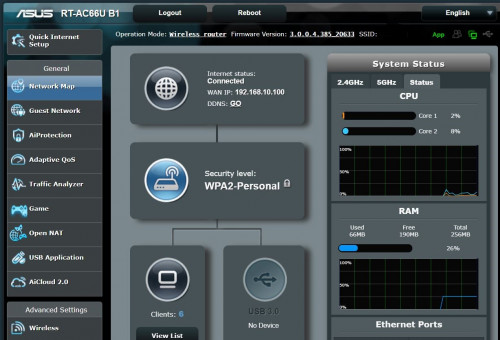
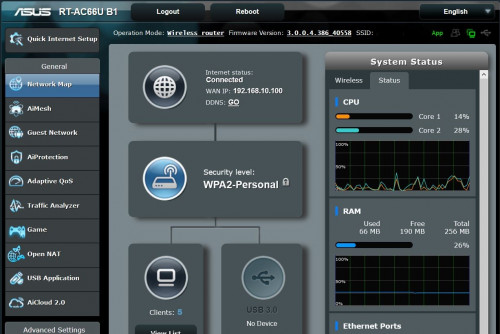
Top webpage of main router

user posted image

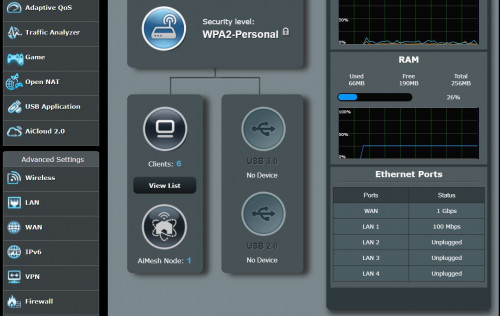
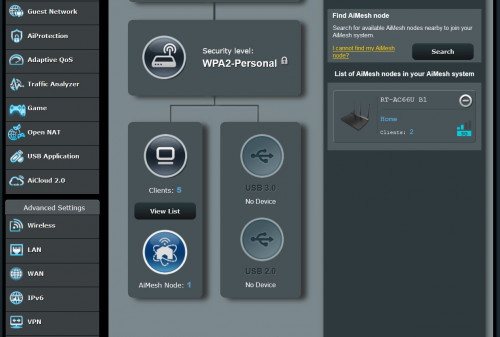
Middle part of webpage of main router. You can see 1 AiMesh node.

user posted image

So far satisfied with performance. Only a few days of running the AiMesh.

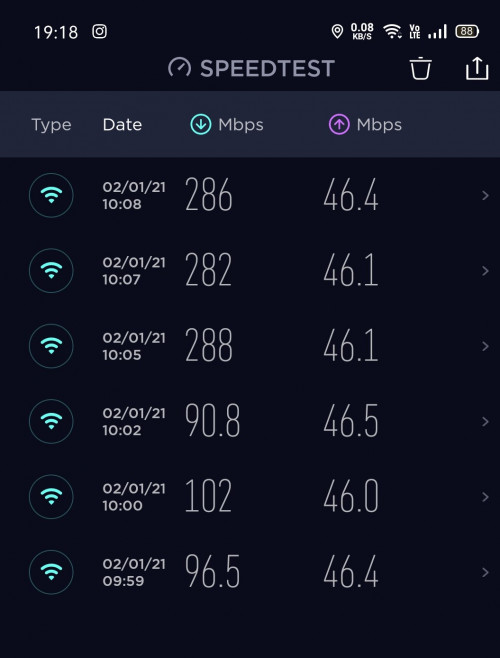
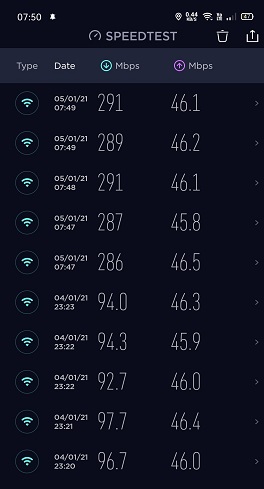
I could get 250 - 290 Mbps if I sit near main router. On the second floor I am getting 70-90 Mbps. Both from my phone. I am having a 300/50 Mbps fiber internet in my home.

user posted image

I need to find some time to work on a guide how to convert a DLink DIR-868L to an ASUS AiMesh capable router.

I did encountered some difficulties but managed to overcome them. rclxub.gif

I will revise the steps and make improvements for better clarity in the final guide.

Stay tune.

Happy New Year and Stay Safe. thumbup.gif


This post has been edited by misk94: Jan 22 2021, 08:51 PM
TSmisk94
post Jan 2 2021, 10:26 PM

Getting Started
**
Junior Member
72 posts

Joined: May 2014


There are 7 steps for the whole migration process.

Warnings and Irregularities:

1. LAN 1 will turn to WAN and WAN is be LAN 4. (Funny but true) biggrin.gif
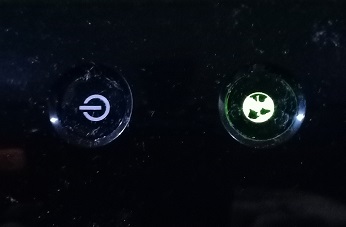
2. Power and Internet LED light are now opposite. Internet LED is now Power. Power LED is now Internet.
3. After router is switched on, power LED will light-up. Now it is now green (instead of orange in DLink factory firmware)
user posted image

4. Next, WiFi LED light-up. Now it is orange (instead of green in DLink factory firmware)

user posted image

Funny but true. biggrin.gif biggrin.gif biggrin.gif

Credits:

• This guide was developed from various online resources and my personal experience on D-Link DIR-868L A1 routers.
• Credits are due to all contributions.
• My contributions are adding improvements and clarity for the whole process.

• A kind individual with online name Ah_Cleo from https://forums.hardwarezone.com.sg shared the following files:

a. DIR868LA1_FW104b01.bin No need if you have FW1.03SHC firmware
b. 25974factory-to-ddwrt.bin
c. CFE_868L_melin384.bin
d. FW_RT_AC66U_B1_300438410007.trx !!!Please do not use. Caused problems!!!
e. RT-AC66U_B1_3.0.0.4_385_20630-ged5e4c3.trx Use this instead
f. mtd-write
g. Putty
h. WinSCP
i. CFEedit

• Please download from the following Google drive link (Hopefully the link is active indefinitely):

https://drive.google.com/file/d/1NYeLnFZjLQ...iew?usp=sharing

Step 1: Downgrade DIR-868L factory firmware to FW1.03SHC

• First, you need to downgrade from your existing firmware (e.g. FW1.22SHC) to FW1.03SHC.
• Second you need to download files listed in Credits section above.
• Download FW1.03SHC firmware from D-Link Singapore website https://www.dlink.com.sg/dir-868l/#firmware.
• Unplug all cables (incl. power cable) from the router.
• Connect the router to the PC using one of the 4 switch ports. Best to use port 2 or 3.
• Set computer IP address to 192.168.0.3 and use 255.255.255.0 as the Subnet mask.
• Power-on the router while pushing a paperclip to the hidden reset button located at the bottom of the device for a few seconds.
• When the Power LED starts blinking, release the reset button.
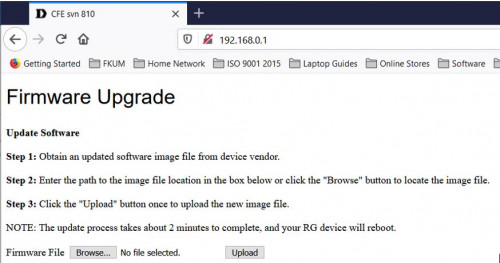
• Use Mozilla FireFox browser and navigate to http://192.168.0.1.
• The following web page will be displayed.
user posted image

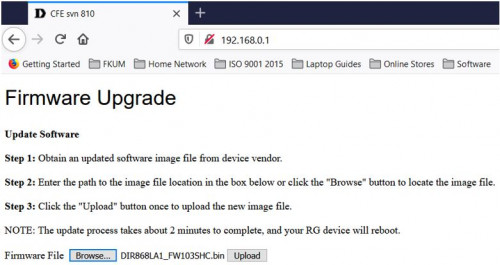
• Next browse for the FW1.03SHC firmware
user posted image

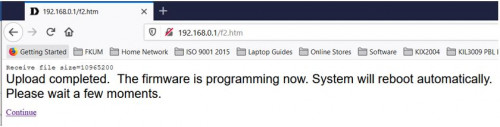
• Click Upload button to upload the FW1.03SHC firmware.
• When completed the router should continue to reboot.
user posted image

• The router should now be running FW1.03SHC firmware and accessible on the default address. (http://192.168.0.1). Default user is admin and no password i.e. blank
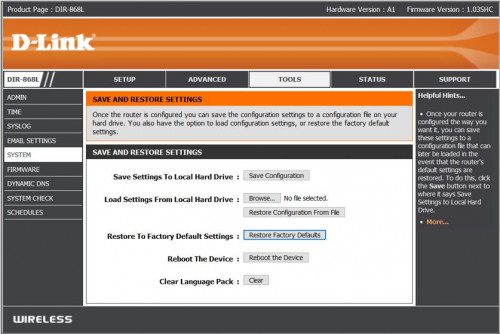
• Next, click to Tools menu, then system menu and click on Restore Factory Defaults button
user posted image

• The router will reboot again.
• After the reboot, the router is ready to be migrated to DD-WRT firmware.

Step 2: Migrate to DD-WRT firmware and enabling SSHd

• Login to router again.
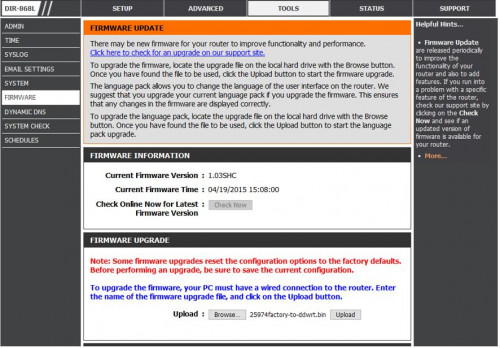
• Next, click to Tools menu then Firmware menu and click on Browse button
user posted image

• Use browse button to find 25974 factory-to-ddwrt.bin file and click Upload button to flash the firmware
• This will take about 3 - 5 minutes for the router to be stable.
• Router should be running DD-WRT firmware.
• By default the router IP address should be 192.168.1.1.
• However, if you cannot access the DD-WRT router page, it is likely that the IP address is still at 192.168.0.1.
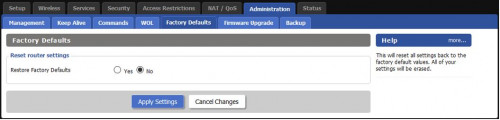
• You should be able to access it using previous IP address and go to Administration tab.
• Reset Factory Defaults - Yes
• Click Apply Settings button
• Reboot router
user posted image

• Change PC IP address to 192.168.1.3 and leave sub netmask as 255.255.255.0 still.
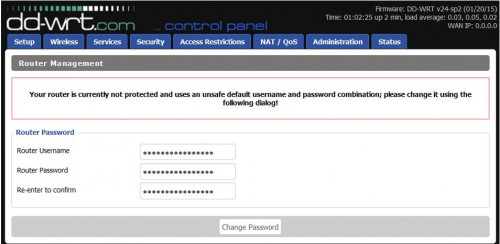
• On the Firefox browser, change to 192.168.1.1 and you will be asked to change username and password.
user posted image

• Enter username: root and password as admin. Please do not change the username. You can change the password if you like.
• Next go to Services tab
• Click Enable button for SSHd
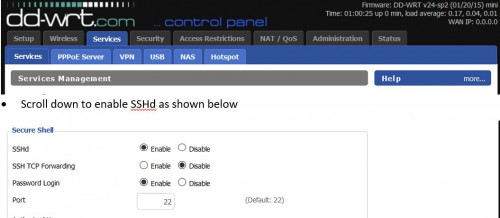
user posted image

• Click on Save Button and Reboot the router
• Now the router is ready for Step 3.

This post has been edited by misk94: Feb 1 2021, 12:18 PM

TSmisk94
post Jan 3 2021, 04:08 PM

Getting Started
**
Junior Member
72 posts

Joined: May 2014


Step 3: Party on with Putty

• Open the Tools folder

user posted image

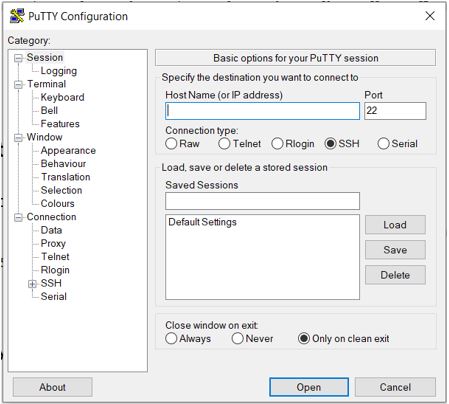
• Click on putty file to launch it and you will see the following screen.
user posted image

• Key in 192.168.1.1 inside Host Name box and click Open button.
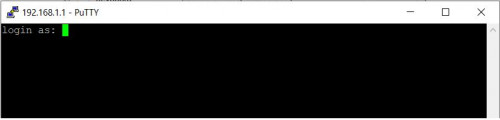
• A login command prompt will appear.

user posted image

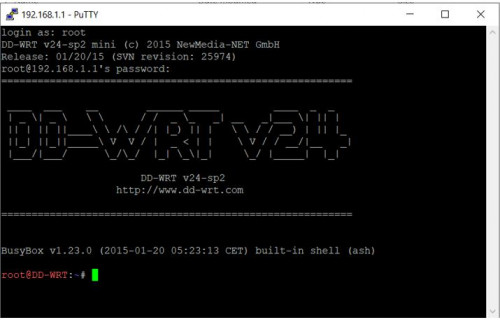
• Log in via the router login=root and password=admin. Please use root only as username.
• Once successfully log in, the following page will appear.

user posted image

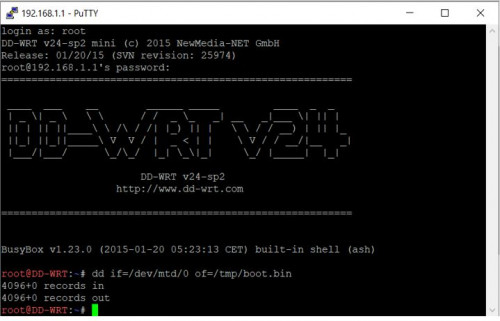
• Enter the following command to backup your CFE
dd if=/dev/mtd/0 of=/tmp/boot.bin
• An update page will appear. Confirm that there are records in and out
user posted image

• Close Putty session.
• Now the router is ready for Step 4.

This post has been edited by misk94: Jan 4 2021, 04:28 PM
TSmisk94
post Jan 3 2021, 04:19 PM

Getting Started
**
Junior Member
72 posts

Joined: May 2014


Step 4: Adding router MAC address to bin file using CFEedit

• From the Tools folder click on the CFEedit icon to lauch it.
• In CFEedit, click File menu --> open CFE and choose CFE_868L_melin384.bin
• Click to Advance Tab and you will see the CFE file
• Look for the following 3 lines and change accordingly.

1. et0macaddr --> change to router MAC Address - LAN

user posted image

2. 0:macaddr --> change to router MAC Address - 2.4 GHz WiFi (same as LAN)

user posted image

3. 1:macaddr --> change to router own MAC Address - 5 GHz WiFi

user posted image

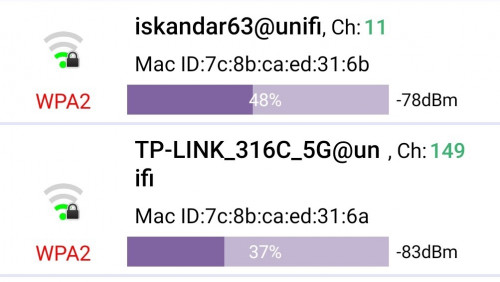
• Best if you get your router MAC Addresses for 2.4 GHz and 5 GHz WiFi before you migrate by using a WiFi app in your phone.
• Examples MAC Addresses scanned from WiFi App.

user posted image

• Once completed, save the edited CFE file as mycfe.bin (any new name you like) and close it.
• Now the router is ready for Step 5.


This post has been edited by misk94: Jan 6 2021, 09:25 PM
TSmisk94
post Jan 3 2021, 04:26 PM

Getting Started
**
Junior Member
72 posts

Joined: May 2014


Good news.

The good thing of using a factory ASUS firmware, you could get new updates automatically from their website.

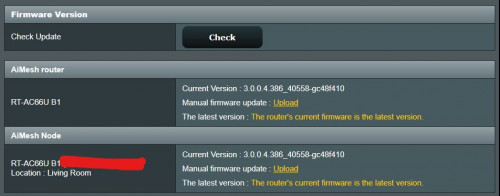
Both of my routers were running RT-AC66U B1 firmware. Release 3.0.0.4_385_20633 before this.

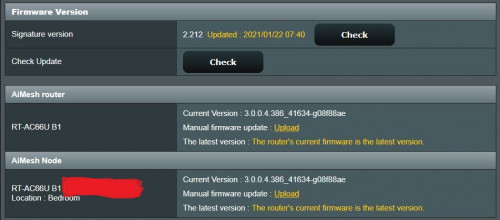
Now, they are running RT-AC66U B1 firmware. Release 3.0.0.4_386_40588. Latest firmware.

user posted image

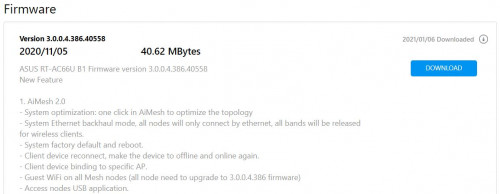
Well better than DLink DIR-868L FW-1.22SHC firmware which was dated 08/02/2018. No update since.

user posted image

I'll take the Asus firmware anytime as it was released 5th Nov 2020. It is using the new AiMesh V2.0

user posted image

user posted image

First impressions:

1. Nicer and cleaner interface.
2. Consumes a bit more memory. 70 MB+ vs 60 MB+. Still plenty memory left from the 256 MB installed onboard.
3. Comparable speed.

user posted image

4. More stable. This is important.
5. Could turn-off the irritating Captcha when you want login to your router.

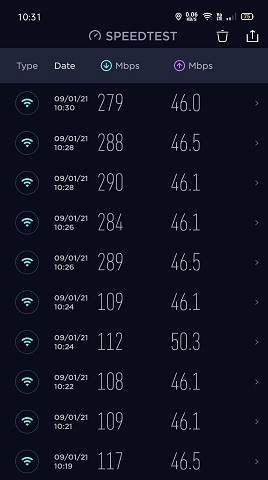
Another Internet Speed Test

user posted image

Updated 24th Jan 2021

This post has been edited by misk94: Jan 24 2021, 08:46 PM
TSmisk94
post Jan 5 2021, 10:35 AM

Getting Started
**
Junior Member
72 posts

Joined: May 2014


Step 5: Using WinSCP to transfer mycfe.bin file

• Find WinSCP folder in Tools folder.
• Open the folder and click WinSCP icon to launch it.
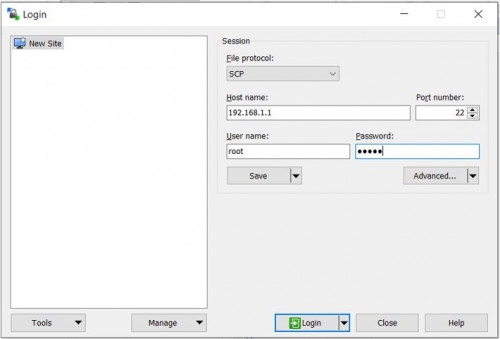
• Use the following to log in.

1. file protocol : "SCP"
2. host name : 192.168.1.1
3. username : root
4. password : admin

user posted image

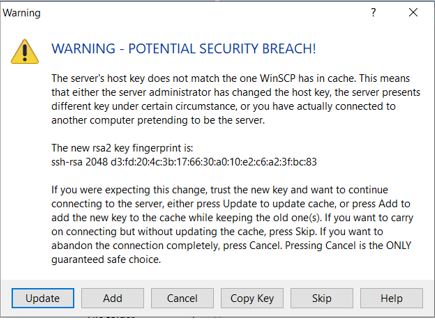
• Warning will appear. No worries. You are the one doing it . Just click update.

user posted image

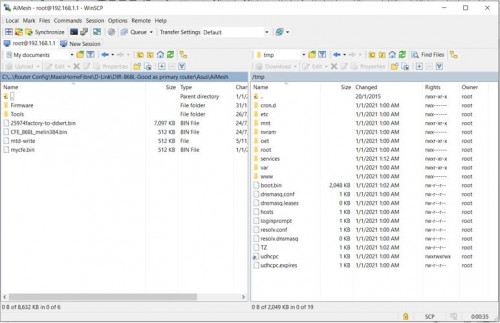
• Once updated, a new window appears as shown below

user posted image

• left side = folders on your PC and right side = router root folder.
• Click to /tmp directory in Router
• Drag /tmp/boot.bin to your local folder (drag to left) and drag mycfe.bin to /tmp of your router (drag to right)
• This is to backup existing CFE file and also upload mycfe.bin file to the router.
• Close session

This post has been edited by misk94: Jan 6 2021, 09:20 PM
TSmisk94
post Jan 5 2021, 06:31 PM

Getting Started
**
Junior Member
72 posts

Joined: May 2014


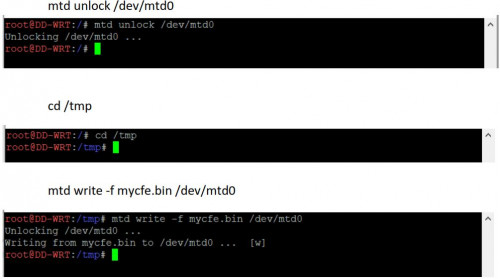
Step 6: Writing mycfe.bin to router flash memory using Putty

• Login back to Putty
• Enter the commands below to flash mycfe.bin file.
• Enter the commands one at a time, in the sequence given below.

user posted image

• Once all done, type reboot while pushing a paperclip to the hidden reset button located at the bottom of the device for a few seconds.
• When the Internet LED starts blinking on and off, release the reset button.
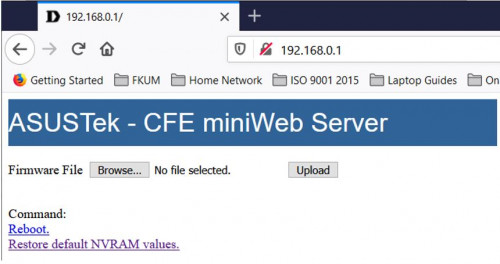
• This should trigger Asus CFE Miniweb Server.

This post has been edited by misk94: Jan 8 2021, 07:58 PM
TSmisk94
post Jan 5 2021, 06:40 PM

Getting Started
**
Junior Member
72 posts

Joined: May 2014


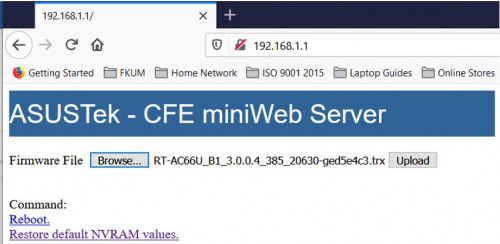
Step 7: Upload RT-AC66U firmware using Asus CFE Miniweb Server

• After booting, the router IP address is changed back to 192.168.0.1.
• I can only assumed that the router default IP address was inherited from DLink CFE Miniweb Server.
• Change PC IP address back to 192.168.0.3
• On your browser, type 192.168.0.1 and you should see the web page below.

user posted image

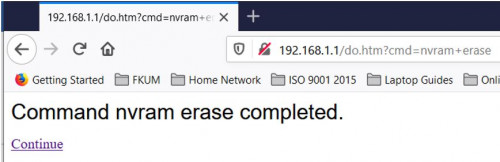
• Next, click on "Restore default NVRAM values" to erase nvram contents.

user posted image

• Browse for RT-AC66U_B1_3.0.0.4_385_20630-ged5e4c3.trx firware file

user posted image

• Click Upload button and let the RT-AC66U firmware be loaded to the router. Please be patient, it will take some time (maybe about 3-5 minutes).
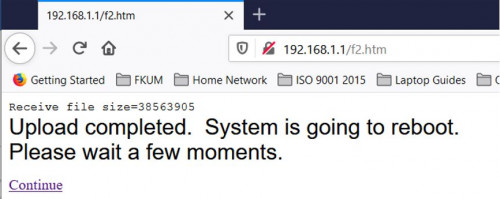
• Finally, you will see the following message. Click Continue link to reboot the router.

user posted image

• Congratulations you succeeded in migrating your DIR-868L router to Asus AiMesh firmware.
• Don’t forget to set your PC IP address back to automatic.
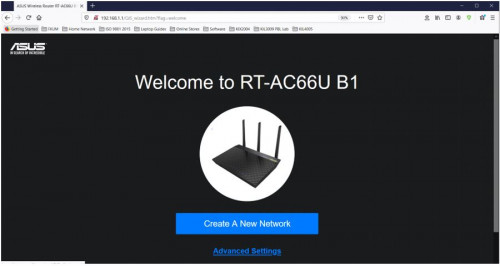
• You should see welcome page of RT-AC66U B1.

user posted image

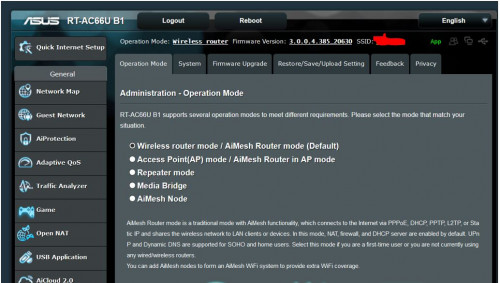
• Now you should be able to do the necessary router configurations. See sample below.

user posted image

• Good luck with migration to Asus AiMesh. thumbsup.gif

• My work is done. rclxm9.gif

ASUS Router App:

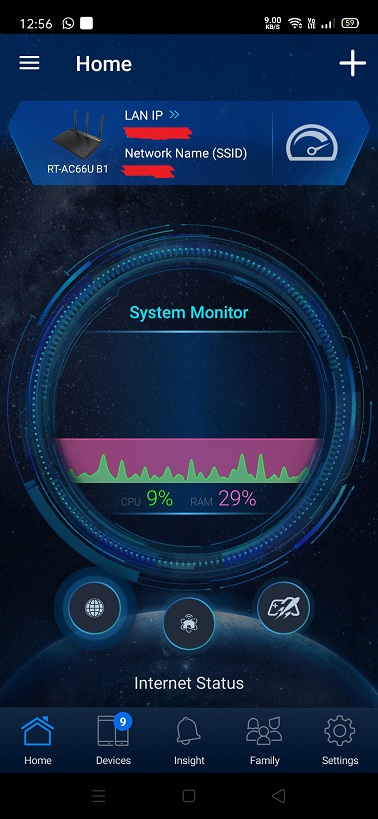
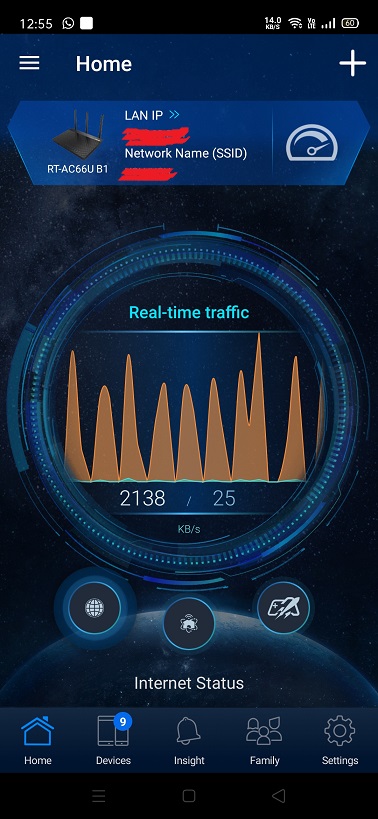
• Recently, I installed the ASUS Router app in my android phone. The app is awesome.
• Similar in comparison to other routers brand such as TP-Link or DLink in terms of functionality but definitely more features and better looking.
• The app will think the converted DIR-868L is a genuine RT-AC66U B1 router. biggrin.gif
• A recommended download. thumbup.gif

user posted image

user posted image

user posted image

user posted image

P/S:
• I saw in the internet people migrating to AsusWrt-Merlin firmware.
• Technically it could be done.
• I don't have any spare DIR-868L router anymore to try this.
• Maybe someone with a spare DIR-868L could have a try and let us know the outcome?

Updated 16th January 2021

This post has been edited by misk94: Jan 17 2021, 08:47 PM
TSmisk94
post Jan 8 2021, 09:22 AM

Getting Started
**
Junior Member
72 posts

Joined: May 2014


You are welcome. smile.gif


TSmisk94
post Jan 22 2021, 01:11 PM

Getting Started
**
Junior Member
72 posts

Joined: May 2014


Latest ASUS RT-66U B1 firware updates from ASUS.

https://www.asus.com/us/Networking/RT-AC66U.../HelpDesk_BIOS/

18 Jan 2021 firmware.

user posted image

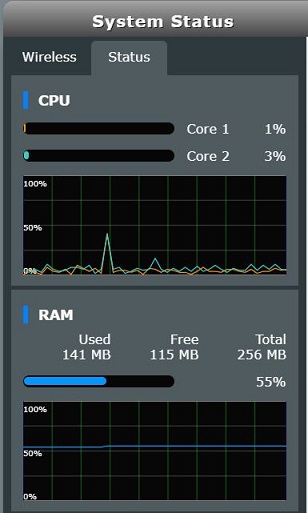
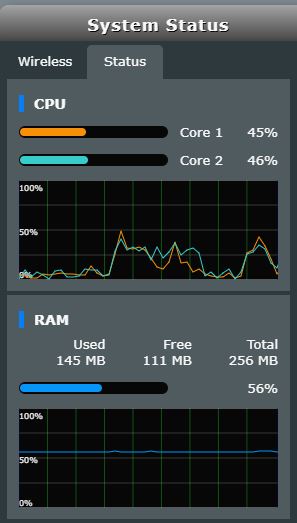
The new firmware seems to consume more memory. Increase from 70+ MB to 140+ MB. Wow! Double increase memory usage.

1. Normal load

user posted image

2. Loaded with Speedtest running

user posted image


This post has been edited by misk94: Jan 24 2021, 08:54 PM
gary_cheah85
post Feb 6 2021, 09:37 PM

**Gary**
****
Senior Member
529 posts

Joined: Aug 2005
Great sharing to maximise the full potential of this router.
It was selling for Rm100 not too long ago
https://www.ookas.my/review/d-link-dir-868l...-router-review/

Performance wise, is it as good as Ac66u?
kaka[22]
post Feb 6 2021, 11:52 PM

Getting Started
**
Junior Member
156 posts

Joined: Feb 2005
RT AC-66U B1....same with AC-66U?
gary_cheah85
post Feb 7 2021, 02:06 PM

**Gary**
****
Senior Member
529 posts

Joined: Aug 2005
QUOTE(kaka22 @ Feb 6 2021, 11:52 PM)
RT AC-66U B1....same with AC-66U?
*
I read somewhere that says rt-AC66U B1 is having same hardware as rt-ac68u, just the orientation is flat Vs standing vertical

The original Rt-ac66u was released few years back having different processor

A1 =CPU1: Broadcom BCM4706 (600 MHz) cpu
B1 =CPU1: Broadcom BCM4708C0 (800 MHz, 2 cores)
TSmisk94
post Feb 7 2021, 02:13 PM

Getting Started
**
Junior Member
72 posts

Joined: May 2014


QUOTE(gary_cheah85 @ Feb 6 2021, 09:37 PM)
Great sharing to maximise the full potential of this router.
It was selling for Rm100 not too long ago
https://www.ookas.my/review/d-link-dir-868l...-router-review/

Performance wise, is it as good as Ac66u?
*
Yes. DIR-868L is relatively inexpensive late 2019/early 2020. But recently, the price went up back if you check Lazada or Shopee.

I do not have an Asus AC66U to make any performance comparison.

Nevertheless, I am satisfied the performance of my AiMesh network running since early Jan 2021.

However, my AiMesh node do need to be manually rebooted once awhile. I think it's due to heat since it is located in a place with minimal air flow.

My main AiMesh router doing fine so far.

Sorry. I could not be any much help.

Regards.

This post has been edited by misk94: Feb 10 2021, 08:10 AM
TSmisk94
post Feb 7 2021, 02:17 PM

Getting Started
**
Junior Member
72 posts

Joined: May 2014


QUOTE(gary_cheah85 @ Feb 7 2021, 02:06 PM)
I read somewhere that says rt-AC66U B1 is having same hardware as rt-ac68u, just the orientation is flat Vs standing vertical

The original Rt-ac66u was released few years back having different processor

A1 =CPU1: Broadcom BCM4706 (600 MHz) cpu
B1 =CPU1: Broadcom BCM4708C0 (800 MHz, 2 cores)
*
Yes. Usually the trend is like that. Later releases of same router brand comes with improved or better hardware.

DIR-868L is having a dual core Broadcom processor. Only DLink firmware is more conservative compared to ASUS firmware. Maybe good enough for average home user.

This post has been edited by misk94: Feb 7 2021, 02:18 PM
gary_cheah85
post Feb 7 2021, 02:41 PM

**Gary**
****
Senior Member
529 posts

Joined: Aug 2005
QUOTE(misk94 @ Feb 7 2021, 02:13 PM)
Yes. DIR-868L is relatively inexpensive late 2019/early 2020. But recently, the price went up back if you check Lazada or Shopee.

I do not have an Asus AC66U to make any performance comparison.

Nevertheless, I am satisfied the performance of my AiMesh network running since early Jan 2021. My AiMesh node do need to be manually rebooted once awhile. Due to heat since it is located in a place with minimal air flow. My main AiMest router doing fine.

Sorry. I could not be any much help.

Regards.
*
Dir-868L is the stock router for Singtel and Starhub for our lovely neighbour in Singapore few years back. You can get a second hand unit for dirt cheap on Carousell, SGD 10-15 easily.

AiMesh node using wireless backhaul or LAN Ethernet backhaul?
Sounds bit problematic to manual restart, since you cannot control AiMesh node at Web UI
TSmisk94
post Feb 10 2021, 08:06 AM

Getting Started
**
Junior Member
72 posts

Joined: May 2014


QUOTE(gary_cheah85 @ Feb 7 2021, 02:41 PM)
Dir-868L is the stock router for Singtel and Starhub for our lovely neighbour in Singapore few years back. You can get a second hand unit for dirt cheap on Carousell, SGD 10-15 easily.

AiMesh node using wireless backhaul or LAN Ethernet backhaul?
Sounds bit problematic to manual restart, since you cannot control AiMesh node at Web UI
*
Yes. Second hand DIR-868L is the way to go if you want inexpensive AiMesh setup. But then, it just the same like buying a second hand car. Lucky or Unlucky. biggrin.gif

By the way, I think you can you use the Optimise function in AiMesh settings or Reboot in System settings.

Both can be done in the ASUS App from your phone.

Either way should give what you want. Though, Reboot will reboot AiMesh main router and nodes.

Regards

This post has been edited by misk94: Feb 10 2021, 08:11 AM
sgpdsmss
post Feb 15 2021, 05:07 PM

Regular
******
Senior Member
1,704 posts

Joined: Jan 2005
QUOTE(misk94 @ Feb 10 2021, 08:06 AM)
Yes. Second hand DIR-868L is the way to go if you want inexpensive AiMesh setup. But then, it just the same like buying a second hand car. Lucky or Unlucky.  biggrin.gif

By the way, I think you can you use the Optimise function in AiMesh settings or Reboot in System settings.

Both can be done in the ASUS App from your phone.

Either way should give what you want. Though, Reboot will reboot AiMesh main router and nodes.

Regards
*
i follow your step to migrate to asus 66 firmware ..but after done ...the lan connection max 100mbps and 2.4g wifi at 30mbps ...
TSmisk94
post Feb 16 2021, 03:00 PM

Getting Started
**
Junior Member
72 posts

Joined: May 2014


QUOTE(sgpdsmss @ Feb 15 2021, 05:07 PM)
i follow your step to migrate to asus 66 firmware ..but after done ...the lan connection max 100mbps and 2.4g wifi at 30mbps ...
*
Glad to hear that you managed to migrate your DIR-868L successfully.

Based on what you said, it is a bit difficult to determine causes of the problem since it could be due to software or hardware or both.

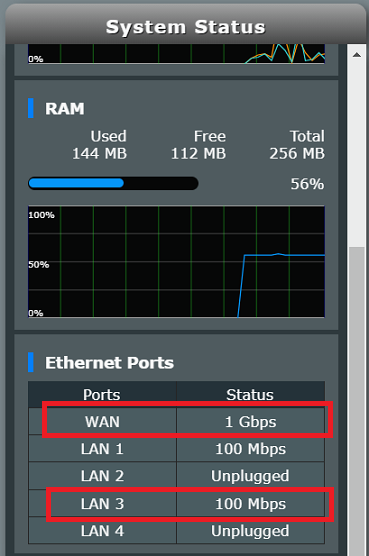
Point 1: 100 Mbps vs 1000 Mbps LAN/WAN

You can only get 1000 Mbps only if LAN cable is short. Maybe 1-2 metres. I can get this from my WAN port because my cable is less than 1 metre.

The other ports, I get 100 Mbps because the cables a lot longer (> 5metres).

user posted image

Although the LAN/WAN ports are rated to be 1000 Mbps, the physical limitation of copper wire will limit you to 100 Mbps when using long LAN cables.

That's why home internet like Unifi, Maxis or Time are using fibre-optics. No more copper lines.

Point 2: 2.4G WiFi.

I can get around 30+ Mbps from 2.4GHz. Yours might differ.

You need to use channel having less interference. A WiFi scanning app could help here.

The client side WiFI also important. Most clients are either 1x1 or 2x2 MiMo. Unless you are using expensive adapters you may get 3x3 MiMo. I think DIR-868L supports upto 3x3 MiMo. Big difference in WiFi speed.

Bottom line is migrating to ASUS firmware only the first part.

You still need to do a bit of tuning to suit your home and surroundings in order to take advantage of rich features available from the ASUS firmware.

With a bit of patience and tuning, you will get the improved WiFi performance that your are looking for.

The following websites may help in your quest.

https://www.lookingpoint.com/blog/wifi-opti...ireless-network

https://www.netspotapp.com/top-10-ways-to-boost-wifi.html

Regards.

This post has been edited by misk94: Mar 3 2021, 10:53 PM

10 Pages  1 2 3 > » Top
 

Change to:
| Lo-Fi Version
0.0147sec    0.67    6 queries    GZIP Disabled
Time is now: 14th December 2025 - 05:44 PM