Outline ·
[ Standard ] ·
Linear+
HP Pavilion Tablet PC TX series, Discussion TX 1000, TX 2000 TX 2500
|
Deani_77
|
 Dec 17 2008, 06:53 PM Dec 17 2008, 06:53 PM
|

|
QUOTE(yiks001 @ Dec 17 2008, 05:36 PM) When I started having intermittent display problems. I ran monitoring software on the tx1316au. I see temperatures can shoot up to 70/80C for CPU. And GPU goes to 110C.. !!!!! shocker!!! Just by leaving an animated browser page open. So If your tx1000 series notebook is out of warranty.... close your browsers rather than just leave it running. I would think the Graphics Processor (GPU) is generating the most heat and is the chip that died. What with all the intermittent screen corruptions before the final death. Would like to see how HP handles the warranty before I purchase another product from them. What software you use to monitor those temperature? Or it was a built-in software? |
|
|
|
|
|
Deani_77
|
Dec 17 2008, 09:57 PM
|
|
|
I get this reading on HP Recommended scheme. Without laptop cooler and run only internet browser and ms excel application. » Click to show Spoiler - click again to hide... « |
|
|
|
|
|
Deani_77
|
Jan 3 2009, 11:39 PM
|
|
|
l think if the tempature still within allowed tempature range, it is OK dough...
|
|
|
|
|
|
Deani_77
|
Jan 14 2009, 07:40 PM
|
|
|
Anybody ever user docking station for your lappy... I saw this and this at HP site. Look nice and planning to get it someday. Anybody ever user or try this docking station can share their experience...  This post has been edited by Deani_77: Jan 14 2009, 07:42 PM This post has been edited by Deani_77: Jan 14 2009, 07:42 PM |
|
|
|
|
|
Deani_77
|
Jan 15 2009, 10:43 PM
|
|
|
QUOTE(obm_nlh @ Jan 15 2009, 09:01 PM) Actually, the usage docking unit is VERY good as it will avoid wear and tear of our existing ports. Right now, I normally use external keyboard and mouse. I can offer to thump the external keyboard better than the baby's fragile one. It does not take that long to reset the external peripherals once you get back home using docking option. I usually hate to coil and uncoil the power adapter everytime I changed my venue.. Too much cumbersome to me. That was my intention to get the docking station. i can just leave my mouse and power adapter at the office or in the back. While at home I can just plug-in my lappy to docking station and everything was there plus additional USB port could come in handy. The only thing that worried me was, if I'm usinh docking station. I cannot use laptop cooler anymore since my lappy will be put on the docking station. |
|
|
|
|
|
Deani_77
|
Jan 16 2009, 06:00 PM
|
|
|
I think HP already stop producing this model due to introduction of TX2 model. Not much shop still have stock at their shop. You are lucky if could find one.
Like myself in Bintulu, after I bought this lappy. One of my friend also search the same model as mine. But unlucky it already out of stock.
May be you can try ask bro from KL and JB about availability of this lappy.
|
|
|
|
|
|
Deani_77
|
Feb 13 2009, 10:21 AM
|
|
|
QUOTE(ahnien @ Feb 12 2009, 12:59 PM) cheap is cheap.... but the screen quality damn noob.... you put it beside a normal desktop, then you will know. the concept of tablet is nice, and at this price. it seems like a very very fair deal. something you would like to take note on. the magnetic pen. you will need to refill the magnetic tip when the magnet goes low and affect the screen sensitivity. furthermore, they onli provide you with like a few extra tips for changing. my fren who got tis model, rarely even use its tablet functions. If you make choice buying tablet notebook means you need it not just buying it make people 'wow' or 'cool' when looking to your tablet. If you don't need tablet notebook. Better get a normal notebook, I believe you can get better spec for it price.  |
|
|
|
|
|
Deani_77
|
Feb 15 2009, 07:19 AM
|
|
|
I heard from my brother who was looking for this TX2000 model recently, he said all the shop already increased this model price since HP already stop producing this model. Any comments?
|
|
|
|
|
|
Deani_77
|
Feb 15 2009, 10:09 AM
|
|
|
He said it almost RM4k but it differ from one shop to another...
|
|
|
|
|
|
Deani_77
|
Feb 17 2009, 03:40 PM
|
|
|
My brother just successful bid a TX2z from ebay for less than RM4k powered by turion 2.1GHz and 320GB hard disk.
|
|
|
|
|
|
Deani_77
|
Feb 26 2009, 08:28 PM
|
|
|
QUOTE(Kuntau @ Feb 26 2009, 05:35 PM) I'm not sure, I think 4GB.. I can't even find the exact model number.. don't know where they put it. Anyway it come with Vista Home Premium 64bit :thumb: Welcome to the club bro... How is you TX2z software trimming process? Getting better WEI? |
|
|
|
|
|
Deani_77
|
Feb 26 2009, 11:30 PM
|
|
|
I think there is no problem discussing it here since the newer model spec almost the same... perhaps they also will faced the same problem as ours....
|
|
|
|
|
|
Deani_77
|
Mar 11 2009, 07:49 AM
|
|
|
Windows 7....
May be not today but in the other day since lack of proper driver for that OS...
|
|
|
|
|
|
Deani_77
|
Aug 1 2009, 08:18 PM
|
|
|
I heard a lot of ppl have problem with TX1000 series but very rare for TX2000 and above...
As for my TX2000, so far no big problem until I need to sent it to HP Center.
|
|
|
|
|
|
Deani_77
|
Apr 3 2010, 12:20 PM
|
|
|
So many complaint on this model so far... As for my unit already replaced the mobo just 1 week before the warranty end... But the heat produced when using heavy application like games gave me very bad feeling... Some time the temperature goes up to nearly water boiling point measured using HWMonitor. Even I'm using laptop cooler... 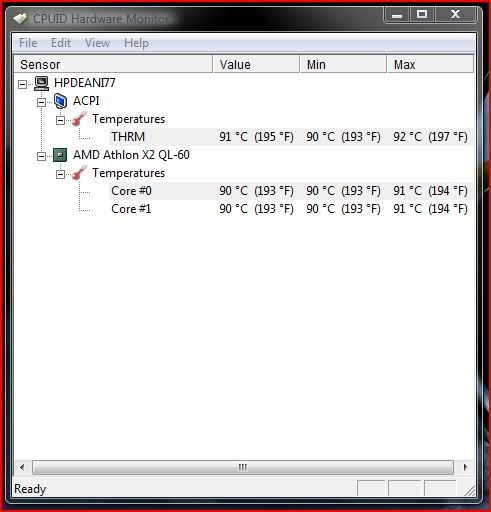 This post has been edited by Deani_77: Apr 3 2010, 01:59 PM This post has been edited by Deani_77: Apr 3 2010, 01:59 PM |
|
|
|
|
|
Deani_77
|
Apr 13 2010, 11:10 AM
|
|
|
QUOTE(tpl @ Apr 7 2010, 07:42 AM) Sell it when u still can man and wait for tm2.. LOL Any idea what is the market price for 2nd TX2000? |
|
|
|
|
|
Deani_77
|
Oct 31 2010, 02:13 PM
|
|
|
QUOTE(Fadly @ Oct 21 2010, 12:30 PM) What's the latest price tag for TX2520? Bro... if you have interest on this model better forget it. Better get for newer version like TX2. Worth spending your money... Don't stuck like us with this problem... |
|
|
|
|
|
Deani_77
|
Oct 8 2011, 06:55 PM
|
|
|
My TX2520 also already kaput last month... From the LED blinking indicator it show CPU problem... Had sent to HP center during warranty period because of mb problem.
Life shorter than my old Packard Bell lappy... (bought on 2004 and still working til now).
|
|
|
|
|



 Quote
Quote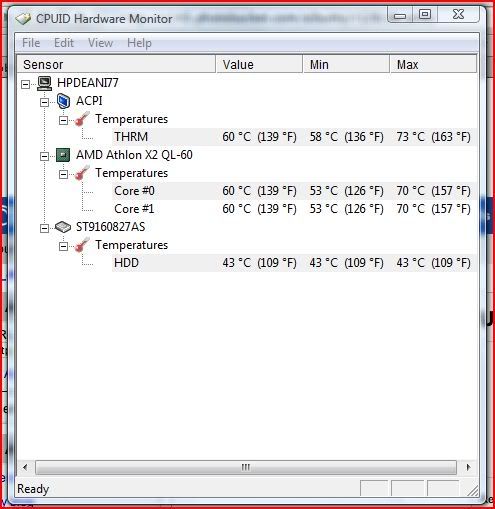

 0.0352sec
 0.31
0.31
 7 queries
 GZIP Disabled