Welcome Guest ( Log In | Register )

22 Pages « < 4 5 6 7 8 > » Bottom

Outline · [ Standard ] · Linear+

 XiaoMi AX3600 AX1800 AX5 Vlan tagging

views
     
neuromancerx
post Sep 8 2020, 03:49 PM

Enthusiast
*****
Junior Member
879 posts

Joined: Jan 2007
i just received this router and immediately replaced my AC86U. Performance wise very significant. However i missed a lot of deep customization offered in asuswrt.

1. Unable to set DNS server in DHCP. I have pi-hole ad blocker and used to point my LAN DNS to here.
2. Limited DDNS support. I remembered in stock openwrt they support a lot of ddns provider. No time to tinker around right now.
3. No support for guest network creation. I need to reconfigure all my iot devices (smart plugs, ip cam)
4. SSH access removed once i performed firmware upgrade. So can't tinker around for adding iptv support, adding additional ddns provider etc.

slowly resolving above issue before i can permanently shut my ac86u.

Back to this thread objective, the solution for getting the ssh and vlan tagging for unifi really works well!
TSheidarren
post Sep 8 2020, 04:13 PM

Getting Started
**
Junior Member
248 posts

Joined: Aug 2018
QUOTE(neuromancerx @ Sep 8 2020, 03:49 PM)
i just received this router and immediately replaced my AC86U. Performance wise very significant. However i missed a lot of deep customization offered in asuswrt.

1. Unable to set DNS server in DHCP. I have pi-hole ad blocker and used to point my LAN DNS to here.
2. Limited DDNS support. I remembered in stock openwrt they support a lot of ddns provider. No time to tinker around right now.
3. No support for guest network creation. I need to reconfigure all my iot devices (smart plugs, ip cam)
4. SSH access removed once i performed firmware upgrade. So can't tinker around for adding iptv support, adding additional ddns provider etc.

slowly resolving above issue before i can permanently shut my ac86u.

Back to this thread objective, the solution for getting the ssh and vlan tagging for unifi really works well!
*
Actually I got the method for permanent ssh access even with latest .67 firmware, will update here soon.

As for PiHole, yes I did edited the DNS server to my PiHole via winscp, now all my client will receive IP and gateway IP from AX3600 and DNS server from PiHole. Will update here soon also, I need to do some screenshots.

neuromancerx
post Sep 8 2020, 04:42 PM

Enthusiast
*****
Junior Member
879 posts

Joined: Jan 2007
QUOTE(heidarren @ Sep 8 2020, 04:13 PM)
Actually I got the method for permanent ssh access even with latest .67 firmware, will update here soon.

As for PiHole, yes I did edited the DNS server to my PiHole via winscp, now all my client will receive IP and gateway IP from AX3600 and DNS server from PiHole. Will update here soon also, I need to do some screenshots.
*
thanks bro!

anyway, the moment im replying this post, im already back on my old router. for some reason after i rebooted this ax1800 router all my internet connection lost. i recalled that i have changed the WAN DNS (to point to my pi-hole) and hoping that all my client DNS request will be forwarded to pi-hole. also i noticed when i did that, the MTU changed to 1480 by itself. so after i reverted all those settings but my internet still disconnected i gave up. will explore more at night as im currently WFH now biggrin.gif

having SSH directly to the router will ease the troubleshooting

This post has been edited by neuromancerx: Sep 8 2020, 04:42 PM
TSheidarren
post Sep 8 2020, 05:03 PM

Getting Started
**
Junior Member
248 posts

Joined: Aug 2018
QUOTE(neuromancerx @ Sep 8 2020, 04:42 PM)
thanks bro!

anyway, the moment im replying this post, im already back on my old router. for some reason after i rebooted this ax1800 router all my internet connection lost. i recalled that i have changed the WAN DNS (to point to my pi-hole) and hoping that all my client DNS request will be forwarded to pi-hole. also i noticed when i did that, the MTU changed to 1480 by itself. so after i reverted all those settings but my internet still disconnected i gave up. will explore more at night as im currently WFH now  biggrin.gif

having SSH directly to the router will ease the troubleshooting
*
Do not point WAN DNS to PiHole, it will ruin everything. Proper way to do it is use winscp, go to /etc/config/dhcp, add list 'dhcp_option' '6,192.168.0.6'
(my PiHole is 192.168.0.6, if u want more DNS server u may do it like '6,192.168.0.6,8.8.8.8' ), by doing this u will get IP form DHCP and DNS server will be PiHole IP

This post has been edited by heidarren: Sep 8 2020, 05:04 PM
neuromancerx
post Sep 8 2020, 05:17 PM

Enthusiast
*****
Junior Member
879 posts

Joined: Jan 2007
QUOTE(heidarren @ Sep 8 2020, 05:03 PM)
Do not point WAN DNS to PiHole, it will ruin everything. Proper way to do it is use winscp, go to /etc/config/dhcp, add       list 'dhcp_option' '6,192.168.0.6' 
(my PiHole is 192.168.0.6, if u want more DNS server u may do it like '6,192.168.0.6,8.8.8.8' ), by doing this u will get IP form DHCP and DNS server will be PiHole IP
*
thats the plan, but then i lost my ssh access when upgraded the fw. anyway just playing for fun. honestly, i do not see any harm pointing the WAN DNS to pihole, since my pi-hole is using 1.1.1.1/8.8.8.8 as an upstream dns resolver. so as long as the internet is reachable, it should resolves.

my pc cant even ping 1.1.1.1, so i believed issue is not related to dns, unless there is something that im not aware with xiaomi's openwrt implementation

This post has been edited by neuromancerx: Sep 8 2020, 05:18 PM
SUSipohps3
post Sep 8 2020, 11:02 PM

Regular
******
Senior Member
1,974 posts

Joined: Dec 2011


Hi guys. which one is better? the new Redmi AX6 or Xiaomi AX3600? seems like those 2 are better than Huawei AX3.
TSheidarren
post Sep 9 2020, 02:00 AM

Getting Started
**
Junior Member
248 posts

Joined: Aug 2018
QUOTE(ipohps3 @ Sep 8 2020, 11:02 PM)
Hi guys. which one is better? the new Redmi AX6 or Xiaomi AX3600? seems like those 2 are better than Huawei AX3.
*
AX6 doesn't have ssh access yet, not sure if they able to crack it, go for AX3600 if you need VLAN tagging
flubear
post Sep 9 2020, 12:29 PM

Getting Started
**
Junior Member
211 posts

Joined: Jan 2003
From: Seri Kembangan


the current firmware should be 1.0.67 but when I've upgraded automatically it pushed a 1.0.227 firmware in, did anyone else got this as well?

toytoy
post Sep 9 2020, 07:04 PM

Enthusiast
*****
Senior Member
875 posts

Joined: Jan 2003


QUOTE(neuromancerx @ Sep 8 2020, 03:49 PM)
i just received this router and immediately replaced my AC86U. Performance wise very significant. However i missed a lot of deep customization offered in asuswrt.

1. Unable to set DNS server in DHCP. I have pi-hole ad blocker and used to point my LAN DNS to here.
2. Limited DDNS support. I remembered in stock openwrt they support a lot of ddns provider. No time to tinker around right now.
3. No support for guest network creation. I need to reconfigure all my iot devices (smart plugs, ip cam)
4. SSH access removed once i performed firmware upgrade. So can't tinker around for adding iptv support, adding additional ddns provider etc.

slowly resolving above issue before i can permanently shut my ac86u.

Back to this thread objective, the solution for getting the ssh and vlan tagging for unifi really works well!
*
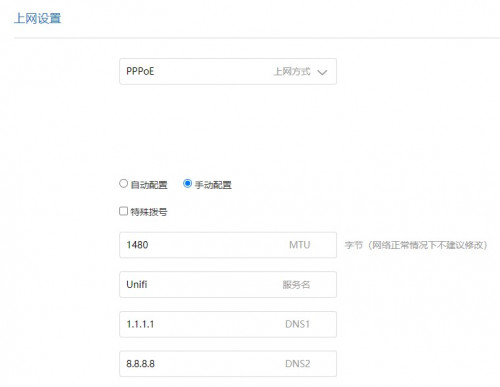
1.Pardon my ignorance but being able to set DNS at DHCP is different from setting the DNS at PPPOE side?

user posted image

2. Yes, DDNS service is limited. I m using no-ip so it's fine for me.

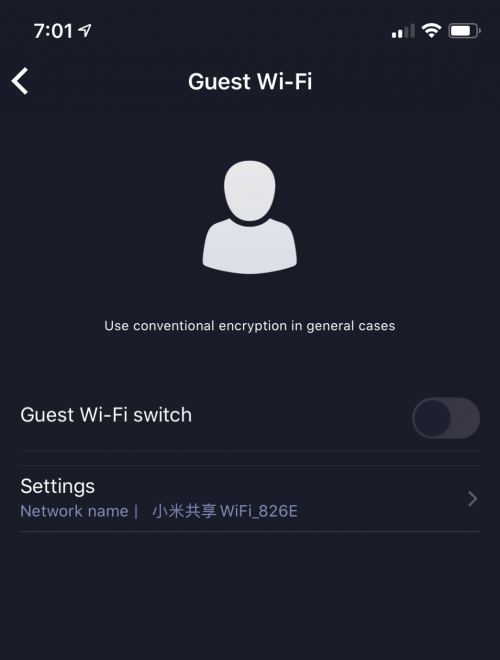
3. You can actually setup Guest WiFi using the APP in mobile phone. There are quite a number of settings available on the app only which is quite weird.

user posted image

This post has been edited by toytoy: Sep 9 2020, 07:04 PM
neuromancerx
post Sep 9 2020, 11:07 PM

Enthusiast
*****
Junior Member
879 posts

Joined: Jan 2007
QUOTE(toytoy @ Sep 9 2020, 07:04 PM)
1.Pardon my ignorance but being able to set DNS at DHCP is different from setting the DNS at PPPOE side?

user posted image

2. Yes, DDNS service is limited. I m using no-ip so it's fine for me.

3. You can actually setup Guest WiFi using the APP in mobile phone. There are quite a number of settings available on the app only which is quite weird.

user posted image
*
1. Technically will achieve the same thing, but in a weird way.

Client DNS resolution when:

Set DNS at DHCP
Client-LAN DNS server

Set DNS at PPPOE side
Client-Router-LAN DNS server

But when i alter DNS setting under pppoe, something broken and im losing my inet access

2. My personal preference for DDNS will be dns-o-matic. It able to update to other multiple ddns service and act as a central hub - since i also have ddns service with he.net and afraid dns. just noticed that i have no-ip account as well, but IINM need to visit their website every month to keep account remain active.
3. Is that miwifi app downloaded from playstore or modded apk? i dont recall i see that option yesterday

This post has been edited by neuromancerx: Sep 9 2020, 11:09 PM
toytoy
post Sep 10 2020, 01:46 AM

Enthusiast
*****
Senior Member
875 posts

Joined: Jan 2003


QUOTE(neuromancerx @ Sep 9 2020, 11:07 PM)
1. Technically will achieve the same thing, but in a weird way.

Client DNS resolution when:

Set DNS at DHCP 
Client-LAN DNS server

Set DNS at PPPOE side
Client-Router-LAN DNS server

But when i alter DNS setting under pppoe, something broken and im losing my inet access

2. My personal preference for DDNS will be dns-o-matic. It able to update to other multiple ddns service and act as a central hub - since i also have ddns service with he.net and afraid dns. just noticed that i have no-ip account as well, but IINM need to visit their website every month to keep account remain active.
3. Is that miwifi app downloaded from playstore or modded apk? i dont recall i see that option yesterday
*
2. Yes, for no-ip need to visit their website every month. but they send reminder every month and the process is mostly less than 1 minute.
3. Yes, MiWiFi app but I am using the iOS version. It is located at the apps site under guest wifi. The strange thing is i have to change to china region in the app to get it connected to my routers.
Janushi P
post Sep 11 2020, 08:14 PM

New Member
*
Probation
8 posts

Joined: Aug 2020
here global version 100% confirmed
https://aliexpress.com/item/1005001346449211.html
Janushi P
post Sep 12 2020, 03:23 AM

New Member
*
Probation
8 posts

Joined: Aug 2020
QUOTE(flubear @ Sep 9 2020, 12:29 PM)
the current firmware should be 1.0.67 but when I've upgraded automatically it pushed a 1.0.227 firmware in, did anyone else got this as well?
*
i have the same version 227
chaos32
post Sep 12 2020, 04:14 AM

Casual
***
Junior Member
485 posts

Joined: May 2006


I am unable to auto update firmware for AX3600. Anybody know where I can manually download firmware? Is there a need to backup before manual update?
flubear
post Sep 12 2020, 05:49 AM

Getting Started
**
Junior Member
211 posts

Joined: Jan 2003
From: Seri Kembangan


QUOTE(Janushi @ Sep 11 2020, 08:14 PM)
here global version 100% confirmed
https://aliexpress.com/item/1005001346449211.html
*
interesting to see this =) but if they have this we just have to get the firmware that is used in Russia and we will be able to update to switch it to English if required.
flubear
post Sep 12 2020, 05:51 AM

Getting Started
**
Junior Member
211 posts

Joined: Jan 2003
From: Seri Kembangan


QUOTE(chaos32 @ Sep 12 2020, 04:14 AM)
I am unable to auto update firmware for AX3600. Anybody know where I can manually download firmware? Is there a need to backup before manual update?
*
only 1.0.67 available for download, 1.0.227 not available on their website yet.

http://cdn.cnbj1.fds.api.mi-img.com/xiaoqi...7f3e_1.0.67.bin

Cheers
chaos32
post Sep 12 2020, 07:06 AM

Casual
***
Junior Member
485 posts

Joined: May 2006


QUOTE(flubear @ Sep 12 2020, 05:51 AM)
only 1.0.67 available for download, 1.0.227 not available on their website yet.

http://cdn.cnbj1.fds.api.mi-img.com/xiaoqi...7f3e_1.0.67.bin

Cheers
*
Thanks.
eugenecctan
post Sep 15 2020, 04:20 PM

Wee Wang Wang
******
Senior Member
1,058 posts

Joined: Nov 2009


Sifu, what is the advantage of Xiaomi AX1800/Redmi AX5 compared to local TP-Link AX20? Other than price. Thanks.
SUSnonamer
post Sep 15 2020, 08:33 PM

Getting Started
**
Junior Member
224 posts

Joined: Apr 2019
QUOTE(eugenecctan @ Sep 15 2020, 04:20 PM)
Sifu, what is the advantage of Xiaomi AX1800/Redmi AX5 compared to local TP-Link AX20? Other than price. Thanks.
*
xiaomi's qos will actually work compare to tplink's qos which probably doesnt work and just for show

but ax20 have faster processor which can be better for gaming

ax20 have alexa which turn your router into another surveillance node for cia

eugenecctan
post Sep 15 2020, 08:39 PM

Wee Wang Wang
******
Senior Member
1,058 posts

Joined: Nov 2009


QUOTE(nonamer @ Sep 15 2020, 08:33 PM)
xiaomi's qos will actually work compare to tplink's qos which probably doesnt work and just for show

but ax20 have faster processor which can be better for gaming

ax20 have alexa which turn your router into another surveillance node for cia
*
How about signal strength? I am trying to convince myself to save rm50 to get something from oversea without warranty compared to local unit that more expensive but with 3 years warranty.

22 Pages « < 4 5 6 7 8 > » Top
 

Change to:
| Lo-Fi Version
0.0301sec    1.05    6 queries    GZIP Disabled
Time is now: 18th December 2025 - 07:05 PM