

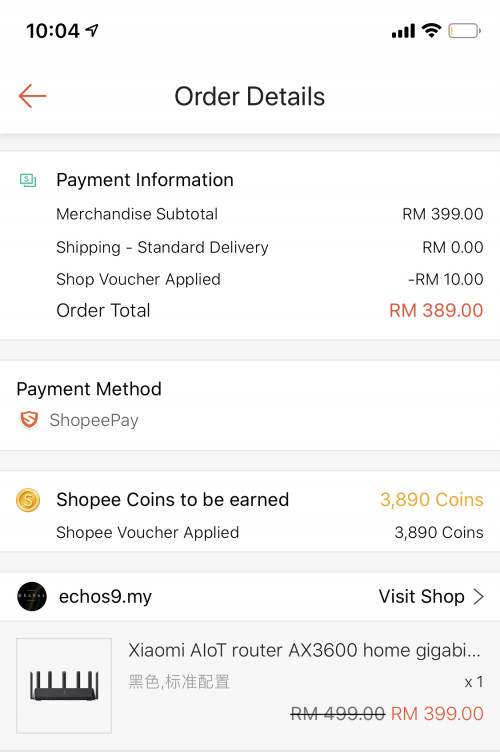
Chepest I found in shopee. Free shipping. RM10 shop discount. 10% Cashback. 1 year warranty. Total comes down to RM350.
XiaoMi AX3600 AX1800 AX5 Vlan tagging
|
|
 Aug 1 2020, 10:06 PM Aug 1 2020, 10:06 PM
|
 
Senior Member
875 posts Joined: Jan 2003  
|
Chepest I found in shopee. Free shipping. RM10 shop discount. 10% Cashback. 1 year warranty. Total comes down to RM350. chilskater liked this post
|
|
|
|
|
|
Aug 2 2020, 03:31 PM
Show posts by this member only | IPv6 | Post
#62
|
|
Probation
4 posts Joined: Jul 2020
|
QUOTE(redjurgen @ Jul 24 2020, 03:01 PM) you using redmi ax5 as well? can you manage do as the video? i can do it and connect thru btu but i cannot get ip6 wan ip ...haizzzz that means i cant access internet. Anyone cant solve it ? (ax5 firmware 1.026) |
|
|
Aug 2 2020, 03:47 PM
|

Junior Member
50 posts Joined: Mar 2008
|
thx ts for sharing. tried setting up everything even downgrading firmware, still got dns error, all follow steps, all ok. but msg say dialling to wan success. onli error from dns. then tried manually gugel dns ip or gugel for solution and diff dns ip still cannot work. sob...
ax3600 |
|
|
Aug 2 2020, 05:21 PM
Show posts by this member only | IPv6 | Post
#64
|
|
Probation
4 posts Joined: Jul 2020
|
where can i download firmware version 1.0.16 for redmi AX5.
i wanna to dwongrade redmi AX5 firmware ....(currently 1.0.26) |
|
|
Aug 3 2020, 02:42 PM
|
|
Junior Member
224 posts Joined: Apr 2019
|
i wonder does the 2.4g capability of ax5/ax1800/ax3600 (2x2 and 1ghz+ processor and FEM) enable the auto selection of 4k resolution in youtube in android boxes?
my previous router which is '2x2 1.0ghz' not able to autoload 4k, now change to '3x3 1.2ghz' only can, wondering is it because of the faster wireless chip or processor or both? because if buying these latest routers and not able to autoload 4k is losing a feature This post has been edited by nonamer: Aug 3 2020, 06:12 PM |
|
|
Aug 3 2020, 08:56 PM
|
|
Junior Member
64 posts Joined: Mar 2005
|
QUOTE(mjtay100 @ Aug 2 2020, 03:31 PM) i can do it and connect thru btu but i cannot get ip6 wan ip ...haizzzz why do you want to have ipv6?that means i cant access internet. Anyone cant solve it ? (ax5 firmware 1.026) |
|
|
|
|
|
Aug 4 2020, 02:10 PM
|
|
Junior Member
81 posts Joined: Sep 2007
|
QUOTE(mjtay100 @ Aug 2 2020, 05:21 PM) where can i download firmware version 1.0.16 for redmi AX5. http://cdn.cnbj1.fds.api.mi-img.com/xiaoqi...3805_1.0.16.bini wanna to dwongrade redmi AX5 firmware ....(currently 1.0.26) mjtay100 liked this post
|
|
|
Aug 4 2020, 02:22 PM
|
|
Junior Member
81 posts Joined: Sep 2007
|
QUOTE(nonamer @ Aug 3 2020, 02:42 PM) i wonder does the 2.4g capability of ax5/ax1800/ax3600 (2x2 and 1ghz+ processor and FEM) enable the auto selection of 4k resolution in youtube in android boxes? Video quality assignment is based on your wan bandwidth and wireless connection. my previous router which is '2x2 1.0ghz' not able to autoload 4k, now change to '3x3 1.2ghz' only can, wondering is it because of the faster wireless chip or processor or both? because if buying these latest routers and not able to autoload 4k is losing a feature Assuming your WAN bandwidth is not an issue.. 5GHz wireless connection in house definitely would get you to 4k selection. |
|
|
Aug 4 2020, 06:07 PM
|
|
Junior Member
224 posts Joined: Apr 2019
|
QUOTE(KyEap @ Aug 4 2020, 02:22 PM) Video quality assignment is based on your wan bandwidth and wireless connection. the android box wifi chip is rtl8189es (1x1, 2.4ghz, 802.11n), not support 5ghz, not even 802.11aAssuming your WAN bandwidth is not an issue.. 5GHz wireless connection in house definitely would get you to 4k selection. i think is because of increased throughput from faster processor and from 2x2 to 3x3 configuration according to following article, even though client antenna remain same, going from 2x2 to 3x3 can increase performance by 10-30% https://pakedge.wordpress.com/2015/11/17/2x...matterfind-out/ but the question is, is the 2.4ghz 2x2 router able to? (autoselect 4k youtube in android box) or maybe with closer distance it is possible? have not tried that bandwidth not issue as 4k only need like 30mbps my internet is 100mbps This post has been edited by nonamer: Aug 4 2020, 06:32 PM |
|
|
Aug 4 2020, 08:37 PM
|
|
Junior Member
81 posts Joined: Sep 2007
|
QUOTE(nonamer @ Aug 4 2020, 06:07 PM) the android box wifi chip is rtl8189es (1x1, 2.4ghz, 802.11n), not support 5ghz, not even 802.11a with your 802.11n wireless chipset.. 150Mbps max throughput in 40MHz(only if so lucky connected in 150Mbps max speed) .. deduct half-duplex nature(-50%), overhead, signal strength & uncertain interference especially 2.4Ghz..your topbox barely support 4k auto selection.i think is because of increased throughput from faster processor and from 2x2 to 3x3 configuration according to following article, even though client antenna remain same, going from 2x2 to 3x3 can increase performance by 10-30% https://pakedge.wordpress.com/2015/11/17/2x...matterfind-out/ but the question is, is the 2.4ghz 2x2 router able to? (autoselect 4k youtube in android box) or maybe with closer distance it is possible? have not tried that bandwidth not issue as 4k only need like 30mbps my internet is 100mbps This post has been edited by KyEap: Aug 4 2020, 08:38 PM |
|
|
Aug 7 2020, 08:06 AM
|

Junior Member
316 posts Joined: Oct 2009
|
morning all, has anyone managed to add vlan tagging for Redmi AX5? for unifi
|
|
|
Aug 10 2020, 08:20 PM
|
|
Junior Member
316 posts Joined: Oct 2009
|
=deleted=
This post has been edited by n0v1ce: Aug 10 2020, 11:11 PM |
|
|
Aug 11 2020, 03:08 PM
|
|
Senior Member
875 posts Joined: Jan 2003
|
Finally got my unit at 10.30PM yesterday 😅
Straight jumped into setting it up and managed to connect to unifi thanks to the great tutorial by heidarren. However, not all went well, the unit came with firmware 1.0.2x and the SSH hack doesn't work. After 1 hour of trial and error and doing some research online finally found out that the SSH hack only works on firmware version 1.0.17 as per heidarren's tutorial. So for the newer units have to downgrade the firmware first. After gaining SSH access can update to latest firmware withouy problem. It's a big upgrade to the TP-Link AC1900 Touch P5 Router I am currently using. WiFi Speed on iPhone X is over 300Mbps which never reach before. Was able to get full 800/200 Mpbs on Laptop and the range is much better. My router is on one end of the house whereas my home office is at the other end. Prevoiusly cannot get past 20Mbps but now can get over 100Mbps download however upload is still less than 20Mbps. Even PS4 able to get 600/200Mpbs. Never see this kind of speed before. Fired up a game of COD WWII Multiplayer and gotten full green bar for all 3 TDM. All in all it is a great router and easy to use. Don't allow me to set non-standard IP Range though. Tried to start with 221.x.x.x but not allowed hehe. What is the max theoretical speed we can get if add another unit of AX3600 as MESH? Thinking of adding another unit upstairs to get better speed in my home office.  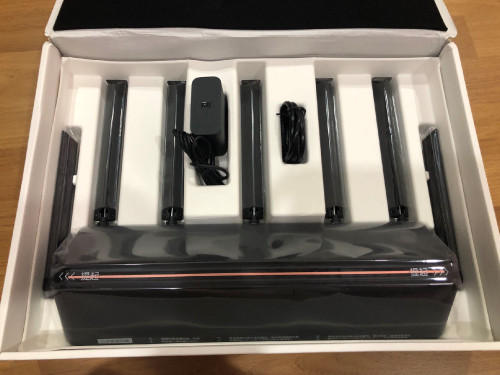 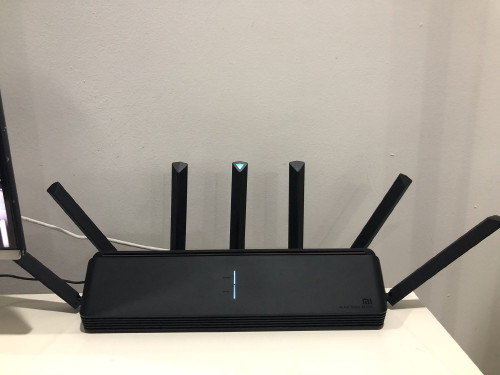 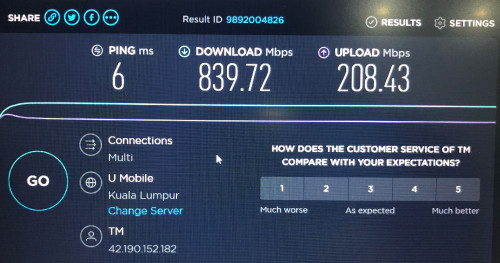 This post has been edited by toytoy: Aug 11 2020, 03:11 PM |
|
|
|
|
|
Aug 11 2020, 06:15 PM
|
|
Senior Member
875 posts Joined: Jan 2003
|
QUOTE(allen84us @ Jul 20 2020, 02:24 PM) i also having problem to connect to expressvpn...anyone has luck on this? Tried connecting ExpressVPN using L2TP protocol and surprisingly it worked. LA3 didn't work but NY2 worked. Maybe you can try it out. Very smart feature. Can assign specific website to use VPN or specific device to use VPN. 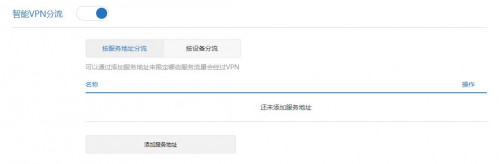 This post has been edited by toytoy: Aug 11 2020, 06:30 PM |
|
|
Aug 12 2020, 09:50 AM
|
|
Junior Member
224 posts Joined: Apr 2019
|
QUOTE(toytoy @ Aug 11 2020, 06:15 PM) Tried connecting ExpressVPN using L2TP protocol and surprisingly it worked. LA3 didn't work but NY2 worked. Maybe you can try it out. if it is able to continuously reconnect dropped connection it is improvement over original openwrt's l2tp client which couldnt so the only practical choice is to use openvpn |
|
|
Aug 12 2020, 12:10 PM
|
|
Probation
4 posts Joined: Jul 2020
|
QUOTE(KyEap @ Aug 4 2020, 02:10 PM) Thanks very much bro ....  |
|
|
Aug 12 2020, 12:35 PM
|
|
Senior Member
875 posts Joined: Jan 2003
|
Redmi AX6 just announced RMB369. Maybe can buy it for MESH setup
 https://xiaomidna.com/news/redmi-router-ax6...at-369-yuan-53/ This post has been edited by toytoy: Aug 12 2020, 12:35 PM |
|
|
Aug 23 2020, 10:48 AM
|
|
Senior Member
875 posts Joined: Jan 2003
|
Hi All, I bought another unit of ax3600 to setup mesh. I am only able to get around 400Mbps max even when I put the routers next to each other. This is not normal right? When I put the unit upstairs I only get Around 200Mbps. I can get more than 300Mbos Connecting directly to the main unit. 😓
I am on latest firmware and factory reset the unit already to try again. Still same. I see YouTube ppl getting around 700Mbps. Am I missing anything? Thx 🙏🏻 |
|
|
Aug 23 2020, 10:52 AM
|
|
Junior Member
306 posts Joined: Sep 2007
|
QUOTE(toytoy @ Aug 23 2020, 10:48 AM) Hi All, I bought another unit of ax3600 to setup mesh. I am only able to get around 400Mbps max even when I put the routers next to each other. This is not normal right? When I put the unit upstairs I only get Around 200Mbps. I can get more than 300Mbos Connecting directly to the main unit. 😓 Interesting, I am on latest firmware and factory reset the unit already to try again. Still same. I see YouTube ppl getting around 700Mbps. Am I missing anything? Thx 🙏🏻 What device are you using to check the connection speed ? When you testing what's the link speed of the connected device to the router ? Did you try using lan connection to test on the child node ? |
|
|
Aug 23 2020, 12:28 PM
|
|
Senior Member
875 posts Joined: Jan 2003
|
QUOTE(NooBiE888 @ Aug 23 2020, 10:52 AM) Interesting, I used an old laptop with intel ax200 WiFi module [bought from shopee for RM35. Recommended!!] Having the laptop right beside main node I get above 800Mbps at stable 2.2 Gbps link speed. Connected to the Child node beside the main node I get less than 400Mbps. Link speed I don’t remember but should be more than 1Gbps. What device are you using to check the connection speed ? When you testing what's the link speed of the connected device to the router ? Did you try using lan connection to test on the child node ? Connected to child node upstairs using lan cable can get around 500Mbps. Swap to WiFi straight drop to 280Mbps. |
| Change to: |  0.0343sec 0.0343sec
 0.62 0.62
 6 queries 6 queries
 GZIP Disabled GZIP Disabled
Time is now: 17th December 2025 - 09:17 AM |
 Quote
Quote