Welcome Guest ( Log In | Register )

22 Pages « < 5 6 7 8 9 > » Bottom

Outline · [ Standard ] · Linear+

 XiaoMi AX3600 AX1800 AX5 Vlan tagging

views
     
SUSnonamer
post Sep 15 2020, 08:58 PM

Getting Started
**
Junior Member
224 posts

Joined: Apr 2019
QUOTE(eugenecctan @ Sep 15 2020, 08:39 PM)
How about signal strength? I am trying to convince myself to save rm50 to get something from oversea without warranty compared to local unit that more expensive but with 3 years warranty.
*
no idea about ax20 but ax1800 signal strength is quite good as far as i can see...acwifi.net point D measurement 65 mark for 5g and 40 mark for 2.4g...5g range slightly better than mine (70 mark for 5g) which already cover whole double storey bungalow...so i know ax1800 will be enough for most normal size home

https://www.acwifi.net/wp-content/uploads/2020/06/D.jpg

eugenecctan
post Sep 16 2020, 10:17 AM

Wee Wang Wang
******
Senior Member
1,058 posts

Joined: Nov 2009


OK guys, last question before I place my order. smile.gif
2 units as mesh setup with Ax5 or Ax1800, which is better? Any link where can I get the best price for either units? Thanks.
neuromancerx
post Sep 17 2020, 04:28 PM

Enthusiast
*****
Junior Member
879 posts

Joined: Jan 2007
sorry, off topic:

im thinking to sell my AX1800 router. im barely using it, just for testing and experience. i dont think im ready to use the stock firmware yet at this point, will wait until it officially supported by openwrt.

other than AX1800, i'm also planning to sell these routers as well:
WS880 flashed with asuswrt RM100
AC86U CN set, consider no warranty. it got issue with disappearing 2.4Ghz but managed to get the workaround by set the country to AU RM250

Too much routers to play :sigh:
PM me if interested
eugenecctan
post Sep 17 2020, 07:05 PM

Wee Wang Wang
******
Senior Member
1,058 posts

Joined: Nov 2009


QUOTE(eugenecctan @ Sep 16 2020, 10:17 AM)
OK guys, last question before I place my order. smile.gif
2 units as mesh setup with Ax5 or Ax1800, which is better? Any link where can I get the best price for either units? Thanks.
*
Bought from Taobao, 1 unit of ax5 and 1 unit of ax1800, then saw the YouTube review on the weak 2.4g. Weaker than Huawei AX3... Hmm, is that true? I just returned a Huawei ax3 due to very weak 2.4g. My smart devices and chromecast are using 2.4g.
flubear
post Sep 19 2020, 01:40 AM

Getting Started
**
Junior Member
211 posts

Joined: Jan 2003
From: Seri Kembangan


Anyone managed to get iptv vlan 600 tag working on one of the ax3600 or ax1800 network port?
BlueWhisky P
post Sep 19 2020, 01:03 PM

New Member
*
Probation
4 posts

Joined: Sep 2020
Hi Darren,

Many thanks for your video but l couldn't get it work.
Perhaps you or some expert can help me as I am network idiot.

Story goes:

I livein Melbourne at the moment using ADSL2+ connect and I just installed the NBN (National Broadband Network) yesterday.
Everything seems to work until the Miwifi part where it would not connect。

People advised me that I might need to get a router with vlan supported and or try to configure this newly bought Xiaomi Ax3600, hence they directed me to your video.
This is where i am stuck as I do not even know how to connect correctly right at the begining.

This is what is happening:

1. Connect the HFC modem to the router WAN port and connect one of the LAN port to my desktop, is this rorrect?
2. My broadband service provider did not give me any login or password, so I cannot do the PPPoE setup like you have shown in the video.

All the help and advice are very much appreciated.

Many thanks.


Momo33
post Sep 19 2020, 02:14 PM

Regular
******
Senior Member
1,448 posts

Joined: Oct 2019
QUOTE(eugenecctan @ Sep 17 2020, 08:05 PM)
Bought from Taobao, 1 unit of ax5 and 1 unit of ax1800, then saw the YouTube review on the weak 2.4g. Weaker than Huawei AX3... Hmm, is that true? I just returned a Huawei ax3 due to very weak 2.4g. My smart devices and chromecast are using 2.4g.
*
china routers have txpower transmit at 100mW compare to malaysia can max at 500mW .
is this the reason for weaker 2.4g signals ?


waghyu
post Sep 19 2020, 02:18 PM

Look at all my stars!!
*******
Senior Member
3,389 posts

Joined: Sep 2019
Ok lo fast enough...


Attached image(s)
Attached Image
SUSCandy12
post Sep 19 2020, 04:56 PM

Regular
******
Senior Member
1,878 posts

Joined: Apr 2019
QUOTE(BlueWhisky @ Sep 19 2020, 01:03 PM)
Hi Darren,

Many thanks for your video but l couldn't get it work.
Perhaps you or some expert can help me as I am network idiot.

Story goes:

I livein Melbourne at the moment using ADSL2+ connect and I just installed the NBN (National Broadband Network) yesterday.
Everything seems to work until the Miwifi part where it would not connect。

People advised me that I might need to get a router with vlan supported and or try to configure this newly bought Xiaomi Ax3600, hence they directed me to your video.
This is where i am stuck as I do not even know how to connect correctly right at the begining.

This is what is happening:

1. Connect the HFC modem to the router WAN port and connect one of the LAN port to my desktop, is this rorrect?
2. My broadband service provider did not give me any login or password, so I cannot do the PPPoE setup like you have shown in the video.

All the help and advice are very much appreciated.

Many thanks.
*
You need to enable bridge mode for your HFC cable modem which disables its routing function which basically turns it into just a "modem" that authenticates with your ISP and acquiring a connecting IP address. After that, proceed to connect it to the WAN port of the wireless router.Enable DHCP/Static IP for the WAN settings of your new router instead of using PPPoE.

There is no need for PPPoE authentication here as your NBN cable modem authenticates itself with the ISP network via DHCP assignment.
BlueWhisky P
post Sep 19 2020, 07:08 PM

New Member
*
Probation
4 posts

Joined: Sep 2020
QUOTE(Candy12 @ Sep 19 2020, 06:56 PM)
You need to enable bridge mode for your HFC cable modem which disables its routing function which basically turns it into just a "modem" that authenticates with your ISP and acquiring a connecting IP address. After that, proceed to connect it to the WAN port of the wireless router.Enable DHCP/Static IP for the WAN settings of your new router instead of using PPPoE.

There is no need for PPPoE authentication here as your NBN cable modem authenticates itself with the ISP network via DHCP assignment.
*
Many thanks Candy12.

Looks like it is the end of the road for me and the easiest way is to switch to an ISP that does no do vlan. sad.gif
eugenecctan
post Sep 20 2020, 07:00 PM

Wee Wang Wang
******
Senior Member
1,058 posts

Joined: Nov 2009


QUOTE(waghyu @ Sep 19 2020, 02:18 PM)
Ok lo fast enough...
*
Thanks. As long as 2.4g stronger than Ac1200 then I am happy. Waiting for receive my router now from China. Thanks.
SUSCandy12
post Sep 20 2020, 10:45 PM

Regular
******
Senior Member
1,878 posts

Joined: Apr 2019
QUOTE(BlueWhisky @ Sep 19 2020, 07:08 PM)
Many thanks Candy12.

Looks like it is the end of the road for me and the easiest way is to switch to an ISP that does no do vlan.  sad.gif
*
Have you confirmed that your NBN HFC isp uses VLAN?

Which ISP are you using? Optus? Telstra?

Usually HFC networks don't use VLAN. Have you set your router to DHCP mode under WAN settings then plug an ethernet cable from your modem to the WAN port of your router? Wait for the few mins for the connection to get detected then try opening your browser to surf the internet?
BlueWhisky P
post Sep 21 2020, 10:16 PM

New Member
*
Probation
4 posts

Joined: Sep 2020
QUOTE(Candy12 @ Sep 21 2020, 12:45 AM)
Have you confirmed that your NBN HFC isp uses VLAN?

Which ISP are you using? Optus? Telstra?

Usually HFC networks don't use VLAN. Have you set your router to DHCP mode under WAN settings then plug an ethernet cable from your modem to the WAN port of your router? Wait for the few mins for the connection to get detected then try opening your browser to surf the internet?
*
I am using Future Broadband and this is what they told me:

- VLAN ID: 100
- 802.1p/VLAN Priority: 0 (Only if required by your device)


Just a while ago, I repeated the steps in Darren's video and configured the router which I wasn't sure it supposed to be eth0 or eth1 but I set it this way:

config interface 'eth1'
option ifname 'eth1.100'
option keepup '1'

config interface 'wan'
option ifname 'eth1.100'

Amazingly it worked after I set the static IP info just given to me today.

However, there are websites I am not able to access such as all the speedtest websites, another puzzle to solve.
SUSCandy12
post Sep 21 2020, 11:58 PM

Regular
******
Senior Member
1,878 posts

Joined: Apr 2019
QUOTE(BlueWhisky @ Sep 21 2020, 10:16 PM)
I am using Future Broadband and this is what they told me:

- VLAN ID: 100
- 802.1p/VLAN Priority: 0 (Only if required by your device)
Just a while ago, I repeated the steps in Darren's video and configured the router which I wasn't sure it supposed to be eth0 or eth1 but I set it this way:

config interface 'eth1'
option ifname 'eth1.100'
option keepup '1'

config interface 'wan'
option ifname 'eth1.100'

Amazingly it worked after I set the static IP info just given to me today.

However, there are websites I am not able to access such as all the speedtest websites, another puzzle to solve.
*
Try changing your public DNS with 3rd party ones such as Google's DNS/Cloudflare
Also you can try disabling IPv6 if it was turned on in your router.
BlueWhisky P
post Sep 22 2020, 07:49 AM

New Member
*
Probation
4 posts

Joined: Sep 2020
QUOTE(Candy12 @ Sep 22 2020, 01:58 AM)
Try changing your public DNS with 3rd party ones such as Google's DNS/Cloudflare
Also you can try disabling IPv6 if it was turned on in your router.
*
I did and the trace route was ok:

Tracing route to speedtest.net [151.101.2.219]
over a maximum of 30 hops:

1 <1 ms <1 ms <1 ms XiaoQiang [192.168.31.1]
2 * * * Request timed out.
3 11 ms 9 ms 11 ms te3-3.mflindist02.aapt.net.au [203.131.61.12]
4 11 ms 10 ms 10 ms bu9.mflinbrdr11.aapt.net.au [202.10.14.33]
5 11 ms 8 ms 6 ms Bundle-Ether19.lon-edge901.melbourne.telstra.net [139.130.41.105]
6 10 ms 10 ms 12 ms bundle-ether10.exi-core10.melbourne.telstra.net [203.50.11.109]
7 10 ms 10 ms 10 ms bundle-ether1.lon-edge903.melbourne.telstra.net [203.50.11.199]
8 12 ms 11 ms 10 ms fas3044810.lnk.telstra.net [203.54.133.106]
9 10 ms 10 ms 10 ms 151.101.2.219


cle900706
post Sep 23 2020, 05:32 PM

Enthusiast
*****
Senior Member
845 posts

Joined: Nov 2010
From: Puchong/Cyberjaya


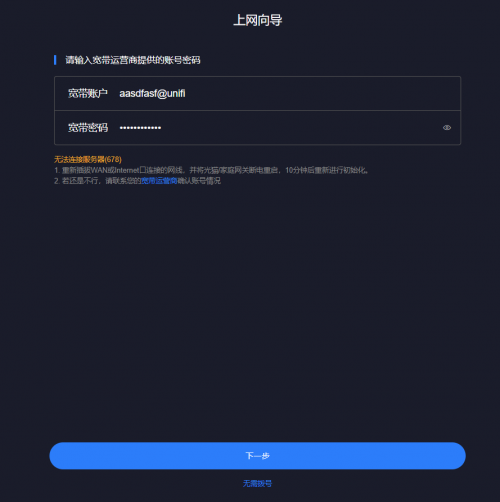
im stucked here... can help?

user posted image
TSheidarren
post Sep 23 2020, 05:48 PM

Getting Started
**
Junior Member
248 posts

Joined: Aug 2018
QUOTE(cle900706 @ Sep 23 2020, 05:32 PM)
im stucked here... can help?

user posted image
*
Use DHCP 1st, change it afterward
cle900706
post Sep 23 2020, 05:58 PM

Enthusiast
*****
Senior Member
845 posts

Joined: Nov 2010
From: Puchong/Cyberjaya


QUOTE(heidarren @ Sep 23 2020, 05:48 PM)
Use DHCP 1st, change it afterward
*
ok got it.
i had done all and input the details for pppoe logins.
from the summary i have ip address those but dns is empty.
not connecting to the internet. hmmmmmmmm


ax5 1.0.16 version
cle900706
post Sep 23 2020, 07:21 PM

Enthusiast
*****
Senior Member
845 posts

Joined: Nov 2010
From: Puchong/Cyberjaya


ok finally everything is up!
i am using android and i dont really see guest wifi options in the app. hmmmmm
eugenecctan
post Sep 25 2020, 07:21 PM

Wee Wang Wang
******
Senior Member
1,058 posts

Joined: Nov 2009


Hi sifus,
For Ax1800 I am able to setup successfully. Thanks. But for Ax5. I cannot detect any as mesh. Any idea why?

22 Pages « < 5 6 7 8 9 > » Top
 

Change to:
| Lo-Fi Version
0.0409sec    0.71    6 queries    GZIP Disabled
Time is now: 19th December 2025 - 11:31 PM