Welcome Guest ( Log In | Register )

22 Pages « < 3 4 5 6 7 > » Bottom

Outline · [ Standard ] · Linear+

 XiaoMi AX3600 AX1800 AX5 Vlan tagging

views
     
NooBiE888
post Aug 23 2020, 01:07 PM

Casual
***
Junior Member
306 posts

Joined: Sep 2007
QUOTE(toytoy @ Aug 23 2020, 12:28 PM)
I used an old laptop with intel ax200 WiFi module [bought from shopee for RM35. Recommended!!] Having the laptop right beside main node I get above 800Mbps at stable 2.2 Gbps link speed. Connected to the Child node beside the main node I get less than 400Mbps. Link speed I don’t remember but should be more than 1Gbps.

Connected to child node upstairs using lan cable can get around 500Mbps. Swap to WiFi straight drop to 280Mbps.
*
Let me say first that I don't have a mesh network so take what I say with a grain of salt.

Potentially the location of the child node is not ideal, signal strength is not good enough.

You also have to consider that wifi is best effort basis.

Also, you are using WiFi backhaul . Some of the wifi band is taken up for interconnect between the router.

Another thing you can try is to check the WiFi settings of the child network to make sure it's transmit power and channel width.

-----------------------

If anyone is considering to let go their unit.

Do PM me, I am looking for a 2nd unit to try mesh.
amir.asyraf
post Aug 23 2020, 01:42 PM

On my way
****
Junior Member
504 posts

Joined: Oct 2012
From: It's all relative


QUOTE(toytoy @ Aug 23 2020, 12:28 PM)
I used an old laptop with intel ax200 WiFi module [bought from shopee for RM35. Recommended!!] Having the laptop right beside main node I get above 800Mbps at stable 2.2 Gbps link speed. Connected to the Child node beside the main node I get less than 400Mbps. Link speed I don’t remember but should be more than 1Gbps.

Connected to child node upstairs using lan cable can get around 500Mbps. Swap to WiFi straight drop to 280Mbps.
*
Intel AX200 for RM35? Got link?
toytoy
post Aug 23 2020, 03:04 PM

Enthusiast
*****
Senior Member
875 posts

Joined: Jan 2003


QUOTE(amir.asyraf @ Aug 23 2020, 01:42 PM)
Intel AX200 for RM35? Got link?
*
Sorry. I just checked. RM30 After deduct shopee coin and voucher. Original price RM43.

https://shopee.com.my/product/269995966/784...6054?smtt=0.0.9
toytoy
post Aug 23 2020, 03:27 PM

Enthusiast
*****
Senior Member
875 posts

Joined: Jan 2003


QUOTE(NooBiE888 @ Aug 23 2020, 01:07 PM)
Let me say first that I don't have a mesh network so take what I say with a grain of salt.

Potentially the location of the child node is not ideal, signal strength is not good enough.

You also have to consider that wifi is best effort basis.

Also, you are using WiFi backhaul . Some of the wifi band is taken up for interconnect between the router.

Another thing you can try is to check the WiFi settings of the child network to make sure it's transmit power and channel width.

-----------------------

If anyone is considering to let go their unit.

Do PM me, I am looking for a 2nd unit to try mesh.
*
The test was carried out with child node around 1.5m beside a the main node using wireless backhaul. If wireless backhaul cuts down the bandwidth my half then 400Mbps seems to be right. WiFi setting and channel for child cannot be changed. I’ve tried few channels below 48 still same.

ax3600 considered have dedicated wireless backhaul? Or have is it Technically possible for other more expensive routers to achieve 800Mbps on the mesh network?

I have tried AV1300 powerline adaptor and now mesh network. Still I’m only getting around 200Mpbs in my home office. Spent more than RM1k ady. Pull one Ethernet cable also not so expensive. I wan die ady. 😭😭😭


NooBiE888
post Aug 23 2020, 07:13 PM

Casual
***
Junior Member
306 posts

Joined: Sep 2007
QUOTE(toytoy @ Aug 23 2020, 03:27 PM)
The test was carried out with child node around 1.5m beside a the main node using wireless backhaul. If wireless backhaul cuts down the bandwidth my half then 400Mbps seems to be right. WiFi setting and channel for child cannot be changed. I’ve tried few channels below 48 still same.

ax3600 considered have dedicated wireless backhaul? Or have is it Technically possible for other more expensive routers to achieve 800Mbps on the mesh network?

I have tried AV1300 powerline adaptor and now mesh network. Still I’m only getting around 200Mpbs in my home office. Spent more than RM1k ady. Pull one Ethernet cable also not so expensive. I wan die ady. 😭😭😭
*
Do you have a long lan cable ?

Try use wired backhaul instead. Connect a lan cable between router and child.

Then test again see.

AFAIK, ax3600 no mention of dedicated backhaul.

If you want full speed you need to pull lan cable.

For normal use, 200 to 300 Mbps is plenty already.
toytoy
post Aug 23 2020, 08:01 PM

Enthusiast
*****
Senior Member
875 posts

Joined: Jan 2003


QUOTE(NooBiE888 @ Aug 23 2020, 07:13 PM)
Do you have a long lan cable ?

Try use wired backhaul instead. Connect a lan cable between router and child.

Then test again see.

AFAIK, ax3600 no mention of dedicated backhaul.

If you want full speed you need to pull lan cable.

For normal use, 200 to 300 Mbps is plenty already.
*
Thx for the suggestion. I was trying to avoid pulling a cable. Was disappointed with powerline adaptor and was hopeful mesh could solve my problem.

Yes I agree 200-300 is more than enough but I have been paying for 800Mbps for a long time without really able to fully utilise it due to device limitations. 😭

Was hoping the latest WiFi 6 and mesh could help solve the problem. Sigh.

I was connected to the router at 1.2Gbps. I believe the other half of 1.2Gbps was used for wireless backhaul. Cut that by half I should still get around 500-600Mbps. But I only get less than 400 when placing the child next yo main. In my home office behind one wall I can only get around 200Mbps. 🤯

This post has been edited by toytoy: Aug 23 2020, 08:02 PM
NooBiE888
post Aug 23 2020, 08:38 PM

Casual
***
Junior Member
306 posts

Joined: Sep 2007
QUOTE(toytoy @ Aug 23 2020, 08:01 PM)
Thx for the suggestion. I was trying to avoid pulling a cable. Was disappointed with powerline adaptor and was hopeful mesh could solve my problem.

Yes I agree 200-300 is more than enough but I have been paying for 800Mbps for a long time without really able to fully utilise it due to device limitations. 😭

Was hoping the latest WiFi 6 and mesh could help solve the problem. Sigh.

I was connected to the router at 1.2Gbps. I believe the other half of 1.2Gbps was used for wireless backhaul. Cut that by half I should still get around 500-600Mbps. But I only get less than 400 when placing the child next yo main. In my home office behind one wall I can only get around 200Mbps. 🤯
*
It could be an issue with the current firmware of the ax3600 as MESH capability was only added recently.

If you really want to get up to 800mbps via wireless backhaul, you need to look into the high end AX mesh routers.

When the child unit is next to the main unit, try to use a short lan cable to connect and test again.

Do check that the backhaul is stated "ethernet".


toytoy
post Aug 23 2020, 08:46 PM

Enthusiast
*****
Senior Member
875 posts

Joined: Jan 2003


QUOTE(NooBiE888 @ Aug 23 2020, 08:38 PM)
It could be an issue with the current firmware of the ax3600 as MESH capability was only added recently.

If you really want to get up to 800mbps via wireless backhaul, you need to look into the high end AX mesh routers.

When the child unit is next to the main unit, try to use a short lan cable to connect and test again.

Do check that the backhaul is stated "ethernet".
*
Thanks for the suggestion. I will try tonight. Hopefully it’s a firmware problem. 🤞🏻
chilskater
post Aug 23 2020, 08:54 PM

Regular
******
Senior Member
1,124 posts

Joined: Oct 2004
QUOTE(toytoy @ Aug 11 2020, 04:08 PM)
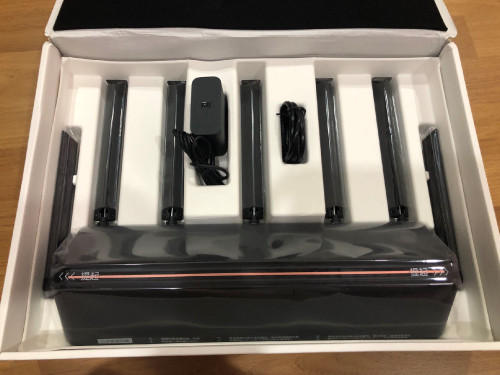
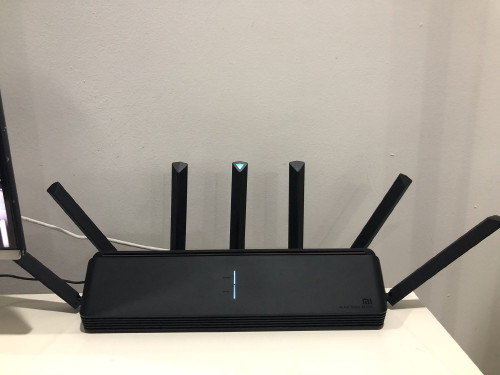
Finally got my unit at 10.30PM yesterday 😅
Straight jumped into setting it up and managed to connect to unifi thanks to the great tutorial by heidarren.

However, not all went well, the unit came with firmware 1.0.2x and the SSH hack doesn't work. After 1 hour of trial and error and doing some research online finally found out that the SSH hack only works on firmware version 1.0.17 as per heidarren's tutorial. So for the newer units have to downgrade the firmware first. After gaining SSH access can update to latest firmware withouy problem.

It's a big upgrade to the TP-Link AC1900 Touch P5 Router I am currently using. WiFi Speed on iPhone X is over 300Mbps which never reach before.

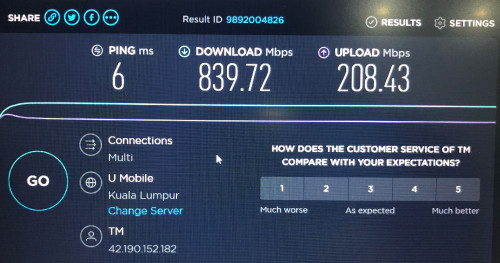
Was able to get full 800/200 Mpbs on Laptop and the range is much better. My router is on one end of the house whereas my home office is at the other end. Prevoiusly cannot get past 20Mbps but now can get over 100Mbps download however upload is still less than 20Mbps. Even PS4 able to get 600/200Mpbs. Never see this kind of speed before. Fired up a game of COD WWII Multiplayer and gotten full green bar for all 3 TDM.

All in all it is a great router and easy to use. Don't allow me to set non-standard IP Range though. Tried to start with 221.x.x.x but not allowed hehe.

What is the max theoretical speed we can get if add another unit of AX3600 as MESH? Thinking of adding another unit upstairs to get better speed in my home office.
user posted image
user posted image
user posted image
user posted image
*
TP Link want to sell? think of replacing my oren unifi router
nikonk
post Aug 25 2020, 10:13 AM

Getting Started
**
Junior Member
55 posts

Joined: Sep 2006
i also just bot ax3600 + ax1800 from tb.
SUSnonamer
post Aug 25 2020, 10:46 AM

Getting Started
**
Junior Member
224 posts

Joined: Apr 2019
this router even though the NPU seems attractive but it still cant really replace a single board computer as main router because it doesnt have storage space to be able to run a torrent capable router that complement 100mbps line allowing downloads to run nonstop / overnight / during work hours

This post has been edited by nonamer: Aug 25 2020, 05:43 PM
TSheidarren
post Aug 25 2020, 12:07 PM

Getting Started
**
Junior Member
248 posts

Joined: Aug 2018
QUOTE(nonamer @ Aug 25 2020, 10:46 AM)
this router even though the NPU seems attractive but it still cant really replace a single board computer as main router because it doesnt have storage space to be able to run a torrent capable router that complement 100mbps broadband allowing downloads to run nonstop / overnight / during work hours
*
I afraid this is an NAS job to do, previous gen XiaoMi routers has a lot of fancy features including this, they were too greedy to try to bring as many features as they can in order to have more selling point, but in the end non of them useful due to instability. This time they decided to cut all fancy things out and focus on routing and wifi only, I think this is the right way because the most important thing for a wireless router is stable, focus on the main thing is always the right choice.

Stable vs features, you choose. Wanna have both? Can, but clearly not @RM350, everything has a cost.

This post has been edited by heidarren: Aug 25 2020, 12:10 PM
amirsubhi
post Aug 25 2020, 02:57 PM

The Power Is IN Your Hand!
******
Senior Member
1,472 posts

Joined: Apr 2005
From: SumwHeRe In MaLaYsIa


after ssh hack, if upgrade, all vlan setting missing?
toytoy
post Aug 27 2020, 10:17 AM

Enthusiast
*****
Senior Member
875 posts

Joined: Jan 2003


QUOTE(amirsubhi @ Aug 25 2020, 02:57 PM)
after ssh hack, if upgrade, all vlan setting missing?
*
Once hack all intact. Update like normal.
cle900706
post Aug 27 2020, 11:32 PM

Enthusiast
*****
Senior Member
845 posts

Joined: Nov 2010
From: Puchong/Cyberjaya


Hi all...... redmi ax6 can ssh hack? probably no one have experience with it yet since its very new.
price is so so so tempting compared to ax3600

https://shopee.com.my/Xiaomi-Redmi-Router-A...7355.5148488852
TSheidarren
post Aug 28 2020, 12:22 AM

Getting Started
**
Junior Member
248 posts

Joined: Aug 2018
QUOTE(cle900706 @ Aug 27 2020, 11:32 PM)
Hi all...... redmi ax6 can ssh hack? probably no one have experience with it yet since its very new.
price is so so so tempting compared to ax3600

https://shopee.com.my/Xiaomi-Redmi-Router-A...7355.5148488852
*
So far no SSH hack for this model yet
cannavaro
post Aug 28 2020, 01:22 AM

CATTENACIO
*******
Senior Member
3,008 posts

Joined: Sep 2005
From: T.T.D.I, Bukit Damansara


QUOTE(toytoy @ Aug 23 2020, 03:27 PM)
The test was carried out with child node around 1.5m beside a the main node using wireless backhaul. If wireless backhaul cuts down the bandwidth my half then 400Mbps seems to be right. WiFi setting and channel for child cannot be changed. I’ve tried few channels below 48 still same.

ax3600 considered have dedicated wireless backhaul? Or have is it Technically possible for other more expensive routers to achieve 800Mbps on the mesh network?

I have tried AV1300 powerline adaptor and now mesh network. Still I’m only getting around 200Mpbs in my home office. Spent more than RM1k ady. Pull one Ethernet cable also not so expensive. I wan die ady. 😭😭😭
*
Not sure if this helps but...
I tested 2 units of Deco M9 Plus on my unifi 800Mbps connection.
Master deco in AP mode connected to my main router.
I put the slave deco M9 about 5m from the main, the deco app shows the slave is getting full signal from the master deco.
I connected my laptop to the slave deco using ethernet and ran the speedtest and got 800++Mbps.

Then I moved the slave deco 1 floor down where the signal from the master deco was 2 to 3 bars. Connected my laptop like the previous test, and got 300+ Mbps.

However, the built in speedtest in the deco android app can only get 500 to 600+Mbps max after several tries.
cle900706
post Sep 7 2020, 04:30 PM

Enthusiast
*****
Senior Member
845 posts

Joined: Nov 2010
From: Puchong/Cyberjaya


xiaomi ax1800 or redmi ax5?
toytoy
post Sep 8 2020, 10:05 AM

Enthusiast
*****
Senior Member
875 posts

Joined: Jan 2003


QUOTE(cannavaro @ Aug 28 2020, 01:22 AM)
Not sure if this helps but...
I tested 2 units of Deco M9 Plus on my unifi 800Mbps connection.
Master deco in AP mode connected to my main router.
I put the slave deco M9 about 5m from the main, the deco app shows the slave is getting full signal from the master deco.
I connected my laptop to the slave deco using ethernet and ran the speedtest and got 800++Mbps.

Then I moved the slave deco 1 floor down where the signal from the master deco was 2 to 3 bars. Connected my laptop like the previous test, and got 300+ Mbps.

However, the built in speedtest in the deco android app can only get 500 to 600+Mbps max after several tries.
*
I think Deco M9 is in a different game given the price. It has dedicated WiFi backhaul which explains why you r able to get full speed on the slave node. The ax3600 does not have it. Thus sharing the WiFi For mesh connection cuts the speed in half.

I put the slave node right beside the main node also get 400Mbps only. 😪

Just out of curiosity why r u using the M9 as AP instead of router?

cannavaro
post Sep 8 2020, 12:59 PM

CATTENACIO
*******
Senior Member
3,008 posts

Joined: Sep 2005
From: T.T.D.I, Bukit Damansara


QUOTE(toytoy @ Sep 8 2020, 10:05 AM)
I think Deco M9 is in a different game given the price. It has dedicated WiFi backhaul which explains why you r able to get full speed on the slave node. The ax3600 does not have it. Thus sharing the WiFi For mesh connection cuts the speed in half.

I put the slave node right beside the main node also get 400Mbps only. 😪

Just out of curiosity why r u using the M9 as AP instead of router?
*
Oh.. sweat.gif
The M9 was not for my own use, it's for a student accommodation that I am managing (which also uses Unifi 800, main router is tplink C2300, whereas mine is archer c7); if I use the M9 as the main router there I have to add yet another switch due to the low number of ethernet ports on the deco sweat.gif


22 Pages « < 3 4 5 6 7 > » Top
 

Change to:
| Lo-Fi Version
0.0287sec    0.58    6 queries    GZIP Disabled
Time is now: 19th December 2025 - 04:53 PM