Outline ·
[ Standard ] ·
Linear+
Unifi Official TM UniFi High Speed Broadband Thread V38, READ 1ST PAGE FOR TURBO SPEED INFO!
|
misspinky
|
 Nov 11 2019, 12:10 PM Nov 11 2019, 12:10 PM
|

|
QUOTE(wanttobuylaptop @ Nov 11 2019, 12:09 AM) get your police report and report this incident to tm and request a replacement. normally it does not cost anything to get replacement if a criminal incident like this happened and your equipment is lost Kucau, better you did as per suggestion and just bring its to any tm point for faster update, If you live in klang valley area best tm point so far i've been is tm point damansara utama/uptown, even much better than menara tm. No harm trying it. |
|
|
|
|
|
misspinky
|
Nov 12 2019, 09:42 AM
|
|
|
QUOTE WikiDevi will be going offline 2019-10-31. For historical dumps of the database, see 'WikiDevi' @ the Internet Archive (MW XML, Files, Images).
Final dumps will be made available after the site goes offline. There is no chance the data will not live on, in some form - even if it isn't 'WikiDevi' anymore. For example, see TechInfoDepot. I thought i'm cannot access too. This post has been edited by misspinky: Nov 12 2019, 09:42 AM |
|
|
|
|
|
misspinky
|
Nov 13 2019, 04:37 PM
|
|
|
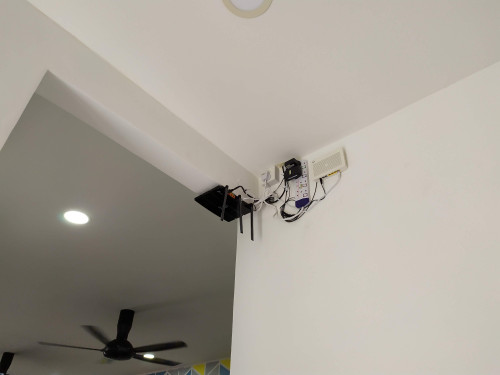
QUOTE(afiqms @ Nov 13 2019, 04:30 PM) bare in mind i have experience with that brand plug, I have 5 of its 4 totally lost with no functions of all sockets and got spike and last 1, 3 sockets no function with broken power button. Just avoid to use that brand plug, these one usually can be found through mr diy. Because that extension plug cannot take heating and high voltage. Better use lwd brand if you want affordable with better protection. Just make sure choose surge socket. If got extra budget pick masterplug or any other brand with surge protection. For installation router, please avoid put near the corner of wall or end of your wall just like you put like that because lightning usually really like go through end line of wall. I have experience on my parents house a few time last time, i can see the lightning goes there during heavy raining with thunder. |
|
|
|
|
|
misspinky
|
Nov 13 2019, 07:41 PM
|
|
|
QUOTE(xCryptik @ Nov 13 2019, 07:26 PM) I know what you faced by that extension. Hahaha. That power button plastic stuff that support the spring inside broke easily. yeah, easily broke and kaput. By the way that extension not use by me but my sister used that extension, i've already told her that extension really not good enough and easily damage. All five extensions use for charge smartphone, television, astro decoder, desk fan and vacuum. Vacuum & desk fan kaput because of using that extension, kaput after using on 5th same brand of extension. I don't use that extension but i've used lwd and other brand surge extension. Better find good for long term than bad one. I suggest him better changed before too late. |
|
|
|
|
|
misspinky
|
Nov 13 2019, 08:02 PM
|
|
|
QUOTE(zeese @ Nov 13 2019, 04:49 PM) Try to hide all the plugs & wirings. This is how I hang my router. All wirings & plug point is hidden inside the wooden box. However, my BTU is located somewhere else.  this one clean and simple. Mine hanging at wall too just like you but i have set wireless aerial, 1 for straight, 1 point to a bit center, 2 for left & right not point to 90degree for better coverage. afiqms better you extend a bit or change the location for that router a bit far from that end point line of wall. Just follow like zeese, put the location far from end point of wall as you can see in picture that small wardrobe. That point i've said just now. |
|
|
|
|
|
misspinky
|
Nov 14 2019, 08:56 AM
|
|
|
QUOTE(pakji @ Nov 14 2019, 01:05 AM) daam i don't like hang up btu and router my btu and router place with Computer table only so my pc desktop use Lan Cable for 1metter or 2metter come original lan cable from router safety for computer table Just way too high for placing btu and router, will be hard if want to replace it soon or relocate the location for both of its. If want placing something very high like this, that will be wireless ceiling access point. He need to state the budget if want better router but avoid that dlink. |
|
|
|
|
|
misspinky
|
Nov 18 2019, 11:40 AM
|
|
|
QUOTE(lowyard @ Nov 18 2019, 02:22 AM) Hello everyone. I tried searching for my issues but couldn't find anything probably coz of wrong keyword. So here goes. My TM onu Alcatel Lucent i240g only have the LAN 1 led and TM logo turn on. I've done several reboot but it's the same thing. Link and auth led never lights up. So now I couldn't get internet. Any idea what's wrong? Thanks in advance. Just call tm hotline, I got this problem too long time ago a few weeks after installed unifi, its faulty from your btu, problem probably on their side. My btu got this problem too because tm technical team on server side accidentally switch my connection on sleep/idle mode. That is what tm technician told me when they investigate from the other side. Tm technical that came to my house change new one of btu, no charges on bill. so, you no need to worry. My friend also got this problem too, but his problem was different, he applied unifi and tm point applied a new package for him with an agreement. But on the final day before change to new package, tm technical team on server side failed to change my friend new package. So, next day tm technical came to his house, changed new btu for him with changed new package on that same day. Both of side need to work together. |
|
|
|
|
|
misspinky
|
Nov 22 2019, 11:00 AM
|
|
|
QUOTE(wanttobuylaptop @ Nov 21 2019, 05:29 PM) received my 1111 asus ac86u from taobao yesterday finish setup and OMG, its so good. wifi @ 5ghz is getting me full speed of 300 mbps going thru 1.5 wall from living room to my bedroom. but cant get unifi tv box to work with hypp tv, dunno if i somehow messed up my white unifi tv box. vlan is configured @ 600 already for port 4. flashed merlin today and gonna tried it out again later at night. whats good channel for 5ghz? i just have to test each and every channel for speed and ping test to figure out? and how to get more channel on 5ghz? i only get unii1 and 3 channel, only 8 of them. which region allow all channel selection? Try pick region Australia, if i'm not mistaken choose that region also improve a bit for wireless coverage. I have read somewhere in this forum but forgot which topic. |
|
|
|
|
|
misspinky
|
Nov 24 2019, 02:21 PM
|
|
|
i would like if they can make an option for us to customize our package in our profile,
eg:
1)internet + standard20 calls.
2)internet + unifiTV
3)internet + standard20 calls + unifiTV
4)internet + speedbooster for certain timeframe just like time broadband did long time ago.
i know price will be different too much for us right now, if they want do these, they need standardized the price first for all of us. not rojak one.
|
|
|
|
|
|
misspinky
|
Dec 6 2019, 09:52 AM
|
|
|
other solution, just maintain your router but need to put at center place for your router either on third or second floor. The wifi antenna of your router need adjust facing, 1 for straight, 1 for back, 2 for left and right. 2 ceiling AP's put at center top ceiling first and second/third floor. mesh also need put at center place of each floor, if want mesh. Addon switch if want more ports.
This post has been edited by misspinky: Dec 6 2019, 09:54 AM
|
|
|
|
|
|
misspinky
|
Dec 6 2019, 03:59 PM
|
|
|
QUOTE(FaezFarhan @ Dec 6 2019, 12:44 PM) I feel like my router is a bit outdated, maybe higher ACs would benefit the 800mbps? So router in front of the stairs floor 3, mesh besides the stairs floor 2, mesh in front of the stairs floor 1, wouldn’t work that well? About the maximum speed of your router, you need to ask blacktubi. He is more experience for asus router. So, you are using latest firmware? if your budget is not tight, I think he might suggest you for aimesh solution. My way with save cost, i'm keep using that router for wired connection, just add ceiling two wifi AP wave 2 or wave 3. if want fast setting one just go for mesh. |
|
|
|
|
|
misspinky
|
Dec 13 2019, 11:06 AM
|
|
|
Allo Technology previously known as Setia Haruman Technology Sdn Bhd that offer City Broadband, lets watch the outcome next year. I can feel, TM will come out another package soon next year whether higher speed or revise current package price package below 300Mbps.
This post has been edited by misspinky: Dec 13 2019, 11:19 AM
|
|
|
|
|
|
misspinky
|
Jan 15 2020, 10:45 AM
|
|
|
QUOTE(cHiLdHo0drEaMz @ Jan 15 2020, 12:08 AM) No sign of 500M & 800M anytime soon  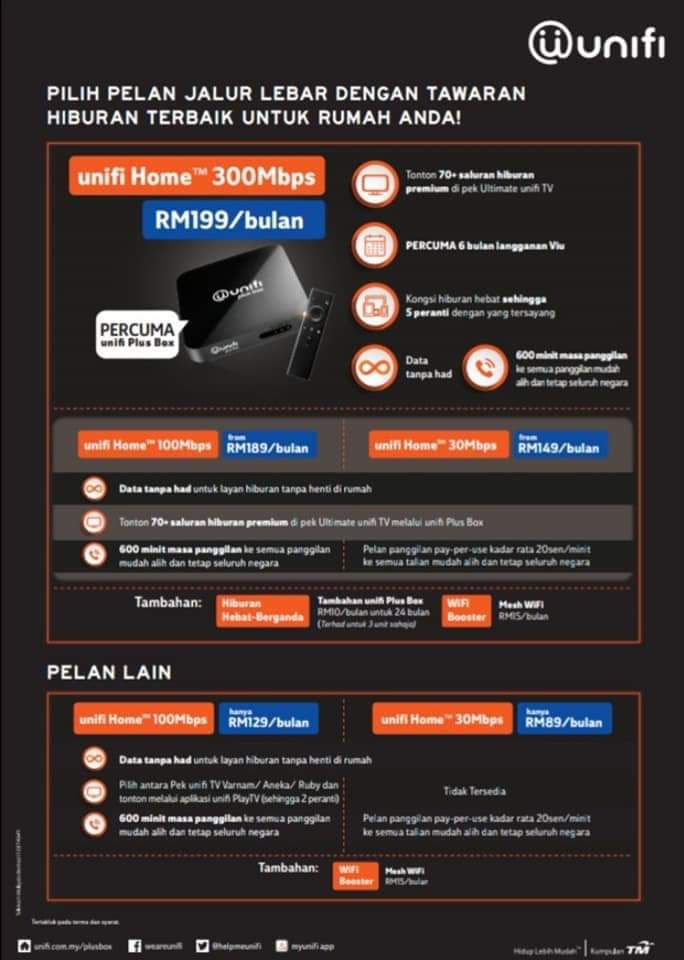 So, this is the lame outcome TM fresh starter package of year 2020  skipped or hold it lads, just wait more price adjustment especially for 100Mbps package. They are still sleeping in dream 2019. All they want, gain more money from 100Mbps users. This post has been edited by misspinky: Jan 15 2020, 10:45 AM |
|
|
|
|
|
misspinky
|
Jan 17 2020, 12:32 PM
|
|
|
QUOTE(AVFAN @ Jan 15 2020, 11:56 AM) ya, so lame...!  i do not see them lowering prices after losing rm4bil with the "2x speed, 1/2 price" thingy after ge14. can almost smell them pushing prices higher again. but have to grandfather those paying low price/high speeds - until they terminate n their own for whatever reason. tm playing prices game all over and over again. so, for me better wait for the best deals for all of us, even though just RM10 for every one of customer. That can be big gain for them. Next package, they will offer better deal than this one but put another tricky parts. Don't worry, more packages tm will offer in this year. |
|
|
|
|
|
misspinky
|
Jan 24 2020, 12:18 PM
|
|
|
QUOTE(CrimsonKing @ Jan 23 2020, 07:24 PM) It is indeed strange that my downgrade request is treated as a complaint report logged under MY ACTIVITIES.  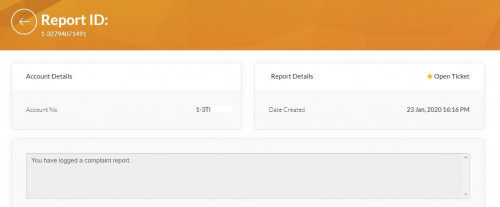 it's normal, they have done this long time ago. Whether upgrade or downgrade, bills; they will put into my activities. All will be complaint, with reference number. |
|
|
|
|
|
misspinky
|
Jan 24 2020, 04:12 PM
|
|
|
QUOTE(CrimsonKing @ Jan 24 2020, 01:54 PM) Thanks for the clarification. This is really funny to me. Whether you call 100 and livechat regarding any problematic need to be take action, they will update into my activities. Next time, you call them again just give your reference number to make more faster action, if problem still exist. |
|
|
|
|
|
misspinky
|
Feb 5 2020, 01:08 PM
|
|
|
QUOTE(judehow @ Feb 4 2020, 01:11 PM) Thanks for your advice and explanation , before this I am level 1 computer hardware but , not including networking . I will show my modem and router just for the evidence worry people say I trolling 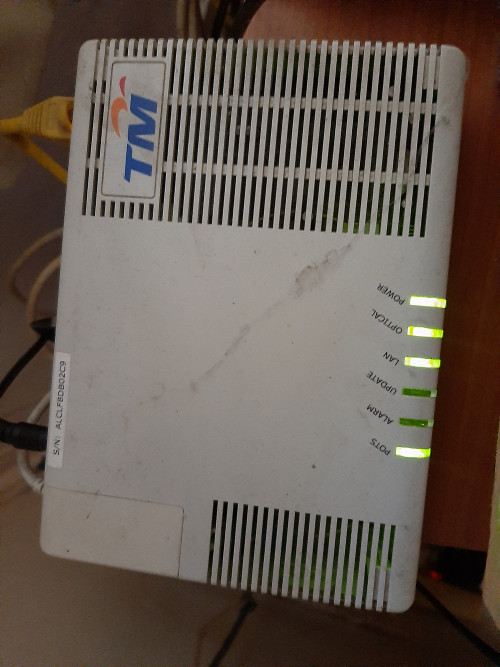 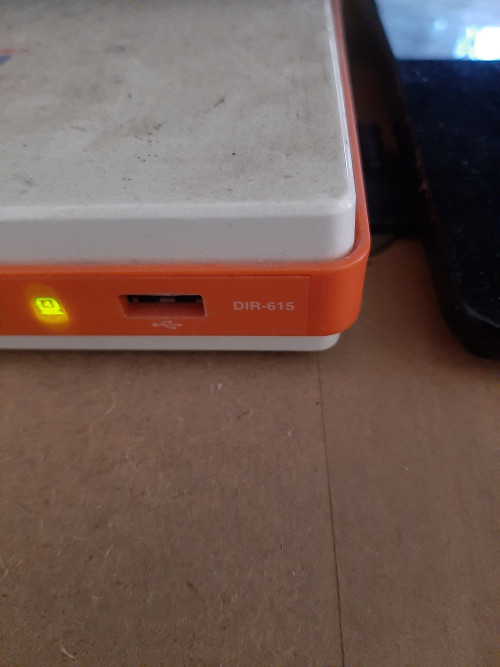 This is an ancient hardware, what package internet speed do you using right now? better change your package if paid higher than yours right now, plus you got new hardware from them. But bare in mind, they will give you d-link router 842 that tm logo. I have using this router with tm stock firmware and d-link firmware. Even though i have changed to d-link firmware, the outcome not quite satisfied but much better than using d-link tm stock firmware. The wifi coverage just normal, wifi speed just good if you stay put nearly router, if you sit far like 3-5meters the wifi speed quite drop and unstable speed. I have experience with other d-link router, the result still not good enough for me. When i changed to tp-link, the speed and coverage much better, but bare in mind just get latest version of that router. Even though many users complaint of heating, just put its at place that temperature normal with external usb pc fan/laptop cooler at router. For price and setup both of brand quite competitive and easy. I remember when my tp-link router got not function well long time ago, tp-link support service change to new one with same model before i change other brand. Just remember if you got router tm dlink 842(black) soon just change to other router that suit for you. good luck. |
|
|
|
|
|
misspinky
|
Feb 12 2020, 09:39 AM
|
|
|
QUOTE(Mr.Wang @ Feb 12 2020, 05:45 AM) What's the difference bwtween Unifi application through TM Point and reseller? Which one is better? Or they are the same? tm point much better, if you're lucky to deal with and slow talk you might get best deal and best price that not publish in their website. good luck |
|
|
|
|
|
misspinky
|
Feb 12 2020, 03:25 PM
|
|
|
QUOTE(ericpires @ Feb 11 2020, 10:28 PM) May I know what is the best 5GHz wifi setting for gaming? Example what channel, and etc. Currently using stock firmware for C1200 router 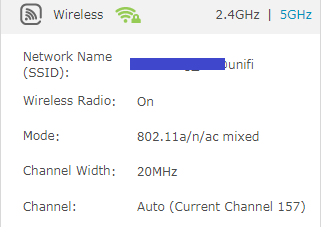 First, change to better router. Pick static channel that not interference with your neighbour, pick 80 MHz, choose ac only or n/ac only. |
|
|
|
|
|
misspinky
|
Feb 12 2020, 03:45 PM
|
|
|
QUOTE(Mr.Wang @ Feb 12 2020, 03:18 PM) I prefer TMPoint too but it's far away from home. Plus, everytime I go there, their service is very slow even when not many customers there. Wait what? I thought only resellers do that, while TMPoint follows the standard price. Might be worth checking it out. So in the end did you installed the unifi under the reseller or you cancelled it? I understand that some (or most?) resellers might pull some tricks because of the commissions they get from every subsription under them. I never dealt with resellers before. Streamyx subscription was through TMPoint before. But it's far that's why I consider if it is worth to subscribe through resellers nearby. Not really, tm point still much better than reseller even though got many customers waiting for called and problem slow service. I will go on tuesday morning and friday 2.30pm, usually not many people during these two days. Their service much better with price given if you are aging using tm service from streamyx until unifi. They rather let you stick with them even you're trying to terminate their service, so they are trying to save 1 customer by giving extra before you do that thing. Unless you really wanna change the isp or want to cut cost because not using anymore. This post has been edited by misspinky: Feb 12 2020, 03:46 PM |
|
|
|
|



 Quote
Quote

 0.1637sec
 0.73
0.73
 7 queries
 GZIP Disabled