Welcome Guest ( Log In | Register )

92 Pages « < 31 32 33 34 35 > » Bottom

Outline · [ Standard ] · Linear+

 Unifi Air, is it good?

views
     
phaez
post Jan 7 2020, 09:39 PM

Getting Started
**
Junior Member
172 posts

Joined: Jun 2011
QUOTE(GameSky @ Jan 7 2020, 07:28 PM)
you can't change, unifi air mostly will kena nat3 ..even my fren.

you could try, some said cannot, some said ok online gaming.
*
Mine also get nat3. My network not suitable for gaming, packet loss and jitter. If I want to game, will hotspot from my maxis mobile.
godslayer84
post Jan 7 2020, 09:54 PM

Getting Started
**
Junior Member
298 posts

Joined: Mar 2011
QUOTE(GameSky @ Jan 7 2020, 07:28 PM)
you can't change, unifi air mostly will kena nat3 ..even my fren.

you could try, some said cannot, some said ok online gaming.
*
I want to replace my Digi infinite to Unifi air..
Coz RM159 vs RM84..
Big different in term of price.
Only the upload speed for unifi air is slow.
But now the nat type for unifi air is 3..
Make me hesitate again.
GameSky
post Jan 7 2020, 10:39 PM

Nyancat too much
*******
Senior Member
6,381 posts

Joined: Jun 2005
From: meow meow
QUOTE(godslayer84 @ Jan 7 2020, 09:54 PM)
I want to replace my Digi infinite to Unifi air..
Coz RM159 vs RM84..
Big different in term of price.
Only the upload speed for unifi air is slow.
But now the nat type for unifi air is 3..
Make me hesitate again.
*
Im sticking to digi, since got decent ping and play ps4 on9 without any problem.. got nat 2 for it.
han7669
post Jan 8 2020, 04:38 AM

New Member
*
Newbie
4 posts

Joined: Feb 2015


user posted image
user posted image
user posted image
user posted image

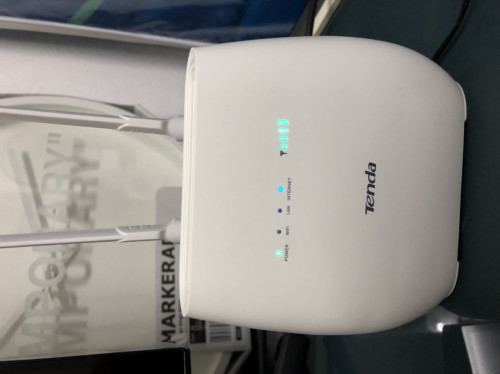
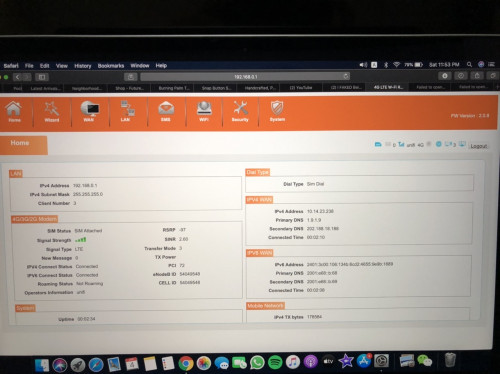
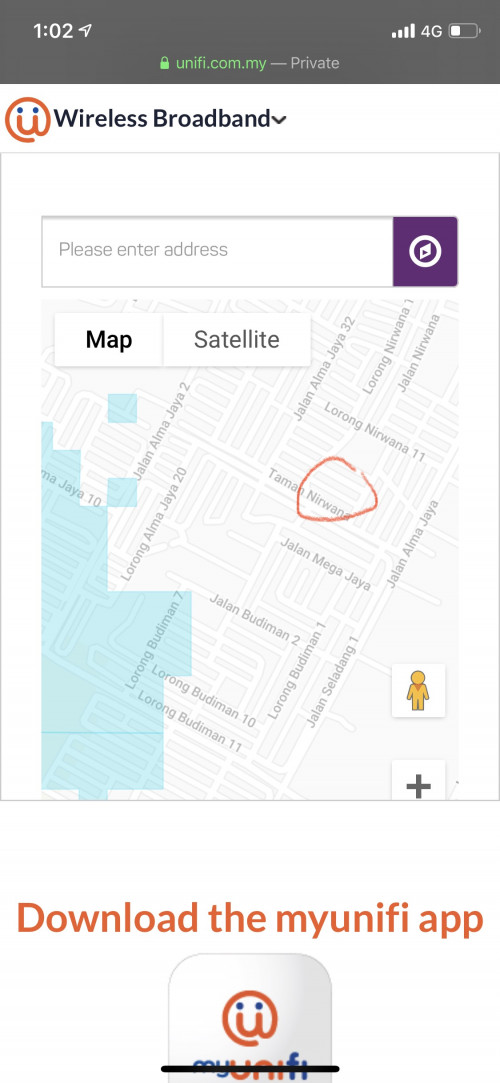
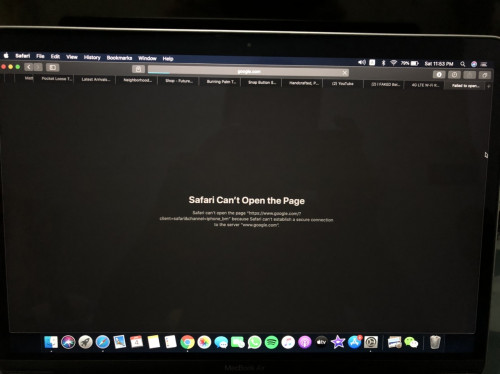
Guys. Need all the expert here for help.
After sign up to Unifi Air. I pair the sim with my own 4G modem. (Tenda 680v2) But as u all can see. It connected to the LTE and have 4bar signal and all. But I just can’t get into the internet. My place are just few Km away from the blue spot. I tried several method like set up APN, update modem firmware and factory reset but none of it works. Do you guys have any idea what other problem could be?
KateWinslett
post Jan 8 2020, 09:59 AM

New Member
*
Junior Member
24 posts

Joined: Jul 2015
I just subscribe Unifi Air yesterday. I took the modem + sim. Try it at home and got 34-35 Mbps. A far cry from my streamyx 4 mbps. I am out of the coverage area, around 50-60 m.

But the speed around 9 pm to 11 pm is quite slow, around 6 - 10 Mbps.

Now its is time to terminate my streamyx.
SUSdreign
post Jan 8 2020, 10:18 AM

Casual
***
Junior Member
382 posts

Joined: Jan 2003


QUOTE(han7669 @ Jan 8 2020, 04:38 AM)

<Image Removed>

Guys. Need all the expert here for help.
After sign up to Unifi Air. I pair the sim with my own 4G modem. (Tenda 680v2) But as u all can see. It connected to the LTE and have 4bar signal and all. But I just can’t get into the internet. My place are just few Km away from the blue spot. I tried several method like set up APN, update modem firmware and factory reset but none of it works. Do you guys have any idea what other problem could be?
*
Something you can try.

Can handphone get connection via WiFi?
Can your Mac ping 1.9.1.9?

This post has been edited by dreign: Jan 8 2020, 10:20 AM
han7669
post Jan 8 2020, 12:39 PM

New Member
*
Newbie
4 posts

Joined: Feb 2015


QUOTE(dreign @ Jan 8 2020, 10:18 AM)
Something you can try.

Can handphone get connection via WiFi?
Can your Mac ping 1.9.1.9?
*
1.Nope, no connection also.

2.
Ping has started…

PING 1.9.1.9 (1.9.1.9): 56 data bytes
Request timeout for icmp_seq 0
Request timeout for icmp_seq 1
Request timeout for icmp_seq 2
Request timeout for icmp_seq 3
Request timeout for icmp_seq 4
Request timeout for icmp_seq 5
Request timeout for icmp_seq 6
Request timeout for icmp_seq 7
Request timeout for icmp_seq 8

--- 1.9.1.9 ping statistics ---
10 packets transmitted, 0 packets received, 100.0% packet loss

JLA
post Jan 8 2020, 12:40 PM

Look at all my stars!!
*******
Senior Member
2,795 posts

Joined: May 2008
QUOTE(han7669 @ Jan 8 2020, 04:38 AM)
Guys. Need all the expert here for help.
After sign up to Unifi Air. I pair the sim with my own 4G modem. (Tenda 680v2) But as u all can see. It connected to the LTE and have 4bar signal and all. But I just can’t get into the internet. My place are just few Km away from the blue spot. I tried several method like set up APN, update modem firmware and factory reset but none of it works. Do you guys have any idea what other problem could be?
*


coverage maps as a guide only.
Your place under LTE coverage with -97 RSRP whatever it means
disconnected
double check APN setting page

Still not work, insert AIR sim card inside phone. make sure phone show LTE / 4G not 3G
APN unifi

Must disconnected to change APN setting


MrMocha
post Jan 8 2020, 04:40 PM

Getting Started
**
Junior Member
193 posts

Joined: May 2013
In trial period at the moment.
Coverage check shown I'm way outside of the current map.
Maybe the map has yet to be updated.

But i get an average of 40-60Mbps downloads, 2-4Mbps uploads.

Way an upgrade from my 8mbps Streamyx.

Ah... The feeling of able to watch 4k youtube video again.... Priceless.

Still continue to check speed daily along the peak hours.

Will see how the trend gonna be.

This post has been edited by MrMocha: Jan 8 2020, 04:41 PM
SUSdreign
post Jan 8 2020, 08:42 PM

Casual
***
Junior Member
382 posts

Joined: Jan 2003


QUOTE(han7669 @ Jan 8 2020, 12:39 PM)
1.Nope, no connection also.

2.
Ping has started…

PING 1.9.1.9 (1.9.1.9): 56 data bytes
Request timeout for icmp_seq 0

--- 1.9.1.9 ping statistics ---
10 packets transmitted, 0 packets received, 100.0% packet loss
*
you got 4 bar and RSPR -97 -this is good
but SINR 2.6 -should be >7
also your tx power not showing anything - try secure the antena.

try move your modem nearer to window, see can get better signal.

you can also consider test your modem in unifi air conform location to test your modem and setting are working.

good luck.
HolyCross
post Jan 9 2020, 12:34 AM

Casual
***
Junior Member
356 posts

Joined: Oct 2007


received call from TM offer to change my streamyx 1mbps to Unifi Air.
so far my streamyx 1mbps is serving me well in streaming cctv live footage and if i were to change to Unifi Air, will the streaming still be okay? since it is wireless.

Any experience in streaming cctv footage? will it be laggy since it is wireless?
penanghomes
post Jan 9 2020, 12:38 AM

Regular
******
Senior Member
1,324 posts

Joined: May 2009


QUOTE(KateWinslett @ Jan 8 2020, 10:59 AM)
I just subscribe Unifi Air yesterday. I took the modem + sim. Try it at home and got 34-35 Mbps. A far cry from my streamyx 4 mbps. I am out of the coverage area, around 50-60 m.

But the speed around 9 pm to 11 pm is quite slow, around 6 - 10 Mbps.

Now its is time to terminate my streamyx.
*
How come tm allowed you to apply Unifi air ?


My location is out of coverage area by only 30metres away.
JLA
post Jan 9 2020, 08:25 AM

Look at all my stars!!
*******
Senior Member
2,795 posts

Joined: May 2008
QUOTE(penanghomes @ Jan 9 2020, 12:38 AM)
How come tm allowed you to apply Unifi air ?
My location is out of coverage area by only 30metres away.
*
wireless coverage map area is computer generated la. no one going around checking where the coverage end.

YES put this at their coverage page.
Disclaimer : Mobile broadband coverage map(s) shown is(are) based on computer simulations outdoor at the street level and a minimum of 2.5Mbps download throughput based on 80% of the time, subjected to number of connected users, resource utilization at the base station and network availability. The actual coverage may vary depending on the surroundings, environmental obstructions, distance to the base stations, the actual location of customer’s mobile device within the building and the height in comparison to the serving base station height, and the structural type & age of the buildings. Such conditions will affect the actual coverage and customer experience.
godslayer84
post Jan 9 2020, 09:07 AM

Getting Started
**
Junior Member
298 posts

Joined: Mar 2011
QUOTE(phaez @ Jan 7 2020, 09:39 PM)
Mine also get nat3. My network not suitable for gaming, packet loss and jitter. If I want to game, will hotspot from my maxis mobile.
*
If hotspot from mobile, will it eat alot of data?
For example 1 hour will consume how many data?
penanghomes
post Jan 9 2020, 11:00 AM

Regular
******
Senior Member
1,324 posts

Joined: May 2009


QUOTE(JLA @ Jan 9 2020, 09:25 AM)
wireless coverage map area is computer generated la. no one going around checking where the coverage end.

YES put this at their coverage page.
Disclaimer : Mobile broadband coverage map(s) shown is(are) based on computer simulations outdoor at the street level and a minimum of 2.5Mbps download throughput based on 80% of the time, subjected to number of connected users, resource utilization at the base station and network availability. The actual coverage may vary depending on the surroundings, environmental obstructions, distance to the base stations, the actual location of customer’s mobile device within the building and the height in comparison to the serving base station height, and the structural type & age of the buildings. Such conditions will affect the actual coverage and customer experience.
*
When i went to TM point to apply, the staff recommended me not to apply
markchan
post Jan 9 2020, 11:04 AM

Enthusiast!!!!!
*******
Senior Member
2,382 posts

Joined: Jun 2005
From: Malacca(KgLapan), Selangor(SungaiLong), KL(PuduRaya)


Tested unifi air using the free modem in the car stream Netflix

Great experience overall
xeon1989
post Jan 9 2020, 11:47 AM

Member since 2008
*****
Junior Member
964 posts

Joined: Jun 2008
QUOTE(HolyCross @ Jan 9 2020, 12:34 AM)
received call from TM offer to change my streamyx 1mbps to Unifi Air.
so far my streamyx 1mbps is serving me well in streaming cctv live footage and if i were to change to Unifi Air, will the streaming still be okay? since it is wireless.

Any experience in streaming cctv footage? will it be laggy since it is wireless?
*
Latency is not something you need to worry.
As of what I know public IP is not supported. Therefore if your CCTV required public IP, not a good idea to take.
phaez
post Jan 9 2020, 04:31 PM

Getting Started
**
Junior Member
172 posts

Joined: Jun 2011
QUOTE(godslayer84 @ Jan 9 2020, 09:07 AM)
If hotspot from mobile, will it eat alot of data?
For example 1 hour will consume how many data?
*
it is subjective, depends on your game, either u use voice chat or not, streaming etc.
colmanjr
post Jan 10 2020, 08:41 AM

New Member
*
Junior Member
39 posts

Joined: Mar 2011


QUOTE(jumanjimd @ Jan 6 2020, 07:31 AM)
jasa sometimes ride on celcom...
better try unifi prepaid 1st to confirm
*
Im using JASA pack at the moment to test. But is there a difference in term of coverage between air vs jasa? That is another question

QUOTE(JLA @ Jan 6 2020, 08:45 AM)
look for signal indicator
4G LTE is unifi, 3G is celcom
*
So unifi tumpang celcom if out of covrerage?

QUOTE(ray8426 @ Jan 6 2020, 09:14 AM)
I am the one out of coverage. but i have unifi mobile before. icon_rolleyes.gif

One thing is upload will slow a bit......
*
QUOTE(phaez @ Jan 6 2020, 09:55 AM)
Just subscribed yesterday with contract for 24month that includes B618 4G Router. My home is out of blue coverage area about 4km(approximately). Manage to get 1bar signal with speed up to 15mbps. I'm satisfied with this spec since other telco that offer unlimited plan is congested in my area. Gonna tune external antenna to get better coverage later.

Edit : Forgot to mention I lock Band 40. Band 5 & band 38 signal is everywhere but use 5mhz spectrum that always congested. Band 40 is for Unifi Air. Unifi Mobile usually will utilise band 5 & 38. That is why coverage map in Unifi Air page is smaller.
*
Thanks for replying. How u apply air if it is out of range? Mine 2-3km from the blue area. How u check cellmapper? Heard its not updated. So the blue map is for band 40? Or 5,38,40
MrMocha
post Jan 10 2020, 09:30 AM

Getting Started
**
Junior Member
193 posts

Joined: May 2013
If some of you getting speed slower than 10Mbps, have you guys tried locking the band to B40?

I got a stable above 35Mbps even up to 70Mbps while during the peak hours.

Use HManager apps to lock.

92 Pages « < 31 32 33 34 35 > » Top
 

Change to:
| Lo-Fi Version
0.0358sec    0.56    6 queries    GZIP Disabled
Time is now: 21st December 2025 - 03:12 AM