Welcome Guest ( Log In | Register )

Bump Topic Topic Closed RSS Feed

Outline · [ Standard ] · Linear+

Unifi Official TM UniFi High Speed Broadband Thread V36, READ 1ST PAGE FOR TURBO SPEED INFO!

views
     
Rudd
post Jan 29 2019, 02:52 PM

Look at all my stars!!
*******
Senior Member
4,043 posts

Joined: Jul 2010

Anyone have experience with relocation request.
How long usually took by TM to process/send technician to install at new home?

This post has been edited by Rudd: Jan 29 2019, 02:52 PM
TSSilentVampire
post Jan 29 2019, 02:57 PM

Networking Enthusiast
*******
Senior Member
5,714 posts

Joined: Mar 2007


QUOTE(nikrizal @ Jan 29 2019, 10:56 AM)
Now thinking of RT-AC86U instead as it's newer and claimed to have better wireless penetration! Anyone would support this claim?
*
Definitely support the RT-AC86U for sure, unless you have the budget for RT-AC5300.
chamelion
post Jan 29 2019, 05:26 PM

Back to Bricking
*******
Senior Member
2,755 posts

Joined: Dec 2004
My case in another thread. Here

QUOTE
The upgrade is not free. They force the UNIFI10 user to pay RM159 where is it Unifi100 + Aneka Plus Pack (RM129 + RM30).

I was told that i cannot unsubscribe Aneka Plus Pack. In fact, the chat centre person end the inquiries abruptly.

Former UNIFI10 pay RM129+ forced RM30
New user pay RM129.

WTF


Anyone manage to unsubscribe Aneka Plus Pack so the bill adjusted to RM129?

Thanks.

This post has been edited by chamelion: Jan 29 2019, 05:27 PM
carcraze66
post Jan 29 2019, 05:36 PM

Ninetwenty2
****
Senior Member
628 posts

Joined: Aug 2007

hi gusy, currently im having another problem with my wifi adapter, DLINK DWA-192 AC1900 adapter, plugged on usb 3.0 port, running on windows 10.

whenever i do speedtest, it will start to shoot up to 140-150++mbps but slow down to 90-100mbps.

anyone experienced this before? i believe this is due to some setting on my PC itself but got no where to start with LOL.

Thanks
soonwai
post Jan 29 2019, 05:59 PM


********
All Stars
11,456 posts

Joined: Oct 2007
From: KL


QUOTE(nikrizal @ Jan 29 2019, 10:56 AM)
Now thinking of RT-AC86U instead as it's newer and claimed to have better wireless penetration! Anyone would support this claim?
*
Cool, new kind of radio waves?
taqu
post Jan 29 2019, 06:18 PM

Enthusiast
*****
Junior Member
864 posts

Joined: May 2005
QUOTE(nikrizal @ Jan 29 2019, 10:56 AM)
Now thinking of RT-AC86U instead as it's newer and claimed to have better wireless penetration! Anyone would support this claim?
*
As usual, I'll look at smallnetbuilder's review:

https://www.smallnetbuilder.com/wireless/wi...eviewed?start=2
YoungMan
post Jan 29 2019, 08:34 PM

Look at all my stars!!
*******
Senior Member
6,796 posts

Joined: Oct 2008
From: Kuala Lumpur


QUOTE(chamelion @ Jan 29 2019, 06:26 PM)
My case in another thread. Here
Anyone manage to unsubscribe Aneka Plus Pack so the bill adjusted to RM129?

Thanks.
*
TM will just ask you to change to the RM129 package and renew contract. This case is same as those who are paying for STD20 on top of their UniFi lite pack.
chamelion
post Jan 29 2019, 09:41 PM

Back to Bricking
*******
Senior Member
2,755 posts

Joined: Dec 2004
Yup. They insist the "free" upgrade as if they did a favour for subscriber yet the fact is they are forcing the early user to pay more compared to market...

Someone needs to teach them about Moore's Law.

One 10 years user switching to Maxis. =)


imalmighty
post Jan 29 2019, 10:01 PM

mic test
*****
Senior Member
732 posts

Joined: Dec 2017
QUOTE(chamelion @ Jan 29 2019, 09:41 PM)
Yup. They insist the "free" upgrade as if they did a favour for subscriber yet the fact is they are forcing the early user to pay more compared to market...

Someone needs to teach them about Moore's Law.

One 10 years user switching to Maxis. =)
*
This is called play dumb, keep avoiding argument and shove words into people's mouth. Involve MCMC complain, write down there, state clearly that no price and value adjustment, no payment will be made. Cut off your autopay if any. Shove words back into them, act smart and add your own terms, their inaction to oblige with price and value adjustment will result in.. *u dig up leezhijiang and system error message posts. Heck i rmber in one of the posts, when leezhijiang demanded for unifi coverage, he go and print out... u read yourself.
https://forum.lowyat.net/index.php?showtopi...post&p=90034695

If u state like this, they will do it for u most likely for avoiding things to get complicated and ugly most likely. If u dont have guts and hustle, direct go TM potong and go to maxis, period.
Kelvynlim
post Jan 29 2019, 10:38 PM

Getting Started
**
Junior Member
166 posts

Joined: Sep 2009
QUOTE(noobandroid @ Jan 23 2019, 08:51 PM)
on your comp, the network will show 100mbps instead of 1gbps
*
I thought this is your network card.. not about your cat5e.
alfredhow78
post Jan 29 2019, 10:39 PM

Casual
***
Junior Member
380 posts

Joined: Oct 2017
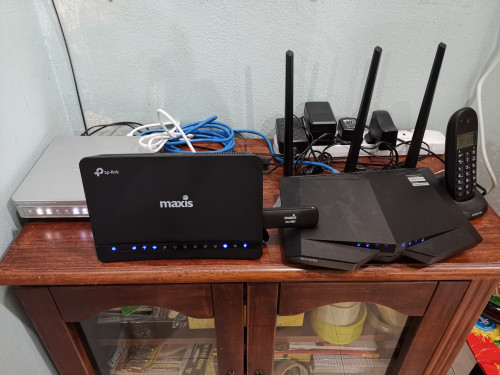
user posted image

Recently facing intermittent unifi connection down...
Called tm they sent over techbician to check the cable is ok. The signal strength is ok. The unifi router is new.

Yesterday the link led and tel1 blinking and my router can't connect to the Internet. Once again I called tm.

Today technician came and they checked everything everything seems normal. And i requested that they change my btu. Now the Internet is smooth already smile.gif
alfredhow78
post Jan 29 2019, 10:40 PM

Casual
***
Junior Member
380 posts

Joined: Oct 2017
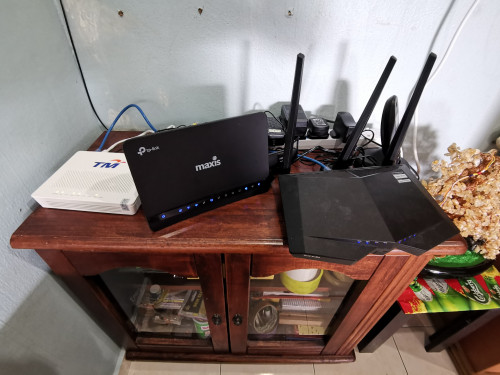
user posted image

Before
Kelvynlim
post Jan 29 2019, 10:41 PM

Getting Started
**
Junior Member
166 posts

Joined: Sep 2009
2 months after turbo to 500 mbps. personally I feel the stability isn’t impressive compared to 50mbps.. the connection will drop then retired again .. sometimes FB or YouTube will buffer

Any sifu can provide guidance to address this?
JohnLai
post Jan 29 2019, 10:48 PM

Skeptical Cat
*******
Senior Member
3,669 posts

Joined: Apr 2006
QUOTE(Kelvynlim @ Jan 29 2019, 10:41 PM)
2 months after turbo to 500 mbps. personally I feel the stability isn’t impressive compared to 50mbps.. the connection will drop then retired again .. sometimes FB or YouTube will buffer

Any sifu can provide guidance to address this?
*
Disable IPv6.
Kelvynlim
post Jan 29 2019, 10:48 PM

Getting Started
**
Junior Member
166 posts

Joined: Sep 2009
QUOTE(soonwai @ Jan 27 2019, 09:57 PM)
Yep, BTU port is set to 100Mbps even though it's capable of 1Gbps so your internet is limited to 100Mbps. A few of us here has faced that problem. TM can reconfigure the BTU remotely but more likely, they'll just change the BTU.
*
Hi, how to know whether my BTU is 100 mbps or 1gbps? Cause I always think for such case, it is my laptop Ethernet card limit the speed... thanks in advance
TSSilentVampire
post Jan 29 2019, 11:04 PM

Networking Enthusiast
*******
Senior Member
5,714 posts

Joined: Mar 2007


QUOTE(carcraze66 @ Jan 29 2019, 05:36 PM)
hi gusy, currently im having another problem with my wifi adapter, DLINK DWA-192 AC1900 adapter, plugged on usb 3.0 port, running on windows 10.

whenever i do speedtest, it will start to shoot up to 140-150++mbps but slow down to 90-100mbps.

anyone experienced this before? i believe this is due to some setting on my PC itself but got no where to start with LOL.

Thanks
*
Your connection confirmed to be supporting gigabit speed now?

QUOTE(alfredhow78 @ Jan 29 2019, 10:39 PM)
user posted image

Recently facing intermittent unifi connection down...
Called tm they sent over techbician to check the cable is ok. The signal strength is ok. The unifi router is new.

Yesterday the link led and tel1 blinking and my router can't connect to the Internet. Once again I called tm.

Today technician came and they checked everything everything seems normal. And i requested that they change my btu. Now the Internet is smooth already smile.gif
*
Yes, you definitely need new BTU. Glad to hear that.

QUOTE(Kelvynlim @ Jan 29 2019, 10:41 PM)
2 months after turbo to 500 mbps. personally I feel the stability isn’t impressive compared to 50mbps.. the connection will drop then retired again .. sometimes FB or YouTube will buffer

Any sifu can provide guidance to address this?
*
Disable IPv6, and get a new router if possible.

QUOTE(Kelvynlim @ Jan 29 2019, 10:48 PM)
Hi, how to know whether my BTU is 100 mbps or 1gbps? Cause I always think for such case, it is my laptop Ethernet card limit the speed... thanks in advance
*
Connect to BTU LAN1 via RJ45 Cat 5e and above cable with one end and the other end of the cable to your PC and check link speed.

fruitie
post Jan 29 2019, 11:11 PM

Rise and Shine
Group Icon
Staff
72,804 posts

Joined: Sep 2005
From: KUL

QUOTE(Rudd @ Jan 29 2019, 02:52 PM)
Anyone have experience with relocation request.
How long usually took by TM to process/send technician to install at new home?
*
Relocated twice before. You will need to walk in to the nearest TM Point to apply for relocation. The staff at counter will let you choose from the available dates. It's best to do 14 days before your relocation date. The last time I did, the system only showed up to 14 days from the day I visited TM Point.
soonwai
post Jan 30 2019, 12:53 AM


********
All Stars
11,456 posts

Joined: Oct 2007
From: KL


QUOTE(Kelvynlim @ Jan 29 2019, 10:48 PM)
Hi, how to know whether my BTU is 100 mbps or 1gbps? Cause I always think for such case, it is my laptop Ethernet card limit the speed... thanks in advance
*
Look at the model and its specifications. This will tell you if it's theoretically capable of 1Gbps. This applies to both the BTU and the card.

Once you know that, you can test. Of course, when you test, you don't test 2 unknowns. So you need to test against a 3rd network port that is known to work at 1Gbps.

If you don't have that then you'll have to start making assumptions and work from there.

Of course, before all that, you need to ensure that your test equipment, eg: your network cable, will not influence the test.
sgpdsmss
post Jan 30 2019, 07:49 AM

Regular
******
Senior Member
1,704 posts

Joined: Jan 2005
QUOTE(fruitie @ Jan 29 2019, 11:11 PM)
Relocated twice before. You will need to walk in to the nearest TM Point to apply for relocation. The staff at counter will let you choose from the available dates. It's best to do 14 days before your relocation date. The last time I did, the system only showed up to 14 days from the day I visited TM Point.
*
possible for relocation + ownership name change?
user A 100Mbps @ kl ali
user B 800Mbps @ penang abu

change to

user A 800Mbps @ kl ali
user B 100Mbps @ penang abu

thanks ..
fruitie
post Jan 30 2019, 09:21 AM

Rise and Shine
Group Icon
Staff
72,804 posts

Joined: Sep 2005
From: KUL

QUOTE(sgpdsmss @ Jan 30 2019, 07:49 AM)
possible for relocation + ownership name change?
user A 100Mbps @ kl ali
user B 800Mbps @ penang abu

change to 

user A 800Mbps @ kl ali
user B 100Mbps @ penang abu

thanks ..
*
What I understand for ownership transfer, both new and old owners need to walk-in together to do it. I have not done any ownership transfer yet because my sister and I are lazy to do it. laugh.gif

371 Pages « < 367 368 369 370 371 >Top
Topic ClosedOptions
 

Change to:
| Lo-Fi Version
0.0230sec    0.37    6 queries    GZIP Disabled
Time is now: 4th December 2025 - 04:56 AM