Welcome Guest ( Log In | Register )

672 Pages « < 399 400 401 402 403 > » Bottom

Outline · [ Standard ] · Linear+

TIME [OFFICIAL] TIME Fibre Broadband™ v4, Experience the ONE TRUE 2Gbps

views
     
shinichi88
post Oct 5 2021, 01:34 PM

Holy Crusader
*****
Senior Member
984 posts

Joined: Sep 2005
From: Selangor
For new Time Fibre users that using Huawei HG8145V5,
do you know the administrator credential to access & change the DNS server?

I've chatted with their support team yesterday and they gave me the wrong credential.
telecoadmin
TIME{last four characters of MAC Address in capitals}

So I request to have 2nd level tech support, explain what I intended to do (set Google DNS & Cloudflare DNS) and they open a request ticket for my case.

Just a moment ago, I check the admin page of the Huawei router, and surprisingly it changes without notice.
» Click to show Spoiler - click again to hide... «


-------------------------------------------
QUOTE(mushigen @ Oct 2 2021, 10:04 PM)
Anyone has issues with Taobao website slow loading when clicking on products? It opens up the main page pretty fast, but very slow/sangkut when viewing products.

When I use free Opera VPN, it can load much faster.

Appreciate any help...  notworthy.gif
*
The second issue I have with TIME is access to China website, Taobao, specifically.
It works on mobile app, but the product page is not stable (item.taobao.com/)

I've checked the IP & ping, noticed that more than 50% lost packets & sometimes 100% lost.

So I search for alternative IP for Taobao (item.taobao.com), and I set it in my Windows (etc/hosts) file.

It works so fast now.

This post has been edited by shinichi88: Oct 5 2021, 01:40 PM
halfdevil
post Oct 5 2021, 02:05 PM

Getting Started
**
Junior Member
100 posts

Joined: Apr 2011
QUOTE(iXora.ix @ Oct 5 2021, 09:51 AM)
Dear all,

I tempting to upgrade from 100mb to 300mb with additional rm10 permonth

[attachmentid=10999520]

my current device is the old huawei ONT> tplink ec230. If let say i upgrade , can I opt not to to use the promo device? ( coz I already use my own router/AP )

Thanks
*
Yes, you can. When the technician come according to your appointment, just tell the technician that you do not need to setup, just pass you the router is enough.
I upgraded mine last month. The technician passed the router to me and requested me screenshot speedtest to send to him.
jjj2
post Oct 5 2021, 02:25 PM

Look at all my stars!!
*******
Senior Member
3,616 posts

Joined: Feb 2006
QUOTE(iXora.ix @ Oct 5 2021, 09:51 AM)
Dear all,

I tempting to upgrade from 100mb to 300mb with additional rm10 permonth

[attachmentid=10999520]

my current device is the old huawei ONT> tplink ec230. If let say i upgrade , can I opt not to to use the promo device? ( coz I already use my own router/AP )

Thanks
*
Yes, you can.
jjj2
post Oct 5 2021, 02:26 PM

Look at all my stars!!
*******
Senior Member
3,616 posts

Joined: Feb 2006
QUOTE(swasts @ Oct 5 2021, 11:25 AM)
Recently I change my router from EC230 to WA8021V5 after TIME offer me free upgrade + 24 months contract. But found out my speed is much slower when using WA8021V5. Only manage to get 90-150 Mbps on 500 Mbps plan. When I switch back to my old EC230 can easily get around 400-500Mbps. Anyone have the same issue ? Does mesh router only focus on range only instead of speed ?
*
Hi, please do perform a speed test at the First mesh node using a network cable.

Thanks.

swasts
post Oct 5 2021, 03:18 PM

Getting Started
**
Junior Member
88 posts

Joined: Nov 2008
QUOTE(jjj2 @ Oct 5 2021, 02:26 PM)
Hi, please do perform a speed test at the First mesh node using a network cable.

Thanks.
*
Speed look good when connecting via cable on first mesh node. Can get around 480 Mbps. Just when using wifi even beside the router the speed drop until 80-100 Mbps. At first I thought I connect using 2.4Ghz then I disable 2.4Ghz option and only using 5Ghz. The speed still same, struggle to hit more than 100Mbps.
#Victor
post Oct 5 2021, 04:11 PM

Look at all my stars!!
*******
Senior Member
4,672 posts

Joined: Nov 2016
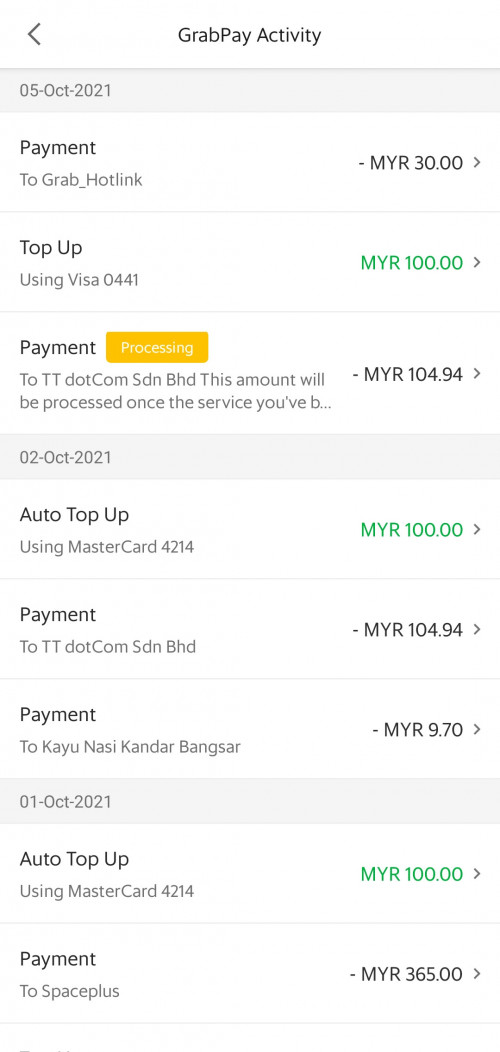
anyone have issue paying TIME with GrabPay today? their billing system seems having havoc today, tried paid using credit card also not reflected after few hours hmm.gif
user posted image
ktchang321
post Oct 5 2021, 08:14 PM

New Member
*
Newbie
10 posts

Joined: Aug 2013
QUOTE(halfdevil @ Oct 5 2021, 02:05 PM)
Yes, you can. When the technician come according to your appointment, just tell the technician that you do not need to setup, just pass you the router is enough.
I upgraded mine last month. The technician passed the router to me and requested me screenshot speedtest to send to him.
*
Yes. Same to me this scenario.
hirano
post Oct 5 2021, 08:58 PM

凸(`△´#)
*******
Senior Member
3,336 posts

Joined: Nov 2007
From: Pluto


QUOTE(#Victor @ Oct 5 2021, 04:11 PM)
anyone have issue paying TIME with GrabPay today? their billing system seems having havoc today, tried paid using credit card also not reflected after few hours hmm.gif
user posted image
*
Yes. The TIME customer service said Grab got problem. They said not TIME punya problem and asking to check again in 48 hours.

This post has been edited by hirano: Oct 5 2021, 08:58 PM
YantoZyrus
post Oct 5 2021, 09:35 PM

Getting Started
**
Junior Member
71 posts

Joined: Jul 2021
recently recontract 24months for 500mbps and being offered WA8021V5 mesh. Is this router good? Current router is Asus RT AX-3000 which supports wifi 6.
Is my current router better than the huawei router offered by time? If that is the case most likely i would ask the technician not to install d...

This post has been edited by YantoZyrus: Oct 5 2021, 09:35 PM
blacktubi
post Oct 5 2021, 09:42 PM

-
Group Icon
Elite
8,424 posts

Joined: Jul 2008

QUOTE(YantoZyrus @ Oct 5 2021, 09:35 PM)
recently recontract 24months for 500mbps and being offered WA8021V5 mesh. Is this router good? Current router is Asus RT AX-3000 which supports wifi 6.
Is my current router better than the huawei router offered by time? If that is the case most likely i would ask the technician not to install d...
*
Your current router is much much better
lostasylum
post Oct 5 2021, 09:44 PM

running to stand still
******
Senior Member
1,085 posts

Joined: Jul 2007
Hi sifu-sifu sekalian.... I have just applied for TIME to replace my incredibly sucky unifi experience (contract is over!) in my condo. I have a few questions:
1. I haven't cancelled my unifi (was planning to only cancel after successful installation). Will that be an issue for installation?

2. From my understanding, TIME technician will need to pull cable in my condo unit. Do they use plastic casing or something? I'm planning to get the cable pulled to the middle of my unit, and i'm afraid it's going to look really ugly.

N9484640
post Oct 5 2021, 09:46 PM

Chasing Electric
******
Senior Member
1,297 posts

Joined: Aug 2014
Is it possible to manually set DNS on the given Huawei router?
Installer says there is no manual setting
blacktubi
post Oct 5 2021, 09:59 PM

-
Group Icon
Elite
8,424 posts

Joined: Jul 2008

QUOTE(lostasylum @ Oct 5 2021, 09:44 PM)
Hi sifu-sifu sekalian.... I have just applied for TIME to replace my incredibly sucky unifi experience (contract is over!) in my condo. I have a few questions:
1. I haven't cancelled my unifi (was planning to only cancel after successful installation). Will that be an issue for installation?

2. From my understanding, TIME technician will need to pull cable in my condo unit. Do they use plastic casing or something? I'm planning to get the cable pulled to the middle of my unit, and i'm afraid it's going to look really ugly.
*
1) If your condo comes with fiber pre-laid, they will reuse that cable. If not, they will pull a fresh fiber cable.

2) Looks better without casing actually. Cause the fiber cable is much thiner than an electric cable and they hot glue it to the edge of ceiling.
lostasylum
post Oct 5 2021, 10:06 PM

running to stand still
******
Senior Member
1,085 posts

Joined: Jul 2007
QUOTE(blacktubi @ Oct 5 2021, 09:59 PM)
1) If your condo comes with fiber pre-laid, they will reuse that cable. If not, they will pull a fresh fiber cable.

2) Looks better without casing actually. Cause the fiber cable is much thiner than an electric cable and they hot glue it to the edge of ceiling.
*
thanks for the super fast reply @blacktubi. I think my condo is quite old, so I think they may have to pull a fresh fibre cable. If let's say they do pull a fresh fibre cable, what happens to the current wall ports that I have in my condo? I won't have to use that any more?

Also, assuming TIME won't be using those ports, does that mean that I can technically have my unifi connection until I cancel my unifi subscription? Sorry, budak baru nak belajar TIME
YantoZyrus
post Oct 5 2021, 10:19 PM

Getting Started
**
Junior Member
71 posts

Joined: Jul 2021
QUOTE(blacktubi @ Oct 5 2021, 09:42 PM)
Your current router is much much better
*
Guess I will stick with my current router then, maybe pass the extra mesh router for my cousin which is on 100mbps time Huawei router.
Xaphier
post Oct 6 2021, 10:09 AM

Casual
***
Junior Member
495 posts

Joined: Sep 2007


Hi guys, I have a rental unit (House A) which is currently using a TIME broadband which has the old modem + TP-Link router combo. I intend to get my new house (House B) a new 500mbps TIME broadband, which I heard, comes with Huawei HG8145V5 modem/router combo. I already have a good router setup in House B, but it does not have any modem yet, so I would still need a modem to work with my router setup. My question is:

1. Can I re-use the old modem from House A to House B? And use that modem to connect to my router?
2. Move the new Huawei HG8145V5 modem/router combo from House B to House A?

I was hoping that I can do all these without having to contact CS or a technician coming. Thanks.

This post has been edited by Xaphier: Oct 6 2021, 10:12 AM
jjj2
post Oct 6 2021, 11:04 AM

Look at all my stars!!
*******
Senior Member
3,616 posts

Joined: Feb 2006
QUOTE(lostasylum @ Oct 5 2021, 10:06 PM)
thanks for the super fast reply @blacktubi. I think my condo is quite old, so I think they may have to pull a fresh fibre cable.
If let's say they do pull a fresh fibre cable, what happens to the current wall ports that I have in my condo? I won't have to use that any more?
Hi, there is no need to use the telephone port any port, unless you wish to use it for telephone purpose.

Also, assuming TIME won't be using those ports, does that mean that I can technically have my unifi connection until I cancel my unifi subscription? Sorry, budak baru nak belajar TIME
Yes, if your Unifi is running on VDSL (using that Tel port) then you can still remain it.
*
jjj2
post Oct 6 2021, 11:08 AM

Look at all my stars!!
*******
Senior Member
3,616 posts

Joined: Feb 2006
QUOTE(Xaphier @ Oct 6 2021, 10:09 AM)
Hi guys, I have a rental unit (House A) which is currently using a TIME broadband which has the old modem + TP-Link router combo. I intend to get my new house (House B) a new 500mbps TIME broadband, which I heard, comes with Huawei HG8145V5 modem/router combo. I already have a good router setup in House B, but it does not have any modem yet, so I would still need a modem to work with my router setup. My question is:

1. Can I re-use the old modem from House A to House B? And use that modem to connect to my router?
Sorry you can't unless you perform a service relocation request to relocate your service from House A --> House B. Do note that Outdoor Relocation Fee of RM120 applies.
2. Move the new Huawei HG8145V5 modem/router combo from House B to House A?
Again, sorry you cant simply relocate the ONU/ONT to another unit, unless a proper service relocation request is done via your selfcare portal (selfcare.time.com.my).

I was hoping that I can do all these without having to contact CS or a technician coming. Thanks.
*
jjj2
post Oct 6 2021, 11:09 AM

Look at all my stars!!
*******
Senior Member
3,616 posts

Joined: Feb 2006
QUOTE(swasts @ Oct 5 2021, 03:18 PM)
Speed look good when connecting via cable on first mesh node. Can get around 480 Mbps. Just when using wifi even beside the router the speed drop until 80-100 Mbps. At first I thought I connect using 2.4Ghz then I disable 2.4Ghz option and only using 5Ghz. The speed still same, struggle to hit more than 100Mbps.
*
Hi, are you using 2 mesh nodes (WA8021V5 x 2) ? If so, then try disable the 2nd unit & only test using the first unit.

Thanks.
jjj2
post Oct 6 2021, 11:11 AM

Look at all my stars!!
*******
Senior Member
3,616 posts

Joined: Feb 2006
QUOTE(YantoZyrus @ Oct 5 2021, 09:35 PM)
recently recontract 24months for 500mbps and being offered WA8021V5 mesh. Is this router good? Current router is Asus RT AX-3000 which supports wifi 6.
Is my current router better than the huawei router offered by time? If that is the case most likely i would ask the technician not to install d...
*
Hi, obviously many^10 times better.

672 Pages « < 399 400 401 402 403 > » Top
 

Change to:
| Lo-Fi Version
0.0216sec    1.83    6 queries    GZIP Disabled
Time is now: 23rd December 2025 - 05:41 AM