Welcome Guest ( Log In | Register )

672 Pages « < 327 328 329 330 331 > » Bottom

Outline · [ Standard ] · Linear+

TIME [OFFICIAL] TIME Fibre Broadband™ v4, Experience the ONE TRUE 2Gbps

views
     
ryansxs
post Dec 19 2020, 08:43 PM

Look at all my stars!!
*******
Senior Member
2,380 posts

Joined: Dec 2005


QUOTE(ComradeZ @ Dec 18 2020, 08:17 PM)
update on my problem

I was having lower download speed than what I was supposed to get 1gbps connection and getting only 300mbps and this morning 100mbps.
solved

apparently my cheeky bastard of a lil brother gets a hold of the port setting and limit my connection to what I've expected, I was furious before then because I pay good money for TIME to install about 35 meter of ethernet cable right to my room and getting speed thats about 10% of my actual sub to TIME.

what I did on my dir882 dlink router, I go to Advanced-Port Settings and change speed of my connection and then change the router password to bugger off the sneaky shit, now all is well again.

thanks for the help, and hope this post help others too if they were in my predicament aswell.
*
time for you to limit his port. :-p LOL
good that you found the root cause, else you might be cracking your head.
overmars
post Dec 19 2020, 11:10 PM

Getting Started
**
Junior Member
216 posts

Joined: Jun 2007
hi guys,

Anyone knows where can i download the latest Time BB firmware for DIR 850L? i can't seem to find from dlink MY website - it's only showing firmwares for TM/Unifi.

Thanks!
T3NET P
post Dec 20 2020, 12:27 AM

New Member
*
Probation
4 posts

Joined: Dec 2020
QUOTE(jjj2 @ Dec 19 2020, 03:15 PM)
Hi, we have tested quite a number of units with these new devices, signal strength is quite promising, if compare to the most reason past EC230, this HG8145V5 has at least 20-30% significant improvement.
We are able to get 3xxMbps consistetly.
I believe you are connecting to the satelite unit, try temp off the WA8021V5 and test what is the speed you are getting....
*
I did test by turning off all the AP units (I have 3 covering the property) and was only able to attain shy of 280M wirelessly while im about the living room area within 2 to 3 meters away from the router. Later in the day, technical support came and tried their best at optimizing the 3 AP locations for the setup but still failed to attain even 200M from these APs. Dissatisfactory report filed but further than this I'm not sure what could be done as the other fact about this entire bundle from Time is that this 2 in 1 router/ont does not have a readily available WAN port for me to install a 3rd party router without having to go through some further tinkering. Does Time still provide the usual ONT together with a regular router like before rather than these poorly marketed gimmick of a mesh? If these came free I'd not complain, but I paid quite a heft getting these 3 units.
jjj2
post Dec 20 2020, 09:05 AM

Look at all my stars!!
*******
Senior Member
3,616 posts

Joined: Feb 2006
QUOTE(T3NET @ Dec 20 2020, 12:27 AM)
I did test by turning off all the AP units (I have 3 covering the property) and was only able to attain shy of 280M wirelessly while im about the living room area within 2 to 3 meters away from the router. Later in the day, technical support came and tried their best at optimizing the 3 AP locations for the setup but still failed to attain even 200M from these APs. Dissatisfactory report filed but further than this I'm not sure what could be done as the other fact about this entire bundle from Time is that this 2 in 1 router/ont does not have a readily available WAN port for me to install a 3rd party router without having to go through some further tinkering. Does Time still provide the usual ONT together with a regular router like before rather than these poorly marketed gimmick of a mesh? If these came free I'd not complain, but I paid quite a heft getting these 3 units.
*
Hi, thank you for the valuble feedback.
As for now, we are only able to obtain speed near to 200Mbps if connected to the satellite units. Will do more on-site testing & feedback. Meanwhile feel free to continue with the tuning session with the current SI.

Yes, you will need to configure your router to be in AP mode in this case.

Thanks.
ryansxs
post Dec 20 2020, 11:22 AM

Look at all my stars!!
*******
Senior Member
2,380 posts

Joined: Dec 2005


QUOTE(T3NET @ Dec 20 2020, 12:27 AM)
I did test by turning off all the AP units (I have 3 covering the property) and was only able to attain shy of 280M wirelessly while im about the living room area within 2 to 3 meters away from the router. Later in the day, technical support came and tried their best at optimizing the 3 AP locations for the setup but still failed to attain even 200M from these APs. Dissatisfactory report filed but further than this I'm not sure what could be done as the other fact about this entire bundle from Time is that this 2 in 1 router/ont does not have a readily available WAN port for me to install a 3rd party router without having to go through some further tinkering. Does Time still provide the usual ONT together with a regular router like before rather than these poorly marketed gimmick of a mesh? If these came free I'd not complain, but I paid quite a heft getting these 3 units.
*
Is this mesh integrated with modem in it? (i doubt so)

Are you getting good speed on wired connection at the main mesh node? (if yes, then your wireless connectivity in between mesh nodes need to be checked, see what is the optimal position to place them)
1234kingbling
post Dec 20 2020, 04:42 PM

Casual
***
Junior Member
314 posts

Joined: Sep 2014
Hi guys, need some advice. Been using time for many years with the trashcan router. Looking at the website, it now uses the huawei routers. Are they any good? Thinking of resigning a new contract to get the newer routers. Is it worth it?
T3NET P
post Dec 20 2020, 08:59 PM

New Member
*
Probation
4 posts

Joined: Dec 2020
QUOTE(jjj2 @ Dec 20 2020, 09:05 AM)
Hi, thank you for the valuble feedback.
As for now, we are only able to obtain speed near to 200Mbps if connected to the satellite units. Will do more on-site testing & feedback. Meanwhile feel free to continue with the tuning session with the current SI.

Yes, you will need to configure your router to be in AP mode in this case.

Thanks.
*
Thanks jjj2. I will look into that and also seek alternatives from Time cust service as well.

QUOTE(ryansxs @ Dec 20 2020, 11:22 AM)
Is this mesh integrated with modem in it? (i doubt so)

Are you getting good speed on wired connection at the main mesh node? (if yes, then your wireless connectivity in between mesh nodes need to be checked, see what is the optimal position to place them)
*
I have no idea if this device is really mesh integrated or not but all I know is that all new Time subscriptions now comes with this complimentary HG8145V5 optical network router that acts as both the fibre terminal with routing capabilities, thus removing the need for having 2 separate devices as how it was bundled before (ONT + additional router eg. TP-link Archer C7 or something). Hence saving cost on CPE. More info on this device.

Wired speed from the ONR is good, 500M as advertised. Wired speed from any of the "mesh" aka APs are around ~200-250M. I will try to further attempt different location to see if it helps although the techs have also tried their best to help with this.


Syederfaan
post Dec 21 2020, 05:02 AM

New Member
*
Newbie
1 posts

Joined: Apr 2016
QUOTE(CH3COOH @ Dec 13 2020, 12:23 AM)
user posted image

Tested over Cat-6 RJ45 cable.
*
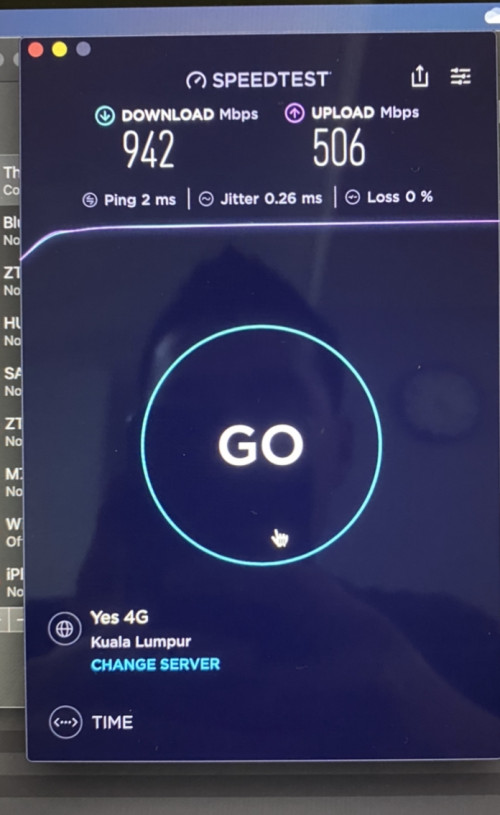
what router are you using? and also the router settings? i can only get 850mbps in speedtest using lan cable
jjj2
post Dec 21 2020, 09:33 AM

Look at all my stars!!
*******
Senior Member
3,616 posts

Joined: Feb 2006
QUOTE(1234kingbling @ Dec 20 2020, 04:42 PM)
Hi guys, need some advice. Been using time for many years with the trashcan router. Looking at the website, it now uses the huawei routers. Are they any good? Thinking of resigning a new contract to get the newer routers. Is it worth it?
*
Viewing from signal strength & penetration power, there is a significant leap.

hlmilk112
post Dec 21 2020, 09:53 AM

Getting Started
**
Junior Member
106 posts

Joined: Sep 2010
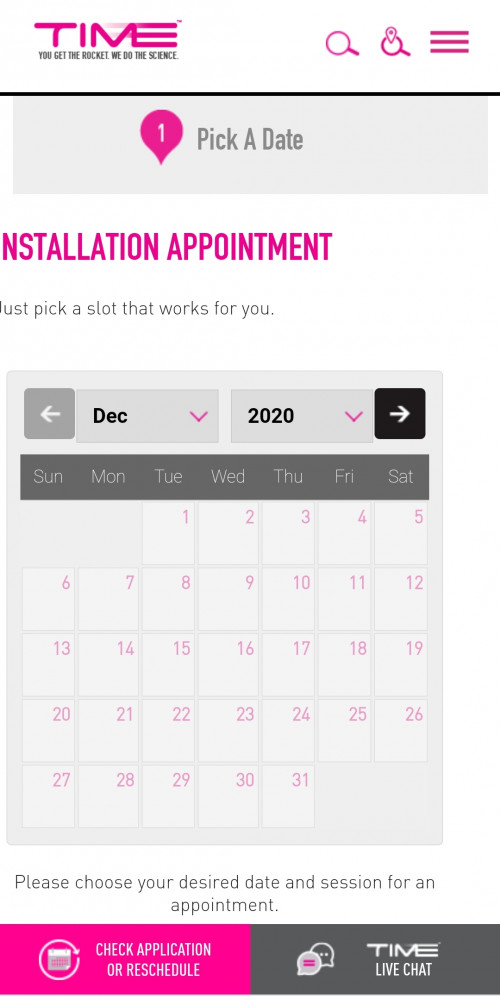
Hi any time agent here? Need help as i cannot pick the date for installation.

user posted image

user posted image

Thanks
FusionXY
post Dec 21 2020, 10:10 AM

LAZZIE ON VACATION
*******
Senior Member
3,836 posts

Joined: Aug 2016

QUOTE(hlmilk112 @ Dec 21 2020, 09:53 AM)
Hi any time agent here? Need help as i cannot pick the date for installation.

user posted image

user posted image

Thanks
*
Hello, what's your building name?

Do provide the building name via PM.

Thanks.
hlmilk112
post Dec 21 2020, 11:21 AM

Getting Started
**
Junior Member
106 posts

Joined: Sep 2010
Relau vista, penang

Thanks a lot to FusionXY

This post has been edited by hlmilk112: Dec 21 2020, 11:24 AM
FusionXY
post Dec 21 2020, 11:54 AM

LAZZIE ON VACATION
*******
Senior Member
3,836 posts

Joined: Aug 2016

QUOTE(hlmilk112 @ Dec 21 2020, 11:21 AM)
Relau vista, penang

Thanks a lot to FusionXY
*
The appointment date can't be selected due to internal infrastructure upgrading process and there might be some delays for the installation.

Sorry for the inconvenience caused.
ComradeZ
post Dec 21 2020, 12:15 PM

Feelwayoveryourhead
******
Senior Member
1,460 posts

Joined: May 2007
From: Shah Alam


QUOTE(ryansxs @ Dec 19 2020, 08:43 PM)
time for you to limit his port. :-p LOL
good that you found the root cause, else you might be cracking your head.
*
not gonna lie, my head was buzzing with everything i want to do with my connection speed, thank god for the indian youtube techtips. if not i would've shell out for the 40m cat7 cable the whole shebang.

and for the bugger, his own repeater is the downside hes barely getting 200mbps out of 1gbps because he uses out old unifi tplink router.
hlmilk112
post Dec 21 2020, 12:27 PM

Getting Started
**
Junior Member
106 posts

Joined: Sep 2010
QUOTE(FusionXY @ Dec 21 2020, 11:54 AM)
The appointment date can't be selected due to internal infrastructure upgrading process and there might be some delays for the installation.

Sorry for the inconvenience caused.
*
Ok thanks for the info. I hv terminate the old acc. Already registered new acc to 500mbps. Then now delay coz upgrading infrastructure. Can i just call in to extend / delay my old termination date? Of not then no internet while waiting they finished the upgrade. 😓😓😓
FusionXY
post Dec 21 2020, 12:32 PM

LAZZIE ON VACATION
*******
Senior Member
3,836 posts

Joined: Aug 2016

QUOTE(hlmilk112 @ Dec 21 2020, 12:27 PM)
Ok thanks for the info. I hv terminate the old acc. Already registered new acc to 500mbps. Then now delay coz upgrading infrastructure. Can i just call in to extend / delay my old termination date? Of not then no internet while waiting they finished the upgrade. 😓😓😓
*
Kindly refer to the agent/dealer that you deal before.

Or contact CS @ 1800181818 for this issues.


fakerdemit
post Dec 21 2020, 02:24 PM

Getting Started
**
Junior Member
227 posts

Joined: Nov 2008
QUOTE(fakerdemit @ Nov 18 2020, 02:45 AM)
I'm having a poor wifi connection from my room, the router is like 2-3 meter away from my room. I don't know why, maybe there is dead spot in my room. I'm looking for ways to improve the wifi connection because of wfh. Can someone suggest some tips or device to buy?

Currently using default router, but I don't think can upgrade to a better one because I'm only renting the room and the router was provided by the landlord. My housemate got himself a wifi extender but according to him even that doesn't improve the speed. So I'm looking at wifi mesh but not sure which one should I get.
*
Hi guys, so just an update - I didn't buy the range extender as suggested by another forumer but I managed to borrow an old extender TP Link 850RE v1. It seemed the speed remains the same or sometimes worst. So now thankfully I got some gift from my company and I'm planning to use that money to buy new router to replace the stock EC230-G1. I'll probably take it with me when I move out then.

So can anyone suggest decent router below RM200 budget? I'm looking at TP Link C80 at the moment.
SUSpundi
post Dec 21 2020, 03:24 PM

Enthusiast
*****
Junior Member
789 posts

Joined: Mar 2019


time down cheras
DRBHCOM P
post Dec 21 2020, 03:30 PM

New Member
*
Probation
6 posts

Joined: Sep 2020
QUOTE(pundi @ Dec 21 2020, 03:24 PM)
time down cheras
*
+1
SUSpundi
post Dec 21 2020, 04:22 PM

Enthusiast
*****
Junior Member
789 posts

Joined: Mar 2019


QUOTE(DRBHCOM @ Dec 21 2020, 03:30 PM)
+1
*
ok aready
after like 20min

672 Pages « < 327 328 329 330 331 > » Top
 

Change to:
| Lo-Fi Version
0.0270sec    0.34    6 queries    GZIP Disabled
Time is now: 24th December 2025 - 04:41 AM