Welcome Guest ( Log In | Register )

Bump Topic Topic Closed RSS Feed
420 Pages « < 61 62 63 64 65 > » Bottom

Outline · [ Standard ] · Linear+

Unifi Official TM UniFi High Speed Broadband Thread V35, READ 1ST PAGE FOR TURBO SPEED INFO!

views
     
tsmin1989
post Sep 22 2018, 12:03 AM

Getting Started
**
Junior Member
124 posts

Joined: Oct 2008
QUOTE(nikrizal @ Sep 21 2018, 11:54 PM)
Have you tried the Speedtest using different devices? Gigabyte LAN preferably.

My C1200 LAN recorded 890Mbps using android box H96 Pro+ , a bit faster than my MacBook Pro which gigabyte LAN is based on Thundebolt interface.
*
I have been tried on my pc and Microsoft surface too. Both get similar speed. I already lodge a report to TM, now waiting they solve the problem.
WaE
post Sep 22 2018, 12:09 AM

Getting Started
**
Junior Member
65 posts

Joined: Jan 2007
QUOTE(dickybird @ Sep 21 2018, 11:19 PM)
How you know you're in which batch?
*
Ask some one inside tm to help me check my account when get turbo.. but he not tell me when it upgrade just give me I in batch!!
Chrizalix
post Sep 22 2018, 12:17 AM

Getting Started
**
Junior Member
53 posts

Joined: Nov 2009
Guys, I have some questions regarding this. (500mbps user here)

Eversince my Unifi got turbo-ed, I have changed my PC from using wifi adapter to full network cable (cat6), then i found out my router got bottleneck-ed at 100mbps (capped). So i went on to get a new cheap router, DIR-842.
I have done speedtest with my phone via 5.0Ghz speed, it can go up to almost 500mbps, but when it comes to PC with cat6, the speed just got stuck at between 120 - 200mbps, while uploading speed is rather stable.

Anyone know what is the issue?
jusbella
post Sep 22 2018, 12:22 AM

Look at all my stars!!
*******
Senior Member
3,032 posts

Joined: Dec 2011


QUOTE(Chrizalix @ Sep 22 2018, 12:17 AM)
Guys, I have some questions regarding this.  (500mbps user here)

Eversince my Unifi got turbo-ed, I have changed my PC from using wifi adapter to full network cable (cat6), then i found out my router got bottleneck-ed at 100mbps (capped). So i went on to get a new cheap router, DIR-842.
I have done speedtest with my phone via 5.0Ghz speed, it can go up to almost 500mbps, but when it comes to PC with cat6, the speed just got stuck at between 120 - 200mbps, while uploading speed is rather stable.

Anyone know what is the issue?
*
What your original router model?
adliazaddin
post Sep 22 2018, 12:22 AM

Casual
***
Junior Member
329 posts

Joined: Jun 2007
From: behind you


QUOTE(Apeiron @ Sep 21 2018, 11:52 PM)
there is Tenda AC18 thread in Lowyat, if not mistaken performance not bad, some even compare it with Asus AC68U.

Tenda AC15 also is similar to Tenda AC18 in spec (according to seller OOKS), looks nicer also.

at pricing RM2XX, and 3 year 1 to 1 swap warranty, can give it a try.
*
thumbup.gif
mrknight
post Sep 22 2018, 12:27 AM

Getting Started
**
Junior Member
109 posts

Joined: Jun 2010
From: Earth Planet


QUOTE(Chrizalix @ Sep 22 2018, 12:17 AM)
Guys, I have some questions regarding this.  (500mbps user here)

Eversince my Unifi got turbo-ed, I have changed my PC from using wifi adapter to full network cable (cat6), then i found out my router got bottleneck-ed at 100mbps (capped). So i went on to get a new cheap router, DIR-842.
I have done speedtest with my phone via 5.0Ghz speed, it can go up to almost 500mbps, but when it comes to PC with cat6, the speed just got stuck at between 120 - 200mbps, while uploading speed is rather stable.

Anyone know what is the issue?
*
have u check what is the speed for your ethernet network? refer picture

» Click to show Spoiler - click again to hide... «


also try with another ethernet cable.. probably faulty cable you have there..
Chrizalix
post Sep 22 2018, 12:44 AM

Getting Started
**
Junior Member
53 posts

Joined: Nov 2009
QUOTE(jusbella @ Sep 22 2018, 12:22 AM)
What your original router model?
*
Previously I was using Asus RT-N14UHP, good modem but it doesn't have the gigabit port.
So I changed it to Dlink DIR-842. Speedtest via phone is great, but when it comes to PC, the speed just capped at around 150-200.


QUOTE(mrknight @ Sep 22 2018, 12:27 AM)
have u check what is the speed for your ethernet network? refer picture

» Click to show Spoiler - click again to hide... «


also try with another ethernet cable.. probably faulty cable you have there..
*
Yes I did, It is Killer E2200, so it is 1Gbps

For the ethernet cable, I've got myself a new 30metres cat6, but so far im only using about 20metres, whereas the 10 I actually cable tied it, will it affect the speed like fiber optics too ?
jusbella
post Sep 22 2018, 12:50 AM

Look at all my stars!!
*******
Senior Member
3,032 posts

Joined: Dec 2011


QUOTE(Chrizalix @ Sep 22 2018, 12:44 AM)
Previously I was using Asus RT-N14UHP, good modem but it doesn't have the gigabit port.
So I changed it to Dlink DIR-842. Speedtest via phone is great, but when it comes to PC, the speed just capped at around 150-200.
Yes I did, It is Killer E2200, so it is 1Gbps

For the ethernet cable, I've got myself a new 30metres cat6, but so far im only using about 20metres, whereas the 10 I actually cable tied it, will it affect the speed like fiber optics too ?
*
It's doesn't affected. Your killer is pcie?
mrknight
post Sep 22 2018, 12:51 AM

Getting Started
**
Junior Member
109 posts

Joined: Jun 2010
From: Earth Planet


QUOTE(Chrizalix @ Sep 22 2018, 12:44 AM)
Previously I was using Asus RT-N14UHP, good modem but it doesn't have the gigabit port.
So I changed it to Dlink DIR-842. Speedtest via phone is great, but when it comes to PC, the speed just capped at around 150-200.
Yes I did, It is Killer E2200, so it is 1Gbps

For the ethernet cable, I've got myself a new 30metres cat6, but so far im only using about 20metres, whereas the 10 I actually cable tied it, will it affect the speed like fiber optics too ?
*
is the router is new too?
but if in network status it showed 1Gbps, i think the problem is with that cable.
try with free cable that TM give you, they ussually give cat5e cable and see if that make a difference.
Doraku
post Sep 22 2018, 12:58 AM

Old threads digger
******
Senior Member
1,155 posts

Joined: Apr 2016


QUOTE(y561994 @ Sep 21 2018, 09:20 PM)
Thread going so fast, harddd to catch up.
*
use track this topic function to catch up with this thread laugh.gif
WaNaWe900
post Sep 22 2018, 01:12 AM

చąហ ąచҽ™
******
Senior Member
1,397 posts

Joined: Feb 2012
From: sOuL SoCiETY.. iSKaNDaRPuTeRi.. JB.. JDT


Hye all...

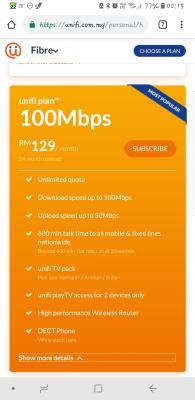
Checking if I'm only user that still stuck with old 30 Mbps upgraded to 50 Mbps with UniFiTV Ultimate cost monthly over RM200 😅😅😅.. contract already ended.. thinking of change to 100 Mbps @ RM129 + 6% SST 🤪

Attached Image

This post has been edited by WaNaWe900: Sep 22 2018, 01:13 AM
Doraku
post Sep 22 2018, 01:17 AM

Old threads digger
******
Senior Member
1,155 posts

Joined: Apr 2016


QUOTE(Chrizalix @ Sep 22 2018, 12:44 AM)
Previously I was using Asus RT-N14UHP, good modem but it doesn't have the gigabit port.
So I changed it to Dlink DIR-842. Speedtest via phone is great, but when it comes to PC, the speed just capped at around 150-200.
Yes I did, It is Killer E2200, so it is 1Gbps

For the ethernet cable, I've got myself a new 30metres cat6, but so far im only using about 20metres, whereas the 10 I actually cable tied it, will it affect the speed like fiber optics too ?
*
I heard Killer LAN and WIFI chipset very problemsome, maybe you can try this do this at your own risk tho sweat.gif
https://forum-en.msi.com/index.php?topic=178063.0

This post has been edited by Doraku: Sep 22 2018, 01:33 AM
woe.com
post Sep 22 2018, 01:21 AM

Casual
***
Junior Member
438 posts

Joined: Dec 2004


QUOTE(shahie @ Sep 21 2018, 11:19 PM)
change the wifi router to dual band router such as dir-842 or similar or even higher spec if you effort, dir-842 consider budget MU-MIMO router with excellent performance. please use 5ghz band instead of 2.4ghz band and you will enjoy the full 300mbps.
*
Ahh, so is because of the router? Just wanted to confirm b4 blindly blame all because of the router, so I should start do some study on the 1st page supported router list now.. hehe, thanks.

QUOTE(fnixirix @ Sep 21 2018, 11:25 PM)
same problem with me last time, chg router n problem solved.
*
Thanks, mind to share which router you using now and does it go up to full speed?

QUOTE(ahlek @ Sep 21 2018, 11:34 PM)
I can get 230mbps on lan. 120mbps on wifi(download n upload).. 😂
*
Hi, which router model u using ya? Need some idea here as well biggrin.gif
jiaen0509
post Sep 22 2018, 02:30 AM

Look at all my stars!!
*******
Senior Member
3,305 posts

Joined: Dec 2012
Anyone Unifi bill get cheaper? My bill supposed to be RM189 before tax. But the bill I receive only RM129 or 133.55 after tax.
AMDAthlon
post Sep 22 2018, 02:31 AM

The future is Fusion
*******
Senior Member
5,221 posts

Joined: Aug 2007
From: Deneb star


QUOTE(WaNaWe900 @ Sep 22 2018, 01:12 AM)
Hye all...

Checking if I'm only user that still stuck with old 30 Mbps upgraded to 50 Mbps with UniFiTV Ultimate cost monthly over RM200 😅😅😅.. contract already ended.. thinking of change to 100 Mbps @ RM129 + 6% SST 🤪

Attached Image
*
I was once like you. Just go to any TM Point Center to change to the RM 129 plan. No use staying at higher expensive plan unless you wished to get the turbo speed
Now enjoying RM 129 plan @ 100Mbps which is good enough for me.
ijibang
post Sep 22 2018, 04:38 AM

Getting Started
**
Junior Member
100 posts

Joined: Dec 2010
QUOTE(WaNaWe900 @ Sep 22 2018, 01:12 AM)
Hye all...

Checking if I'm only user that still stuck with old 30 Mbps upgraded to 50 Mbps with UniFiTV Ultimate cost monthly over RM200 😅😅😅.. contract already ended.. thinking of change to 100 Mbps @ RM129 + 6% SST 🤪

Attached Image
*
I'm on the same package costing me RM180/= per month, contract going to expire in October 2018.
I asked TM and they don't give a damn if you opt out to their new 100Mbps@RM129/= or not.
They said if you opt out, your 10X upgrade would become ineligible.
What to do??? Wait for another 3 months and see, after all already burnt for 23 months.
Last time, the "Thank You campaign" (30 to 50 Mbps) took me 3 month's waiting time.
I'm waiting with long neck for the 500Mbps.....................................

zhuoyang
post Sep 22 2018, 04:47 AM

Getting Started
**
Junior Member
197 posts

Joined: Jul 2011
Why everyone is jumping to cat6 ? isn't cat5e is good enough for gigabit connection?
fnixirix
post Sep 22 2018, 06:16 AM

☻neKo 猫, ねこ neKo☻
****
Senior Member
577 posts

Joined: Aug 2007
From: Petaling Jaya


QUOTE(woe.com @ Sep 22 2018, 01:21 AM)
Thanks, mind to share which router you using now and does it go up to full speed?


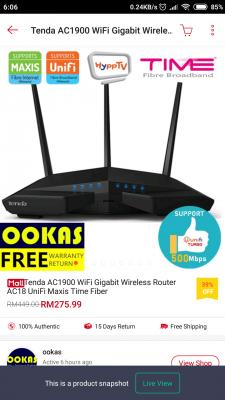
Bought tenda ac1900 ac18 from ookas for rm275 discount more rm2.00 n free poslaju, total just rm273.

Get full speed on wifi if same floor..
If 2nd floor just drop 50-80mbps like that. (220mbps wifi speed / 300mbps)

This post has been edited by fnixirix: Sep 22 2018, 07:27 AM


Attached thumbnail(s)
Attached Image
amirul hafizz
post Sep 22 2018, 06:37 AM

Casual
***
Junior Member
369 posts

Joined: Sep 2018


ohmy.gif ohmy.gif ohmy.gif


Attached thumbnail(s)
Attached Image
ClarenceT
post Sep 22 2018, 07:16 AM

10k Club
********
All Stars
14,929 posts

Joined: May 2015
TM turbo-ed to upgrade Unifi Lite FTTH 10Mbps to Unifi Turbo 100Mbps since yesterday.

So no need to rush to TMpoint unless willing to refresh 24 months contract for free STD20 voice pack.


420 Pages « < 61 62 63 64 65 > » Top
Topic ClosedOptions
 

Change to:
| Lo-Fi Version
0.0170sec    0.80    6 queries    GZIP Disabled
Time is now: 4th December 2025 - 01:44 PM