

I got turboed.
Im a noob here. To achieve the speed. Need change router only or both box?
The ONU i got is Huawei HG8240w.
Unifi Official TM UniFi High Speed Broadband Thread V35, READ 1ST PAGE FOR TURBO SPEED INFO!
Unifi Official TM UniFi High Speed Broadband Thread V35, READ 1ST PAGE FOR TURBO SPEED INFO!
|
|
 Sep 22 2018, 07:18 AM Sep 22 2018, 07:18 AM
|
 
Junior Member
62 posts Joined: Oct 2013  
|
I got turboed.
Im a noob here. To achieve the speed. Need change router only or both box? The ONU i got is Huawei HG8240w. |
|
|
|
|
|
Sep 22 2018, 07:31 AM
Show posts by this member only | IPv6 | Post
#1262
|

Senior Member
4,490 posts Joined: Oct 2014
|
QUOTE(Reckoning @ Sep 22 2018, 07:18 AM) I got turboed. Did you bothered to read the first page, first post, green text?Im a noob here. To achieve the speed. Need change router only or both box? The ONU i got is Huawei HG8240w.  |
|
|
Sep 22 2018, 07:40 AM
|
|
Newbie
8 posts Joined: Aug 2016
|
Just and observation and you may want to confirm this. Speedtest results consistently poorer using Chrome versus Internet Explorer, despite using the same speedtest client and location.... In my case as much as 100Mbps.
Speed is highest when the client application is used directly, e.g. Use speedtest.net application either android or Windows |
|
|
Sep 22 2018, 07:45 AM
|
|
Junior Member
62 posts Joined: Oct 2013
|
QUOTE(zher4883 @ Sep 22 2018, 07:31 AM) Did you bothered to read the first page, first post, green text? Wow will read. Thanks pro |
|
|
Sep 22 2018, 08:00 AM
|

Senior Member
1,304 posts Joined: Mar 2010
|
QUOTE(WaE @ Sep 21 2018, 11:09 PM) i have wait for long... tm help me see my batch got turbo.. my at batch 10 now is batch 5.. What is ur current package?i hate wait for long time.. |
|
|
Sep 22 2018, 08:12 AM
|
|
Junior Member
65 posts Joined: Jan 2007
|
QUOTE(pokchik @ Sep 22 2018, 08:00 AM) What is ur current package? 100Mbps... |
|
|
|
|
|
Sep 22 2018, 08:13 AM
|

Senior Member
5,714 posts Joined: Mar 2007 
|
QUOTE(tsmin1989 @ Sep 21 2018, 11:33 PM) My unifi also upgrade to 800mbps but I can't get full speed even I change all my network cable to Cat 6. Could be the settings in your router, or the fact your router could not handle the full speed.My router is TP-Link AC1200 provide by TM ] QUOTE(adliazaddin @ Sep 21 2018, 11:41 PM) ? tenda sucks ? Nah, it is good, but don’t expect too good of a performance, like those expensive routers. QUOTE(Scissorshand @ Sep 21 2018, 11:45 PM) Sifu.. One advice for you. CHANGE ROUTER. Refer to 1st page, 1st posy, green text. TM should not do anything. It is your router that is the issue. Sounds like your 2.4GHz band, which is the only band available for your router, is congested or full of interference. Refer to 1st page, 1st post, green text, and get a new dual band router, and go on the 5GHz AC band and your problem will be solved.Am using rtn12hp with latest firmware, have been expriencing intermittent drop in connection since few months back and its getting worse. Almost everyday since last Sun am having the issue during the evening Have called CS and they have reset the connection incl the port however it doesnt help. What else should be asking TM to do to diagnose the problem? When the connection goes bad, i'll get abt 2-3mbps of the 50mbps subs. TIA QUOTE(Chrizalix @ Sep 22 2018, 12:17 AM) Guys, I have some questions regarding this. (500mbps user here) The Killer NIC on your PC could be the issue. Uninstall Killer Networking Suite, and only get the basic drivers for it.Eversince my Unifi got turbo-ed, I have changed my PC from using wifi adapter to full network cable (cat6), then i found out my router got bottleneck-ed at 100mbps (capped). So i went on to get a new cheap router, DIR-842. I have done speedtest with my phone via 5.0Ghz speed, it can go up to almost 500mbps, but when it comes to PC with cat6, the speed just got stuck at between 120 - 200mbps, while uploading speed is rather stable. Anyone know what is the issue? QUOTE(zhuoyang @ Sep 22 2018, 04:47 AM) Why everyone is jumping to cat6 ? isn't cat5e is good enough for gigabit connection? It is, but Cat 6 is better, and less low quality shit out there compared to Cat5e. |
|
|
Sep 22 2018, 08:27 AM
|
|
Junior Member
62 posts Joined: Oct 2013
|
Better call TM for new router or buy own router for 500mbps?
My unifi over 2 years already. So i assume extend contract if ask tm to replace |
|
|
Sep 22 2018, 08:30 AM
|

Junior Member
506 posts Joined: Feb 2005
|
QUOTE(Scissorshand @ Sep 21 2018, 11:45 PM) Sifu.. this is how asus starting his intermittent problem after period of time. i have a similar experience early last year with my old N66U, at the end try to use stock TM router (cheap brand on orange box - forgot the brand) and the connection smooth for the few days. throw away that asus and get another N12HP, also only a few months similar problem came, at the end migrate to dlink product now.Am using rtn12hp with latest firmware, have been expriencing intermittent drop in connection since few months back and its getting worse. Almost everyday since last Sun am having the issue during the evening Have called CS and they have reset the connection incl the port however it doesnt help. What else should be asking TM to do to diagnose the problem? When the connection goes bad, i'll get abt 2-3mbps of the 50mbps subs. TIA Below ping test using 1.1.1.1 dns PING www.yahoo.com (106.10.xxx.xx): 56 data bytes 64 bytes from 106.10.250.10: seq=0 ttl=57 time=8.910 ms 64 bytes from 106.10.250.10: seq=1 ttl=57 time=9.224 ms 64 bytes from 106.10.250.10: seq=2 ttl=57 time=8.902 ms 64 bytes from 106.10.250.10: seq=3 ttl=57 time=10.071 ms 64 bytes from 106.10.250.10: seq=4 ttl=57 time=10.013 ms 64 bytes from 106.10.250.10: seq=5 ttl=57 time=9.936 ms 64 bytes from 106.10.250.10: seq=6 ttl=57 time=9.995 ms 64 bytes from 106.10.250.10: seq=7 ttl=57 time=10.009 ms 64 bytes from 106.10.250.10: seq=8 ttl=57 time=8.696 ms 64 bytes from 106.10.250.10: seq=9 ttl=57 time=9.673 ms --- www.yahoo.com ping statistics --- 10 packets transmitted, 10 packets received, 0% packet loss round-trip min/avg/max = 8.696/9.542/10.071 ms This post has been edited by shahie: Sep 22 2018, 08:31 AM |
|
|
Sep 22 2018, 08:32 AM
|
|
Junior Member
101 posts Joined: Jun 2006
|
QUOTE(Reckoning @ Sep 22 2018, 08:27 AM) Better call TM for new router or buy own router for 500mbps? Just buy your own router, TM does not provide good router to begin with.My unifi over 2 years already. So i assume extend contract if ask tm to replace |
|
|
Sep 22 2018, 08:45 AM
|

Senior Member
1,448 posts Joined: Apr 2007
|
QUOTE(Chrizalix @ Sep 22 2018, 12:17 AM) Guys, I have some questions regarding this. (500mbps user here) check your network card Eversince my Unifi got turbo-ed, I have changed my PC from using wifi adapter to full network cable (cat6), then i found out my router got bottleneck-ed at 100mbps (capped). So i went on to get a new cheap router, DIR-842. I have done speedtest with my phone via 5.0Ghz speed, it can go up to almost 500mbps, but when it comes to PC with cat6, the speed just got stuck at between 120 - 200mbps, while uploading speed is rather stable. Anyone know what is the issue?  get a new one if the old one is not supporting the latest protocol standard... get a new one if the old one is not supporting the latest protocol standard...  |
|
|
Sep 22 2018, 09:04 AM
|
|
Junior Member
159 posts Joined: Oct 2009
|
Hi all.... I am on VDSL2 and gladly to inform that my line now supports 100Mbps.
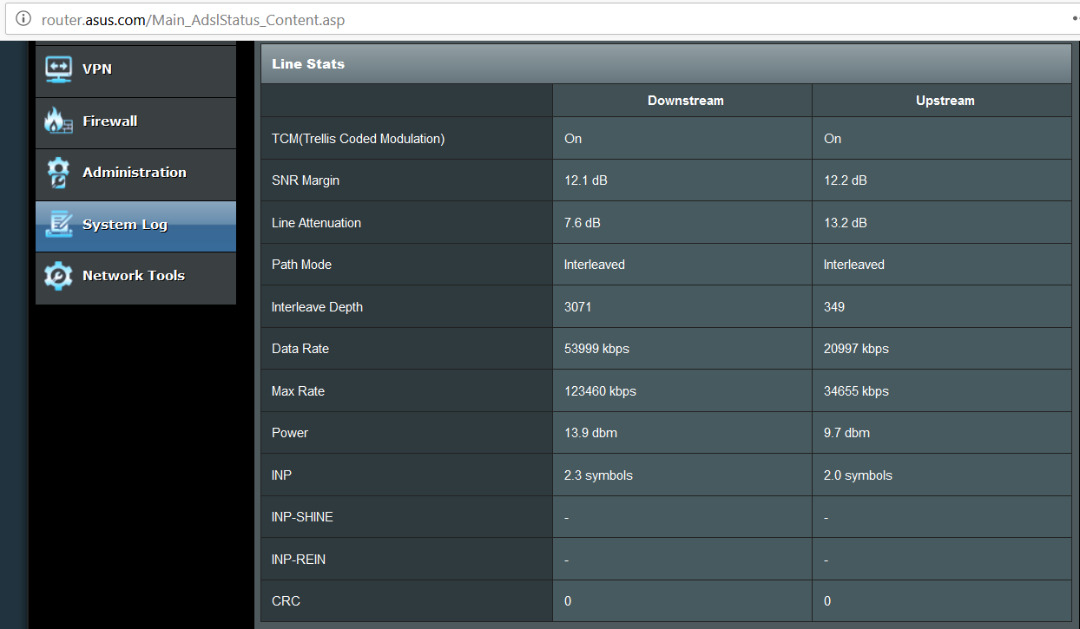 Previously, my VDSL2 only supports about 50Mbps++ (see screenshot below) .. maybe TM did some upgrade at the cabinet outside my apartment. 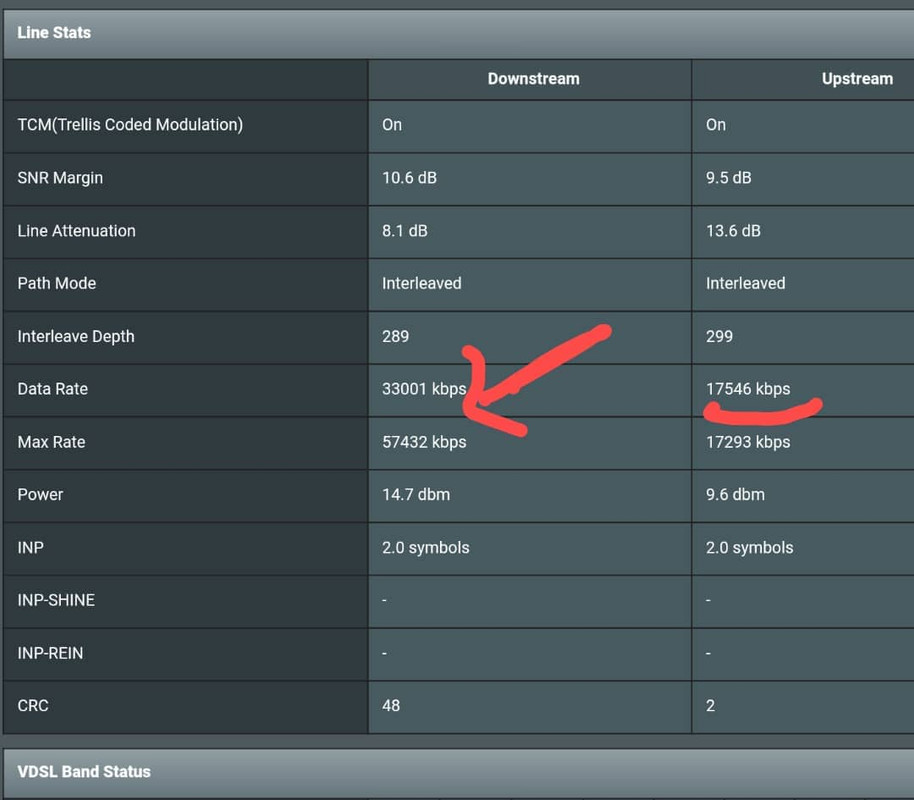 I was thinking to just switch to Maxis RM89/mth for unlimited 30Mbps, but I guess now I can maintain with Unifi 100Mbps for RM129.  This post has been edited by AmyDazz: Sep 22 2018, 09:04 AM |
|
|
Sep 22 2018, 09:38 AM
|

All Stars
11,251 posts Joined: Jul 2005
|
QUOTE(AmyDazz @ Sep 22 2018, 09:04 AM) Hi all.... I am on VDSL2 and gladly to inform that my line now supports 100Mbps. Haha chun Previously, my VDSL2 only supports about 50Mbps++ (see screenshot below) .. maybe TM did some upgrade at the cabinet outside my apartment. I was thinking to just switch to Maxis RM89/mth for unlimited 30Mbps, but I guess now I can maintain with Unifi 100Mbps for RM129.  |
|
|
|
|
|
Sep 22 2018, 09:40 AM
|
|
All Stars
11,251 posts Joined: Jul 2005
|
QUOTE(WaNaWe900 @ Sep 22 2018, 01:12 AM) Hye all... Go ahead Checking if I'm only user that still stuck with old 30 Mbps upgraded to 50 Mbps with UniFiTV Ultimate cost monthly over RM200 😅😅😅.. contract already ended.. thinking of change to 100 Mbps @ RM129 + 6% SST 🤪 [attachmentid=10034311] While i got another year 2 burn  |
|
|
Sep 22 2018, 09:42 AM
|
|
Junior Member
124 posts Joined: Oct 2008
|
QUOTE(SilentVampire @ Sep 22 2018, 08:13 AM) Could be the settings in your router, or the fact your router could not handle the full speed. TM call me today say that it was no issue from their site, if the problem of modem or router, they will come to change it for free. Just wait for the technician come over.Nah, it is good, but don’t expect too good of a performance, like those expensive routers. One advice for you. CHANGE ROUTER. Refer to 1st page, 1st posy, green text. TM should not do anything. It is your router that is the issue. Sounds like your 2.4GHz band, which is the only band available for your router, is congested or full of interference. Refer to 1st page, 1st post, green text, and get a new dual band router, and go on the 5GHz AC band and your problem will be solved. The Killer NIC on your PC could be the issue. Uninstall Killer Networking Suite, and only get the basic drivers for it. It is, but Cat 6 is better, and less low quality shit out there compared to Cat5e. |
|
|
Sep 22 2018, 09:44 AM
Show posts by this member only | IPv6 | Post
#1276
|
|
Junior Member
158 posts Joined: Jan 2003
|
QUOTE(WaE @ Sep 21 2018, 11:09 PM) i have wait for long... tm help me see my batch got turbo.. my at batch 10 now is batch 5.. when you sign up unifi for the first time?i hate wait for long time.. |
|
|
Sep 22 2018, 09:57 AM
|

Junior Member
99 posts Joined: Jul 2013 
|
QUOTE(serve @ Sep 21 2018, 06:02 PM) Already got turbo'ed here..Taman Pusat Kepong...Just now received sms and email though i've been turbo'ed on 16/9 zzz still getting no news until today... |
|
|
Sep 22 2018, 10:07 AM
Show posts by this member only | IPv6 | Post
#1278
|

Junior Member
131 posts Joined: Nov 2011
|
QUOTE(amirul hafizz @ Sep 22 2018, 06:37 AM)   |
|
|
Sep 22 2018, 10:10 AM
|
|
Junior Member
99 posts Joined: Jul 2013
|
QUOTE(Reckoning @ Sep 22 2018, 08:27 AM) Better call TM for new router or buy own router for 500mbps? buy yr ownMy unifi over 2 years already. So i assume extend contract if ask tm to replace |
|
|
Sep 22 2018, 10:18 AM
|
|
Junior Member
62 posts Joined: Oct 2013
|
QUOTE(SamD @ Sep 22 2018, 08:32 AM) Just buy your own router, TM does not provide good router to begin with. QUOTE(x3BabyLemon @ Sep 22 2018, 10:10 AM) buy yr own Tqvm. Will buy my own. Anyway just for info. Did call TMnet on new routers for the turbo speed. They informed will be done in phases. Not now. Now is giving turbo speed to all first. |
|
Topic ClosedOptions
|
| Change to: |  0.0195sec 0.0195sec
 0.59 0.59
 6 queries 6 queries
 GZIP Disabled GZIP Disabled
Time is now: 3rd December 2025 - 05:44 PM |
 Quote
Quote