Welcome Guest ( Log In | Register )

302 Pages « < 278 279 280 281 282 > » Bottom

Outline · [ Standard ] · Linear+

Home Networking WiFi Router Discussion Thread, Updated for 2023

views
     
kingkingyyk
post Jun 21 2024, 10:40 AM

10k Club
Group Icon
Elite
15,694 posts

Joined: Mar 2008
QUOTE(x3Kai @ Jun 21 2024, 12:47 AM)
As I don't believe that is normal, this leads me to the conclusion that the Wi-Fi capability of this router is trash, hence my rationale of getting a cheap modern Chinese router with strong Wi-Fi capability to use as an AP, or at least strong enough to cover 700 ish sqft. I don't really need the router capability if it's not compatible with our local configuration. But if it does, 1 less device = save more electricity!
*
Indeed that router radio is thrash, can't even cover entire apartment lot. I replaced one with RT-AX53U and beat that crappy stock router in no time.

Don't get China version of router, they have the radio crippled due to national regulation. The power limit is not as high and some channels don't work, so cheaper part can be used (or skipped) and hence sold cheaper.

This post has been edited by kingkingyyk: Jun 21 2024, 10:43 AM
x3Kai
post Jun 21 2024, 11:40 AM

Getting Started
**
Junior Member
285 posts

Joined: Jun 2012
From: Kuala Lumpur


QUOTE(kingkingyyk @ Jun 21 2024, 10:40 AM)
Indeed that router radio is thrash, can't even cover entire apartment lot. I replaced one with RT-AX53U and beat that crappy stock router in no time.

Don't get China version of router, they have the radio crippled due to national regulation. The power limit is not as high and some channels don't work, so cheaper part can be used (or skipped) and hence sold cheaper.
*
I knew it was bad, but I didn't know it was this bad until I tested yesterday. Guess I'll be replacing the router, or at least the AP. The question is how? For an apartment this size, I was thinking a single AP would suffice, but with thick concrete walls, would a mesh system be better?

In regards to China version routers, anyone have experience with routers from Xiaomi? From my research, there's very little difference between the China and Global version, some even reported that the China version AX3000 being stronger in signal. The only difference is the support where Chinese version are all in Mandarin, which I think I'm fine with, along with the risk of not getting any warranty support.

But as u said, most likely many China versions have their radio crippled, but specs are specs right? The difference in technical specs should be sufficient to tell the expected performance differences of the products right?
BOTAK_WAI
post Jun 21 2024, 01:40 PM

Blow Water First Class
*******
Senior Member
4,166 posts

Joined: Jan 2003
From: Cheras, KL


QUOTE(x3Kai @ Jun 21 2024, 11:40 AM)
I knew it was bad, but I didn't know it was this bad until I tested yesterday. Guess I'll be replacing the router, or at least the AP. The question is how? For an apartment this size, I was thinking a single AP would suffice, but with thick concrete walls, would a mesh system be better?

In regards to China version routers, anyone have experience with routers from Xiaomi? From my research, there's very little difference between the China and Global version, some even reported that the China version AX3000 being stronger in signal. The only difference is the support where Chinese version are all in Mandarin, which I think I'm fine with, along with the risk of not getting any warranty support.

But as u said, most likely many China versions have their radio crippled, but specs are specs right? The difference in technical specs should be sufficient to tell the expected performance differences of the products right?
*
my advice: get an asus tuf-ax4200 and no need headache.

TSblacktubi
post Jun 21 2024, 01:50 PM

-
Group Icon
Elite
8,430 posts

Joined: Jul 2008

QUOTE(x3Kai @ Jun 21 2024, 11:40 AM)
I knew it was bad, but I didn't know it was this bad until I tested yesterday. Guess I'll be replacing the router, or at least the AP. The question is how? For an apartment this size, I was thinking a single AP would suffice, but with thick concrete walls, would a mesh system be better?

In regards to China version routers, anyone have experience with routers from Xiaomi? From my research, there's very little difference between the China and Global version, some even reported that the China version AX3000 being stronger in signal. The only difference is the support where Chinese version are all in Mandarin, which I think I'm fine with, along with the risk of not getting any warranty support.

But as u said, most likely many China versions have their radio crippled, but specs are specs right? The difference in technical specs should be sufficient to tell the expected performance differences of the products right?
*
China domestic market routers are limited to 200mW TX power on the 5GHz band.

And hence they use lower end power amplifier and Wi-Fi front end module.

Many China brands didn't bother with global regulations, they follow Chinese standards when selling their products internationally. Hence you can barely notice any difference.

WiFi is not straightforward, that's why you have good AX1800 routers (e.g. RT-AX56U) that can give you 200Mbps over 2 walls and AX3000 routers (e.g. free stuff from ISP) that can barely do 150Mbps.

Specs is not everything on wireless routers.
issac99289928
post Jun 21 2024, 02:00 PM

Getting Started
**
Junior Member
291 posts

Joined: Sep 2016
From: muar, johor


China’s Latest Regulation on 2.4 GHz and 5 GHz Equipment
5150 – 5350 mhz EIRP Power ≤ 23 dBm
5725 – 5850 mhz EIRP Power ≤ 33 dBm

https://incompliancemag.com/chinas-latest-r...-ghz-equipment/


x3Kai
post Jun 21 2024, 03:49 PM

Getting Started
**
Junior Member
285 posts

Joined: Jun 2012
From: Kuala Lumpur


QUOTE(BOTAK_WAI @ Jun 21 2024, 01:40 PM)
my advice: get an asus tuf-ax4200 and no need headache.
*
thanks for the recommendation, but i'm not really looking to invest so much into a router as of now, hence why i'm looking for cheap alternatives. other than phones and my desktop, all other devices are pretty old and can't really take full advantage of such a modern router. heck i'll probably even downgrade my plan after the loyalty monthly discount runs out sweat.gif

QUOTE(blacktubi @ Jun 21 2024, 01:50 PM)
China domestic market routers are limited to 200mW TX power on the 5GHz band.

And hence they use lower end power amplifier and Wi-Fi front end module.

Many China brands didn't bother with global regulations, they follow Chinese standards when selling their products internationally. Hence you can barely notice any difference.

WiFi is not straightforward, that's why you have good AX1800 routers (e.g. RT-AX56U) that can give you 200Mbps over 2 walls and AX3000 routers (e.g. free stuff from ISP) that can barely do 150Mbps.

Specs is not everything on wireless routers.
*
just looked through this and what you posted in other parts of this threads about china routers, thanks for the treasure trove of information. seems like this even affects brands like Asus that has same product skews both globally and in china where they use cheaper parts for the china version, makes sense i guess. I was pretty lucky when I bought my ASUS RT-AC66U from china back then. It was a significant upgrade over the TP Link AC1200 that TIME provided last time, more stable connection, etc., but i'm not sure if that's just placebo effect or what.

but not sure if this still holds true, someone previously told me “it's better to have multiple AP instead a singular strong AP". with that in mind, if the price makes sense (i.e. I can get a few decent routers as AP, saw some dirt cheap AX3000 telco units) and set it up as purely AP, connected over LAN (referring to my illustration previously provided), will the impact of restricted transmit power still be that significant now that I'm not relying on radio signal penetrating any walls since each space have their dedicated AP.

if that no longer holds true, any recommendations for decent AP that can cover 700 sqft space?

QUOTE(issac99289928 @ Jun 21 2024, 02:00 PM)
China’s Latest Regulation on 2.4 GHz and 5 GHz Equipment
5150 – 5350 mhz      EIRP Power    ≤ 23 dBm
5725 – 5850  mhz    EIRP Power    ≤ 33 dBm

https://incompliancemag.com/chinas-latest-r...-ghz-equipment/
*
thanks for the info.
kingkingyyk
post Jun 21 2024, 04:47 PM

10k Club
Group Icon
Elite
15,694 posts

Joined: Mar 2008
QUOTE(x3Kai @ Jun 21 2024, 03:49 PM)
thanks for the recommendation, but i'm not really looking to invest so much into a router as of now, hence why i'm looking for cheap alternatives. other than phones and my desktop, all other devices are pretty old and can't really take full advantage of such a modern router.
*
As I mentioned, I swapped with a cheap RT-AX53 (AX1800U/AX1800HP) and it works much better than the free router. wink.gif

Cheaper alternative would be TP-Link AX23. Not a fans of TP-Link as the firmware is buggy, though.

This post has been edited by kingkingyyk: Jun 21 2024, 04:48 PM
MyProLife
post Jun 22 2024, 03:12 PM

I bully wumao & MPKL
*******
Senior Member
2,075 posts

Joined: Sep 2021
From: nowhere

QUOTE(x3Kai @ Jun 21 2024, 03:49 PM)
thanks for the recommendation, but i'm not really looking to invest so much into a router as of now, hence why i'm looking for cheap alternatives. other than phones and my desktop, all other devices are pretty old and can't really take full advantage of such a modern router. heck i'll probably even downgrade my plan after the loyalty monthly discount runs out  sweat.gif
just looked through this and what you posted in other parts of this threads about china routers, thanks for the treasure trove of information. seems like this even affects brands like Asus that has same product skews both globally and in china where they use cheaper parts for the china version, makes sense i guess. I was pretty lucky when I bought my ASUS RT-AC66U from china back then. It was a significant upgrade over the TP Link AC1200 that TIME provided last time, more stable connection, etc., but i'm not sure if that's just placebo effect or what.

but not sure if this still holds true, someone previously told me “it's better to have multiple AP instead a singular strong AP". with that in mind, if the price makes sense (i.e. I can get a few decent routers as AP, saw some dirt cheap AX3000 telco units) and set it up as purely AP, connected over LAN (referring to my illustration previously provided), will the impact of restricted transmit power still be that significant now that I'm not relying on radio signal penetrating any walls since each space have their dedicated AP.

if that no longer holds true, any recommendations for decent AP that can cover 700 sqft space?
thanks for the info.
*
Depends on which brand actually if you want buy from china as cheap APs (don't just expect buy one can cover everywhere)

Xiaomi there got some models available in both china and global variants. Unless you banana then china variants should be okay enough. Some models especially MTK powered can be flashed with openwrt. I recommend to try AX3000T as it is relatively recent and decent enough as ap (flashable with openwrt)

Tp-link china lineup is very different from global lineup. Because China r&d team is separated from global r&d team. China lineup tends to use cheaper components like lower amount of ram/rom/lower rf components. ( so i don't recommend buy tp-link china models from chinese platforms)

Asus also got some that available in both china and global. But actually which defind software/firmware feature is determined by CPE (in laymen term is bios for asus routers) china firmware may have some unnecessary features like game boosters service. If you want slightly better coverage can always set to Australia
mode in advanced settings


It all up to you accordingly to budget. Got more budget can try 2 or 3 asus routers as ap, if less budget then get xiaomi ax3000t should be okay (regardless of china or global variants)
PRSXFENG
post Jun 22 2024, 05:42 PM

Look at all my stars!!
*******
Senior Member
2,616 posts

Joined: Nov 2020


QUOTE(MyProLife @ Jun 22 2024, 03:12 PM)
Depends on which brand actually if you want buy from china as cheap APs (don't just expect buy one can cover everywhere)

Xiaomi there got some models available in both china and global variants. Unless you banana then china variants should be okay enough. Some models especially MTK powered can be flashed with openwrt. I recommend to try AX3000T as it is relatively recent and decent enough as ap (flashable with openwrt)

Tp-link china lineup is very different from global lineup. Because China r&d team is separated from global r&d team. China lineup tends to use cheaper components like lower amount of ram/rom/lower rf components. ( so i don't recommend buy tp-link china models from chinese platforms)

Asus also got some that available in both china and global. But actually which defind software/firmware feature is determined by CPE (in laymen term is bios for asus routers) china firmware may have some unnecessary features like game boosters service. If you want slightly better coverage can always set to Australia
mode in advanced settings
It all up to you accordingly to budget. Got more budget can try 2 or 3 asus routers as ap, if less budget then get xiaomi ax3000t should be okay (regardless of china or global variants)
*
My "as cheap as possible" suggestion is to get a Xiaomi AX3200/Redmi AX6s from CeX (2nd hand) for RM85

https://my.webuy.com/product-detail/?id=6934177754951

but you need to go through the process of getting openwrt on it

https://openwrt.org/toh/xiaomi/ax3200
podrunner
post Jun 23 2024, 03:52 PM

Look at all my stars!!
*******
Senior Member
2,214 posts

Joined: Feb 2009
Hi, finally got the free speed upgrade from 800 mbps to 1gb yesterday. The installer came with one unit of white Dlink DPN-FX3060V. Currently my set up is the old grey modem + Dlink DIR-X3060Z. Installer said there’s no need to change to the combo box, that the current set up is capable. Is this correct?
Download WiFi speed around 850mpbs near the router on iPhone 14. Will spped improve using the white combo box? Many thanks.

(Will be betting a new TP link mesh as current M5 is no longer as capable)
MyProLife
post Jun 23 2024, 05:20 PM

I bully wumao & MPKL
*******
Senior Member
2,075 posts

Joined: Sep 2021
From: nowhere

QUOTE(podrunner @ Jun 23 2024, 03:52 PM)
Hi, finally got the free speed upgrade from 800 mbps to 1gb yesterday.  The installer came with one unit of white Dlink DPN-FX3060V.  Currently my set up is the old grey modem + Dlink DIR-X3060Z.  Installer said there’s no need to change to the combo box, that the current set up is capable.  Is this correct? 
Download WiFi speed around 850mpbs near the router on iPhone 14. Will spped improve using the white combo box?  Many thanks.

(Will be betting a new TP link mesh as current M5 is no longer as capable)
*
May not be improved with iPhone even replacing with DPN due to model wireless limitations. Best tested with laptop with AX200 or above wireless adapter .


Omochao
post Jun 25 2024, 09:48 PM

Enthusiast
*****
Junior Member
835 posts

Joined: Nov 2007
From: Land of Forgotten
QUOTE(x3Kai @ Jun 21 2024, 12:47 AM)
I've made a simple drawing to better illustrate my situation.
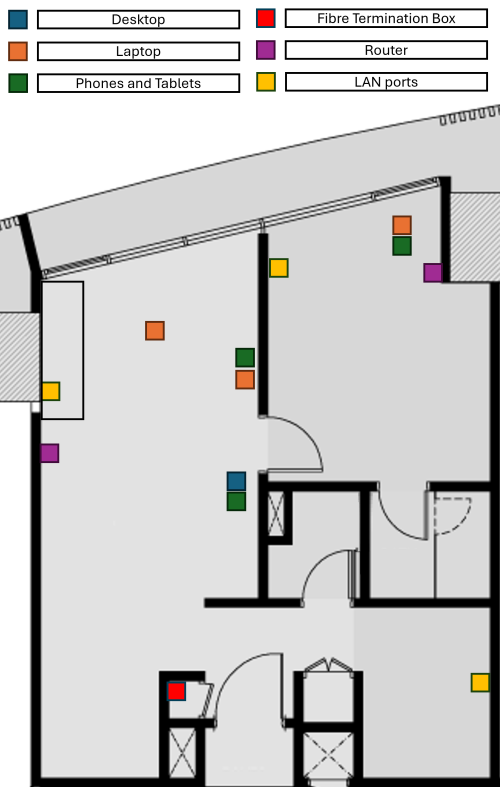
user posted image

To begin with, I thought of digging out my old TIME router and place it in the storage room, then connect it to the switch, where it'll be connected to the LAN port in both the living room and master bedroom, and use the 2 new mesh routers as AP, but even with that set up, I'm still unable to make the most out of my 600 Mbps as I lose 200 Mbps just by being 3 meters away from the router.

As I don't believe that is normal, this leads me to the conclusion that the Wi-Fi capability of this router is trash, hence my rationale of getting a cheap modern Chinese router with strong Wi-Fi capability to use as an AP, or at least strong enough to cover 700 ish sqft. I don't really need the router capability if it's not compatible with our local configuration. But if it does, 1 less device = save more electricity!
*
If you have LAN port built into your home, then you can consider using AP mode to maximize your signal and speed throughput.

Places where you don't really need full speed, you can get a used or new WiFi5 gen. But I suggest that if possible, get all the same model for better setup and fine tuning later on.

In my case for example, running two deco x50 as a main and wireless node, while my 1st floor, I used back what was provided by my ISP and can be paired to my main X50 nodes effortlessly and is directly wired to the main node on ground floor. The fast roaming works perfectly as of now, almost 1 month no issues or weird bugs anymore. Infact, is even better at coverage if compared to a X50 I used at the same spot for the same floor.

You can always look for Deco that supports ECO mode, but this only on a certain model with a certain firmware. Like the Deco X50 i'm using I can schedule the Wifi to turn off automatically at a certain time and leave only 2.4Ghz to be turned on.

ASUS has that function too if I'm not wrong.

There is no balance to it, if you want full coverage you got to install more APs or mesh around the house and that would definitely consume a little bit more of electricity at the end of the month.


About the router provided by your ISP, maybe the signal strength coverage is set to low or standard? I'm not sure, but you got to login into it and check the settings, sometimes routers comes as default setting. hence why I said needs fine tuning earlier.

This post has been edited by Omochao: Jun 25 2024, 09:51 PM

westlife
post Jul 7 2024, 03:12 AM

10k Club
********
All Stars
14,323 posts

Joined: Jan 2011
which model of wifi 6 and 7 model will be sufficient to cover a 882 sq ft two bedrooms and 2 bathrooms apartment unit?

just want to go for a minimum model that can do the job.

user posted image
NagaK
post Jul 17 2024, 11:13 AM

Regular
******
Senior Member
1,196 posts

Joined: Sep 2018


Hi need help.
I already have TP link AX73 pair with Wifi Extender but issue is still my wifi speed for TV cabinet for reach keep loading in HD.

Does Asus AI mesh would help? I'm planning to upgrade Asus router
josh5671
post Jul 27 2024, 04:53 PM

Regular
******
Senior Member
1,197 posts

Joined: Dec 2010
Greeting. Is there any good router to intro?
Using 500mbps with x1860z no issue.
But i found out ite wifi seem like easy to disconnect and reconnect instantly. Feel like it more suck thab my previous streamyx tplink vr600 adsl modem router.
Singh93
post Jul 28 2024, 10:00 AM

Getting Started
**
Junior Member
224 posts

Joined: Sep 2019


QUOTE(josh5671 @ Jul 27 2024, 05:53 PM)
Greeting. Is there any good router to intro?
Using 500mbps with x1860z no issue.
But i found out ite wifi seem like easy to disconnect and reconnect instantly. Feel like it more suck thab my previous streamyx tplink vr600 adsl modem router.
*
get a tplink or asus router to solve your network issues.
josh5671
post Jul 28 2024, 10:16 AM

Regular
******
Senior Member
1,197 posts

Joined: Dec 2010
QUOTE(Singh93 @ Jul 28 2024, 10:00 AM)
get a tplink or asus router to solve your network issues.
*
yea. tplink currently aim for BE wifi 7 series (yet decide)
for asus, RT-AX59U, TUF-AX4200

any idea?
Singh93
post Jul 28 2024, 01:40 PM

Getting Started
**
Junior Member
224 posts

Joined: Sep 2019


QUOTE(josh5671 @ Jul 28 2024, 11:16 AM)
yea. tplink currently aim for BE wifi 7 series (yet decide)
for asus, RT-AX59U, TUF-AX4200

any idea?
*
wifi 6 routers from asus are still good to date. if you wait more wifi 7 gaming routers will release soon be86u will be the better bet.
of tp link be 800 series.
if you need range get the mesh routers, nothing beats them
josh5671
post Jul 28 2024, 11:41 PM

Regular
******
Senior Member
1,197 posts

Joined: Dec 2010
QUOTE(Singh93 @ Jul 28 2024, 01:40 PM)
wifi 6 routers from asus are still good to date. if you wait more wifi 7 gaming routers will release soon be86u will be the better bet.
of tp link be 800 series. 
if you need range get the mesh routers, nothing beats them
*
actually i no need super long range, just the current 1860z suck on penetrate wall.
i plan to 1 router cover whole house. shouldnt be an issue as my old tplink VR600V already done it.
Zaryl
post Jul 29 2024, 01:31 AM

Hardcore Casual Gamer
******
Senior Member
1,711 posts

Joined: Jan 2003
From: Kedah Khap Khoun Khap (4K)


hi all

i have a 2 year old ASUS RT-AX82U 5400 WiFI 6 router.

right now i have like 25 devices connected to it. I have multiple WiFi switches, vacuum robot cleaner and many IP CCTVs.
the latest device is the Panasonic Aircond 1HP inverter WiFi. Location is just ~5 meters from the router but it's inside my study room.

before this, i could connect and use the Comfort Cloud app to remotely control the aircon.
but then, yesterday my Brother's wifi printer siuddenly couldn't print wirelessly, so I did a network reset on the printer.
But somehow, the printer is taking damn long to receive data and to print.

I end up disable the WLAN SSID on the printer and use direct cable printer instead. Much faster and reliable.

Ok, coming back to the aircon, now I could no longer control it via the app. At first, it says some Network error, please check with router etc etc.
Then i did a WiFi reset on the Aircond, and also reboot my ASUS AX82U router, also updated to the latest firmware.

Still cannot pair it using the app. bangwall.gif

I read the official manual, ASUS AX82U supposedly can cater up to max 250 devices at one time, which I call it BS! vmad.gif

Now my questions are:

1. how many max devices can a consumer grade router can have before having lower bandwidth/device connectivity problem?
2. any good latest router that can cater at least ~50-60 devices without any problem?

thanks sifus! notworthy.gif

302 Pages « < 278 279 280 281 282 > » Top
 

Change to:
| Lo-Fi Version
0.0293sec    1.62    6 queries    GZIP Disabled
Time is now: 24th December 2025 - 03:23 PM

