

QUOTE(blacktubi @ Jun 1 2024, 01:09 PM)
5GHz-2 of XT8 is really solid, definitely beats the AX4200
5GHz-1 is on par

5GHz-1 is on par
 what about 2.4ghz mainly for IOT devices?
Home Networking WiFi Router Discussion Thread, Updated for 2023
|
|
 Jun 1 2024, 02:27 PM Jun 1 2024, 02:27 PM
Show posts by this member only | IPv6 | Post
#5561
|
 
Senior Member
2,517 posts Joined: Mar 2016 
|
QUOTE(blacktubi @ Jun 1 2024, 01:09 PM) 5GHz-2 of XT8 is really solid, definitely beats the AX4200 5GHz-1 is on par what about 2.4ghz mainly for IOT devices? |
|
|
|
|
|
Jun 1 2024, 02:35 PM
|
 
Elite
8,421 posts Joined: Jul 2008 
|
QUOTE(yongtjunkit @ Jun 1 2024, 02:27 PM) what about 2.4ghz mainly for IOT devices? |
|
|
Jun 1 2024, 06:24 PM
Show posts by this member only | IPv6 | Post
#5563
|
|
Senior Member
2,517 posts Joined: Mar 2016
|
QUOTE(blacktubi @ Jun 1 2024, 02:35 PM) I will prefer Broadcom when it comes to IoT and connecting more devices. I see, just wondering if I should reshuffle my routers and pair AX86U pro and the TUF AX4200 together(zenwifi xt8 v2 would run standalone) or should I go with Zenwifi XT8 V2(1 unit) and AX86U pro (except I'm having roaming issues with this combination ) The roaming issue with the zenwifi xt8 v2 and ax86u pro combo is devices would always get stuck on the zenwifi xt8 v2 and would not roam/ very slowly roam to the ax86u pro, I've tried setting the roaming assistant from -70 to -60, it did help a bit, but it's not as good as Zenwifi XT8 V2 and AX92U combo also I did swap their role around(ax86u pro as the main router) and also the same issue, devices would get stuck with the zenwifi xt8 v2 but devices roaming from ax86u pro to zenwifi xt8 has no issue roamingThis post has been edited by yongtjunkit: Jun 1 2024, 06:44 PM |
|
|
Jun 1 2024, 08:46 PM
|
|
Elite
8,421 posts Joined: Jul 2008
|
QUOTE(yongtjunkit @ Jun 1 2024, 06:24 PM) I see, just wondering if I should reshuffle my routers and pair AX86U pro and the TUF AX4200 together(zenwifi xt8 v2 would run standalone) or should I go with Zenwifi XT8 V2(1 unit) and AX86U pro (except I'm having roaming issues with this combination You shouldn't mix tri band and dual band) The roaming issue with the zenwifi xt8 v2 and ax86u pro combo is devices would always get stuck on the zenwifi xt8 v2 and would not roam/ very slowly roam to the ax86u pro, I've tried setting the roaming assistant from -70 to -60, it did help a bit, but it's not as good as Zenwifi XT8 V2 and AX92U combo also I did swap their role around(ax86u pro as the main router) and also the same issue, devices would get stuck with the zenwifi xt8 v2 but devices roaming from ax86u pro to zenwifi xt8 has no issue roaming |
|
|
Jun 1 2024, 09:29 PM
Show posts by this member only | IPv6 | Post
#5565
|
|
Senior Member
2,517 posts Joined: Mar 2016
|
QUOTE(blacktubi @ Jun 1 2024, 08:46 PM) You shouldn't mix tri band and dual band I see, I guess ax86u pro would be better be paired with TUF AX4200? If yes, which should be the main router (I'm using Unifi 500mbps)? This post has been edited by yongtjunkit: Jun 2 2024, 12:53 AM |
|
|
Jun 5 2024, 11:17 PM
Show posts by this member only | IPv6 | Post
#5566
|

Senior Member
1,596 posts Joined: Mar 2014 From: 75°26'11.6"S, 136°16'16.0"E 
|
need help
I tried upgrading the firmware for my old asus RT-AC86U and looks like it's bricked. the power LED goes on, then it attempts to connect to the Internet before 2.4G and 5G band activates, the Internet LED goes down, 2.4G and 5G LED lights up, then the router restarts and repeat the same motion over and over. anything I should do? edit: fixed. if anyone bricked their router during firmware update, pls use and follow thru rescue mode and firmware restoration mode by ASUS. what a hassle...makes me not wanting to update firmware in the future liow This post has been edited by lolzcalvin: Jun 6 2024, 01:03 AM |
|
|
|
|
|
Jun 8 2024, 11:52 AM
Show posts by this member only | IPv6 | Post
#5567
|
|
Elite
8,421 posts Joined: Jul 2008
|
QUOTE(lolzcalvin @ Jun 5 2024, 11:17 PM) need help Jumping from a really old firmware to a much newer firmware will cause this issue. When is the last time you updated your firmware?I tried upgrading the firmware for my old asus RT-AC86U and looks like it's bricked. the power LED goes on, then it attempts to connect to the Internet before 2.4G and 5G band activates, the Internet LED goes down, 2.4G and 5G LED lights up, then the router restarts and repeat the same motion over and over. anything I should do? edit: fixed. if anyone bricked their router during firmware update, pls use and follow thru rescue mode and firmware restoration mode by ASUS. what a hassle...makes me not wanting to update firmware in the future liow Just try to update them more frequently, it's more secure as well |
|
|
Jun 8 2024, 02:50 PM
|
|
Senior Member
2,494 posts Joined: Jan 2003 From: Cheras
|
OK I really have an issue which I think quite weird.
I just bought this small USB modem that has the option to lock to B28. I'm using Hotlink line which can connect to Hotlink 5G on my iPhone (I'm subscribed to 5G plan). But when I put the SIM card in that USB modem and tried to lock to B28, there's no signal. Only B1/B3/B7/B8 worked. Any ideas? |
|
|
Jun 8 2024, 04:05 PM
Show posts by this member only | IPv6 | Post
#5569
|
|
Elite
8,421 posts Joined: Jul 2008
|
QUOTE(my44 @ Jun 8 2024, 02:50 PM) OK I really have an issue which I think quite weird. Cause you are not supposed to use B28, it's reserved as the NSA radio to get into 5G.I just bought this small USB modem that has the option to lock to B28. I'm using Hotlink line which can connect to Hotlink 5G on my iPhone (I'm subscribed to 5G plan). But when I put the SIM card in that USB modem and tried to lock to B28, there's no signal. Only B1/B3/B7/B8 worked. Any ideas? |
|
|
Jun 8 2024, 04:32 PM
Show posts by this member only | IPv6 | Post
#5570
|
|
Senior Member
2,494 posts Joined: Jan 2003 From: Cheras
|
QUOTE(blacktubi @ Jun 8 2024, 04:05 PM) Cause you are not supposed to use B28, it's reserved as the NSA radio to get into 5G. Ok so it was just a hype by certain shopee sellers. Which I fell for it. FML. |
|
|
Jun 10 2024, 12:03 PM
|

Senior Member
967 posts Joined: Apr 2009
|
Hi guys, wanna ask for recommendation, my condo has a very thick wall, currently using m9 plus (2 unit) and powerline (connected to PC). However powerline is very unstable and cannot get the max speed i need (200mbps). Also i bought tplink adapter and it seems its unstable too. Can anyone recommend me a good router that can penetrate thick wall. My condo only 1000sqft. Thx in advance.
This post has been edited by Bombgen: Jun 10 2024, 12:21 PM |
|
|
Jun 10 2024, 02:56 PM
|
|
Elite
8,421 posts Joined: Jul 2008
|
QUOTE(Bombgen @ Jun 10 2024, 12:03 PM) Hi guys, wanna ask for recommendation, my condo has a very thick wall, currently using m9 plus (2 unit) and powerline (connected to PC). However powerline is very unstable and cannot get the max speed i need (200mbps). Also i bought tplink adapter and it seems its unstable too. Can anyone recommend me a good router that can penetrate thick wall. My condo only 1000sqft. Thx in advance. What is your budget and what Internet plan do you use? |
|
|
Jun 11 2024, 08:23 AM
|
|
Senior Member
967 posts Joined: Apr 2009
|
QUOTE(blacktubi @ Jun 10 2024, 02:56 PM) What is your budget and what Internet plan do you use? Budget: Below rm800TIME 200mbps I played Dota so i need routers that are good for gaming This post has been edited by Bombgen: Jun 11 2024, 08:23 AM |
|
|
|
|
|
Jun 13 2024, 07:18 AM
|
|
Junior Member
18 posts Joined: Sep 2010
|
Hi guys, I need a recommendation for a router for my unifi. I'm currently using a LAN cable connected to my PC for gaming and wifi for phones and tablets. I would like to get a router that can support LAN cable connection for gaming and good wifi speed for everything else.
House type: Landed Size of house: 2 stories, 1200 square feet Features required: No particular Number of devices connected to WiFi: 10-20 Internet Speed: 300mbps Budget: Less than RM 500 Thank you in advance. |
|
|
Jun 14 2024, 04:57 PM
Show posts by this member only | IPv6 | Post
#5575
|
|
Junior Member
9 posts Joined: Jan 2021
|
House type: Landed
Size of house: 3,500 square feet and 3-storey but I have CAT 6 LAN socket to every room Features required: Antivirus, QoS, Bandwidth Limiter, VPN Number of devices connected to WiFi: 30+ devices such as CCTV, IP TV, phone, and computer. Internet Speed: 500Mbps Budget: RM1k Hi guys, would like to source for the best router for coverage for above scenario. This post has been edited by poisonteh: Jun 14 2024, 04:58 PM |
|
|
Jun 17 2024, 05:24 PM
|
|
Elite
8,421 posts Joined: Jul 2008
|
QUOTE(choongy @ Jun 13 2024, 07:18 AM) Hi guys, I need a recommendation for a router for my unifi. I'm currently using a LAN cable connected to my PC for gaming and wifi for phones and tablets. I would like to get a router that can support LAN cable connection for gaming and good wifi speed for everything else. The TP-Link Archer AX73 is more than enough for youHouse type: Landed Size of house: 2 stories, 1200 square feet Features required: No particular Number of devices connected to WiFi: 10-20 Internet Speed: 300mbps Budget: Less than RM 500 Thank you in advance. QUOTE(poisonteh @ Jun 14 2024, 04:57 PM) House type: Landed Budget is kinda low based on your request but here's my recommendationSize of house: 3,500 square feet and 3-storey but I have CAT 6 LAN socket to every room Features required: Antivirus, QoS, Bandwidth Limiter, VPN Number of devices connected to WiFi: 30+ devices such as CCTV, IP TV, phone, and computer. Internet Speed: 500Mbps Budget: RM1k Hi guys, would like to source for the best router for coverage for above scenario. ASUS TUF-AX4200 and main router and get 2 units of RT-AX57 as the AiMesh node with Ethernet backhual, 1 on every floor, TUF-AX4200 on the main floor with modem Recommended ASUS because the features you need are not available on TP-Link I would prefer sticking to the same model for the entire system but with the limited budget, I downgraded to RT-AX57 for your nodes This post has been edited by blacktubi: Jun 17 2024, 05:25 PM |
|
|
Jun 17 2024, 05:26 PM
|
|
Elite
8,421 posts Joined: Jul 2008
|
QUOTE(Bombgen @ Jun 11 2024, 08:23 AM) Budget: Below rm800 ASUS TUF-AX4200 and use a good PCIE wireless adapter at your PC, the USB adapters are weakTIME 200mbps I played Dota so i need routers that are good for gaming |
|
|
Jun 18 2024, 04:46 PM
|

Junior Member
285 posts Joined: Jun 2012 From: Kuala Lumpur
|
Hey guys,
Here is my current set up: TIME Fibre 500 Mbps (now on free upgrade to 600 Mbps) 2x Huawei HG8145X6 1 located in the electrical box / storage room where fibre comes in. (fully concrete structure, it's so bad that my room right down the hallway couldn't even get more than 2/5 bars on my phone, assuming it's the 5ghz band because the current setup didn't split the SSIDs) 1 located in my living room, behind my big ass printer connected to the other unit via cable, should be CAT5. The condo is bout 800 sq. ft. and I sit in the living area most of the time anyways. 6 months back when the installer came, he was able to get 500Mbps in both 5g and LAN in the speed test and reported back as such. Today, even after the 600 Mbps upgrade, I'm only getting bout 100 Mbps on my living room computer. The Wi-Fi setup for the computer is also a little junky. I went from a USB Wi-Fi card (dead now) to now, using an old phone (can receive 5ghz connection) to USB tether my connection (temporary solution). I'm getting AX210 Wi-Fi card + PCIE adapter from China to replace this junky set up but was wondering if I should also upgrade the router set up. This is because other devices were also never able to get 600 Mbps speed. At peak, I will have like 3 computers, 6 phones, 2 android TV box and 2 tablets connecting to my poor router. From what I read, unlike Unifi that uses VLAN tagging, TIME only relies on PPPoE so I guess most of the China routers should be compatible? Plus most likely, I'll be using it as a router only, instead of modem + router since my Fibre termination box is stuck at the electrical box / storage room. Sure, I'll miss out on 6ghz but is it really that big of a deal? Any recommendations? This post has been edited by x3Kai: Jun 18 2024, 04:48 PM |
|
|
Jun 19 2024, 08:45 AM
Show posts by this member only | IPv6 | Post
#5579
|

Junior Member
835 posts Joined: Nov 2007 From: Land of Forgotten
|
QUOTE(x3Kai @ Jun 18 2024, 04:46 PM) Hey guys, You can try to extend the fibre cable to somewhere which has less electrical interference, but I don't really think is electrical box but more likely the spot of the storage room is, where there are many walls and a door that makes your wifi signal keep bouncing here and there, and by the time it reaches your living room, the speed is heavily affected.Here is my current set up: TIME Fibre 500 Mbps (now on free upgrade to 600 Mbps) 2x Huawei HG8145X6 1 located in the electrical box / storage room where fibre comes in. (fully concrete structure, it's so bad that my room right down the hallway couldn't even get more than 2/5 bars on my phone, assuming it's the 5ghz band because the current setup didn't split the SSIDs) 1 located in my living room, behind my big ass printer connected to the other unit via cable, should be CAT5. The condo is bout 800 sq. ft. and I sit in the living area most of the time anyways. 6 months back when the installer came, he was able to get 500Mbps in both 5g and LAN in the speed test and reported back as such. Today, even after the 600 Mbps upgrade, I'm only getting bout 100 Mbps on my living room computer. The Wi-Fi setup for the computer is also a little junky. I went from a USB Wi-Fi card (dead now) to now, using an old phone (can receive 5ghz connection) to USB tether my connection (temporary solution). I'm getting AX210 Wi-Fi card + PCIE adapter from China to replace this junky set up but was wondering if I should also upgrade the router set up. This is because other devices were also never able to get 600 Mbps speed. At peak, I will have like 3 computers, 6 phones, 2 android TV box and 2 tablets connecting to my poor router. From what I read, unlike Unifi that uses VLAN tagging, TIME only relies on PPPoE so I guess most of the China routers should be compatible? Plus most likely, I'll be using it as a router only, instead of modem + router since my Fibre termination box is stuck at the electrical box / storage room. Sure, I'll miss out on 6ghz but is it really that big of a deal? Any recommendations? But best way is to get the fibre extended up to living room, wiring it or how to conceal is up to your imagination and planning as we do not know how your house is like, or get a specialist who can do it, but doesn't comes cheap to pull a simple fibre or LAN. But most importantly, you need to test your speed by plugging a LAN cable directly to the main router and test whether can you hit 500mbps or not, once you rule out is not the router issues, then it could be either your 1) device Wifi gen is WiFi4 or 5. devices too old to support your router speeds, bottle necking. 2) settings on the router not optimized for your house network 3) wrong timing day of speed test server (this affects too during high peak usage test) 4) placement of your router. Also will not recommend China based router even if its cheaper unless you are 100% sure and done your research that the particular model can flash it to a english version or international firmware, but most likely cannot. So better stick with the general worldwide ones that is being sold locally here in shops as that would means it supports our local ISP settings. Would recommend you to ASUS, tp link or if you don't mind, D-Link which is the cheapest among them but unreliable firmware stability. This post has been edited by Omochao: Jun 19 2024, 08:48 AM |
|
|
Jun 21 2024, 12:47 AM
|
|
Junior Member
285 posts Joined: Jun 2012 From: Kuala Lumpur
|
QUOTE(Omochao @ Jun 19 2024, 08:45 AM) You can try to extend the fibre cable to somewhere which has less electrical interference, but I don't really think is electrical box but more likely the spot of the storage room is, where there are many walls and a door that makes your wifi signal keep bouncing here and there, and by the time it reaches your living room, the speed is heavily affected. Just came back after double checking the configuration and did some more testing, there were some inconsistencies with what my previous post described.But best way is to get the fibre extended up to living room, wiring it or how to conceal is up to your imagination and planning as we do not know how your house is like, or get a specialist who can do it, but doesn't comes cheap to pull a simple fibre or LAN. But most importantly, you need to test your speed by plugging a LAN cable directly to the main router and test whether can you hit 500mbps or not, once you rule out is not the router issues, then it could be either your 1) device Wifi gen is WiFi4 or 5. devices too old to support your router speeds, bottle necking. 2) settings on the router not optimized for your house network 3) wrong timing day of speed test server (this affects too during high peak usage test) 4) placement of your router. Also will not recommend China based router even if its cheaper unless you are 100% sure and done your research that the particular model can flash it to a english version or international firmware, but most likely cannot. So better stick with the general worldwide ones that is being sold locally here in shops as that would means it supports our local ISP settings. Would recommend you to ASUS, tp link or if you don't mind, D-Link which is the cheapest among them but unreliable firmware stability. 1) The HG8145X6 modem/router is not in the storage room, the only device is the storage room is the fibre termination box, which then is connected to a switch that has a LAN connection to my living room where my TIME provided modem/router is located. The other mesh router is located in the bedroom as advised by the TIME installer, connected via Wi-Fi mesh, but I don't know how effective is that as it's blocked by a concrete wall. 2) I was able to test speed using LAN cable on my only desktop in the house, and it gets around 630 Mbps, whereas tethering via an old handphone, it's only getting 100 Mbps as it's being blocked by a huge ass printer. I moved the router temporarily above the printer and am getting 150 Mbps at late night. Please note I have clear line of sight of the router while sitting in front of this desktop. I did test again using my current phone, a S22 and got around 250 Mbps, so I'm definitely upgrading my Wi-Fi solution for this desktop as leaving an Ethernet cable on the floor isn't an option (or is it?  ) and there isn't a convenient way to route it. ) and there isn't a convenient way to route it. 3) Testing with the same S22 I'm getting around 400 Mbps sitting near my desktop, and almost the full 600 Mbps when placed right next to the router. The desktop is around 3-4 meters away from the router. (is this normal?) 4) Testing with another relatively modern laptop right next to the router via Wi-Fi resulted in approximately 250 Mbps, but when brought back to where it's mostly used (about 3 meters away but with cabinets slightly blocking it), it drops down to 50 Mbps. I've went and disabled the 2.4 GHz band on the laptop and now it's getting around 100 Mbps. I've made a simple drawing to better illustrate my situation. 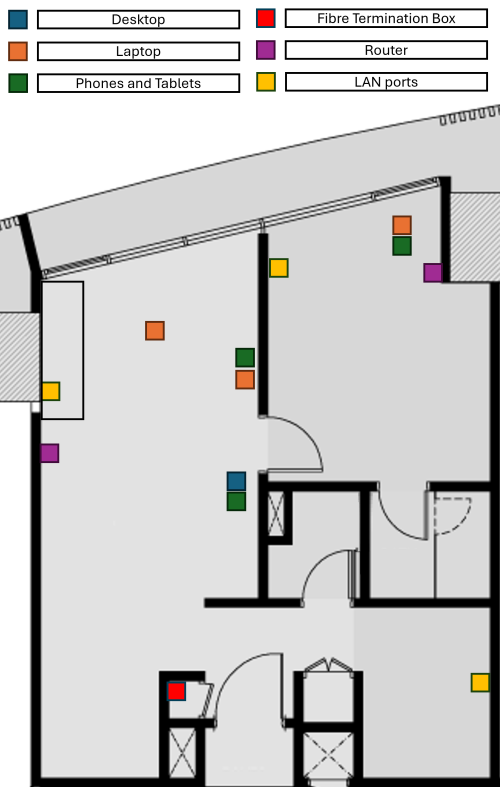 To begin with, I thought of digging out my old TIME router and place it in the storage room, then connect it to the switch, where it'll be connected to the LAN port in both the living room and master bedroom, and use the 2 new mesh routers as AP, but even with that set up, I'm still unable to make the most out of my 600 Mbps as I lose 200 Mbps just by being 3 meters away from the router. As I don't believe that is normal, this leads me to the conclusion that the Wi-Fi capability of this router is trash, hence my rationale of getting a cheap modern Chinese router with strong Wi-Fi capability to use as an AP, or at least strong enough to cover 700 ish sqft. I don't really need the router capability if it's not compatible with our local configuration. But if it does, 1 less device = save more electricity! |
| Change to: |  0.0235sec 0.0235sec
 0.58 0.58
 6 queries 6 queries
 GZIP Disabled GZIP Disabled
Time is now: 22nd December 2025 - 05:01 PM |
 Quote
Quote