Umobile promise a minimum 100Mbps for 5G. IMO that good enough especially for RM68 a month. While Maxis is 300Mbps if I'm not mistaken. Not sure for CelcomDigi thou. Yeah for now I'm enjoying the 500-600Mbps in my area. Big upgrade for me from Unifi 100Mbps
I'm using Digi Postpaid 150. In my area, the speed goes up to 350mbps but opposite my condo the speed is around 1gbps lol.
For Uhome 5G, I'm getting a constant speed of 700+mbps but it is SLOW during daytime (from 11AM to 5PM) - I can only get 120mbps. Sometimes it even goes down to 80mbps.
Just want to leave this here, for those using Apple devices, consider getting a Broadcom based router.
Apple is using exclusively Broadcom Wi-Fi 6 SoC on all their products and they seem to perform better and more stable when paired with a Broadcom based router.
Just wondering does this still apply today?
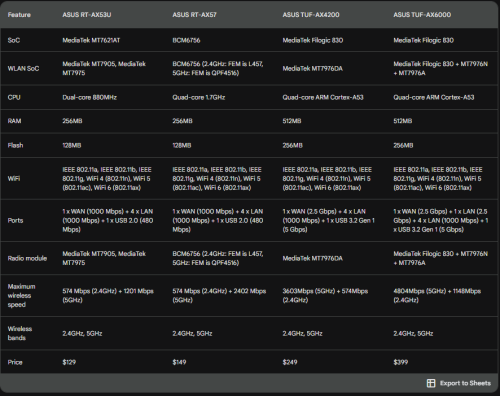
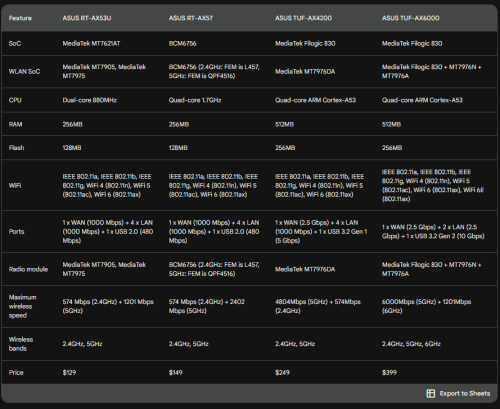
Like for example with new asus router model such as tuf ax4200 and tuf ax6000?
What about RT model such as ax53U and also the ax57?
This post has been edited by yongtjunkit: Aug 29 2023, 10:23 AM
blacktubi review of tuf ax4200 seems promising. Bought 1 to replace my ax30 lol. Hopefully can reduce wifi latency.
see my updated table in my previous post (due to mistakes I have made)
You might be surprised to learn that WiFi 6 SoC, the BCM6756 in the ASUS RT-AX57 (2022), may also support WiFi 6E. The BCM6756 SoC is the successor to the BCM6755 SoC used in the ZenWIFI AX XT8 (2020), which is only a WiFi 6 SoC.
see my updated table in my previous post (due to mistakes I have made)
You might be surprised to learn that WiFi 6 SoC, the BCM6756 in the ASUS RT-AX57 (2022), may also support WiFi 6E. The BCM6756 SoC is the successor to the BCM6755 SoC used in the ZenWIFI AX XT8 (2020), which is only a WiFi 6 SoC.
» Click to show Spoiler - click again to hide... «
The only difference of 6E and Wi-Fi 6 is just on the frequency
The technology is almost similar with no capacity improvement. In fact, the range of 6GHz is weaker than 5GHz.
However, when 6GHz band is used as mesh wireless backhaul, the performance is better than 5GHz due to reduced interference and the ability to operate reliably on 160MHz mode.
You can see that in my ASUS ZenWiFi XT12 and ET12 comparison.
5GHz 160MHz is kinda handicaped as half of it will step into DFS territory.
I see, this means that Adaptive QOS would disable NAT acceleration?
i am not sure if adaptive QoS will disable the nat acceleration or not but for sure QoS Bandwidth Limiter and NAT Acceleration are functions that cannot work at the same time. You can only choose for one function to work at a time.
Hi Sifus, I am currently subscribed to Time fibre 500-mbps package and am using the originally installed sets: Modem: Huawei HG8240H Router: DLink DIR 850L Aged: 5 1/2 years (approx.)
Please kindly advice what and how best to upgrade my hardware since they are aged above recommended usage. Thank you.
i am not sure if adaptive QoS will disable the nat acceleration or not but for sure QoS Bandwidth Limiter and NAT Acceleration are functions that cannot work at the same time. You can only choose for one function to work at a time.
, just performed a factory reset and I’ve found out that enabling adaptive QOS and IPSec VPN Sever would disable Nat Acceleration
Don’t recall this is an issue on older asus router with Broadcom chipset


 Aug 21 2023, 11:08 PM


 Quote
Quote







 , just performed a factory reset and I’ve found out that enabling adaptive QOS and IPSec VPN Sever would disable Nat Acceleration
 0.0516sec
 0.32
0.32
 6 queries
 GZIP Disabled