

QUOTE(pokeat @ Apr 12 2021, 08:38 PM)
TM-Unifi 300mpbs plan, called and wait them to send technician come over to check

Did you select VLAN Tagging aka Unifi Profile.And connect through LAN Port 1 on the Modem aka Huawei Modem.
Thanks
Home Networking WiFi Router Discussion Thread, Updated for 2023
|
|
 Apr 12 2021, 11:36 PM Apr 12 2021, 11:36 PM
Show posts by this member only | IPv6 | Post
#3501
|
 
Senior Member
3,836 posts Joined: Aug 2016 
|
QUOTE(pokeat @ Apr 12 2021, 08:38 PM) TM-Unifi 300mpbs plan, called and wait them to send technician come over to check Did you select VLAN Tagging aka Unifi Profile.And connect through LAN Port 1 on the Modem aka Huawei Modem. Thanks |
|
|
|
|
|
Apr 13 2021, 03:41 AM
|

Newbie
3 posts Joined: Aug 2005 
|
Dear all sifus,
Recently install D-Link Router DIR-825M provided by Unifi. Have been using it since 4 months ago. Everything works fine. But since 2 days ago, my Samsung phone Note 10 Lite and tablet Galaxy Note 8 with S-Pen and a HP notebook cannot connect using WIFI. On the Samsung phone and tablet shows connected without internet (both 2.4G and 5G) and the notebook can't connect at all. Funny thing is the Xiaomi Redmi 8 can connect. Already reboot the router many times but result still the same can't connect with WIFI. Anyone here encounter this problem? Any way to solve this? HW:A1 FW:DIR-825M_V1.1.8 Attached thumbnail(s) 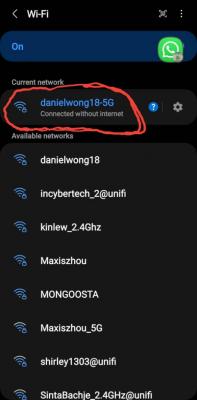
|
|
|
Apr 13 2021, 01:04 PM
|

Junior Member
438 posts Joined: Oct 2008 From: Goblintown
|
QUOTE(FusionXY @ Apr 12 2021, 11:36 PM) Did you select VLAN Tagging aka Unifi Profile. I skipped Special Requirements from ISP - guess this must be Asus settings And connect through LAN Port 1 on the Modem aka Huawei Modem. Thanks  |
|
|
Apr 13 2021, 01:05 PM
|
|
Junior Member
438 posts Joined: Oct 2008 From: Goblintown
|
QUOTE(blacktubi @ Apr 8 2021, 09:10 PM) TUF-AX3000 and RT-AX82U are only slightly better than the RT-AX3000 in terms of performance. Mod, any idea how to utilize my LAN 4 ? It's programmed for Unifi IPTV The RT-AX3000 is a great product but my main concern is still regarding IoT on 2.4Ghz. No harm to try the RT-AX3000 and see if it works well for your situation.  Suppose for my gaming port sia Suppose for my gaming port sia |
|
|
Apr 13 2021, 01:27 PM
|

Senior Member
1,258 posts Joined: Jan 2003
|
QUOTE(pokeat @ Apr 13 2021, 01:04 PM) I skipped Special Requirements from ISP - guess this must be Asus settings This is the setting you have to use. |
|
|
Apr 13 2021, 03:10 PM
Show posts by this member only | IPv6 | Post
#3506
|

Senior Member
2,516 posts Joined: Mar 2016
|
QUOTE(pokeat @ Apr 13 2021, 01:05 PM) Mod, any idea how to utilize my LAN 4 ? It's programmed for Unifi IPTV Do you use unifi TV(the white color unifi TV box)? Suppose for my gaming port siaif yes, then you can't use it for anything other than unifi TV service if not, you can go to Lan>IPTV> select the unifi-busniess profile |
|
|
|
|
|
Apr 13 2021, 06:05 PM
|

Senior Member
3,852 posts Joined: Aug 2005
|
QUOTE(dwky @ Apr 13 2021, 03:41 AM) Dear all sifus, Did you to remove the wifi profile from the phone (client) and then try to reconnectRecently install D-Link Router DIR-825M provided by Unifi. Have been using it since 4 months ago. Everything works fine. But since 2 days ago, my Samsung phone Note 10 Lite and tablet Galaxy Note 8 with S-Pen and a HP notebook cannot connect using WIFI. On the Samsung phone and tablet shows connected without internet (both 2.4G and 5G) and the notebook can't connect at all. Funny thing is the Xiaomi Redmi 8 can connect. Already reboot the router many times but result still the same can't connect with WIFI. Anyone here encounter this problem? Any way to solve this? HW:A1 FW:DIR-825M_V1.1.8 else if you to remove the wifi setting on the router and then re-set it again with SSID |
|
|
Apr 13 2021, 06:11 PM
Show posts by this member only | IPv6 | Post
#3508
|
|
Newbie
3 posts Joined: Aug 2005
|
QUOTE(VeeJay @ Apr 13 2021, 06:05 PM) Did you to remove the wifi profile from the phone (client) and then try to reconnect Yes tried. Change SSID name, change security also can't access the internet.else if you to remove the wifi setting on the router and then re-set it again with SSID Called Dlink support, ask to factory reset  . Will try to reset to factory setting . Will try to reset to factory settingAlso called Unifi support. Maybe they will replace my router  |
|
|
Apr 16 2021, 03:20 PM
|
 
Staff
72,862 posts Joined: Sep 2005 From: KUL 
|
QUOTE(blacktubi @ Apr 7 2021, 10:16 AM) How many smart home devices you have and what brands are those? Hmm.. WiFi 6. Do you think I will have issue if I really upgrade my budget to AX86U? Certain smart home devices do not work properly on WiFi 6.  I'm still thinking if I should just close both eyes and go for this beast and use for few years. I'm still thinking if I should just close both eyes and go for this beast and use for few years. This post has been edited by fruitie: Apr 16 2021, 03:20 PM |
|
|
Apr 18 2021, 04:38 PM
Show posts by this member only | IPv6 | Post
#3510
|
|
Junior Member
519 posts Joined: Aug 2011
|
Hi guys, my gf’s family is using Maxis Fibre. They also have a phone line and because of that they provided a crappy white color router with a telephone port. I want to get a new router for her but most routers I see (i.e the Asus AC88u I use) does not have a telephone port.
Is it possible for me to set it up so that the ori Maxis provided router stays so they can use the telephone, while I plug a 2nd ethernet cable from the modem to the 2nd router? |
|
|
Apr 18 2021, 05:02 PM
Show posts by this member only | IPv6 | Post
#3511
|

Junior Member
566 posts Joined: Jun 2005 From: Somewhere over the rainbow
|
QUOTE(IntensiveBytes @ Apr 18 2021, 04:38 PM) Hi guys, my gf’s family is using Maxis Fibre. They also have a phone line and because of that they provided a crappy white color router with a telephone port. I want to get a new router for her but most routers I see (i.e the Asus AC88u I use) does not have a telephone port. Are you sure the phone is connected to the router? The fibre terminates in an ONT box with ethernet port for the router and a phone port. You can change the ISP provided router for your own.Is it possible for me to set it up so that the ori Maxis provided router stays so they can use the telephone, while I plug a 2nd ethernet cable from the modem to the 2nd router? There's no 'modem', that's what we used to have in the dial-up days. |
|
|
Apr 18 2021, 05:16 PM
Show posts by this member only | IPv6 | Post
#3512
|
|
Junior Member
519 posts Joined: Aug 2011
|
QUOTE(kk131 @ Apr 18 2021, 05:02 PM) Are you sure the phone is connected to the router? The fibre terminates in an ONT box with ethernet port for the router and a phone port. You can change the ISP provided router for your own. Ah wrong terminology. Yes, the telephone wire is connected to the router, not the ONT box where the fiber cable goes into.There's no 'modem', that's what we used to have in the dial-up days. |
|
|
Apr 18 2021, 06:51 PM
|
|
Senior Member
1,258 posts Joined: Jan 2003
|
QUOTE(kk131 @ Apr 18 2021, 05:02 PM) Are you sure the phone is connected to the router? The fibre terminates in an ONT box with ethernet port for the router and a phone port. You can change the ISP provided router for your own. Unless maxis fibre tech has changed, I remember the VOIP phone port is on their router, unlike Unifi which uses the fibre ONT.There's no 'modem', that's what we used to have in the dial-up days. So if you want to continue to use the phone line, simplest way is to connect a new router to the maxis router as an AP. But not the most elegant solution, you end up with 3 boxes. |
|
|
|
|
|
Apr 18 2021, 07:54 PM
Show posts by this member only | IPv6 | Post
#3514
|
|
Junior Member
519 posts Joined: Aug 2011
|
QUOTE(kkm @ Apr 18 2021, 06:51 PM) Unless maxis fibre tech has changed, I remember the VOIP phone port is on their router, unlike Unifi which uses the fibre ONT. Yup you are exactly right.. such a nuisance. Anyway yes I got an AC86u for my gf to connect to the Maxis router as an AP. The Maxis provided router is shite (the one they give if you need VOIP).So if you want to continue to use the phone line, simplest way is to connect a new router to the maxis router as an AP. But not the most elegant solution, you end up with 3 boxes. |
|
|
Apr 18 2021, 08:07 PM
|
|
Junior Member
438 posts Joined: Apr 2007
|
House type: Landed
Size of house: 3000-3500 sqft, 2 storey Features required: just need for wifi6 and Unifi TV box, prefer wifi 6 to future proof router Number of devices connected to WiFi: ~5 computers, ~10 mobile phones/tablets Internet Speed: Unifi turbo 800Mbps package Budget: below RM500 possible? if not, please advise something below RM1k. Router will be placed at ground floor TV area, is there 1 router that can give the 800mbps wifi speed to 2nd floor? if not, what's the suitable router + mesh wifi setup? thanks in advance! |
|
|
Apr 18 2021, 08:28 PM
Show posts by this member only | IPv6 | Post
#3516
|
|
Junior Member
566 posts Joined: Jun 2005 From: Somewhere over the rainbow
|
QUOTE(IntensiveBytes @ Apr 18 2021, 07:54 PM) Yup you are exactly right.. such a nuisance. Anyway yes I got an AC86u for my gf to connect to the Maxis router as an AP. The Maxis provided router is shite (the one they give if you need VOIP). I'm glad that I haven't taken a contract with Maxis, this arrangement prevents you from running a proper firewall and QOS on the router and makes things more difficult for DNS and ad-blocking. |
|
|
Apr 22 2021, 03:19 PM
|
|
Junior Member
22 posts Joined: Mar 2009
|
Hi Sifus, need some advice on routers.
currently on time wifi using their mesh wifi Huawei Edge ONT, but facing trouble having signal inside my bedroom (2 bedroom apartment, router placed in living room). Speed is fast and stable in the living room but deteriorates when its inside the room. Would getting another better router like TPLinks AX20 or AX10 solve the issue? Suspect its the thick concrete wall blocking the signals any advice? |
|
|
Apr 22 2021, 04:23 PM
|
|
Junior Member
566 posts Joined: Jun 2005 From: Somewhere over the rainbow
|
QUOTE(hxleo1 @ Apr 22 2021, 03:19 PM) Hi Sifus, need some advice on routers. Install a wifi analyzer app on your phone and see if you have overlapping channels with your neighbours.currently on time wifi using their mesh wifi Huawei Edge ONT, but facing trouble having signal inside my bedroom (2 bedroom apartment, router placed in living room). Speed is fast and stable in the living room but deteriorates when its inside the room. Would getting another better router like TPLinks AX20 or AX10 solve the issue? Suspect its the thick concrete wall blocking the signals any advice? |
|
|
Apr 23 2021, 12:30 AM
|

Junior Member
732 posts Joined: Jul 2010
|
Sifu
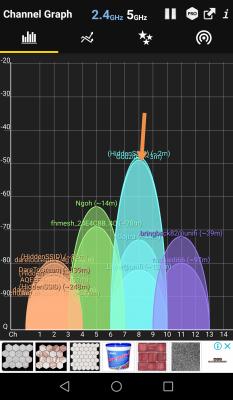
Is this the best channel for setting both bands to avoid congestion? Thanks This post has been edited by StevenL: Apr 23 2021, 12:34 AM Attached thumbnail(s) 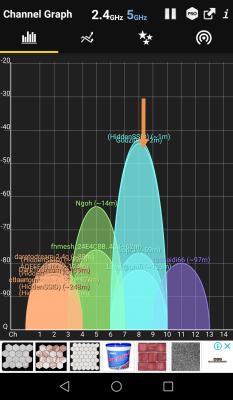
|
|
|
Apr 23 2021, 06:06 AM
|
|
Junior Member
566 posts Joined: Jun 2005 From: Somewhere over the rainbow
|
QUOTE(StevenL @ Apr 23 2021, 12:30 AM) Sifu You have plenty of competition for bandwidth! For 5Ghz can you set a higher channel above 100 in your router?Is this the best channel for setting both bands to avoid congestion? Thanks |
| Change to: |  0.0215sec 0.0215sec
 0.23 0.23
 6 queries 6 queries
 GZIP Disabled GZIP Disabled
Time is now: 15th December 2025 - 10:58 PM |
 Quote
Quote