Outline ·
[ Standard ] ·
Linear+
Home Networking WiFi Router Discussion Thread, Updated for 2023
|
VeeJay
|
 Apr 1 2021, 10:13 PM Apr 1 2021, 10:13 PM
|

|
QUOTE(hhc8 @ Apr 1 2021, 05:10 PM) Laptop connect via LAN to router I get Download 517 mbps Upload 109 mbps . Using my handpphone 5GHz connection placed next to my PC on 1st Floor, I get 186 download 71 upload. Next to PC testing is fine, but you should test next to the wifi router itself. Thats would help to determine if the connection is fine, and when you walk away or placed near PC, there are congestions/interference. You can use "wifi analyzer" from playstore to measure your wifi connection strength as well |
|
|
|
|
|
VeeJay
|
Apr 2 2021, 01:14 AM
|
|
|
QUOTE(hhc8 @ Apr 1 2021, 11:14 PM) Next to the router, 5GHz wifi connection, using my handphone I get 445 mbps download and 113 mbps upload. Personally if you ask me, 180Mbps is very good for top floor! Will let others to suggest further. If you want higher speed either run a LAN cable from ground floor to top floor or you need multiple mesh wifi. |
|
|
|
|
|
VeeJay
|
Apr 13 2021, 06:05 PM
|
|
|
QUOTE(dwky @ Apr 13 2021, 03:41 AM) Dear all sifus, Recently install D-Link Router DIR-825M provided by Unifi. Have been using it since 4 months ago. Everything works fine. But since 2 days ago, my Samsung phone Note 10 Lite and tablet Galaxy Note 8 with S-Pen and a HP notebook cannot connect using WIFI. On the Samsung phone and tablet shows connected without internet (both 2.4G and 5G) and the notebook can't connect at all. Funny thing is the Xiaomi Redmi 8 can connect. Already reboot the router many times but result still the same can't connect with WIFI. Anyone here encounter this problem? Any way to solve this? HW:A1 FW:DIR-825M_V1.1.8 Did you to remove the wifi profile from the phone (client) and then try to reconnect else if you to remove the wifi setting on the router and then re-set it again with SSID |
|
|
|
|
|
VeeJay
|
Jun 30 2021, 11:32 PM
|
|
|
QUOTE(maxguy @ Jun 30 2021, 01:44 PM) 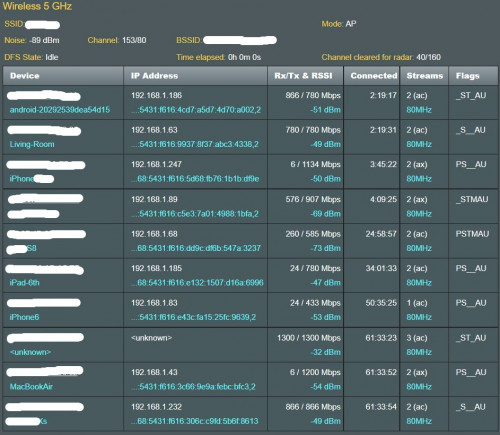 Wi-Fi 5 GHz performance depending client access type, here an example of AX86U Wi-Fi connection log whats a nice log! didnt know this model can breakdown transmission and receiving speed by client connection!  But the price!  Is there any other mid-range Asus model has similar log? |
|
|
|
|
|
VeeJay
|
Jul 8 2021, 09:05 PM
|
|
|
QUOTE(Awesomekllr @ Jul 8 2021, 02:29 PM) Sad. Well too bad the corridor doesn't have any power socket. If getting another mesh to put in the room really helps, I would gladly get one. Btw thanks for the help.  Is it possible to run lan cable from Mesh1 to Mesh2? Or how about placing Mesh2 outside the door (pull an power extension and try, else) |
|
|
|
|



 Quote
Quote
 0.0318sec
 1.75
1.75
 7 queries
 GZIP Disabled