Welcome Guest ( Log In | Register )

302 Pages « < 162 163 164 165 166 > » Bottom

Outline · [ Standard ] · Linear+

Home Networking WiFi Router Discussion Thread, Updated for 2023

views
     
Cincai.La
post Feb 24 2021, 07:34 PM

Getting Started
**
Junior Member
184 posts

Joined: Jun 2020
From: IPOH


Hi, currently I only have 1 router that provides by TM in A house. B house is just beside A house but B house internet speed is slow. 100Mbps only can get 10-20Mbps only. Any solution?

House type: Landed
Size of house: 2 houses (800m²)
Features required: no. just want to make sure that devices have smooth internet speed within 5meter away from the router
Number of devices connected to WiFi: 16
Internet Speed: 100Mbps
Budget: cost performance
runrabbitjunk P
post Feb 25 2021, 03:02 AM

New Member
*
Probation
3 posts

Joined: Feb 2021
QUOTE(wirelessbuyer @ Feb 23 2021, 07:09 PM)
You may consider tplink archer ax73 RM400 for its value for money. Many fellow friends here are also suggesting it, btw I'm using it too in a 1000sqft apartment and so far has been working excellent for me. For asus you may consider tuf ax-3000 or ax-58u, a bit above your budget but sometime you can get it on sale at shopee/lazada around RM550-600.
AX1800 means 574Mbps at 2.4GHz + 1,201Mbps at 5GHz @ 80MHz = ~1800Mbps theoretical speed
AX3000 means 574Mbps at 2.4GHz + 2,402Mbps at 5GHz @ 160MHz = ~3000Mbps theoretical speed
Since you want to future proof yourself with wifi6, just buy wifi6 router and skip any wifi5 router aka ac2400
*
TQ buddy! I'll go with AX1800 since I don't think I'll ever get speed over 1800Mbps with a sound mind. Too much money for not so needed bang.
zher4883
post Feb 25 2021, 11:43 AM

Look at all my stars!!
*******
Senior Member
4,490 posts

Joined: Oct 2014


QUOTE(Cincai.La @ Feb 24 2021, 07:34 PM)
Hi, currently I only have 1 router that provides by TM in A house. B house is just beside A house but B house internet speed is slow. 100Mbps only can get 10-20Mbps only. Any solution?

House type: Landed
Size of house: 2 houses (800m²)
Features required: no. just want to make sure that devices have smooth internet speed within 5meter away from the router
Number of devices connected to WiFi: 16
Internet Speed: 100Mbps
Budget: cost performance
*
Typically, the most cost efficient solution would be pulling a cable and installing an Access Point in House B.
Use a Mesh solution if pulling cable is unacceptable (higher cost).
Cincai.La
post Feb 25 2021, 12:14 PM

Getting Started
**
Junior Member
184 posts

Joined: Jun 2020
From: IPOH


QUOTE(zher4883 @ Feb 25 2021, 11:43 AM)
Typically, the most cost efficient solution would be pulling a cable and installing an Access Point in House B.
Use a Mesh solution if pulling cable is unacceptable (higher cost).
*
Any router suggest if I want to pull cable?
Also If I want mesh then what router will u suggest?
ScivanShimitar
post Feb 25 2021, 01:40 PM

Getting Started
**
Junior Member
186 posts

Joined: Mar 2010
nvm Im dumb

This post has been edited by ScivanShimitar: Feb 25 2021, 01:57 PM
TSblacktubi
post Feb 25 2021, 01:58 PM

-
Group Icon
Elite
8,427 posts

Joined: Jul 2008

QUOTE(ScivanShimitar @ Feb 25 2021, 01:40 PM)
Is Asus AC68U enough for 800mbps? Just upgraded to 800 and I'm not getting more than 5xxmbps.
*
If your device are typical 2x2 Wireless AC common in most phone, 500Mbps is the max you can get.

You need a WiFi 6 router + WiFi 6 device to get anything close to 800Mbps on WiFi.
zher4883
post Feb 25 2021, 02:10 PM

Look at all my stars!!
*******
Senior Member
4,490 posts

Joined: Oct 2014


QUOTE(Cincai.La @ Feb 25 2021, 12:14 PM)
Any router suggest if I want to pull cable?
Also If I want mesh then what router will u suggest?
*
You sure your house is as huge as 800m² where you had mentioned in your earlier post?
ScivanShimitar
post Feb 25 2021, 02:49 PM

Getting Started
**
Junior Member
186 posts

Joined: Mar 2010
QUOTE(blacktubi @ Feb 25 2021, 01:58 PM)
If your device are typical 2x2 Wireless AC common in most phone, 500Mbps is the max you can get.

You need a WiFi 6 router + WiFi 6 device to get anything close to 800Mbps on WiFi.
*
Oh no I was not referring to wifi, I was getting 5xx mbps on wired after using the check update function on the router settings page.

After I downloaded and flashed the newest firmware manually from Asus page, I managed to get 8xxmbps now on wired.

Was dumb of me not manually checking the firmware at first anyway
Cincai.La
post Feb 25 2021, 03:18 PM

Getting Started
**
Junior Member
184 posts

Joined: Jun 2020
From: IPOH


QUOTE(zher4883 @ Feb 25 2021, 02:10 PM)
You sure your house is as huge as 800m² where you had mentioned in your earlier post?
*
ignore that sweat.gif I don't know how to measure. The house is just beside only. if want to pull cable the length between router A to B within 10-15 meter.
zher4883
post Feb 25 2021, 06:26 PM

Look at all my stars!!
*******
Senior Member
4,490 posts

Joined: Oct 2014


QUOTE(Cincai.La @ Feb 25 2021, 03:18 PM)
ignore that sweat.gif I don't know how to measure. The house is just beside only. if want to pull cable the length between router A to B within 10-15 meter.
*
You could re-use router as an Access Point if you have but if you are looking to buy new router, get a WiFi 6 capable router. Personally, I'm using TP-Link Archer AX20 and I believe this model is good enough for your scenario.

Considering the distance and the thickness of wall in between houses, I can't tell exactly how well mesh wifi will work and I would advise against doing so unless the setup must be wire free.
Cincai.La
post Feb 25 2021, 08:36 PM

Getting Started
**
Junior Member
184 posts

Joined: Jun 2020
From: IPOH


QUOTE(zher4883 @ Feb 25 2021, 06:26 PM)
You could re-use router as an Access Point if you have but if you are looking to buy new router, get a WiFi 6 capable router. Personally, I'm using TP-Link Archer AX20 and I believe this model is good enough for your scenario.

Considering the distance and the thickness of wall in between houses, I can't tell exactly how well mesh wifi will work and I would advise against doing so unless the setup must be wire free.
*
Alright.Thanks for the advice. Just buy the Tp-Link Deco M4(2pack). I will try to see it work or not.
msa9696
post Feb 26 2021, 12:15 AM

Regular
******
Senior Member
1,593 posts

Joined: Aug 2006
Need some recommendation here. Currently using an overkilled TP-Link AC5400 and 2 x TP-Link Powerline TL-WPA8630P kit since June 2017. I guess a lot has changed and hopefully there are better options out there now.

My router giving lots of issues lately, failed to troubleshoot the issues and plan to buy a spare, or replacement for this setup.

Don't need fancy features, as I don't use any of those which comes with the AC5400. Most important is strong signal and coverage. Current setup also having issues with coverage due to having 3 phase power (so one of the floor signal is very weak)

Thinking of the following options:-
a) Get a replacement router while maintaining existing powerline
b) Replace entire setup with mesh, I'm not that familiar with mesh, is it really reliable in terms of having better coverage and signal? I guess mesh will be able to cover all areas, as long as we just add on additional unit?

Budget probably below RM 1,500 but I guess I don't have to spend so much since my requirement is just good coverage?

Current internet speed is 100Mbps, total about 10-15 devices connected. House 4000+ sqft, 3 floors.

Any recommendation is very much appreciated.
SFX
post Feb 26 2021, 01:26 AM

Getting Started
**
Junior Member
236 posts

Joined: Nov 2006
QUOTE(msa9696 @ Feb 26 2021, 12:15 AM)
Need some recommendation here. Currently using an overkilled TP-Link AC5400 and 2 x TP-Link Powerline TL-WPA8630P kit since June 2017. I guess a lot has changed and hopefully there are better options out there now.

My router giving lots of issues lately, failed to troubleshoot the issues and plan to buy a spare, or replacement for this setup.

Don't need fancy features, as I don't use any of those which comes with the AC5400. Most important is strong signal and coverage. Current setup also having issues with coverage due to having 3 phase power (so one of the floor signal is very weak)

Thinking of the following options:-
a) Get a replacement router while maintaining existing powerline
b) Replace entire setup with mesh, I'm not that familiar with mesh, is it really reliable in terms of having better coverage and signal? I guess mesh will be able to cover all areas, as long as we just add on additional unit?

Budget probably below RM 1,500 but I guess I don't have to spend so much since my requirement is just good coverage?

Current internet speed is 100Mbps, total about 10-15 devices connected. House 4000+ sqft, 3 floors.

Any recommendation is very much appreciated.
*
Was your TP-Link AC5400 router refer to TP-Link Archer C5400X router? If yes, then you cannot use it for mesh setup. In that retrospect, I'm currently using an ASUS RT-AC88U (an AC3100 system) router that was released in 2015. The firmware was subsequently updated by the manufacturer to support AiMesh several years later when mesh is becoming the norm for home usage.

So, to answer your questions.

Thinking of the following options:-
a) Get a replacement router while maintaining existing powerline
Replace existing router. Remove Powerline from your setup. Powerline works poorly on 3-phase electrical system. In fact, I consider powerline networking for home use a rubbish technology.
b) Replace entire setup with mesh, I'm not that familiar with mesh, is it really reliable in terms of having better coverage and signal? I guess mesh will be able to cover all areas, as long as we just add on additional unit?
Yes, replace entire setup with mesh. The advantage of mesh is you can roam seamlessly between floors in your house.

Proposed solution:
1. Get WiFi 6 (AX technology; WiFi 5 is AC technology) router with mesh capabilities.
2. Get mesh units with ethernet backhaul (wired CAT6 ethernet cable). Don't use wireless to connect mesh unit to the router because of the size of your house (i.e. BIG, with 3 floors) and the number of units connected (10 – 15). Remember, wireless range extension only works well if the location you intend to place the mesh unit has good wireless signal from your router.
3. This solution gets a lot of hate, but please consider doing it, which is to pull ethernet cable to each floor for the mesh unit. Do it once and do it properly, you won't have to worry about the future. In the future if you want to replace the mesh units, plug it out and plug in the new mesh unit.

Examples:
TP-Link
Mesh networking from TP-Link was branded as OneMesh.
Routers: List of AX and AC routers with OneMesh support
Mesh units: List of mesh units

ASUS
Mesh networking from ASUS was branded as AiMesh or ZenWiFi.
Routers: List of AX and AiMesh capable routers (filtered search results)
Mesh units: List of AX and ZenWiFi mesh units (filtered search results)
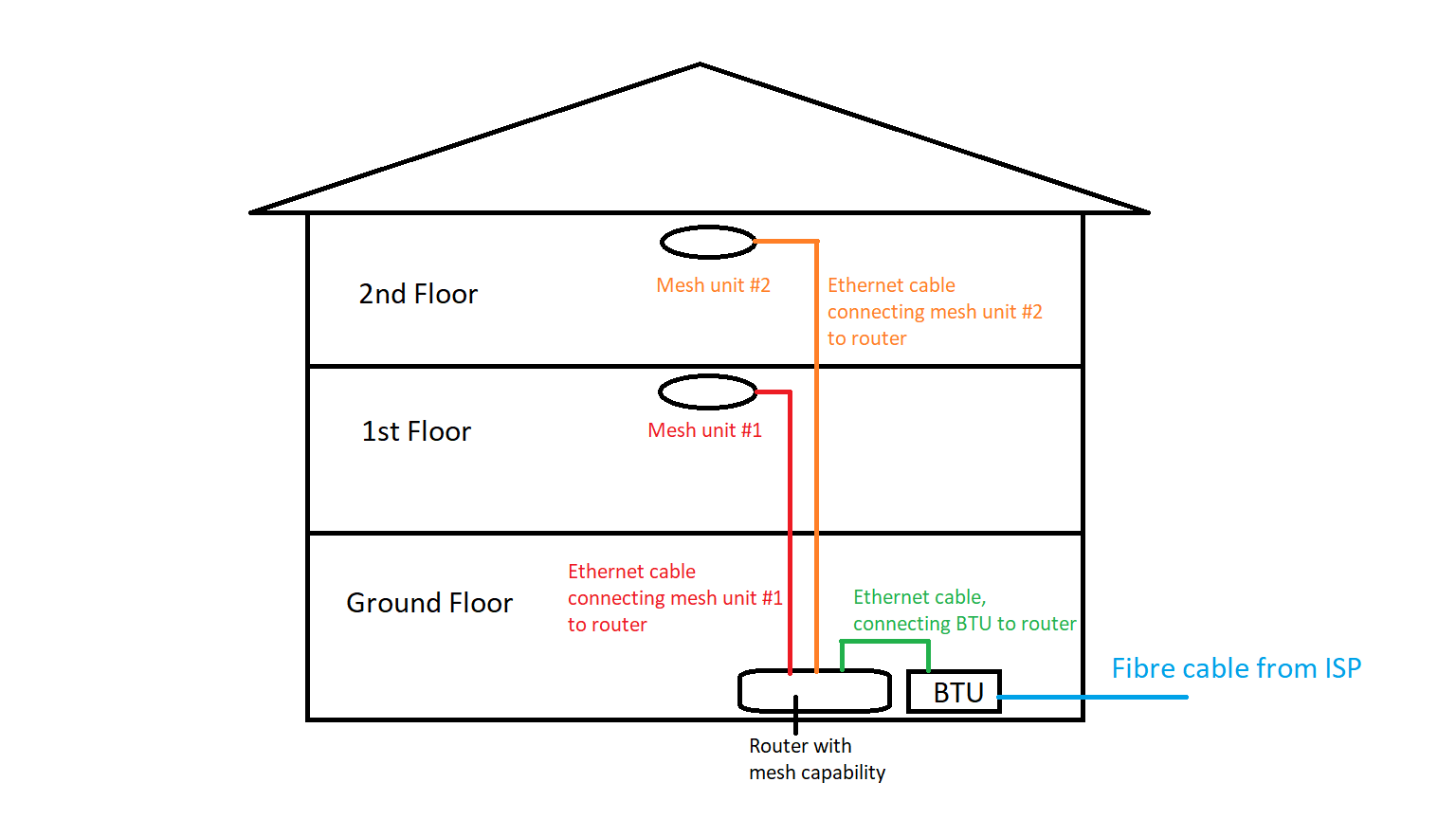
user posted image
Figure 1: A graphical illustration of mesh setup, with one router capable of mesh networking and two mesh units to extend the network connection using ethernet cable backhaul

In the above figure, the mesh units were placed near the centre of the house on each floor to cover the front and back of the floor, with the assumption that central placement of the mesh unit provide signal strong enough to both front and back of that particular floor. It all depends on the floor plan of the house. If one mesh unit placed at the centre of the floor plan and you cannot get good signal at the front and back, then you might need to place 2 mesh units per floor, one at the front and one at the back of that floor to get good coverage.

This post has been edited by SFX: Feb 26 2021, 02:03 AM

msa9696
post Feb 26 2021, 01:49 AM

Regular
******
Senior Member
1,593 posts

Joined: Aug 2006
QUOTE(SFX @ Feb 26 2021, 01:26 AM)
Was your TP-Link AC5400 router refer to TP-Link Archer C5400X router? If yes, then you cannot use it for mesh setup.

So, to answer your questions.

Thinking of the following options:-
a) Get a replacement router while maintaining existing powerline
Replace existing router. Remove Powerline from your setup. Powerline works poorly on 3-phase electrical system. In fact, I consider powerline networking for home use a rubbish technology.
b) Replace entire setup with mesh, I'm not that familiar with mesh, is it really reliable in terms of having better coverage and signal? I guess mesh will be able to cover all areas, as long as we just add on additional unit?
Yes, replace entire setup with mesh. The advantage of mesh is you can roam seamlessly between floors in your house.

Proposed solution:
1. Get WiFi 6 (AX technology; WiFi 5 is AC technology) router with mesh capabilities.
2. Get mesh units with ethernet backhaul (wired CAT6 ethernet cable). Don't use wireless to connect mesh unit to the router because of the size of your house (i.e. BIG, with 3 floors). Remember, wireless range extension only works well if the location you intend to place the mesh unit has good wireless signal from your router.
3. This solution gets a lot of hate, but please consider doing it, which is to pull ethernet cable to each floor for the mesh unit. Do it once and properly, you won't have to worry about the future. In the future if you want to replace the mesh units, plug it out and plug in the new mesh unit.

user posted image
*
Thanks a lot for your advice, really appreciate it.
I was surfing through the discussion here earlier and saw some recommendation on AX73, then saw a good deal from Ookas which is ending in few hours. So I quickly bought it as a temporary solution first, since the price is reasonable. Cannot live with router issues since so many of us working from home now. Hence with the AX73 don't think I can opt for ethernet backhaul.

This is my plan.
My router currently placed on 1st floor. Signal on 1st floor ok.
Ground floor is using powerline, and signal also acceptable, so I thought for now, not to waste the powerline and continue using it first.
Second floor having weak signal, so I think I can also consider just to buy 1 unit extender with OneMesh capability. Some recommended RE505X which is yet to arrive, might consider it later. Between my router (1st floor) and 2nd floor, half way up the stairs, there's a plug point and signal to the router should be ok. So maybe can consider to place the mesh extender there in future.

Hope my plan makes sense for now, don't mind to change later if it doesn't work out, as now most important is to quickly get my network up and running first.
SFX
post Feb 26 2021, 02:33 AM

Getting Started
**
Junior Member
236 posts

Joined: Nov 2006
QUOTE(msa9696 @ Feb 26 2021, 01:49 AM)
Thanks a lot for your advice, really appreciate it.
I was surfing through the discussion here earlier and saw some recommendation on AX73, then saw a good deal from Ookas which is ending in few hours. So I quickly bought it as a temporary solution first, since the price is reasonable. Cannot live with router issues since so many of us working from home now. Hence with the AX73 don't think I can opt for ethernet backhaul.

This is my plan.
My router currently placed on 1st floor. Signal on 1st floor ok.
Ground floor is using powerline, and signal also acceptable, so I thought for now, not to waste the powerline and continue using it first.
Second floor having weak signal, so I think I can also consider just to buy 1 unit extender with OneMesh capability. Some recommended RE505X which is yet to arrive, might consider it later. Between my router (1st floor) and 2nd floor, half way up the stairs, there's a plug point and signal to the router should be ok. So maybe can consider to place the mesh extender there in future.

Hope my plan makes sense for now, don't mind to change later if it doesn't work out, as now most important is to quickly get my network up and running first.
*
Your powerline adapter was not mesh capable. So you are connecting to different wireless SSIDs. One for ground floor SSID from the 1st powerline adapter, another SSID for the 2nd floor from the 2nd powerline adapter and finally the third SSID for 1st floor where your main router was located.

If you cannot use ethernet backhaul on the TP-Link AX73 router means that you utilised all 4 ethernet ports for your devices' connection using ethernet cable (and for powerline). The solution is to add another switch (8-ports recommended) to expand the number of ethernet ports available. Connect devices to the additional switch, with one ethernet cable connecting the switch back to router. Use the rest of the ethernet ports on the router itself for ethernet backhaul of your powerline/range extender/mesh units.
wirelessbuyer
post Feb 26 2021, 09:35 AM

Casual
***
Junior Member
346 posts

Joined: Jul 2012
QUOTE(msa9696 @ Feb 26 2021, 01:49 AM)
Thanks a lot for your advice, really appreciate it.
I was surfing through the discussion here earlier and saw some recommendation on AX73, then saw a good deal from Ookas which is ending in few hours. So I quickly bought it as a temporary solution first, since the price is reasonable. Cannot live with router issues since so many of us working from home now. Hence with the AX73 don't think I can opt for ethernet backhaul.

This is my plan.
My router currently placed on 1st floor. Signal on 1st floor ok.
Ground floor is using powerline, and signal also acceptable, so I thought for now, not to waste the powerline and continue using it first.
Second floor having weak signal, so I think I can also consider just to buy 1 unit extender with OneMesh capability. Some recommended RE505X which is yet to arrive, might consider it later. Between my router (1st floor) and 2nd floor, half way up the stairs, there's a plug point and signal to the router should be ok. So maybe can consider to place the mesh extender there in future.

Hope my plan makes sense for now, don't mind to change later if it doesn't work out, as now most important is to quickly get my network up and running first.
*
Since you already bought the tplink ax73, just fyi (if you don't already aware) that tplink onemesh will not support ethernet backhaul, only deco line up support ethernet backhaul. You can only use single router in a onemesh network (multiple router won't work) and must combine it with one or multiple onemesh certified range extender or powerline. https://www.tp-link.com/my/support/faq/2690/

QUOTE(SFX @ Feb 26 2021, 02:33 AM)
Your powerline adapter was not mesh capable. So you are connecting to different wireless SSIDs. One for ground floor SSID from the 1st powerline adapter, another SSID for the 2nd floor from the 2nd powerline adapter and finally the third SSID for 1st floor where your main router was located.

If you cannot use ethernet backhaul on the TP-Link AX73 router means that you utilised all 4 ethernet ports for your devices' connection using ethernet cable (and for powerline). The solution is to add another switch (8-ports recommended) to expand the number of ethernet ports available. Connect devices to the additional switch, with one ethernet cable connecting the switch back to router. Use the rest of the ethernet ports on the router itself for ethernet backhaul of your powerline/range extender/mesh units.
*
Apparently with tplink ax73, the onemesh doesn't support ethernet backhaul (as of today), except for deco line up. I just wish tplink follow how asus implement their aimesh that allow multiple routers to work together, so that old routers can be repurpose for a mesh network. I own ax73 and my assumption initially was onemesh should work with multiple routers either wired/wireless, but apparently not, tplink onemesh have this limitation, probably is done purposely to separate from their deco mesh line up.

msa9696
post Feb 26 2021, 11:31 AM

Regular
******
Senior Member
1,593 posts

Joined: Aug 2006
QUOTE(SFX @ Feb 26 2021, 02:33 AM)
Your powerline adapter was not mesh capable. So you are connecting to different wireless SSIDs. One for ground floor SSID from the 1st powerline adapter, another SSID for the 2nd floor from the 2nd powerline adapter and finally the third SSID for 1st floor where your main router was located.

If you cannot use ethernet backhaul on the TP-Link AX73 router means that you utilised all 4 ethernet ports for your devices' connection using ethernet cable (and for powerline). The solution is to add another switch (8-ports recommended) to expand the number of ethernet ports available. Connect devices to the additional switch, with one ethernet cable connecting the switch back to router. Use the rest of the ethernet ports on the router itself for ethernet backhaul of your powerline/range extender/mesh units.
*
QUOTE(wirelessbuyer @ Feb 26 2021, 09:35 AM)
Since you already bought the tplink ax73, just fyi (if you don't already aware) that tplink onemesh will not support ethernet backhaul, only deco line up support ethernet backhaul. You can only use single router in a onemesh network (multiple router won't work) and must combine it with one or multiple onemesh certified range extender or powerline. https://www.tp-link.com/my/support/faq/2690/
Apparently with tplink ax73, the onemesh doesn't support ethernet backhaul (as of today), except for deco line up. I just wish tplink follow how asus implement their aimesh that allow multiple routers to work together, so that old routers can be repurpose for a mesh network. I own ax73 and my assumption initially was onemesh should work with multiple routers either wired/wireless, but apparently not, tplink onemesh have this limitation, probably is done purposely to separate from their deco mesh line up.
*
Still trying to digest all these as I'm very weak on all these networking, will definitely read more to understand deeper.

My current setup:-
1st Floor - TP-Link AC5400 router, using 1 ethernet port go into the wall
G Floor - Powerline, 1 unit connected to the wall (which connects to the router on 1st Floor) and another Powerline further apart to extend the signal
2nd Floor - currently no powerline, weak wifi signal (2 bar), so I also have concern the AX73 signal will be weaker than my existing AC5400

Not sure if I can maintain my setup with the AX73 (replacing AC5400), and then create a mesh network (with RE505X when it arrives) to boost signal to 2nd floor. Sound weird to me, where 1st and 2nd floor will be on mesh network while ground floor is on the homeplug setup.

Worst case, maybe for short term, just buy a cheaper range extender (not mesh) for 2nd floor.
daigoking P
post Feb 26 2021, 12:19 PM

New Member
*
Probation
32 posts

Joined: Jun 2019
QUOTE(chkwong @ Jan 27 2021, 05:18 PM)
Just changed to Huawei AX3 Pro recently, this thing rocks! Double storey house, router at ground floor, gaming at 1st floor back room. More than 15+ devices connected
*
Bro, your AX3 Pro bought within Malaysia or Taobao?

You use it as main router or bridge it as Wifi AP only?

Are you using Unifi? If yes, got any VLAN issue?
ideaplus
post Feb 26 2021, 12:39 PM

Enthusiast
*****
Junior Member
928 posts

Joined: Nov 2014
QUOTE(msa9696 @ Feb 26 2021, 11:31 AM)
Still trying to digest all these as I'm very weak on all these networking, will definitely read more to understand deeper.

My current setup:-
1st Floor - TP-Link AC5400 router, using 1 ethernet port go into the wall
G Floor - Powerline, 1 unit connected to the wall (which connects to the router on 1st Floor) and another Powerline further apart to extend the signal
2nd Floor - currently no powerline, weak wifi signal (2 bar), so I also have concern the AX73 signal will be weaker than my existing AC5400

Not sure if I can maintain my setup with the AX73 (replacing AC5400), and then create a mesh network (with RE505X when it arrives) to boost signal to 2nd floor. Sound weird to me, where 1st and 2nd floor will be on mesh network while ground floor is on the homeplug setup.

Worst case, maybe for short term, just buy a cheaper range extender (not mesh) for 2nd floor.
*
As I read from your post, you have one AC5400 and going to have another AX73, right? Then why not using AC5400 to connect with AX73 using AP method, so can save some money. If money is not an issue, then just continue your initial plan smile.gif
wirelessbuyer
post Feb 26 2021, 01:21 PM

Casual
***
Junior Member
346 posts

Joined: Jul 2012
QUOTE(msa9696 @ Feb 26 2021, 11:31 AM)
Still trying to digest all these as I'm very weak on all these networking, will definitely read more to understand deeper.

My current setup:-
2nd Floor - currently no powerline, weak wifi signal (2 bar), so I also have concern the AX73 signal will be weaker than my existing AC5400
1st Floor - TP-Link AC5400 router, using 1 ethernet port go into the wall
G Floor - Powerline, 1 unit connected to the wall (which connects to the router on 1st Floor) and another Powerline further apart to extend the signal

Not sure if I can maintain my setup with the AX73 (replacing AC5400), and then create a mesh network (with RE505X when it arrives) to boost signal to 2nd floor. Sound weird to me, where 1st and 2nd floor will be on mesh network while ground floor is on the homeplug setup.

Worst case, maybe for short term, just buy a cheaper range extender (not mesh) for 2nd floor.
*
While waiting for re5050x to enter malaysian market, you could try the suggestion by ideaplus if you can pull lan cable to either 2nd floor or G floor.

2nd floor - Existing AC5400, access point mode (if you can pull lan cable from 1st floor)
1st floor - AX73, router mode
G floor - Existing Powerline

or

2nd floor - Existing Powerline
1st floor - AX73, router mode
G floor - Existing AC5400, access point mode (if you can pull lan cable from 1st floor)

302 Pages « < 162 163 164 165 166 > » Top
 

Change to:
| Lo-Fi Version
0.0312sec    1.05    6 queries    GZIP Disabled
Time is now: 23rd December 2025 - 08:57 PM