

 Feb 26 2021, 01:26 AM


QUOTE(msa9696 @ Feb 26 2021, 12:15 AM)
Need some recommendation here. Currently using an overkilled TP-Link AC5400 and 2 x TP-Link Powerline TL-WPA8630P kit since June 2017. I guess a lot has changed and hopefully there are better options out there now.
My router giving lots of issues lately, failed to troubleshoot the issues and plan to buy a spare, or replacement for this setup.
Don't need fancy features, as I don't use any of those which comes with the AC5400. Most important is strong signal and coverage. Current setup also having issues with coverage due to having 3 phase power (so one of the floor signal is very weak)
Thinking of the following options:-
a) Get a replacement router while maintaining existing powerline
b) Replace entire setup with mesh, I'm not that familiar with mesh, is it really reliable in terms of having better coverage and signal? I guess mesh will be able to cover all areas, as long as we just add on additional unit?
Budget probably below RM 1,500 but I guess I don't have to spend so much since my requirement is just good coverage?
Current internet speed is 100Mbps, total about 10-15 devices connected. House 4000+ sqft, 3 floors.
Any recommendation is very much appreciated.

Was your TP-Link AC5400 router refer to TP-Link Archer C5400X router? If yes, then you cannot use it for mesh setup. In that retrospect, I'm currently using an ASUS RT-AC88U (an AC3100 system) router that was released in 2015. The firmware was subsequently updated by the manufacturer to support AiMesh several years later when mesh is becoming the norm for home usage.My router giving lots of issues lately, failed to troubleshoot the issues and plan to buy a spare, or replacement for this setup.
Don't need fancy features, as I don't use any of those which comes with the AC5400. Most important is strong signal and coverage. Current setup also having issues with coverage due to having 3 phase power (so one of the floor signal is very weak)
Thinking of the following options:-
a) Get a replacement router while maintaining existing powerline
b) Replace entire setup with mesh, I'm not that familiar with mesh, is it really reliable in terms of having better coverage and signal? I guess mesh will be able to cover all areas, as long as we just add on additional unit?
Budget probably below RM 1,500 but I guess I don't have to spend so much since my requirement is just good coverage?
Current internet speed is 100Mbps, total about 10-15 devices connected. House 4000+ sqft, 3 floors.
Any recommendation is very much appreciated.
So, to answer your questions.
Thinking of the following options:-
a) Get a replacement router while maintaining existing powerline
Replace existing router. Remove Powerline from your setup. Powerline works poorly on 3-phase electrical system. In fact, I consider powerline networking for home use a rubbish technology.
b) Replace entire setup with mesh, I'm not that familiar with mesh, is it really reliable in terms of having better coverage and signal? I guess mesh will be able to cover all areas, as long as we just add on additional unit?
Yes, replace entire setup with mesh. The advantage of mesh is you can roam seamlessly between floors in your house.
Proposed solution:
1. Get WiFi 6 (AX technology; WiFi 5 is AC technology) router with mesh capabilities.
2. Get mesh units with ethernet backhaul (wired CAT6 ethernet cable). Don't use wireless to connect mesh unit to the router because of the size of your house (i.e. BIG, with 3 floors) and the number of units connected (10 – 15). Remember, wireless range extension only works well if the location you intend to place the mesh unit has good wireless signal from your router.
3. This solution gets a lot of hate, but please consider doing it, which is to pull ethernet cable to each floor for the mesh unit. Do it once and do it properly, you won't have to worry about the future. In the future if you want to replace the mesh units, plug it out and plug in the new mesh unit.
Examples:
TP-Link
Mesh networking from TP-Link was branded as OneMesh.
Routers: List of AX and AC routers with OneMesh support
Mesh units: List of mesh units
ASUS
Mesh networking from ASUS was branded as AiMesh or ZenWiFi.
Routers: List of AX and AiMesh capable routers (filtered search results)
Mesh units: List of AX and ZenWiFi mesh units (filtered search results)
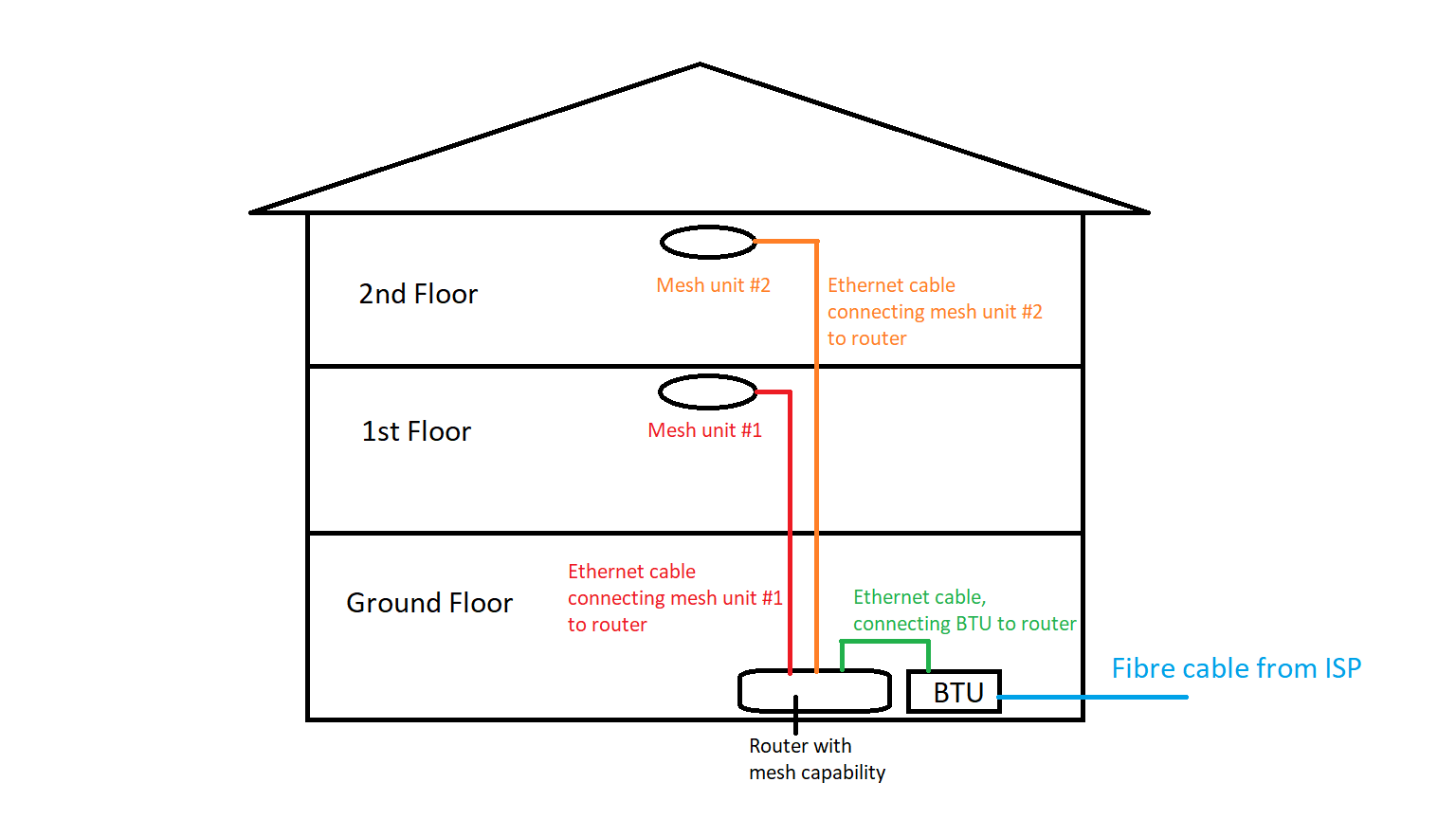
Figure 1: A graphical illustration of mesh setup, with one router capable of mesh networking and two mesh units to extend the network connection using ethernet cable backhaul
In the above figure, the mesh units were placed near the centre of the house on each floor to cover the front and back of the floor, with the assumption that central placement of the mesh unit provide signal strong enough to both front and back of that particular floor. It all depends on the floor plan of the house. If one mesh unit placed at the centre of the floor plan and you cannot get good signal at the front and back, then you might need to place 2 mesh units per floor, one at the front and one at the back of that floor to get good coverage.
This post has been edited by SFX: Feb 26 2021, 02:03 AM
 Quote
Quote
 0.0198sec
 0.97
0.97
 7 queries
 GZIP Disabled