Welcome Guest ( Log In | Register )

302 Pages « < 161 162 163 164 165 > » Bottom

Outline · [ Standard ] · Linear+

Home Networking WiFi Router Discussion Thread, Updated for 2023

views
     
penew
post Feb 21 2021, 08:21 PM

Casual
***
Junior Member
393 posts

Joined: Apr 2006
QUOTE(XeactorZ @ Feb 20 2021, 04:48 PM)
Does tp link ax73 seems overkill for 100mbps user?
As my relative wanna switch router, as they currently using stock router given by TM, is from TP Link, but I had no idea which model
The reason they wanna switch to new router is due to having frequently disconnection laugh.gif
And use mobile internet is much faster than their home Wi-Fi laugh.gif
*
Quite an overkill. But since using it, i don't recall any disconnection so far. ..been running smoothly and stable, so I guess it's worth it. Now I get full 300mbps on my Note 20 - even 200+mbps on 5GHz band out in the garden (around 50meters away from the router)

I want cheaper options, there's the AX20.

This post has been edited by penew: Feb 21 2021, 08:23 PM
XeactorZ
post Feb 21 2021, 10:28 PM

♥ PandaDog ♥
*********
All Stars
31,612 posts

Joined: Aug 2010
QUOTE(penew @ Feb 21 2021, 08:21 PM)
Quite an overkill. But since using it, i don't recall any disconnection so far. ..been running smoothly and stable, so I guess it's worth it. Now I get full 300mbps on my Note 20 - even 200+mbps on 5GHz band out in the garden (around 50meters away from the router)

I want cheaper options, there's the AX20.
*
What my relative is coverage
As current router, either frequent disconnect, else the signal is very low laugh.gif
I guess better ask them stick to AX73

This post has been edited by XeactorZ: Feb 21 2021, 10:28 PM
taqu
post Feb 22 2021, 12:23 AM

Enthusiast
*****
Junior Member
864 posts

Joined: May 2005
QUOTE(penew @ Feb 21 2021, 08:21 PM)
Quite an overkill. But since using it, i don't recall any disconnection so far. ..been running smoothly and stable, so I guess it's worth it. Now I get full 300mbps on my Note 20 - even 200+mbps on 5GHz band out in the garden (around 50meters away from the router)

I want cheaper options, there's the AX20.
*
Great performance thumbup.gif But I can no longer look at routers having many antennas tongue.gif
mecheng
post Feb 22 2021, 12:14 PM

New Member
*
Newbie
49 posts

Joined: Feb 2009
Hi Sifus, would like to seek recommendation for router upgrade.

House type: Condo
Size of house: 1600
Features required: no preference
Number of devices connected to WiFi:5-6 devices
Internet Speed: 300mbps
Budget: within RM500

Need it to boost up my internet connection speed, as via wifi i am only getting 25-40mbps - laptop; 40-50mbps - phone.

Thanks alot..
jpong1
post Feb 22 2021, 01:08 PM

Getting Started
**
Junior Member
292 posts

Joined: Jun 2016
QUOTE(mecheng @ Feb 22 2021, 12:14 PM)
Hi Sifus, would like to seek recommendation for router upgrade.

House type: Condo
Size of house: 1600
Features required: no preference
Number of devices connected to WiFi:5-6 devices
Internet Speed: 300mbps
Budget: within RM500

Need it to boost up my internet connection speed, as via wifi i am only getting 25-40mbps - laptop; 40-50mbps - phone.

Thanks alot..
*
TP Link AX73
ASUS RT-AX56U

mecheng
post Feb 22 2021, 01:13 PM

New Member
*
Newbie
49 posts

Joined: Feb 2009
QUOTE(jpong1 @ Feb 22 2021, 01:08 PM)
TP Link AX73
ASUS RT-AX56U
*
Thanks bro. What are the differences between this 2? other than price?
jpong1
post Feb 22 2021, 08:57 PM

Getting Started
**
Junior Member
292 posts

Joined: Jun 2016
QUOTE(mecheng @ Feb 22 2021, 01:13 PM)
Thanks bro. What are the differences between this 2? other than price?
*
ASUS more functions or features; better let other senior users to reply. smile.gif
you can search the spec and compare.


runrabbitjunk P
post Feb 23 2021, 06:54 PM

New Member
*
Probation
3 posts

Joined: Feb 2021
Need some router expert help, been online for hours and still can't find what I need bangwall.gif bangwall.gif bangwall.gif

House type: Condo
Size of house: 900
Features required: future proof with Wifi 6 I guess, plus support NAS
Number of devices connected to WiFi:almost 10 devices (laptops, phones, tablets, google speakers, TV)
Internet Speed: now 24Mbps but I've loved to get about 1000Mbps one day
Budget: depends on quality but not more than RM 600

Personally leaning towards Asus, don't mind D-Link but just want it to last for the next 5 years. Last NetGear WNDR4300 died think due to heat or something.

Thanks a bunch guys!

runrabbitjunk P
post Feb 23 2021, 09:42 PM

New Member
*
Probation
3 posts

Joined: Feb 2021
QUOTE(runrabbitjunk @ Feb 23 2021, 02:54 PM)
Need some router expert help, been online for hours and still can't find what I need  bangwall.gif  bangwall.gif  bangwall.gif

House type: Condo
Size of house: 900
Features required: future proof with Wifi 6 I guess, plus support NAS
Number of devices connected to WiFi:almost 10 devices (laptops, phones, tablets, google speakers, TV)
Internet Speed: now 24Mbps but I've loved to get about 1000Mbps one day
Budget: depends on quality but not more than RM 600

Personally leaning towards Asus, don't mind D-Link but just want it to last for the next 5 years. Last NetGear WNDR4300 died think due to heat or something.

Thanks a bunch guys!
*
What's the diff between the AX1800 and AX3000 and is the AC2400 any good?
wirelessbuyer
post Feb 23 2021, 11:09 PM

Casual
***
Junior Member
346 posts

Joined: Jul 2012
QUOTE(runrabbitjunk @ Feb 23 2021, 06:54 PM)
Need some router expert help, been online for hours and still can't find what I need  bangwall.gif  bangwall.gif  bangwall.gif

House type: Condo
Size of house: 900
Features required: future proof with Wifi 6 I guess, plus support NAS
Number of devices connected to WiFi:almost 10 devices (laptops, phones, tablets, google speakers, TV)
Internet Speed: now 24Mbps but I've loved to get about 1000Mbps one day
Budget: depends on quality but not more than RM 600

Personally leaning towards Asus, don't mind D-Link but just want it to last for the next 5 years. Last NetGear WNDR4300 died think due to heat or something.

Thanks a bunch guys!
*
You may consider tplink archer ax73 RM400 for its value for money. Many fellow friends here are also suggesting it, btw I'm using it too in a 1000sqft apartment and so far has been working excellent for me. For asus you may consider tuf ax-3000 or ax-58u, a bit above your budget but sometime you can get it on sale at shopee/lazada around RM550-600.

QUOTE(runrabbitjunk @ Feb 23 2021, 09:42 PM)
What's the diff between the AX1800 and AX3000 and is the AC2400 any good?
*
AX1800 means 574Mbps at 2.4GHz + 1,201Mbps at 5GHz @ 80MHz = ~1800Mbps theoretical speed
AX3000 means 574Mbps at 2.4GHz + 2,402Mbps at 5GHz @ 160MHz = ~3000Mbps theoretical speed
Since you want to future proof yourself with wifi6, just buy wifi6 router and skip any wifi5 router aka ac2400
XeactorZ
post Feb 23 2021, 11:23 PM

♥ PandaDog ♥
*********
All Stars
31,612 posts

Joined: Aug 2010
QUOTE(wirelessbuyer @ Feb 23 2021, 11:09 PM)
You may consider tplink archer ax73 RM400 for its value for money. Many fellow friends here are also suggesting it, btw I'm using it too in a 1000sqft apartment and so far has been working excellent for me. For asus you may consider tuf ax-3000 or ax-58u, a bit above your budget but sometime you can get it on sale at shopee/lazada around RM550-600.
AX1800 means 574Mbps at 2.4GHz + 1,201Mbps at 5GHz @ 80MHz = ~1800Mbps theoretical speed
AX3000 means 574Mbps at 2.4GHz + 2,402Mbps at 5GHz @ 160MHz = ~3000Mbps theoretical speed
Since you want to future proof yourself with wifi6, just buy wifi6 router and skip any wifi5 router aka ac2400
*
Malaysia don't have AX-58U, is called RT-AX3000 in Malaysia laugh.gif
wirelessbuyer
post Feb 23 2021, 11:52 PM

Casual
***
Junior Member
346 posts

Joined: Jul 2012
QUOTE(XeactorZ @ Feb 23 2021, 11:23 PM)
Malaysia don't have AX-58U, is called RT-AX3000 in Malaysia laugh.gif
*
Ah thanks for the correction, very similar yet slightly different doh.gif
syafri88
post Feb 24 2021, 12:39 AM

Getting Started
**
Junior Member
154 posts

Joined: Jan 2005
From: Miri


Hello all,

Wanna seek your recommendation on wifi setup at my house

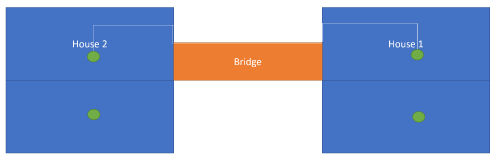
House type: 2 bungalow with bridge link
Area of each house : 2500 per floor
Budget: 2-2.5k

Wanna install Maxis Fibre when the connection reach the house. As of now, my plan is to install 1 router at each floor, whilst connecting the upper floor router with a LAN cable run. should be around 50 meter distance, using the bridge as a cable tray.

I'll also install 1 router at the ground floor at each house, and connecting all through Asus Ai Mesh.

Currently looking at 2 RT-AX3000 and 2 RT-AX55 or 2RT-AC86


Any comment on this setup?
wondernoob
post Feb 24 2021, 10:26 AM

New Member
*
Junior Member
29 posts

Joined: Mar 2012


Hi there, I'm looking to get tplink archer ax73 for my condo. My setup is the old TM unifi (with silver-colour modem & router). Do I need to get a modem too? Any recommendations?

House type: Condo
Size of house: 1000
Features required: Just need a solid updating of the modem/router setup. Casual home usage with 5-10 devices at a time
Internet Speed: 30Mbps
Budget: Around RM500
johnsdoes
post Feb 24 2021, 10:46 AM

Getting Started
**
Junior Member
257 posts

Joined: Nov 2014
QUOTE(wondernoob @ Feb 24 2021, 10:26 AM)
Hi there, I'm looking to get tplink archer ax73 for my condo. My setup is the old TM unifi (with silver-colour modem & router). Do I need to get a modem too? Any recommendations?

House type: Condo
Size of house: 1000
Features required: Just need a solid updating of the modem/router setup. Casual home usage with 5-10 devices at a time
Internet Speed: 30Mbps
Budget: Around RM500
*
if no problem with your modem, no point request new one from TM.

tplink archer ax73 is good enough.
for wireless solution, you can use mesh to reach farther room

for cheaper solution you can even use the old router as brighe and broadcast wifi at other area via lan cable.

kk131
post Feb 24 2021, 12:33 PM

On my way
****
Junior Member
566 posts

Joined: Jun 2005
From: Somewhere over the rainbow


QUOTE(syafri88 @ Feb 24 2021, 12:39 AM)
Hello all,

Wanna seek your recommendation on wifi setup at my house

House type: 2 bungalow with bridge link
Area of each house : 2500 per floor
Budget: 2-2.5k

Wanna install Maxis Fibre when the connection reach the house. As of now, my plan is to install 1 router at each floor, whilst connecting the upper floor router with a LAN cable run. should be around 50 meter distance, using the bridge as a cable tray.

I'll also install 1 router at the ground floor at each house, and connecting all through Asus Ai Mesh.

Currently looking at 2 RT-AX3000 and 2 RT-AX55 or 2RT-AC86
Any comment on this setup?
*
It would be easier to understand your plan if you could make a simple block diagram. What I understand is that you will have 1 BTU (supplied by Maxis) and linked to your router, you will have 3 mesh nodes linked to the router with ethernet backhaul. Your plan sounds good to me, max length of a CAT 6 cable is 100 m. I would aim to connect you smart TV's, NAS, desktop PC's etc on ethernet as well if possible.
Smurfs
post Feb 24 2021, 12:39 PM

Regular
******
Senior Member
1,061 posts

Joined: Feb 2008


QUOTE(wondernoob @ Feb 24 2021, 10:26 AM)
Hi there, I'm looking to get tplink archer ax73 for my condo. My setup is the old TM unifi (with silver-colour modem & router). Do I need to get a modem too? Any recommendations?

House type: Condo
Size of house: 1000
Features required: Just need a solid updating of the modem/router setup. Casual home usage with 5-10 devices at a time
Internet Speed: 30Mbps
Budget: Around RM500
*
you are on FTTH or VDSL2?

If VDSL 2 your options will be quite limited.
syafri88
post Feb 24 2021, 01:02 PM

Getting Started
**
Junior Member
154 posts

Joined: Jan 2005
From: Miri


QUOTE(kk131 @ Feb 24 2021, 12:33 PM)
It would be easier to understand your plan if you could make a simple block diagram. What I understand is that you will have 1 BTU (supplied by Maxis) and linked to your router, you will have 3 mesh nodes linked to the router with ethernet backhaul. Your plan sounds good to me, max length of a CAT 6 cable is 100 m. I would aim to connect you smart TV's, NAS, desktop PC's etc on ethernet as well if possible.
*
user posted image

I think that image is a simple representation of it.

What model do you recommend for the router with backhaul, and the other 2 wireless?

Is 2 AX3000 for the backhaul and 2 AX 55 enought for it?
kk131
post Feb 24 2021, 01:24 PM

On my way
****
Junior Member
566 posts

Joined: Jun 2005
From: Somewhere over the rainbow


QUOTE(syafri88 @ Feb 24 2021, 01:02 PM)
user posted image

I think that image is a simple representation of it.

What model do you recommend for the router with backhaul, and the other 2 wireless?

Is 2 AX3000 for the backhaul and 2 AX 55 enought for it?
*
If the area of each floor is around 2,500 ft^2 you might not get complete coverage on the 5Ghz band as it doesn't penetrate brick walls so easily. If you want complete coverage you might need an additional mesh node. It's a bit trial-and-error, you may need to move the nodes around within the limitations of power sockets etc.

AX is the WiFi6 standard so theoretically higher throughput, it depends what your plans are and if you plan to buy WiFi PC's, phones, etc in the future and how much bandwidth you want. if you want to save cost the AC66U B1 is known to be a good value and trusted router. Seems like there are a few people on here with better knowledge of the router market. The AC86U had a high failure rate back in 2018 but I think Asus has solved the problem now.
syafri88
post Feb 24 2021, 06:19 PM

Getting Started
**
Junior Member
154 posts

Joined: Jan 2005
From: Miri


QUOTE(kk131 @ Feb 24 2021, 01:24 PM)
If the area of each floor is around 2,500 ft^2 you might not get complete coverage on the 5Ghz band as it doesn't penetrate brick walls so easily. If you want complete coverage you might need an additional mesh node. It's a bit trial-and-error, you may need to move the nodes around within the limitations of power sockets etc.

AX is the WiFi6 standard so theoretically higher throughput, it depends what your plans are and if you plan to buy WiFi PC's, phones, etc in the future and how much bandwidth you want. if you want to save cost the AC66U B1 is known to be a good value and trusted router. Seems like there are a few people on here with better knowledge of the router market. The AC86U had a high failure rate back in 2018 but I think Asus has solved the problem now.
*
I am okay with just using 2.4Ghz band. As may user in the house will just use for streaming to phone and TV.

AC86U had a design flaw and leads to failure? Good to know. Then gotta go for my 1st proposal then.

302 Pages « < 161 162 163 164 165 > » Top
 

Change to:
| Lo-Fi Version
0.0237sec    0.78    6 queries    GZIP Disabled
Time is now: 24th December 2025 - 04:39 PM