

QUOTE(sHawTY @ Nov 23 2018, 11:33 PM)
It's not supplying enough power, that's considered faulty la, aiyo 

thanks, if really faulty, should i sent for replacement. china banyak jauh loo. 
How to buy cheap ASUS RT-AC68U router, come have a look
|
|
 Nov 23 2018, 11:56 PM Nov 23 2018, 11:56 PM
|
 
Junior Member
70 posts Joined: Jan 2003  
|
QUOTE(sHawTY @ Nov 23 2018, 11:33 PM) It's not supplying enough power, that's considered faulty la, aiyo thanks, if really faulty, should i sent for replacement. china banyak jauh loo. |
|
|
|
|
|
Nov 24 2018, 12:04 AM
Show posts by this member only | IPv6 | Post
#1182
|

All Stars
14,909 posts Joined: Jul 2005 
|
QUOTE(xpmen @ Nov 23 2018, 11:56 PM) thanks, if really faulty, should i sent for replacement. china banyak jauh loo. Just buy the AC adaptor from the link I shared to you RM49 vs RM100++ shipping cost to China  |
|
|
Nov 24 2018, 12:54 AM
|
|
Newbie
13 posts Joined: Nov 2018
|
|
|
|
Nov 24 2018, 12:19 PM
Show posts by this member only | IPv6 | Post
#1184
|

Senior Member
2,348 posts Joined: Apr 2008
|
QUOTE(xpmen @ Nov 23 2018, 11:56 PM) thanks, if really faulty, should i sent for replacement. china banyak jauh loo. China is near only, not Beijing but just Guangzhou. |
|
|
Nov 24 2018, 02:30 PM
Show posts by this member only | IPv6 | Post
#1185
|
|
Senior Member
2,329 posts Joined: Jun 2015
|
QUOTE(xpmen @ Nov 23 2018, 11:56 PM) thanks, if really faulty, should i sent for replacement. china banyak jauh loo. just buy a new adapter locally |
|
|
Nov 25 2018, 04:50 PM
|
|
Senior Member
1,811 posts Joined: Jan 2003 From: KL 
|
Router setup in 1st floor.
My lepak area is always ground floor. Still can get full 300MBPS speed on phone wifi signal , what a powerful router. 
|
|
|
|
|
|
Nov 25 2018, 04:56 PM
|

Senior Member
2,104 posts Joined: Sep 2008
|
QUOTE(thunderbird @ Nov 25 2018, 04:50 PM) Router setup in 1st floor. ASUS RT86U ?My lepak area is always ground floor. Still can get full 300MBPS speed on phone wifi signal , what a powerful router.
This post has been edited by christina1: Nov 25 2018, 04:56 PM |
|
|
Nov 25 2018, 05:12 PM
|
|
Senior Member
1,811 posts Joined: Jan 2003 From: KL
|
QUOTE(christina1 @ Nov 25 2018, 04:56 PM) ASUS RT86U ? yes 86 |
|
|
Nov 25 2018, 05:37 PM
Show posts by this member only | IPv6 | Post
#1189
|
|
All Stars
14,909 posts Joined: Jul 2005
|
QUOTE(thunderbird @ Nov 25 2018, 04:50 PM) what a powerful router. Which region in the "Wireless > Professional" settings did you use? |
|
|
Nov 25 2018, 07:41 PM
|
|
Senior Member
1,811 posts Joined: Jan 2003 From: KL
|
QUOTE(sHawTY @ Nov 25 2018, 05:37 PM) Which region in the "Wireless > Professional" settings did you use? China (default) |
|
|
Nov 25 2018, 08:32 PM
Show posts by this member only | IPv6 | Post
#1191
|
|
All Stars
14,909 posts Joined: Jul 2005
|
QUOTE(thunderbird @ Nov 25 2018, 07:41 PM) China (default) Go to a place where you can only see 2 out 3 bars (or 3 out 4 bars) on your handphone / tabletThen change the region to Australia Once the router finished rebooting, test the place where you you see the 2 out of 3 bars again I've tested all the regions and found out Australia works best for me I'm using Pocophone F1 & iPad Air 2. In the kitchen, they can only get 3 out of 4 bars before I change the region After changing the region to Australia, I get full 4 bars in the kitchen Also previously my Pocophone is showing the wireless speed of 390Mb/s in the kitchen. But after changing the region, it increases to 560Mb/s (Maximum for Pocophone F1 is 866Mb/s) This post has been edited by sHawTY: Nov 25 2018, 08:35 PM |
|
|
Nov 25 2018, 09:56 PM
|
|
Senior Member
1,811 posts Joined: Jan 2003 From: KL
|
QUOTE(sHawTY @ Nov 25 2018, 08:32 PM) Go to a place where you can only see 2 out 3 bars (or 3 out 4 bars) on your handphone / tablet thanks, will try later.Then change the region to Australia Once the router finished rebooting, test the place where you you see the 2 out of 3 bars again I've tested all the regions and found out Australia works best for me I'm using Pocophone F1 & iPad Air 2. In the kitchen, they can only get 3 out of 4 bars before I change the region After changing the region to Australia, I get full 4 bars in the kitchen Also previously my Pocophone is showing the wireless speed of 390Mb/s in the kitchen. But after changing the region, it increases to 560Mb/s (Maximum for Pocophone F1 is 866Mb/s) |
|
|
Nov 26 2018, 12:09 PM
|

Senior Member
4,743 posts Joined: Jan 2003 From: u noe EARTH ? wher all human being is there
|
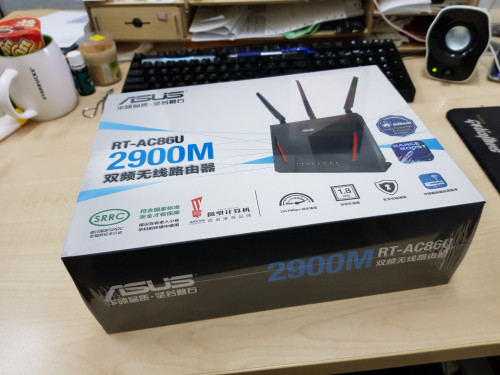 cukur sampai |
|
|
|
|
|
Nov 26 2018, 02:11 PM
|
|
All Stars
14,909 posts Joined: Jul 2005
|
QUOTE(milky @ Nov 26 2018, 12:09 PM) cukur sampai Configured d?  |
|
|
Nov 26 2018, 02:25 PM
|
|
Senior Member
2,329 posts Joined: Jun 2015
|
QUOTE(sHawTY @ Nov 25 2018, 08:32 PM) Go to a place where you can only see 2 out 3 bars (or 3 out 4 bars) on your handphone / tablet later gonna go home and try...Then change the region to Australia Once the router finished rebooting, test the place where you you see the 2 out of 3 bars again I've tested all the regions and found out Australia works best for me I'm using Pocophone F1 & iPad Air 2. In the kitchen, they can only get 3 out of 4 bars before I change the region After changing the region to Australia, I get full 4 bars in the kitchen Also previously my Pocophone is showing the wireless speed of 390Mb/s in the kitchen. But after changing the region, it increases to 560Mb/s (Maximum for Pocophone F1 is 866Mb/s) need some advice: i am on 500Mbps plan after Turbo... after setting up the 86u router, i use cat5e cable between ONU and router, and didn't change 5Ghz setting to 80Mhz, when i tested it with iphone 7+ it gave me close to 500Mbps speed on 5Ghz wifi however after replace the cat5e with cat7 to ONU/BTU, set 5Ghz to 80Mhz, testing wifi speed on iphone 7+ (1 ft away from router) only can achieve the most 300Mbps... another problem i faced is with my new tp-link t9uh on pc on 2nd floor, i can't even achieve 100Mbps on 5Ghz (set to 80Mhz)... can advice on how i can improve it ? |
|
|
Nov 26 2018, 04:12 PM
Show posts by this member only | IPv6 | Post
#1196
|

Senior Member
562 posts Joined: Feb 2009 From: klang valley
|
Final arrival
 |
|
|
Nov 26 2018, 04:47 PM
|
|
Senior Member
4,743 posts Joined: Jan 2003 From: u noe EARTH ? wher all human being is there
|
QUOTE(sHawTY @ Nov 26 2018, 02:11 PM) Configured d? havent just got it.. 2nite try.. |
|
|
Nov 26 2018, 05:11 PM
|
|
Senior Member
4,743 posts Joined: Jan 2003 From: u noe EARTH ? wher all human being is there
|
QUOTE(bsa12 @ Nov 26 2018, 04:12 PM) Final arrival the item come out of box chinese language? i mean inside settting |
|
|
Nov 26 2018, 06:05 PM
Show posts by this member only | IPv6 | Post
#1199
|
|
All Stars
14,909 posts Joined: Jul 2005
|
QUOTE(milky @ Nov 26 2018, 05:11 PM) the item come out of box chinese language? i mean inside settting Yes. But you can change the language to English after the initial setup |
|
|
Nov 26 2018, 08:47 PM
|
|
Newbie
19 posts Joined: Dec 2015
|
Hi anyone,my AC86U used close to 2 week but sometime will suddenly disconnect the wan.Wifi is ok just suddenly no internet and Router Wan light is red.Few time is like when i turn off my pc will happen this issue.But my Lan cable is new buy Urgreen Cat 7 i think Quality is OK.Have anybody happen this issue or others?
|
| Change to: |  0.0211sec 0.0211sec
 0.69 0.69
 6 queries 6 queries
 GZIP Disabled GZIP Disabled
Time is now: 11th December 2025 - 02:48 PM |
 Quote
Quote