Outline ·
[ Standard ] ·
Linear+
How to buy cheap ASUS RT-AC68U router, come have a look
|
window0722
|
 Nov 8 2018, 09:51 AM Nov 8 2018, 09:51 AM
|
New Member


|
QUOTE(thunderbird @ Oct 17 2018, 06:39 PM) if LZD taobao is available again, i will buy from LZD as it's direct shpping. If you buy from taobao China, you need to use agent for sure, although i have several good agents to be selected. Hey bro.I have read many commend but still not sure , somebody say taobao direct or wherehouse forward will reject from custom because is sensitive item.Somebody say is ok no any blocking.So can you comfirm with me your by experiense.Thanks |
|
|
|
|
|
window0722
|
Nov 13 2018, 06:02 PM
|
New Member
|
QUOTE(cskean @ Nov 11 2018, 12:50 AM) I'm very sure as I've been fact finding since a week ago. The reason why their items always show SOLD OUT is because they do not ship directly to Malaysia, just like what you say conflict with Asus Malaysia. Thats why I said earlier, need to use 3rd party forwarder. Let the seller ship the router to the 3rd party forwarder warehouse in China, then the forwarder will handle the shipment from their side. Mind to share which seller you purchase from? Is it from taobao or tmall and how much you get for it? I think not this reason.Because i have try to buy another item under TMALL.Still show sold out.Just change to china location then can buy.I think maybe TMALL want remain the item for china buyer to buy, |
|
|
|
|
|
window0722
|
Nov 19 2018, 03:37 PM
|
New Member
|
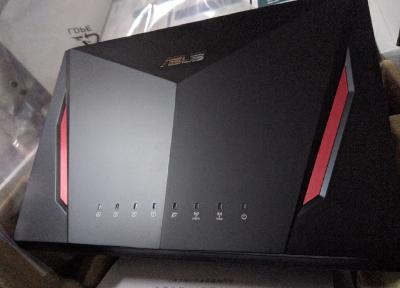
Last friday arrived,yesterday setup.Got a issue is ram usage too high.Reboot then idle 5x%~6x% usage.It is normal?Firewall any AI protect disabled. |
|
|
|
|
|
window0722
|
Nov 19 2018, 05:06 PM
|
New Member
|
QUOTE(sHawTY @ Nov 19 2018, 04:43 PM) Macha, share some screenshot of the RAM usage la, else how to help you 
Not in home,just can remote by phone now. |
|
|
|
|
|
window0722
|
Nov 19 2018, 05:33 PM
|
New Member
|
QUOTE(vernon91 @ Nov 19 2018, 05:25 PM) free RAM = wasted resources. Looks okay to me Does it affect ur router performance? if not why bother  Actually still stable until now,because not yet to heavy use.Scare later run more BT ram will full load then jam.Have see more forum from chinese or english version also say this is normal.(Sorry bad english) |
|
|
|
|
|
window0722
|
Nov 19 2018, 05:46 PM
|
New Member
|
QUOTE(sHawTY @ Nov 19 2018, 05:40 PM) That's normal This is mine with all the firewall + AiProtection turned (why would you turn that off anyway?  ) )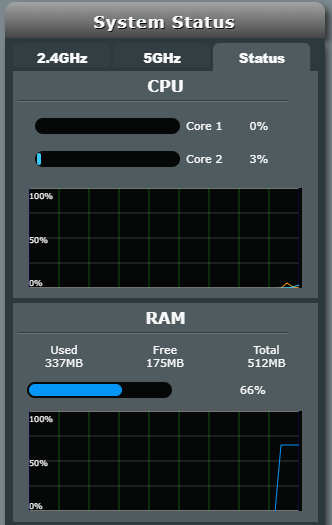 Because first time use Asus.Before this is use tplink and not yet see the ram high usage.So think maybe is firewall or something feature run in background every time.But i will try enable all feature tonight.BTW the WTF feature also not yet to try HAHA.Thanks to reply Bro. |
|
|
|
|
|
window0722
|
Nov 19 2018, 07:11 PM
|
New Member
|

Sorry another issue.My internet is UNIFI 100mbps.But my all lan cable is cat 6 and above .WAN always show 100mbps.What is the problem? This post has been edited by window0722: Nov 19 2018, 07:12 PM |
|
|
|
|
|
window0722
|
Nov 19 2018, 07:31 PM
|
New Member
|
QUOTE(sHawTY @ Nov 19 2018, 07:28 PM) The culprit might be the BTU itself How old is the BTU? This year changed when i update 100mbps from unifi.Model is Huawei HG8240H.I have read the spec is support gigabit.So i think not the hardware issue. |
|
|
|
|
|
window0722
|
Nov 19 2018, 08:07 PM
|
New Member
|
QUOTE(sHawTY @ Nov 19 2018, 07:33 PM) Have you tried using a different ethernet cable? Also, try and plug back the original TM router to see if you can get gigabit ethernet on the WAN port or not Change already , no point.And the original router not show wan status. |
|
|
|
|
|
window0722
|
Nov 19 2018, 08:47 PM
|
New Member
|
QUOTE(vernon91 @ Nov 19 2018, 08:41 PM) Huawei HG8240H has gigabit port, very likely is cable problem, get some high quality one, don used those free from router try directly from PC to PNU? AMP Cat 6 i think is enought high quality already right? Your mean is PC to Modem?How to check the Connection status?Because i have try access modem but not work. |
|
|
|
|
|
window0722
|
Nov 19 2018, 08:56 PM
|
New Member
|
QUOTE(sHawTY @ Nov 19 2018, 08:48 PM) As Vernon91 mentioned above, try to disconnect the ethernet cable from the WAN port on your router then connect your BTU directly to a PC See if it's showing 100Mb or 1Gb Now downloading,later will try. |
|
|
|
|
|
window0722
|
Nov 19 2018, 08:59 PM
|
New Member
|
QUOTE(vernon91 @ Nov 19 2018, 08:51 PM) sure be no problem, just connect ur pc to the modem and then check the network status from PC [attachmentid=10114103] but since u mentioned that ur internet is only 100mbps, why need 1gbps wan to router  if still the same, maybe TM has configured ur ONU Ethernet port to be 100mbps? Ok understand.Because Lan can show 1gbps.Why wan dont show?My friend RT1200G+ show me picture below.You say is bug or what? 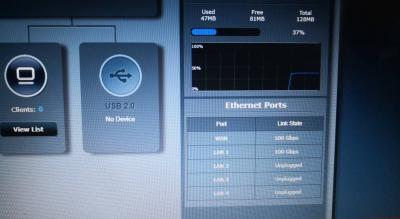
|
|
|
|
|
|
window0722
|
Nov 19 2018, 08:59 PM
|
New Member
|
QUOTE(darkzone18 @ Nov 19 2018, 08:53 PM) Are you not yet update latest firmware? |
|
|
|
|
|
window0722
|
Nov 20 2018, 10:54 PM
|
New Member
|
QUOTE(kwai_83 @ Nov 20 2018, 01:11 PM) what ver firmware you using can share out Is latested 3.0.0.4.384_32799-gfe72567 |
|
|
|
|
|
window0722
|
Nov 20 2018, 11:00 PM
|
New Member
|
Late to reply,today try PC direct connect modem.LAN 1 and LAN 2 show 100mbps.Other 2 port is gigabit.So i think is tm preset the traffic speed in modem.Any body can teach how to log in the modem to configure?I have try but failed.Cant log in the interface.Model is Huawei HG8240h.
|
|
|
|
|
|
window0722
|
Nov 20 2018, 11:17 PM
|
New Member
|
QUOTE(sHawTY @ Nov 20 2018, 11:08 PM) You can't. Only TM can do that Call TM helpline I think TM also not will do.Last time have call tm come to check the open port issue then ask they how to access the modem.They say cant because they have try but also failed.Maybe first time finish configure the modem then modem will be lock. |
|
|
|
|
|
window0722
|
Nov 26 2018, 08:47 PM
|
New Member
|
Hi anyone,my AC86U used close to 2 week but sometime will suddenly disconnect the wan.Wifi is ok just suddenly no internet and Router Wan light is red.Few time is like when i turn off my pc will happen this issue.But my Lan cable is new buy Urgreen Cat 7 i think Quality is OK.Have anybody happen this issue or others?
|
|
|
|
|
|
window0722
|
Nov 26 2018, 08:51 PM
|
New Member
|
And also i have trace back the system log but never see any issue.Just can see latest massage is rebooted when happen the issue.
|
|
|
|
|
|
window0722
|
Nov 26 2018, 11:52 PM
|
New Member
|
QUOTE(sHawTY @ Nov 26 2018, 11:48 PM) Assuming you're using UniFi / Maxis Fibre, are you on VDSL or FTTH? My Unifi is use FTTH |
|
|
|
|



 Quote
Quote

 0.0508sec
 0.65
0.65
 7 queries
 GZIP Disabled