Welcome Guest ( Log In | Register )

6 Pages  1 2 3 > » Bottom

Outline · [ Standard ] · Linear+

 How to buy cheap ASUS RT-AC68U router, come have a look

views
     
junclj
post Sep 23 2018, 10:46 PM

Look at all my stars!!
*******
Senior Member
2,348 posts

Joined: Apr 2008


Hi, I'm looking for a cheap AC86U from taobao such like this https://detail.tmall.com/item.htm?id=556334...919063:33030646

Hope this router can maximize the download speed of my home Unifi turbo 500mbps.

However, I have a doubt to ask. Do this router has asus DDNS "asuscomm.com" too? because I need to setup the free DDNS for my home cctv and alarm.

This post has been edited by junclj: Sep 23 2018, 10:46 PM
junclj
post Sep 23 2018, 10:47 PM

Look at all my stars!!
*******
Senior Member
2,348 posts

Joined: Apr 2008


QUOTE(boxsystem @ Sep 6 2018, 09:20 AM)
anyone buying? I can't understand Chinese..
*
then find me, I'm Chinese brows.gif
junclj
post Sep 24 2018, 07:21 AM

Look at all my stars!!
*******
Senior Member
2,348 posts

Joined: Apr 2008


need another help before I decide to order this router.
I need to clarify about the power adapter.

can I remove the head of the adapter to replace with UK head?
https://item.taobao.com/item.htm?id=566780604931

I was searched about the AC86U power adapter should be looked like this, hope the item above will suits
https://item.taobao.com/item.htm?id=5663801...ucket=11#detail

This post has been edited by junclj: Sep 24 2018, 10:00 AM
junclj
post Sep 24 2018, 10:34 AM

Look at all my stars!!
*******
Senior Member
2,348 posts

Joined: Apr 2008


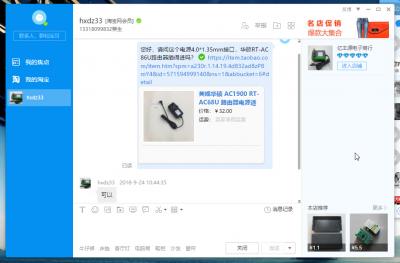
already ask the taobao sellers there, they say RT-AC68U and RT-AC86U are using the same power adapter. Better just buy this one, no need to worry at all about of replacing the head plug of the power adapter.

https://item.taobao.com/item.htm?spm=a230r....bucket=6#detail


Attached Image

Attached Image

This post has been edited by junclj: Sep 24 2018, 10:49 AM
junclj
post Sep 24 2018, 08:30 PM

Look at all my stars!!
*******
Senior Member
2,348 posts

Joined: Apr 2008


I was placed order for a RT-AC86U. Guys, better fast! China is public holiday for today because today is Mooncake festival/Mid-Autumn festival. So better place order now, then they will ship out by tomorrow. It may take 1 to 2 days to arrive into the Guangzhou collecting station then only forward to Malaysia in the next following week.

Next full week is public holiday for China. From 1st Oct 2018 until 7th Oct 2018 which is China National Days. Better order fast now!
junclj
post Sep 26 2018, 01:45 PM

Look at all my stars!!
*******
Senior Member
2,348 posts

Joined: Apr 2008


hi, guys. RT-AC68U and RT-AC86U have the same voltage of 19v 1.75a 33w but this morning I was noticed that, the RT-AC86U is using 5.5*2.5mm but RT-AC68U is using 4.0*1.35MM

https://www.ebay.com/itm/Genuine-Original-A...G8AAOSwt5hbo5JT

Therefore, I guess I was bought the wrong size AC adapter for my RT-AC86U. I am now changed my plan to buy a universal socket for eg. LDNIO SC3604.

user posted image


junclj
post Sep 26 2018, 02:28 PM

Look at all my stars!!
*******
Senior Member
2,348 posts

Joined: Apr 2008


QUOTE(jhleo1 @ Sep 26 2018, 02:18 PM)
Why not just use the universal adapter?
*
adapter just make the AC adapter not plug tightly. I got a TMall tvbox in my home which comes will the China 2 pin adapter. The adapter is plug with a universal adapter. Problem is the adapter is easily lose out, the whole tvbox is power off immediately when I accidentally touched it.

just go for better choice is either replace to UK socket AC adapter or use a universal socket extension eg. LDNIO SC3604.

This post has been edited by junclj: Sep 26 2018, 02:28 PM
junclj
post Sep 28 2018, 03:35 PM

Look at all my stars!!
*******
Senior Member
2,348 posts

Joined: Apr 2008


QUOTE(Nando's @ Sep 26 2018, 09:54 AM)
Why don't you guys just get a Universal Adapter from DIY, settle  brows.gif
*
May I ask your signature speedtest? Your package now is Unifi turbo 300mbps? Upload speed definitely is 50mbps?
junclj
post Sep 28 2018, 07:44 PM

Look at all my stars!!
*******
Senior Member
2,348 posts

Joined: Apr 2008


QUOTE(gedebe @ Sep 28 2018, 07:02 PM)
hi guys, if i am on older notebook computer which can only support 2.0 usb and wireless G or the best is N then if i upgrade to unifi 300mbps, any solution for me to enjoy the speed wireless?
*
base on google search USB 2.0 maximum can reach 480mbps, so you should try this but most of the time wifi cannot always reach maximum speed.

Why not just plug a cat5e or cat6 cable directly to the router?
junclj
post Oct 1 2018, 11:22 AM

Look at all my stars!!
*******
Senior Member
2,348 posts

Joined: Apr 2008


QUOTE(sgpdsmss @ Oct 1 2018, 10:32 AM)
same ...still cant connect
*
Have you plug the router direct to your PC, then check the default gateway IP address?

should send to RMA because already press the reset pin but still not working.
junclj
post Oct 1 2018, 12:06 PM

Look at all my stars!!
*******
Senior Member
2,348 posts

Joined: Apr 2008


China is having a long public holidays start from today until 7th Oct. However, I was asked the customer service just now, my router was pending for delivery out because they are off for duty from 29th Sept until 2nd Oct 2018. My router will resume ship out at 3rd Oct 2018.
junclj
post Oct 1 2018, 02:54 PM

Look at all my stars!!
*******
Senior Member
2,348 posts

Joined: Apr 2008


QUOTE(sgpdsmss @ Oct 1 2018, 01:10 PM)
yes press the Reset pin and still not Working ...
send back for replace unit ..
*
This is a Malaysia set Asus router?
junclj
post Oct 2 2018, 11:00 PM

Look at all my stars!!
*******
Senior Member
2,348 posts

Joined: Apr 2008


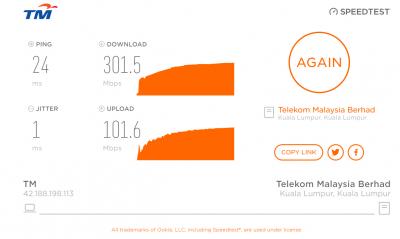
I was just received my Asus RT-AC86U today. So surprised for the speed performance. Just can describe my old RT-AC55UHP really can't fight with this beast.
It was my first time to use that powerful router. OK, for those guy who are using RT-AC55UHP here. Indeed, this router (RT-AC55UHP) only can reach maximum 300~320mbps on wired. My Unifi package is 500mbps turbo. Yes, this is about your router problem but not Unifi problem. So for those user here, if you are still using RT-AC55UHP and your home have any fiber broadband connection with more than 300mbps speed. Please upgrade your router as soon as possible. This is my advice.

One more thing I like to confirm in here, this router RT-AC86U (China Version) is using the same DC adapter with RT-AC68U. So you guys can buy the size 4.4*1.35mm from shopee, lazada or lelong.

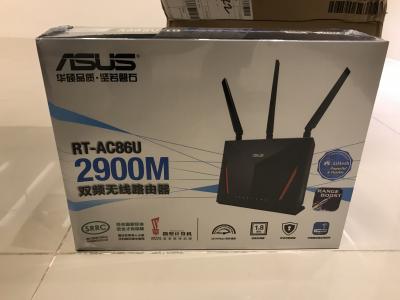
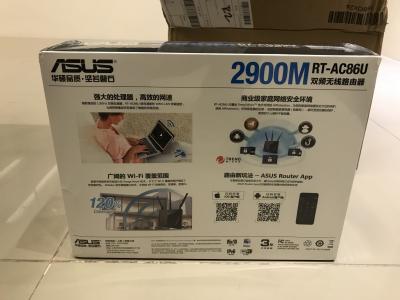
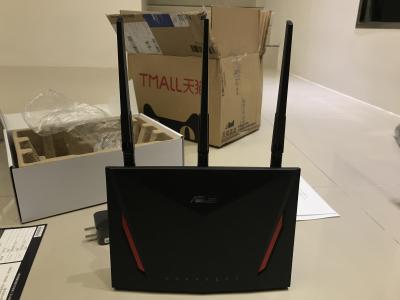
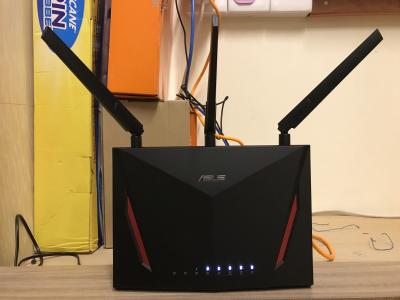
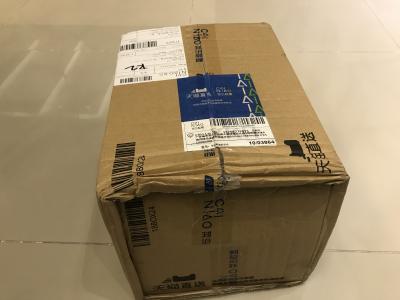
This is my new router, RT-AC86U.
Attached Image

Attached Image

Attached Image

Attached Image

Attached Image

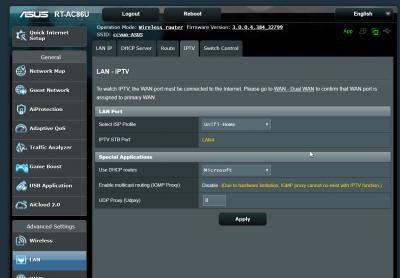
This is official Asus firmware, I did not flash to Merlin custom firmware. Fully support Unifi without problem.
Attached Image

Attached Image

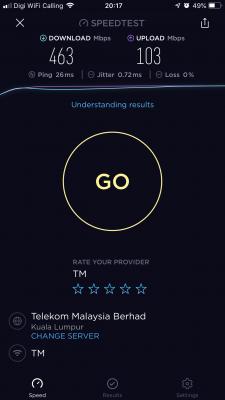
Speedtest Result on Wifi
Attached Image

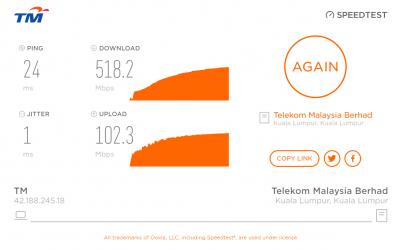
Speedtest Result on LAN connection
Attached Image

Speedtest Result on LAN connection with my old Asus RT-AC55UHP
Attached Image

This post has been edited by junclj: Oct 3 2018, 10:07 PM

junclj
post Oct 3 2018, 10:14 AM

Look at all my stars!!
*******
Senior Member
2,348 posts

Joined: Apr 2008


QUOTE(zher4883 @ Oct 3 2018, 07:30 AM)
Hey, dude just a question. How many channels does the RT-AC86U has on the 5GHz band.
*
Only 5 channel options to choose or just leave it in Auto mode. I was left "Enabled smart connect", everything in auto no manual option to choose.
Attached Image
junclj
post Oct 3 2018, 10:16 AM

Look at all my stars!!
*******
Senior Member
2,348 posts

Joined: Apr 2008


QUOTE(mdzaboy @ Oct 3 2018, 05:39 AM)
Can share the link?
*
what link? purchase link? I bought from this seller
https://detail.tmall.com/item.htm?id=556334...919063:33030646
junclj
post Oct 4 2018, 04:41 PM

Look at all my stars!!
*******
Senior Member
2,348 posts

Joined: Apr 2008


QUOTE(sheemmet @ Oct 4 2018, 04:05 PM)
go under Wireless > Professional tab , on the last column , REGION set to ASIA ( default is China )
you should have 9 channels not 5 ( default for China )
icon_rolleyes.gif

always always , check the region for wireless or router settings
*
Thanks for your info, yes it is default by China region. I did not notice it.
Attached Image
junclj
post Oct 4 2018, 05:51 PM

Look at all my stars!!
*******
Senior Member
2,348 posts

Joined: Apr 2008


QUOTE(EddieBrock @ Oct 4 2018, 05:46 PM)
Legit? Need to change pin?
*
This is China version, yes it is legit but no Asus Malaysia warranty. You need to buy a universal adapter to plug in the China adapter.
See mine, which is bought from China. Works for Unifi like a charm.

This post has been edited by junclj: Oct 4 2018, 05:53 PM
junclj
post Oct 5 2018, 09:39 AM

Look at all my stars!!
*******
Senior Member
2,348 posts

Joined: Apr 2008


QUOTE(sygoh3 @ Oct 5 2018, 08:24 AM)
Hi all sifus,

I just bought a AC86U from taobao, i connect the LAN1 from BTU to WAN connection at my AC86U, select the PPPoe connection and key in Unifi account and password but after go to main page it shown not connected.

I saw several post, the Quick Internet Setup (QIS) page from my ASUS 86U is different with other people,
[attachmentid=10055495]
it do not have an option to choose ISP profile. Is there any setting wrong?

Other ppl post have the below page
[attachmentid=10055496]
*
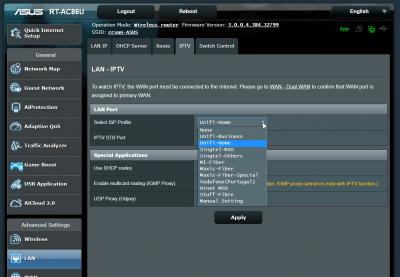
Hi, you need to skip the wizard to set manually. I was done that for my China set too. And most importantly is, after you login with your Unifi account and password. You have to go to IPTV settings then switch to Unifi-Home manually.

This post has been edited by junclj: Oct 5 2018, 09:39 AM
junclj
post Oct 7 2018, 07:58 AM

Look at all my stars!!
*******
Senior Member
2,348 posts

Joined: Apr 2008


QUOTE(sHawTY @ Oct 7 2018, 12:33 AM)
1. RT-AC68U is actually using the same AC adaptor as the RT-AC86U. I know because I have both of them
2. Why waste so much time looking around eBay and Taobao for the AC adaptor when you can just buy one from Lazada?
https://www.lazada.com.my/products/asus-19v...s265886000.html
3. I'm using the same exact AC adaptor in the link above on my RT-AC68U and it has been working fine since the last 7 months (original AC adaptor is dead)
*
Because I was asked in here before but nobody can answer to me. That's why I do research myself. Need to double confirm before to proceed order this adapter.
junclj
post Oct 7 2018, 05:46 PM

Look at all my stars!!
*******
Senior Member
2,348 posts

Joined: Apr 2008


QUOTE(thunderbird @ Oct 7 2018, 01:12 PM)
hello, for 86U owner,

i have one question, can the router be configured to shut down during certain time and boot up again certain time?

For example, 1am to 8am, i need it to be off and 8am onwards, turn on again

Thanks
*
I'm using digital timer. My router, BTU and gigabit switch all just off for 1 minute every midnight 2am then on back at 2.01am. The purpose of doing this is to refresh my router logging, clean out the RAM and change to new public IP. Sometimes I can't login to my home CCTV from outdoor, that's why I need to do restart router. However, Asus routers are not always got these kind of problems. Usually last time when I'm not using digital timer, I never switch off the router for weeks and never have problem of login in to my home CCTV and alarm system from outdoor.

You should get one digital timer here,
https://shopee.com.my/SUM-24-Hours-Digital-...85895.483946002

This post has been edited by junclj: Oct 7 2018, 06:34 PM

6 Pages  1 2 3 > » Top
 

Change to:
| Lo-Fi Version
0.0641sec    1.11    7 queries    GZIP Disabled
Time is now: 20th December 2025 - 09:15 PM