Welcome Guest ( Log In | Register )

58 Pages « < 37 38 39 40 41 > » Bottom

Outline · [ Standard ] · Linear+

 Samsung LED TV Thread V2, Continue from V1

views
     
13itcher
post Nov 17 2023, 10:39 AM

New Member
*
Junior Member
22 posts

Joined: Apr 2009
QUOTE(cloudeen @ Nov 17 2023, 01:59 AM)
Finally finish setting up the tv. here is my report:

1.The box is being hold by 3 flat plastic ropes. After cutting the 3 ropes, the top cupboard lit can be slide up, leaving the tv sitting on the bottom cupboard.

2. following the installation guide, on both left side and right side of bottom cupboard, there are "locks" which need to be unlock (origami style) in order to lay the bottom cupboard flat. this process will actually damage/crease the cupboard holding the lock. before me unlocking it, the cupboard appear to be new and fresh without any sign they have been folded/used before.

3. all the polyforms inside the cupboard holding the tv appear to be in good condition.

4. the white protective foam looks new, smooth and without crease, except there are some of minor folded area near the bottom part of the white foam touching the bottom polyform. maybe it was not being tuck in properly during factory packing. Anyway its minor. 95% of the white foam looks fresh.

5. tv still have the transparent peel in tack. no sign of it being pilled prior.

6. After turning on the tv, i forgot to immediately check the panel display time. After logging in all my apps, i checked the panel time using smartthings app (i dont have service remote). it shows (3) <-- with bracket.

7. initially i thought it means 3 hour? not bad? but after some further 15mins fiddling, the app shows (5). so i guess it means 50mins. i suspect after i pass the hour mark, it will show 1 (without bracket).

So based on all of the above, i conclude that the s90c 77" i bought with 12k is not a display unit, as the rumors suggest.
One interesting story to add is that, as i live in jb quite near to that exact shop selling all 3 size of s90c cheap, i actually went to the shop physically on 9/11 and pretending to be shopping for this tv. I did not want to ask the staff directly about their online listing because at that time i thought the price was a price error, and i didnt want to alert them.
The price for s90c 77" given by the promoter was rm20k (after the purported 11.11 discount). I just say i will consider and left.
Tempted to go back now and ask the promoter why i got it 8k (7k without laz cash) cheaper.
*
Great news. I received my 65" S90C yesterday and managed to set it up.
Checked the usage timer and confirmed it is a new set.
Confirmed from ANAPEAK values 512 so it is a 2nd gen panel.
Overall, I think 65" S90C at RM6.8k is a steal although Samsung Tizen operating system is at least 2 to 3 generation behind LG WebOS

cloudeen
post Nov 17 2023, 10:51 AM

Getting Started
**
Junior Member
94 posts

Joined: Apr 2005
QUOTE(13itcher @ Nov 17 2023, 10:39 AM)
Great news. I received my 65" S90C yesterday and managed to set it up.
Checked the usage timer and confirmed it is a new set.
Confirmed from ANAPEAK values 512 so it is a 2nd gen panel.
Overall, I think 65" S90C at RM6.8k is a steal although Samsung Tizen operating system is at least 2 to 3 generation behind LG WebOS
*
I agree on the OS part, samsung really loses in the UI department. I was shocked yesterday that i need to point the remote at the tv for it to work. Also there is not pointer (i think, may be wrong) like on LG?

Coming from LG CX, the samsung UI really felt decade behind.
neekun
post Nov 17 2023, 05:02 PM

I'm a Mac
*******
Senior Member
2,570 posts

Joined: Jun 2006


QUOTE(13itcher @ Nov 17 2023, 10:39 AM)
Great news. I received my 65" S90C yesterday and managed to set it up.
Checked the usage timer and confirmed it is a new set.
Confirmed from ANAPEAK values 512 so it is a 2nd gen panel.
Overall, I think 65" S90C at RM6.8k is a steal although Samsung Tizen operating system is at least 2 to 3 generation behind LG WebOS
*
Yea the Tizen looks so dated , that is one of the reason I chose LG few year back when I upgrade my tv.

However for soundbar, Samsung is decent. By the way, my Samsung HW-Q950T (bought in late 2020) is available to let go as I am upgrading to Sony soundbar. Anyone interested please DM me.
ZeneticX
post Nov 17 2023, 05:34 PM

stars for what
********
All Stars
12,413 posts

Joined: Jan 2008
From: KL - Cardiff - Subang - Sydney


QUOTE(cloudeen @ Nov 17 2023, 10:51 AM)
I agree on the OS part, samsung really loses in the UI department. I was shocked yesterday that i need to point the remote at the tv for it to work. Also there is not pointer (i think, may be wrong) like on LG?

Coming from LG CX, the samsung UI really felt decade behind.
*
to be fair.... the magic remote feature is unique to LG only

other TV OS like Google TV or even Apple TV still need remote to navigate

This post has been edited by ZeneticX: Nov 17 2023, 05:35 PM
cloudeen
post Nov 17 2023, 05:38 PM

Getting Started
**
Junior Member
94 posts

Joined: Apr 2005
QUOTE(ZeneticX @ Nov 17 2023, 05:34 PM)
to be fair.... the magic remote feature is unique to LG only

other TV OS like Google TV or even Apple TV still need remote to navigate
*
Ah. never know its unique feature.
but i think my path of upgrading, if any, would be sony flagship oled 77 3 years later. which will likely to cost a fortune.
ZeneticX
post Nov 17 2023, 05:44 PM

stars for what
********
All Stars
12,413 posts

Joined: Jan 2008
From: KL - Cardiff - Subang - Sydney


QUOTE(cloudeen @ Nov 17 2023, 05:38 PM)
Ah. never know its unique feature.
but i think my path of upgrading, if any, would be sony flagship oled 77 3 years later. which will likely to cost a fortune.
*
your S90C with 2nd gen panel is very good already. should be still good even 5 years later, assuming nothing bad happens to it. And you need to pray if anything were to happen its within the 2 years warranty period tongue.gif

just sit out, enjoy and wait for next gen tech to come along before upgrading

QD-OLED is the pinnacle now. next in line is microLED and who knows what the next 5 years will bring

This post has been edited by ZeneticX: Nov 17 2023, 05:46 PM
Kahlamx
post Nov 17 2023, 06:40 PM

Casual
***
Junior Member
370 posts

Joined: Dec 2015
QUOTE(cloudeen @ Nov 17 2023, 10:51 AM)
I agree on the OS part, samsung really loses in the UI department. I was shocked yesterday that i need to point the remote at the tv for it to work. Also there is not pointer (i think, may be wrong) like on LG?

Coming from LG CX, the samsung UI really felt decade behind.
*
QUOTE(cloudeen @ Nov 17 2023, 05:38 PM)
Ah. never know its unique feature.
but i think my path of upgrading, if any, would be sony flagship oled 77 3 years later. which will likely to cost a fortune.
*
How's the S90C HDR brightness as compare to the CX besides the bigger size factor? I am currently still on 65 LG CX. So tempted each year to upgrade but yet to find any worthy upgrade except the LG G3 or the Sony A95L but still quite expensive now.

This post has been edited by Kahlamx: Nov 17 2023, 06:40 PM
Kiding
post Nov 17 2023, 07:21 PM

Regular
******
Senior Member
1,135 posts

Joined: Jan 2003
From: Seri Kembangan


QUOTE(Kahlamx @ Nov 17 2023, 06:40 PM)
How's the S90C HDR brightness as compare to the CX besides the bigger size factor? I am currently still on 65 LG CX. So tempted each year to upgrade but yet to find any worthy upgrade except the LG G3 or the Sony A95L but still quite expensive now.
*
I personally compare lg c3 and Samsung s95c side by side, s95c is brighter than c3 quite significantly.
Kahlamx
post Nov 17 2023, 07:49 PM

Casual
***
Junior Member
370 posts

Joined: Dec 2015
QUOTE(Kiding @ Nov 17 2023, 07:21 PM)
I personally compare lg c3 and Samsung s95c side by side, s95c is brighter than c3 quite significantly.
*
Yeah, C3 is a mid ranger not a flagship though. Fair comparison would be against the G3 MLA OLED.
ZeneticX
post Nov 17 2023, 08:43 PM

stars for what
********
All Stars
12,413 posts

Joined: Jan 2008
From: KL - Cardiff - Subang - Sydney


QUOTE(Kahlamx @ Nov 17 2023, 06:40 PM)
How's the S90C HDR brightness as compare to the CX besides the bigger size factor? I am currently still on 65 LG CX. So tempted each year to upgrade but yet to find any worthy upgrade except the LG G3 or the Sony A95L but still quite expensive now.
*
S90C HDR peak brightness can hit around 1000 nits

C3 if not mistaken only around 600 - 700 nits

This post has been edited by ZeneticX: Nov 17 2023, 08:44 PM
vapanel
post Nov 17 2023, 09:21 PM

Regular
******
Senior Member
1,075 posts

Joined: Oct 2022


QUOTE(ZeneticX @ Nov 17 2023, 08:43 PM)
S90C HDR peak brightness can hit around 1000 nits

C3 if not mistaken only around 600 - 700 nits
*
i thought 77” is gen2 can hit 2000nits
ZeneticX
post Nov 17 2023, 09:29 PM

stars for what
********
All Stars
12,413 posts

Joined: Jan 2008
From: KL - Cardiff - Subang - Sydney


QUOTE(vapanel @ Nov 17 2023, 09:21 PM)
i thought 77” is gen2 can hit 2000nits
*
for S95C due to heatsink

S90C without heatsink is around 1000 nits only
vapanel
post Nov 17 2023, 09:31 PM

Regular
******
Senior Member
1,075 posts

Joined: Oct 2022


QUOTE(ZeneticX @ Nov 17 2023, 09:29 PM)
for S95C due to heatsink

S90C without heatsink is around 1000 nits only
*
oh same like g3 and c3
Kahlamx
post Nov 17 2023, 10:46 PM

Casual
***
Junior Member
370 posts

Joined: Dec 2015
QUOTE(ZeneticX @ Nov 17 2023, 08:43 PM)
S90C HDR peak brightness can hit around 1000 nits

C3 if not mistaken only around 600 - 700 nits
*
yeah on paper, S90C is around 1000 nits and C3 at around slightly over 800 nits at 10% window based on Rtings value. Clearly, it has reached the 1000 nits milestone, good since most of the movies and contents are mastered at 1000 nits. I reckon tone map with that peak should be great. So it is quite future proof in that sense.

CX would be around ~700 nits if calibrated. So I am just curious to find out what the other forumer is experiencing jumping from CX to S90C. tongue.gif

Cause for G3 is around 1300-1400 nits range. Almost twice the peak of CX if I were to upgrade.

This post has been edited by Kahlamx: Nov 17 2023, 10:50 PM
ZeneticX
post Nov 17 2023, 10:52 PM

stars for what
********
All Stars
12,413 posts

Joined: Jan 2008
From: KL - Cardiff - Subang - Sydney


QUOTE(Kahlamx @ Nov 17 2023, 10:46 PM)
yeah on paper, S90C is around 1000 nits and C3 at around slightly over 800 nits at 10% window based on Rtings value. Clearly, it has reached the 1000 nits milestone, good since most of the movies and contents are mastered at 1000 nits. I reckon tone map with that peak should be great. So it is quite future proof in that sense.

CX would be around ~700 nits if calibrated. So I am just curious to find out what the other forumer is experiencing jumping from CX to S90C.  tongue.gif

Cause for G3 is around 1300-1400 nits range. Almost twice the peak of CX if I were to upgrade.
*
If double the brightness is what you looking for, then G3, S95C and A95L are better choices
neekun
post Nov 18 2023, 12:02 AM

I'm a Mac
*******
Senior Member
2,570 posts

Joined: Jun 2006


QUOTE(Kahlamx @ Nov 17 2023, 06:40 PM)
How's the S90C HDR brightness as compare to the CX besides the bigger size factor? I am currently still on 65 LG CX. So tempted each year to upgrade but yet to find any worthy upgrade except the LG G3 or the Sony A95L but still quite expensive now.
*
I upgraded from LG GX 65 to Sony A80L 77, it's a significant upgrade to me with bigger screen and sony colour to me is more natural.
cloudeen
post Nov 18 2023, 01:16 AM

Getting Started
**
Junior Member
94 posts

Joined: Apr 2005
QUOTE(ZeneticX @ Nov 17 2023, 05:44 PM)
your S90C with 2nd gen panel is very good already. should be still good even 5 years later, assuming nothing bad happens to it. And you need to pray if anything were to happen its within the 2 years warranty period tongue.gif

just sit out, enjoy and wait for next gen tech to come along before upgrading

QD-OLED is the pinnacle now. next in line is microLED and who knows what the next 5 years will bring
*
Just finish watching hercules poirot 3 using plex app on the s90c.
(my source file is 18g in size, streamed from my main pc)

the image quality is extremely beautiful in HDR picture mode (peak brightness high, contrast enhancer off)
I find FMM is too dull/dark for my taste.
Similar result when i tried FMM on flinch on apple tv+.

I know the experts keep saying FMM is closest to creator intent etc etc.
But i really felt FMM doesnt unlock the full capability of the panel at all. HDR picture mode with contrast enhancer off is the way to go for now.

And during some quick camera pan shot, i noticed very obvious imperfection of the motion processing of samsung tv.
Immediately off the entire picture clarity function but then notice some jaggerness.
Look like i will have to manually tweak the picture clarity setting to find the sweat spot.
Cant remember i have such struggle when i was using LG CX.

I think samsung firmware/software/ui is really too unintuitive compare to LG.
For example it seems to me the picture mode wont stick (or i dunno how to do it intuitively) for different type of source.
I want the the picture mode to be set to eco mode (with manually lowered brightness) while my parent is watching the sdr tv show.
But it seems after watching HDR content (in hdr picture mode), switching back to tv, the picture mode no longer stick to the eco mode.
Too much time wasted in doing research to find out how to do these kind of small small setting.

Another annoyance is that my sonos beam 2, while putting on center, will block the tv's IR sensor.
I totally cannot understand why they didnt just put the sensor at edge of the TV??
I was forced to use the digital remote during the entire session just now. using it to slowing change setting for each picture mode is such pain in the ass (unlike LG magic remote, can adjust a slider very fast)

These minor inconveniences are slowly pushing me away towards sony flagship. Not sure i can tahan for 5 years or not.

This post has been edited by cloudeen: Nov 18 2023, 01:16 AM
ZeneticX
post Nov 18 2023, 03:24 AM

stars for what
********
All Stars
12,413 posts

Joined: Jan 2008
From: KL - Cardiff - Subang - Sydney


QUOTE(cloudeen @ Nov 18 2023, 01:16 AM)
Just finish watching hercules poirot 3 using plex app on the s90c.
(my source file is 18g in size, streamed from my main pc)

the image quality is extremely beautiful in HDR picture mode (peak brightness high, contrast enhancer off)
I find FMM is too dull/dark for my taste.
Similar result when i tried FMM on flinch on apple tv+.

I know the experts keep saying FMM is closest to creator intent etc etc.
But i really felt FMM doesnt unlock the full capability of the panel at all. HDR picture mode with contrast enhancer off is the way to go for now.

And during some quick camera pan shot, i noticed very obvious imperfection of the motion processing of samsung tv.
Immediately off the entire picture clarity function but then notice some jaggerness.
Look like i will have to manually tweak the picture clarity setting to find the sweat spot.
Cant remember i have such struggle when i was using LG CX.

I think samsung firmware/software/ui is really too unintuitive compare to LG.
For example it seems to me the picture mode wont stick (or i dunno how to do it intuitively) for different type of source.
I want the the picture mode to be set to eco mode (with manually lowered brightness) while my parent is watching the sdr tv show.
But it seems after watching HDR content (in hdr picture mode), switching back to tv, the picture mode no longer stick to the eco mode.
Too much time wasted in doing research to find out how to do these kind of small small setting.

Another annoyance is that my sonos beam 2, while putting on center, will block the tv's IR sensor.
I totally cannot understand why they didnt just put the sensor at edge of the TV??
I was forced to use the digital remote during the entire session just now. using it to slowing change setting for each picture mode is such pain in the ass (unlike LG magic remote, can adjust a slider very fast)

These minor inconveniences are slowly pushing me away towards sony flagship. Not sure i can tahan for 5 years or not.
*
You can follow this video for some settings, its for S95C but should apply to S90C as well


After that you might want to watch this as well


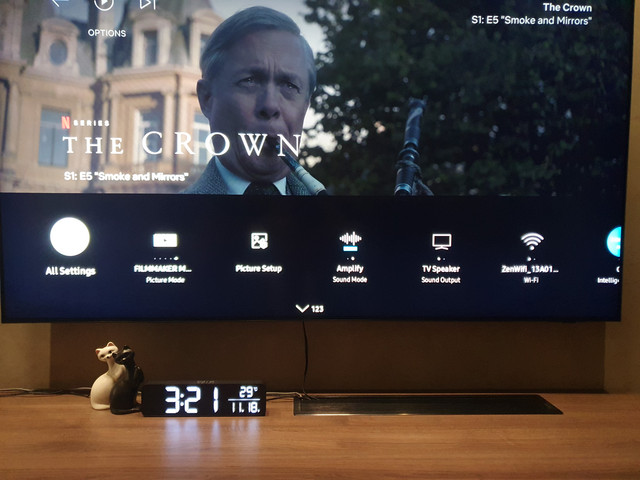
For quick navigating you need to make use of the quick settings bar. Press the button below the power button (with a settings icon), then press the dpad until you reach the quick settings option. From here you can actually rearrange the icons. This is how I arrange mine. With this I can instantly change picture mode just with a click of the remote. But for me its useless since I stick to FMM all the time

user posted image

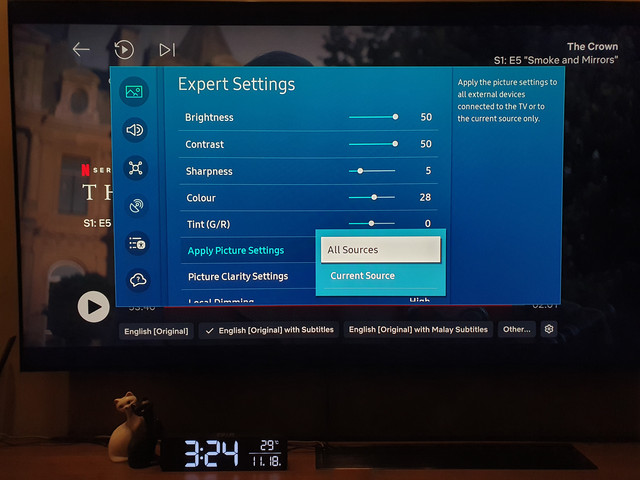
For individual image settings according to source, should be under Expert Settings - Apply Picture Settings - choose Current Source

user posted image

For motion processing, in Samsung you always need to enable Custom mode in the Clarity settings then tweak it from there. You can max out the Blur reduction, Judder reduction it depends. You can slowly increase it until you feel the SOE is too obvious. Usually this value is around the range of 3 - 5. Since OLED have a rapid response time the value might even be lower, some even left it at 0 i saw

Honestly I heard a lot of negative feedback about the software as well before I got my TV, but then I got used to it on the first day itself. Once you go through the settings you will realise its actually less than LG (can be good and bad) so its quicker to go through everything. I have no complaints about the usability actually, my only complaint was sometimes it lags a bit when scrolling fast

This post has been edited by ZeneticX: Nov 18 2023, 03:43 AM
loonsave
post Nov 21 2023, 10:28 AM

Regular
******
Senior Member
1,635 posts

Joined: May 2005


QUOTE(dragonwhites @ Nov 16 2023, 11:49 PM)
Had same issue with the same seller, tried to buy QN90C, he said he has 30 more other case he can not honor.
They are from TBC.
Tried to top up to buy, but then Samsung told him the model is EOL... not sure what to do now...

user posted image
*
It seems TBC have a very bad reputation. I placed order for my S95C in Home Expo on 16 Sep, then make full payment on 22 Oct. Set the delivery date to 15 Nov.
Then on the delivery date, they told me shipment delay, will send on 17 Nov. And then on 17 Nov, said Samsung delay the shipment and will deliver on Jan 2024.
Really pissed me off.
neekun
post Nov 22 2023, 10:25 AM

I'm a Mac
*******
Senior Member
2,570 posts

Joined: Jun 2006


QUOTE(loonsave @ Nov 21 2023, 10:28 AM)
It seems TBC have a very bad reputation. I placed order for my S95C in Home Expo on 16 Sep, then make full payment on 22 Oct. Set the delivery date to 15 Nov.
Then on the delivery date, they told me shipment delay, will send on 17 Nov. And then on 17 Nov, said Samsung delay the shipment and will deliver on Jan 2024.
Really pissed me off.
*
You should ask for full refund if they cannot commit the delivery date.

58 Pages « < 37 38 39 40 41 > » Top
 

Change to:
| Lo-Fi Version
0.0252sec    0.60    6 queries    GZIP Disabled
Time is now: 4th December 2025 - 11:44 AM