

How about the GUI for the new STB?
Is it fluid?
Astro Version 13A, All about Astro Malaysia offerings
Astro Version 13A, All about Astro Malaysia offerings
|
|
 Sep 1 2019, 05:29 PM Sep 1 2019, 05:29 PM
Show posts by this member only | IPv6 | Post
#1881
|
 
Junior Member
306 posts Joined: May 2009 
|
How about the GUI for the new STB?
Is it fluid? |
|
|
|
|
|
Sep 1 2019, 06:46 PM
Show posts by this member only | IPv6 | Post
#1882
|

Senior Member
7,795 posts Joined: Dec 2014 From: Malaysia 
|
QUOTE(lpsoldier007 @ Sep 1 2019, 05:29 PM) How about the GUI for the new STB? The GUI is exactly the same as beta v1.1. But this Ultra box comes with cloud recording feature. And as for Satellite Installation settings, the Input Type of "Universal" is no longer there. Only dCSS and SAT CR option are available. Is it fluid?  User interactions are much more responsive compared to my previous PVR DMT5 v2 box. But still, it is not as real-time as the previous UI on PVR DMT5. Pressing arrow keys to navigate, scrolling through letters when on screen keyboard appears (e.g. enter WiFi password, search for programme) has noticeable lags. If I press fast fast, it'll ignore those interactions and respond slowly. It is sluggish somehow, but overall still average la. Not as bad as the beta v1.1 that I use on my PVR DMT5 v2 previously. Hope they'll improve it in future updates. The previous UI on PVR DMT5 models is the most responsive UI ever on Astro STBs, and pretty much no lags. No matter how fast I press, it'll still respond every single button interaction I press. Unlike this new beta UI. I love GUI that almost has no lags. |
|
|
Sep 2 2019, 01:50 AM
|

Senior Member
1,149 posts Joined: Feb 2009
|
QUOTE(joshhd @ Aug 30 2019, 10:58 AM) I just got the confirmation from Astro installer. I used to have a single cable in my wall for the "old astro" then later switched to Astro IPTV, the installer didn't setup the dish for me.Upon swapping to Astro Ultra box (4K UHD box), your LNB will be swapped to DCSS type and no longer the Dual LNB (Universal) that requires 2 cables to be connected from your satellite dish to your Astro box. DCSS type of LNB allows you to be able to receive/record multiple channels and even able to connect to multiple set-top-box around your homes, with only one single cable from the satellite dish instead of multiple messy cables connect directly to your dual/quad LNB. This could really solve many technical and installation problems faced by installers, especially when the customer's premise find that laying 2 or more cables to satellite dish is inconvenient, especially with concealed cabling, extra rewiring job to do, etc. So yes, only 1 cable needed if you're an Astro Ultra Box user, thanks to DCSS LNB. However, if you are currently using SatCR type, then it will remain and continue to use as it is for your Astro Ultra box (means they won't swap to DCSS type for you). And yea, new set top box comes with new remote control. But the installer might take it back when you swap your box. But why take it back when you find it still in good condition anyway? If your current Astro remote control still working as usual, tell the installer to let you keep your existing remote control, so that the new remote control, can take it as spare remote control, or you may use it when your old remote control is faulty due to wear and tear. Does this means new decoder can use back the single old cable without need to hacking the wall for 2nd cable? |
|
|
Sep 2 2019, 07:51 AM
|
|
Senior Member
2,516 posts Joined: Mar 2016
|
QUOTE(AhBoy~~ @ Sep 2 2019, 01:50 AM) I used to have a single cable in my wall for the "old astro" then later switched to Astro IPTV, the installer didn't setup the dish for me. Astro IPTV customers currently aren’t eligible for this beta program.Does this means new decoder can use back the single old cable without need to hacking the wall for 2nd cable? It appears that you are in IP mode( no satellite backup) that’s why your satellite dish isn’t connected. Chances are it would still use IP multicast instead( connects via Ethernet cable ) If they were to set up satellite again assuming what you meant by “old Astro” is the SD decoder, they will need to replace the satellite dish, possibly cable( they did for my house- coming from the philips decoder( black one) to DMTv4( Astro beyond paco box with no PVR)), and ofc the decoder This post has been edited by yongtjunkit: Sep 2 2019, 07:56 AM |
|
|
Sep 2 2019, 09:33 AM
Show posts by this member only | IPv6 | Post
#1885
|
|
Senior Member
7,795 posts Joined: Dec 2014 From: Malaysia
|
QUOTE(AhBoy~~ @ Sep 2 2019, 01:50 AM) I used to have a single cable in my wall for the "old astro" then later switched to Astro IPTV, the installer didn't setup the dish for me. Does this means new decoder can use back the single old cable without need to hacking the wall for 2nd cable? QUOTE(yongtjunkit @ Sep 2 2019, 07:51 AM) Astro IPTV customers currently aren’t eligible for this beta program. They'll use back the same cable as you already have, and it connects only 1 cable. No hacking needed. The only thing they will change is your LNB, into the dCSS type, not the usual Universal type. It appears that you are in IP mode( no satellite backup) that’s why your satellite dish isn’t connected. Chances are it would still use IP multicast instead( connects via Ethernet cable ) If they were to set up satellite again assuming what you meant by “old Astro” is the SD decoder, they will need to replace the satellite dish, possibly cable( they did for my house- coming from the philips decoder( black one) to DMTv4( Astro beyond paco box with no PVR)), and ofc the decoder Yes, Astro IPTV users aren't eligible for this beta programme for now. If the dish is still the old silver 60cm one, then they'll replace it with a new black 65cm dish. As for cable, it depends... If the cable has been used for decades or not in good condition, then they'll rewire it. Overall, the biggest change is the LNB. |
|
|
Sep 2 2019, 09:18 PM
|
|
Senior Member
2,516 posts Joined: Mar 2016
|
By any chance, is it possible to connect Astro IPTV( IP mode) to satellite ?
Or must use Ethernet ? Wanted to get rid of the maxis router from my house WiFi setup and keep the maxis router in the store room, replacing it with an ASUS router This post has been edited by yongtjunkit: Sep 2 2019, 09:19 PM |
|
|
|
|
|
Sep 3 2019, 02:04 AM
Show posts by this member only | IPv6 | Post
#1887
|
|
Senior Member
7,795 posts Joined: Dec 2014 From: Malaysia
|
QUOTE(yongtjunkit @ Sep 2 2019, 09:18 PM) By any chance, is it possible to connect Astro IPTV( IP mode) to satellite ? If you're trying to replacing to your own third party router (e.g. Asus), you're still able to watch/receive Astro IPTV service with your Asus router. Or must use Ethernet ? Wanted to get rid of the maxis router from my house WiFi setup and keep the maxis router in the store room, replacing it with an ASUS router Not necessary only Maxis routers can watch/receive Astro IPTV service one. Just make sure your router's VLAN (a.k.a VLAN Tagging) settings is configured to Astro IPTV's VLAN settings for the particular LAN port that you're about to connect to your Astro box. But usually, it has been pre-configured by default (provided you bought the router in Malaysia). By standard installation, Astro's IPTV function will only work via Ethernet LAN cable connection, similar like Unifi TV on TM Unifi Fibre network. Astro's IPTV won't work via WiFi connection directly from Astro box to your router. (Accessing to VOD content not counted la). Why? Did you face any trouble connecting your Astro box to your router? If your house/area is under TM HSBB network, you can switch from IP mode to Satellite mode whenever the Astro box detects that "network is down" and unable to receive any channels via IP mode. They call it Hybrid mode. But if your house/area is under Maxis NGBB (Maxis's own fibre network, not share with TM) or TIME Fibre network, then bye bye. Your Astro box is solely dependant on network (IP mode) and you cannot switch to Satellite mode even if you connect your Astro box to the satellite dish. Basically, Hybrid mode is disabled for you. |
|
|
Sep 3 2019, 07:28 AM
Show posts by this member only | IPv6 | Post
#1888
|
|
Senior Member
2,516 posts Joined: Mar 2016
|
QUOTE(joshhd @ Sep 3 2019, 02:04 AM) If you're trying to replacing to your own third party router (e.g. Asus), you're still able to watch/receive Astro IPTV service with your Asus router. The only issue is, with the ASUS router VOD functionality is not available. Not necessary only Maxis routers can watch/receive Astro IPTV service one. Just make sure your router's VLAN (a.k.a VLAN Tagging) settings is configured to Astro IPTV's VLAN settings for the particular LAN port that you're about to connect to your Astro box. But usually, it has been pre-configured by default (provided you bought the router in Malaysia). By standard installation, Astro's IPTV function will only work via Ethernet LAN cable connection, similar like Unifi TV on TM Unifi Fibre network. Astro's IPTV won't work via WiFi connection directly from Astro box to your router. (Accessing to VOD content not counted la). Why? Did you face any trouble connecting your Astro box to your router? If your house/area is under TM HSBB network, you can switch from IP mode to Satellite mode whenever the Astro box detects that "network is down" and unable to receive any channels via IP mode. They call it Hybrid mode. But if your house/area is under Maxis NGBB (Maxis's own fibre network, not share with TM) or TIME Fibre network, then bye bye. Your Astro box is solely dependant on network (IP mode) and you cannot switch to Satellite mode even if you connect your Astro box to the satellite dish. Basically, Hybrid mode is disabled for you. Using DMT 5V2, don’t see any WiFi option available The ASUS router doesn’t have the Vlan tagging built in apparently, brought it in Malaysia I’m on maxis own fiber network, no way to enable hybrid mode ? My house have satellite dish (HD only - 1 tunner) This post has been edited by yongtjunkit: Sep 3 2019, 07:55 AM |
|
|
Sep 7 2019, 03:42 PM
Show posts by this member only | IPv6 | Post
#1889
|
|
Senior Member
7,795 posts Joined: Dec 2014 From: Malaysia
|
Njoi Now, which was introduced to provide selected content to be available to watch for free, especially Astro Arena.
 But that doesn't last long. From 30 Sept 2019, Njoi Now will cease and no longer available, including Njoi Now mobile apps and website. 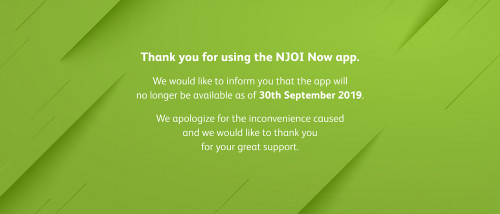 QUOTE Effective 30 September 2019, the NJOI Now app and website will no longer be available to all customers. We apologize for the inconvenience caused and we would like to thank all our customers for the great support. Hmm, it seems to me that recently Astro is taking more and more "free stuff" away from Njoi users. NJOI Prepaid customers can continue watching their favourite content on their NJOI set up box. For non Astro and NJOI Prepaid customers who wish to continue watching our content, kindly subscribe Astro or purchase NJOI Prepaid. Do contact us at 03-9543 38 38 to find out more about our services and packages. Astro Maya HD has ceased, Astro Xi Yue HD has ceased, Njoi Now is going to cease. What, Astro find it no longer profiting them? I wonder what's the next thing they'll take away... |
|
|
Sep 7 2019, 03:42 PM
Show posts by this member only | IPv6 | Post
#1890
|
|
Senior Member
7,795 posts Joined: Dec 2014 From: Malaysia
|
Any Astro Ultra box beta testers here?
What do you think about the box, and the 4K UHD service? This post has been edited by joshhd: Sep 7 2019, 03:46 PM |
|
|
Sep 7 2019, 04:45 PM
|

All Stars
48,447 posts Joined: Sep 2014 From: REality
|
astro is trying to reduce their operating cost..
and same time tying to attract those "free" Njoi fellows into Paying platform (B.yond, PVR or UHD whatever paid services). |
|
|
Sep 7 2019, 05:28 PM
Show posts by this member only | IPv6 | Post
#1892
|
|
Senior Member
7,795 posts Joined: Dec 2014 From: Malaysia
|
QUOTE(yongtjunkit @ Sep 3 2019, 07:28 AM) The only issue is, with the ASUS router VOD functionality is not available. Err I'm kinda confused.. Using DMT 5V2, don’t see any WiFi option available The ASUS router doesn’t have the Vlan tagging built in apparently, brought it in Malaysia I’m on maxis own fiber network, no way to enable hybrid mode ? My house have satellite dish (HD only - 1 tunner) Are you using IPTV, or just the normal HD box? If it's HD box, both WiFi and IPTV function will not be available. Only PVR box can be used for Astro IPTV. And usually if you're using Astro IPTV, it is connected via LAN cable, therefore WiFi may be disabled by the software. If your subscription has HD-PVR service, either by adding RM26.50/month or subscribed to either Value Pack/Super Pack/Super Pack Plus or Family Starter, you are eligible to HD-PVR service. You can upgrade to PVR box without any additional monthly fee. But a one time installation fee may be imposed depending on any ongoing promotions or subscription. Double confirm with Astro if you want to know more. And once you change to PVR box, 24 months contract will restart. Can you share with us the Asus router model number, so that can check whether your router can support VLAN configurations or not. Cuz usually router nowadays can support VLAN. If you're confident that your area is under Maxis network (not TM), then hybrid mode are not available for you. |
|
|
Sep 7 2019, 05:57 PM
Show posts by this member only | IPv6 | Post
#1893
|
|
Senior Member
2,516 posts Joined: Mar 2016
|
QUOTE(joshhd @ Sep 7 2019, 05:28 PM) Err I'm kinda confused.. Astro IPTV, PVR decoder model DMT 5V2 - made by Samsung Are you using IPTV, or just the normal HD box? If it's HD box, both WiFi and IPTV function will not be available. Only PVR box can be used for Astro IPTV. And usually if you're using Astro IPTV, it is connected via LAN cable, therefore WiFi may be disabled by the software. If your subscription has HD-PVR service, either by adding RM26.50/month or subscribed to either Value Pack/Super Pack/Super Pack Plus or Family Starter, you are eligible to HD-PVR service. You can upgrade to PVR box without any additional monthly fee. But a one time installation fee may be imposed depending on any ongoing promotions or subscription. Double confirm with Astro if you want to know more. And once you change to PVR box, 24 months contract will restart. Can you share with us the Asus router model number, so that can check whether your router can support VLAN configurations or not. Cuz usually router nowadays can support VLAN. If you're confident that your area is under Maxis network (not TM), then hybrid mode are not available for you. Router model ASUS RT-AC 68U Yup, My house area is under maxis network This post has been edited by yongtjunkit: Sep 7 2019, 06:09 PM |
|
|
|
|
|
Sep 7 2019, 06:00 PM
|
 
Moderator
10,308 posts Joined: Jan 2003 From: Kuala Lumpur
|
Anyone face this problem before? My decoder can't detect my internet connection. When do the network test, it is fine. But I can't view any OD content.
|
|
|
Sep 7 2019, 06:33 PM
Show posts by this member only | IPv6 | Post
#1895
|

Junior Member
185 posts Joined: Nov 2009
|
QUOTE(joshhd @ Sep 7 2019, 03:42 PM) Any Astro Ultra box beta testers here? for me;What do you think about the box, and the 4K UHD service? good 1. HD channels look better, i don't know maybe the resolution settings to 2160p improve the tv upscaling. 2. both UHD channels show same thing, boring .. and not all EPL in the channel . but the quality is great. 3. cloud recording - sucks because for now not all channel or programme can be recorded. 4. my tuner diagnostics shows this; strength>80, quality <20 , is this acceptable? but overall is good. |
|
|
Sep 7 2019, 08:20 PM
Show posts by this member only | IPv6 | Post
#1896
|
|
Senior Member
7,795 posts Joined: Dec 2014 From: Malaysia
|
QUOTE(suffeylp @ Sep 7 2019, 06:33 PM) for me; 2. Because both ch844 and ch845 is considered as a test and demo transmission, and it really wasn't meant for general public to enjoy. Test channels are usually like that. Repetitive, pretty much no commercials, and would get boring if you watch too long. good 1. HD channels look better, i don't know maybe the resolution settings to 2160p improve the tv upscaling. 2. both UHD channels show same thing, boring .. and not all EPL in the channel . but the quality is great. 3. cloud recording - sucks because for now not all channel or programme can be recorded. 4. my tuner diagnostics shows this; strength>80, quality <20 , is this acceptable? but overall is good. 3. What are the channels you can't do cloud recording? Well, besides radio channels and Astro First/Best channels.... How about the UI? Lag? Easy to use? Or more buttons to press? Did you submit any feedback at the Astro Beta Programme website? If yes, did they respond by call back to you or email you or something? |
|
|
Sep 8 2019, 12:28 PM
Show posts by this member only | IPv6 | Post
#1897
|
|
Junior Member
185 posts Joined: Nov 2009
|
QUOTE(joshhd @ Sep 7 2019, 08:20 PM) 2. Because both ch844 and ch845 is considered as a test and demo transmission, and it really wasn't meant for general public to enjoy. Test channels are usually like that. Repetitive, pretty much no commercials, and would get boring if you watch too long. 3. local channels (rtm, media prima) , but the installer did inform me that astro is working on this.3. What are the channels you can't do cloud recording? Well, besides radio channels and Astro First/Best channels.... How about the UI? Lag? Easy to use? Or more buttons to press? Did you submit any feedback at the Astro Beta Programme website? If yes, did they respond by call back to you or email you or something? the UI is doing fine for me, no noteable lag. i like the responsiveness. I just notice that we can't pause and rewind like last time in pvr stb. hmmm.. well i didn't manage to submit feedback because no option to select for the feedback category. |
|
|
Sep 8 2019, 02:35 PM
|
|
Senior Member
7,795 posts Joined: Dec 2014 From: Malaysia
|
QUOTE(suffeylp @ Sep 8 2019, 12:28 PM) 3. local channels (rtm, media prima) , but the installer did inform me that astro is working on this. Ohh, cuz that will be another some legal agreement that Astro needs to be deal with both RTM and Media Prima. Cuz their "license" "agreement" "rights" that Astro has to transmit their channels is to broadcast the channel as linear TV channel on Astro and Njoi satellite TV platform, but when it comes to cloud recording, it means the video/channel is being stored at their servers. So another "agreement" needs to be carried out by both of them.the UI is doing fine for me, no noteable lag. i like the responsiveness. I just notice that we can't pause and rewind like last time in pvr stb. hmmm.. well i didn't manage to submit feedback because no option to select for the feedback category. You can no longer pause live TV and rewind live TV that you've watched because Astro Ultra box does not have built in hard disk to temporary store recordings for immediate rewind and pause feature (review buffer depth, or a.k.a timeshift). Astro now focuses their beta testers on cloud recording, and cloud DVR feature where you can "Play from Start" the programme, which eventually your Astro Ultra box will switch from satellite mode to internet mode (e.g. WiFi) to "stream" the particular linear TV channel back in time. However if you take a closer look, Astro Ultra box has one USB 3.0 port and microSD card slot. That could mean that in the future, they can enable users to enjoy "offline" recordings and timeshift (review buffer depth) by connecting to an external storage like external hard disk and potentially a microSD card, and basically make it works like the current Astro PVR box now. But whether would that happen, well, only the engineers knows... 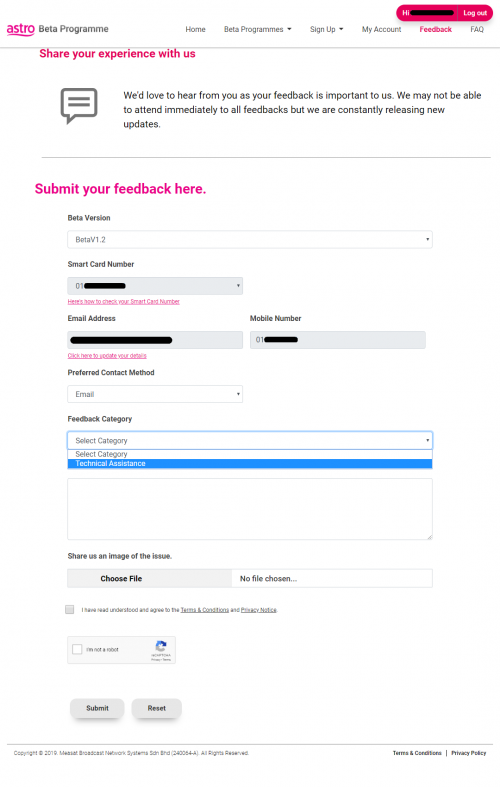 Select Beta V1.2, and select the one and only Technical Assistance option, and just type whatever feedback you want to share with them. |
|
|
Sep 8 2019, 10:43 PM
|

Senior Member
6,103 posts Joined: Apr 2009 From: Marang, Terengganu 
|
I thought this only occur on heavy weathers.  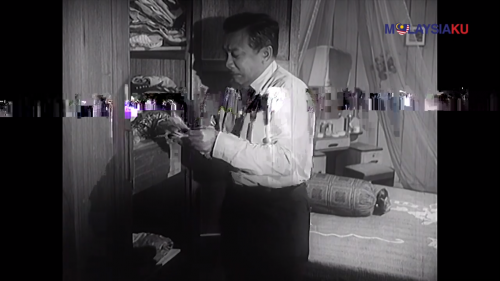 This post has been edited by Qash-M: Sep 8 2019, 10:43 PM |
|
|
Sep 9 2019, 11:49 AM
|
|
All Stars
48,447 posts Joined: Sep 2014 From: REality
|
QUOTE(Qash-M @ Sep 8 2019, 10:43 PM) I thought this only occur on heavy weathers. Pixelated broadcast?Well either it's super old movies or something is wrong in Astro side... Can also be cable loosen up... |
| Change to: |  0.0207sec 0.0207sec
 0.34 0.34
 6 queries 6 queries
 GZIP Disabled GZIP Disabled
Time is now: 8th December 2025 - 01:39 PM |
 Quote
Quote