Welcome Guest ( Log In | Register )

68 Pages « < 44 45 46 47 48 > » Bottom

Outline · [ Standard ] · Linear+

 Official TP-Link C1200 V1(EU) Firmware is out, Hidden WDS functionality works!, Page 29

views
     
eugenecctan
post Jun 10 2019, 02:47 PM

Wee Wang Wang
******
Senior Member
1,058 posts

Joined: Nov 2009


QUOTE(Aspick @ Jun 9 2019, 02:08 AM)
I can confirm @heidarren statement is true about flashing  C1200 router (EU firmware) to US firmware. Need to first flash to the firmware as listed in Edit 7 of your first page. After flashing to the beta version you'll be able to then flash to US firmware.
Yes i do find the 5G signal much stronger after flashing to US firmware. Surprisingly the 5G signal is even stronger than 2.4G signal behind one wall at 10 feet away from the router.

US firmware do have the capability for WDS. I'm using mine with 5G as backhaul and also 5G as SSID wifi. Just follow @JohnLai advice in page 29.

For the power supply, i tried both the stock power supply and one with 12V/2A output. I find that the wifi signal output is the same strength. Stability not sure yet but I'm testing the router flashed with US firmware using stock power supply. Will see how long it remains before it reboots?
*
So firstly I will need to flash to the EU firmware (already did), after that flash to US firmware and the repeat the same process for WDS. Am I right?

Aspick
post Jun 10 2019, 11:45 PM

Getting Started
**
Junior Member
189 posts

Joined: Jul 2018


QUOTE(eugenecctan @ Jun 10 2019, 02:47 PM)
So firstly I will need to flash to the EU firmware (already did), after that flash to US firmware and the repeat the same process for WDS. Am I right?
*
Yes. Read edit 10 page 1
eugenecctan
post Jun 11 2019, 09:55 PM

Wee Wang Wang
******
Senior Member
1,058 posts

Joined: Nov 2009


Dear Sifus, any suggestion on which wifi channel should I use for 5G? Previously I set my original router to 48 due to the EU firmware. Should I stick with channel 48 or switch to Auto? Thanks.
eugenecctan
post Jun 11 2019, 10:03 PM

Wee Wang Wang
******
Senior Member
1,058 posts

Joined: Nov 2009


Wah, thanks all sifus, very impressive speed using US firmware, previous I am getting up to 160Mbps near to the wireless bridged router. And getting around 100 Mbps around my kitchen area. Now I am getting 200Mbps close to the router and >160Mbps almost every location I have tested including kitchen area. THANKS!!!!
TSJohnLai
post Jun 12 2019, 02:31 PM

Skeptical Cat
*******
Senior Member
3,669 posts

Joined: Apr 2006
Aspick , heidarren and eugenecctan = Any random reboot issue encountered after flashing USv1 firmware? Remember to report back.

Second question........did you guy try to flash USv2 or USv3 firmware to the EUv1 hardware? From previous posts made by you three, it appears flashing USv1 firmware to EUv1 hardware work perfectly. But, how about USv2 and USv3? hmm.gif

This post has been edited by JohnLai: Jun 12 2019, 02:31 PM
eugenecctan
post Jun 12 2019, 04:07 PM

Wee Wang Wang
******
Senior Member
1,058 posts

Joined: Nov 2009


QUOTE(JohnLai @ Jun 12 2019, 02:31 PM)
Aspick , heidarren and eugenecctan = Any random reboot issue encountered after flashing USv1 firmware? Remember to report back.

Second question........did you guy try to flash USv2 or USv3 firmware to the EUv1 hardware? From previous posts made by you three, it appears flashing USv1 firmware to EUv1 hardware work perfectly. But, how about USv2 and USv3?  hmm.gif
*
I am using the US firmware listed in page 1 edit 10. I believe is US v1, I never try out v2 or v3. So far very stable, I am using original 1A adapter in WDS mode with 2.4G disable.
Aspick
post Jun 13 2019, 09:25 AM

Getting Started
**
Junior Member
189 posts

Joined: Jul 2018


QUOTE(JohnLai @ Jun 12 2019, 02:31 PM)
Aspick , heidarren and eugenecctan = Any random reboot issue encountered after flashing USv1 firmware? Remember to report back.

Second question........did you guy try to flash USv2 or USv3 firmware to the EUv1 hardware? From previous posts made by you three, it appears flashing USv1 firmware to EUv1 hardware work perfectly. But, how about USv2 and USv3?  hmm.gif
*
My router did not encounter reboot for 3 days straight. Unfortunately on day 3, my house electricity went down temporarily so will have to restart the test again.

Dare not try USv2 or USv3 worried it'll brick my router which is the only one I have to supply wifi to whole of my 1st flr (main router on grd flr). Maybe some brave soul here can try and report back.... 😂
taqu
post Jun 14 2019, 07:40 AM

Enthusiast
*****
Junior Member
864 posts

Joined: May 2005
The C1200 used to be my home router. Beside the super long boot time & occasional need for reboot, it was quite stable, decently fast & decent coverage. Now running as upstair Wifi AP, I'm happy with it. You can get 350 mbps Wifi speed close by, and 80 mbps after 3 walls. Still on stock firmware
squall_12
post Jun 15 2019, 08:32 PM

Regular
******
Senior Member
1,779 posts

Joined: Jan 2003
Hi guy,

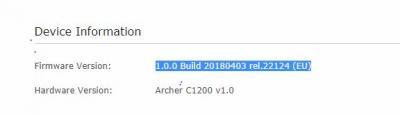
my router seem to be reboot as i keep seeing different unifi ip and picture showing is my router latest firmware.

Thanks


Attached thumbnail(s)
Attached Image
TSJohnLai
post Jun 15 2019, 09:41 PM

Skeptical Cat
*******
Senior Member
3,669 posts

Joined: Apr 2006
QUOTE(squall_12 @ Jun 15 2019, 08:32 PM)
Hi guy,

my router seem to be reboot as i keep seeing different unifi ip and picture showing is my router latest firmware.

Thanks
*
Malaysia firmware edition?

Do consider EU or US firmware.........because MY firmware (TIME,TM,MAXIS) are based on very ancient build.......
squall_12
post Jun 15 2019, 11:47 PM

Regular
******
Senior Member
1,779 posts

Joined: Jan 2003
if u see the picture is based on EU firmware
TSJohnLai
post Jun 16 2019, 12:32 AM

Skeptical Cat
*******
Senior Member
3,669 posts

Joined: Apr 2006
QUOTE(squall_12 @ Jun 15 2019, 11:47 PM)
if u see the picture is based on EU firmware
*
If you read properly....it is based on very 'ancient' EU firmware. laugh.gif

Old branch.


squall_12
post Jun 16 2019, 01:24 AM

Regular
******
Senior Member
1,779 posts

Joined: Jan 2003
QUOTE(JohnLai @ Jun 16 2019, 12:32 AM)
If you read properly....it is based on very 'ancient' EU firmware.  laugh.gif

Old branch.
*
so which firmware should i update to fixed my router issue like wifi issue and router reboot? Thanks
TSJohnLai
post Jun 16 2019, 12:05 PM

Skeptical Cat
*******
Senior Member
3,669 posts

Joined: Apr 2006
QUOTE(squall_12 @ Jun 16 2019, 01:24 AM)
so which firmware should i update to fixed my router issue like wifi issue and router reboot? Thanks
*
The random reboot issue is still there even with latest branch of EU/US firmware, just not that frequent. Maybe one or two random reboots in a month?

Read the first page, first post.
squall_12
post Jun 16 2019, 01:48 PM

Regular
******
Senior Member
1,779 posts

Joined: Jan 2003
QUOTE(JohnLai @ Jun 16 2019, 12:05 PM)
The random reboot issue is still there even with latest branch of EU/US firmware, just not that frequent. Maybe one or two random reboots in a month?

Read the first page, first post.
*
ok thanks right now is using the EU firmware. rclxm9.gif rclxm9.gif
Aspick
post Jun 22 2019, 01:37 AM

Getting Started
**
Junior Member
189 posts

Joined: Jul 2018


JohnLai, seems the US firmware still has the random reboot issue. I think my router rebooted twice, once on the 3rd day then again on the 6th day.

Luckily, I'm using this as a WDS with only 1 or 2 devices connected to it intermittently.
TSJohnLai
post Jun 22 2019, 08:35 PM

Skeptical Cat
*******
Senior Member
3,669 posts

Joined: Apr 2006
QUOTE(Aspick @ Jun 22 2019, 01:37 AM)
JohnLai, seems the US firmware still has the random reboot issue. I think my router rebooted twice, once on the 3rd day then again on the 6th day.

Luckily, I'm using this as a WDS with only 1 or 2 devices connected to it intermittently.
*
This is really disappointing indeed. Guess C1200 is the black sheep of TP-Link quality control regardless of hardware and software revision.


xcoolpc
post Jun 27 2019, 05:36 PM

Getting Started
**
Junior Member
157 posts

Joined: May 2007
From: Seri Kembangan, Selangor


I am facing a problem whereby access control whitelist activated in main router (TP Link C58HP). The WDS AC1200 will fail even though all MAC address (including PC connected) had been added into whitelist in main router. Anyone encounter the same?

This post has been edited by xcoolpc: Jun 27 2019, 05:37 PM
JuneResources
post Jul 7 2019, 08:16 PM

ONE Stop Resources
*******
Senior Member
4,174 posts

Joined: Mar 2012
From: Kuala Lumpur


QUOTE(squall_12 @ Jun 15 2019, 08:32 PM)
Hi guy,

my router seem to be reboot as i keep seeing different unifi ip and picture showing is my router latest firmware.

Thanks
*
Same as my one get the router from TM.
Any idea to remove wifi name @unifi?


TSJohnLai
post Jul 7 2019, 08:24 PM

Skeptical Cat
*******
Senior Member
3,669 posts

Joined: Apr 2006
QUOTE(JuneResources @ Jul 7 2019, 08:16 PM)
Same as my one get the router from TM.
Any idea to remove wifi name @unifi?
*
Firefox ;

Login to the router, press F12, go to Network tab and keep it open.

Now, at the router configuration page, go to Advanced, Wireless, Wireless Settings.
Start with 2.4Ghz, directly click Save and pay attention to the latest stuff listed at Network.
Find select the correct stuff (forgot the name), go to Params, find your SSID name and edit out the @unifi, edit and resend.
Do the same with 5.0ghz?

68 Pages « < 44 45 46 47 48 > » Top
 

Change to:
| Lo-Fi Version
0.0274sec    0.40    6 queries    GZIP Disabled
Time is now: 10th December 2025 - 06:26 PM